Generative AI Glossary: A Complete Guide to Key Terms and Concepts
Generative AI Glossary: A Complete Guide to Key Terms and Concepts
Generative AI is rapidly transforming industries ranging from creative arts to customer service, making it crucial for professionals and enthusiasts to understand its underlying concepts. As of 2023, the generative AI market is expected to grow annually by over 34%, reflecting its expanding role in business and technology.
This glossary demystifies terms related to generative AI, offering clear definitions and practical applications to help you navigate this innovative field effectively. By enhancing your knowledge with these key terms, you can better leverage AI technologies to drive innovation and efficiency in your endeavors.
1. Anthropomorphism
Anthropomorphism attributes human traits to AI systems, interpreting their outputs as if they have human emotions or intentions. While this makes AI interactions seem more natural, it’s crucial to remember that AI lacks consciousness.
2. Artificial Intelligence (AI)
AI encompasses technologies that emulate human intelligence and behavior. It enhances user experiences by automating tasks, making personalized recommendations, and facilitating efficient interactions.
3. Artificial Neural Networks (ANN)
ANNs are algorithms designed to recognize patterns by mimicking the brain’s structure. They are pivotal in making accurate predictions and personalizing user experiences, significantly enhancing customer satisfaction.
4. Augmented Intelligence
This concept combines human and machine intelligence to maximize data handling and decision-making capabilities. It leverages computational speed and human contextual understanding to improve outcomes in various applications.
5. Conversational AI
Conversational AI uses natural language processing to interact in human-like conversations, providing 24/7 customer support and enhancing user experience through more intuitive interactions.
6. CRM with Generative AI
Generative AI transforms CRM systems by automating content creation, such as personalized emails, and enhancing customer relationship management through tailored interactions and efficient service.
7. Deep Learning
Deep learning, a subset of machine learning, involves layered neural networks that help recognize complex patterns. This technology is essential in fields like image recognition and speech processing.
8. Discriminator in a GAN
In Generative Adversarial Networks (GANs), the discriminator assesses data authenticity, playing a crucial role in applications like fraud detection by distinguishing between real and synthetic data.
9. Ethical AI Maturity Model
This framework guides organizations in implementing responsible AI practices, focusing on transparency, fairness, and accountability to build trust and ensure ethical AI usage.
10. Explainable AI (XAI)
XAI aims to make AI decisions transparent, enabling users to understand and trust AI outputs crucial in sensitive applications like healthcare and finance.
11. Generative AI
Generative AI focuses on creating content or data based on existing patterns. It’s extensively used in marketing, e-commerce, and customer service to generate personalized content efficiently.
12. Generative Adversarial Network (GAN)
A GAN involves two neural networks, the generator and the discriminator, which work together to improve data authenticity, aiding in sophisticated marketing and data security.
13. Generative Pre-trained Transformer (GPT)
GPT models are advanced AI systems that generate human-like text, facilitating personalized customer interactions and content creation.
14. Grounding
Grounding ensures AI systems relate their responses to real-world knowledge, enhancing the relevance and accuracy of their outputs.
15. Hallucination
AI hallucination occurs when a model generates incorrect or irrelevant information, emphasizing the importance of monitoring AI outputs to maintain reliability.
16. Human in the Loop (HITL)
HITL involves human oversight in AI operations, ensuring AI outputs’ accuracy and ethical alignment and enhancing trust and system reliability.
17. Large Language Model (LLM)
LLMs process vast amounts of text to generate coherent and contextually appropriate responses, supporting tasks like customer service and content generation.
18. Machine Learning
Machine learning enables systems to learn and improve from experience without explicit programming, which is essential for predictive analytics and personalized services.
19. Machine Learning Bias
This refers to AI models developing biased outputs based on skewed data inputs, highlighting the need for diverse data and ongoing monitoring to ensure fairness.
20. Natural Language Processing (NLP)
NLP allows machines to understand and generate human language, facilitating more natural and effective communication with users.
21. Parameters
In AI, parameters are the configurations that guide model behavior, which are crucial for fine-tuning performance and ensuring the relevance of AI outputs.
22. Predictive AI
Predictive AI uses historical data to forecast future events, enabling personalized customer experiences and informed business decisions.
23. Prompt Defense
Prompt defense involves safeguarding AI models against generating harmful or biased outputs by setting strict guidelines on content generation.
24. Prompt Engineering
This involves designing inputs for AI systems to elicit the most accurate and relevant outputs, enhancing the effectiveness of AI interactions.
25. Red-Teaming
Red-teaming in AI involves challenging AI systems to identify vulnerabilities ensuring robustness and safety in AI applications.
26. Reinforcement Learning
This AI training method uses trial and error, rewarding correct outputs to refine AI behaviors, similar to training a pet with treats.
27. Safety
AI safety focuses on preventing unintended harmful consequences, ensuring that AI systems operate reliably and ethically.
28. Sentiment Analysis
This technique analyzes the emotional tone behind texts to understand user sentiments and is widely used in customer feedback and market analysis.
29. Supervised Learning
Supervised learning involves training AI with known data inputs and outputs, enhancing its ability to make accurate predictions.
30. Toxicity
AI toxicity refers to harmful or offensive outputs generated by AI, underscoring the importance of filtering and monitoring content to maintain respectful interactions.
31. Transformer
Transformers are advanced models that process data sequences, which is crucial for understanding the context in language processing and content generation.
32. Transparency
Transparency in AI involves being clear about how AI systems operate and use data, building user trust and understanding.
33. Unsupervised Learning
This learning type lets AI explore data without predefined labels, helping discover hidden patterns and insights crucial for personalized user experiences.
34. Validation
Validation tests AI models against unseen data to ensure they learn effectively, akin to conducting a pop quiz to assess knowledge retention.
35. Zero Data Retention
This practice involves not storing data used in AI interactions, ensuring user privacy and trust.
36. Zone of Proximal Development (ZPD)
In AI, ZPD involves training models on progressively challenging tasks to enhance their learning capabilities, improving their performance and adaptability.
Conclusion
Understanding these terms is crucial as generative AI continues to evolve and integrate into various sectors. This glossary enhances your conceptual knowledge and prepares you to leverage AI technologies effectively in your personal and professional endeavors.
1. What is the difference between AI and Generative AI?
AI refers to the broad capabilities of machines to mimic human intelligence. Generative AI specifically focuses on creating new content from learned data patterns.
2. How does deep learning differ from other AI techniques?
Deep learning uses layered neural networks to analyze data, making it particularly effective for processing complex patterns like speech or images.
3. What is the significance of ‘Human in the Loop’ in AI systems?
Human oversight ensures that AI systems are accurate, ethical, and aligned with organizational goals, enhancing reliability and trust.
4. Can AI systems be biased? How is this addressed?
AI systems can exhibit biases based on their training data. Addressing this requires using diverse data sets and continually monitoring and adjusting the AI’s learning process.
5. Why is transparency important in AI?
Transparency helps users understand how AI systems make decisions, which is essential for trust, especially in applications involving sensitive data or critical decisions.
RFP Response Templates – The Ultimate Guide
RFP Response Templates – The Ultimate Guide
In today’s fast-paced business world, the ability to respond quickly and effectively to requests for proposals (RFPs) can set your company apart from the competition. With the average proposal team submitting over 162 RFP responses annually, a well-structured RFP response template is more than a convenience—it’s necessary.
In this blog, we’ll explore the key elements of a successful RFP response template, how to customize it to meet your client’s needs and the tools that can help streamline your proposal process.
What is an RFP Response Template?
An RFP response template is a meticulously crafted document that serves as a foundational blueprint for responding to proposal requests. It is designed to streamline the proposal creation process, enabling your team to produce high-quality, tailored responses that align with potential clients’ needs and requirements.
Using a template ensures that your proposals maintain a consistent format and structure. This uniformity is crucial, especially when multiple team members contribute to the response. It helps present a cohesive and professional document, making it easier for evaluators to follow and understand your proposal.
2. Pre-filled Information:
The template includes pre-filled answers to common questions and standard sections such as company history, qualifications, and success stories. This reduces the time spent on repetitive tasks, allowing your team to focus on customizing the content to address each RFP’s specific concerns and requirements.
3. Customization and Flexibility:
While the template provides a standard framework, it also offers flexibility for customization. Each RFP has unique aspects, and the template allows you to tailor your responses to highlight how your solutions specifically meet the client’s needs. This balance of standardization and customization is key to producing effective proposals efficiently.
4. Enhanced Collaboration:
The RFP response template fosters better collaboration among team members and subject matter experts (SMEs). By providing a clear structure and predefined sections, team members can easily understand their roles and contributions, ensuring a more organized and coordinated effort in crafting the proposal.
5. Compliance and Accuracy:
With a well-structured template, you can ensure that your responses comply with the RFP requirements and industry standards. It minimizes the risk of overlooking critical information and helps maintain accuracy in your responses, essential for building trust and credibility with potential clients.
Key Components of an Effective RFP Response Template
A comprehensive RFP response template typically includes the following sections:
Cover Letter: This section serves as the introduction to your proposal, setting the tone and context. It should be engaging and professional, expressing your enthusiasm for the project and briefly outlining your understanding of the client’s needs and how your company is uniquely positioned to meet them.
Executive Summary: A concise overview of your proposal that highlights your strategic approach and unique selling points. It should focus on the client’s key concerns and demonstrate how your solution provides a clear and compelling benefit.
Company Qualifications: This section provides a detailed overview of your company’s background, including its history, core values, team qualifications, and relevant experience. Use this section to build credibility and showcase your company’s ability to deliver on the proposed project.
Proposed Solution: Here, you’ll detail your approach to addressing the client’s needs. This includes a comprehensive implementation plan, key deliverables, project timelines, and all parties’ roles. Be specific about how your solution aligns with the client’s goals and requirements.
Pricing Details: Transparent pricing is crucial. Break down the costs into categories (e.g., labor, materials, overhead) and provide clear payment terms. Include any potential discounts or incentives, but avoid underselling your services.
Success Stories: Use case studies and testimonials from past clients to demonstrate your company’s track record of success. Choose examples that closely align with the client’s industry or specific challenges to make them more relatable and impactful.
Terms and Conditions: Outline the contractual terms, including the rights and responsibilities of both parties, potential risks, and contingency plans. This section ensures that all parties clearly understand the agreement and helps prevent misunderstandings.
Integrating these elements into your RFP response template creates a powerful tool that enhances your team’s efficiency and effectiveness in producing high-quality proposals. This strategic approach saves time and increases your chances of winning new business by delivering tailored, professional, and persuasive responses to RFPs.
Customizing Your RFP Response Template
Customizing your RFP response template is crucial for creating a proposal that stands out and meets each client’s specific needs. A generic response may fail to resonate with the client, while a tailored response demonstrates your deep understanding of their unique requirements and challenges. Here are four detailed steps to ensure your RFP response is customized effectively:
1. Research the Client to Understand Their Needs
Thoroughly researching the client and their industry is the first step in customization. This enables you to tailor your response to their goals, pain points, and expectations. Here’s how to gather this insight:
Analyze the RFP Document: Carefully read the RFP document multiple times. Note any specific requirements, preferred formats, and evaluation criteria. Highlight key sections that need special attention.
Direct Communication: Please arrange conversations with the key decision-makers or the contact person in the RFP. Use these discussions to understand their primary concerns and priorities.
Website and Marketing Materials: Review the client’s website, blog posts, press releases, and marketing collateral. These can provide valuable information about the company’s current initiatives, corporate culture, and market positioning.
Competitor Analysis: Research the client’s competitors and the incumbent vendor (if any). Understanding the competitive landscape can help you identify your unique value proposition and areas where you have an advantage.
2. Collaborate With Subject Matter Experts (SMEs)
Engaging SMEs within your organization ensures that your proposal is accurate, detailed, and reflects your company’s expertise. Here’s how to effectively collaborate with SMEs:
Kickoff Meetings: Host a kickoff meeting with your SMEs to discuss the RFP, the potential client, and the project’s importance. Share your insights from the research phase to align everyone on the client’s needs.
Drafting Support: Prepare initial drafts of the answers for the SMEs to review. This saves them time and makes providing detailed and accurate information easier.
Content Guidelines: Provide clear guidelines and examples of previous successful RFP responses. This helps SMEs understand the expected quality and format of their contributions.
Flexible Communication: Determine each SME’s preferred communication style. Some prefer emails, while others are more responsive to phone calls or video meetings. Adapt your approach to ensure smooth collaboration.
Visual elements can significantly improve the readability and impact of your proposal. They help communicate complex information succinctly and make your proposal more engaging. Here’s how to incorporate graphics effectively:
Data Visualization: Use pie charts, bar graphs, and line charts to present quantitative data such as business growth, financial projections, or success metrics. Visuals can make data more accessible and memorable.
Comparison Tables: Create tables to compare your solution’s features and benefits against competitors or the incumbent. Highlighting your unique advantages visually can be more persuasive than text alone.
Project Timelines: Develop a timeline graphic to illustrate your proposed project plan. This will help the client understand the project’s phases, key milestones, and expected delivery dates.
Infographics: Design infographics to summarize complex processes or workflows. Infographics can break down complicated information into digestible and visually appealing sections.
4. Make the Proposal Clear, Compelling, and Concise
Editing your proposal to be clear, compelling, and concise ensures that your message is easily understood and impactful. Here’s how to achieve this:
Clear Language: Avoid jargon and overly technical language unless it is necessary and understood by the client. Use straightforward language to convey your message.
Engaging Content: Focus on what makes your proposal compelling. Highlight your unique selling points, competitive advantages, and the benefits your solution offers the client. Use storytelling techniques to make your case studies and success stories more engaging.
Concise Writing: Eliminate unnecessary words and redundancies. Ensure each sentence serves a purpose and adds value to the proposal. Use bullet points and subheadings to break up text and make scanning easier.
Proofreading and Editing: Use tools like Grammarly or the Hemingway App to check for spelling, grammar, and readability issues. Have a team member not involved in writing the proposal review it for clarity and coherence. Reading the proposal out loud can also help catch awkward phrasing or inconsistencies.
By following these detailed steps, you can customize your RFP response template to create tailored, professional, and persuasive proposals. This approach increases your chances of winning new business and builds stronger relationships with potential clients by demonstrating your commitment to understanding and addressing their unique needs.
Tools to Speed Up Your Proposal Process
Leveraging the right tools can dramatically reduce the time and effort required to create high-quality proposals. Here are two key tools that can help:
Sales Proposal Platform: A sales proposal platform or software can streamline the RFP response process. These platforms often include features like auto-suggesting answers from past RFPs, assigning questions to SMEs, and maintaining a content library for easy access to frequently used information.
Generative AI: Generative AI can be a game-changer when creating RFP responses. It can help you build a custom content plan, summarize executive bios, and draft initial responses quickly, giving you a strong starting point to refine and customize.
Conclusion
A well-crafted RFP response template is an invaluable asset for any proposal team. By incorporating the key components outlined above and leveraging advanced tools like sales proposal platforms and generative AI, you can create compelling, tailored responses that increase your chances of winning new business.
Remember, your RFP response aims to make the client feel understood and confident in your ability to deliver. You can achieve this consistently and efficiently with a solid template and the right tools.
Sign up with GetGenerative.ai today and start crafting impressive proposals quickly. Streamline your process and spend more time on what’s important. Ideal for Salesforce consultants ready to enhance their performance.
Act now—discover the next level of Salesforce consulting with GetGenerative.ai!
Frequently Asked Questions (FAQs)
1. What is an RFP response template?
An RFP response template is a pre-structured document that helps streamline the response to proposal requests by providing repeatable answers in a consistent format.
2. Why should I use an RFP response template?
Using an RFP response template saves time, ensures consistency, and allows your team to focus on customizing responses to meet each client’s specific needs.
3. What are the key components of an RFP response template?
Key components include a cover letter, executive summary, company qualifications, proposed solution, pricing details, success stories, and terms and conditions.
4. How do I customize an RFP response template?
Customize your template by researching the client, collaborating with SMEs, using graphics, and editing for clarity and impact.
5. What tools can help speed up the RFP response process?
RFP response software and generative AI can help streamline the process by suggesting answers from past RFPs, automating content upkeep, and drafting initial responses.
Salesforce Einstein Intent: A Comprehensive Guide
Salesforce Einstein Intent: A Comprehensive Guide
A study by Salesforce found that 76% of customers expect companies to understand their needs and expectations, and 84% say the company’s experience is as important as its products and services.
Leveraging AI to streamline operations and improve customer service is no longer optional—it’s essential. Salesforce Einstein Intent is a powerful tool designed to help businesses analyze text and understand customer intentions, enabling more efficient case routing and support management. This blog will explore how to get started with Salesforce Einstein Intent and create a model to route support cases effectively.
What is Salesforce Einstein Intent?
Salesforce Einstein Intent is part of the Einstein Platform Services, offering AI capabilities to enhance business processes. This tool focuses on natural language processing (NLP) to classify text into predefined categories, making it easier to understand and respond to customer queries.
“AI will be the most transformative technology since electricity.”
Key Features and Benefits of Salesforce Einstein Intent:
Automated Text Classification: Einstein Intent automatically categorizes text into predefined intents such as “Billing,” “Order Change,” “Password Help,” “Sales Opportunity,” and “Shipping Info.” This automation saves time and reduces manual effort in processing customer queries.
Improved Customer Service: By accurately identifying customer intent, businesses can route queries to the appropriate department quickly. This leads to faster resolution times and improved customer satisfaction.
Scalability: Einstein Intent can handle a large volume of text data, making it suitable for businesses of all sizes. Einstein Intent can scale to meet your needs whether you’re a small startup or a large enterprise.
Customizable Models: Businesses can train custom models specific to their industry or business requirements. This flexibility ensures that the AI model is tailored to address the unique challenges faced by the business.
Integration with Salesforce: As part of the Salesforce ecosystem, Einstein Intent seamlessly integrates with other Salesforce tools and services. This integration allows businesses to leverage the full potential of the Salesforce platform.
By utilizing Einstein Intent, businesses can automate the routing of support cases to the appropriate departments, reducing response times and improving overall customer satisfaction.
To begin using Einstein Intent, follow these essential steps:
Prerequisites
Before diving into creating a model, ensure you have the following prerequisites in place:
Key File: Locate your einstein_platform.pem file containing your private key. This file is essential for generating a JWT token for authorization.
cURL: Install the cURL command line tool, which is used to make API requests. It is pre-installed on Linux and OSX, but you can download it fromcURL’s official website.
Token Generation: Obtain a JWT token using the OAuth 2.0 JWT bearer token flow. This token is required for authorization when making API calls. Follow the step-by-step instructions on the Salesforce token setup page.
Define Your Classes and Gather Data
The first step in creating your model is defining the labels you want the model to output. These labels represent the intent behind the text, such as “Billing,” “Order Change,” “Password Help,” “Sales Opportunity,” and “Shipping Info.” Gather text data corresponding to each label to create a comprehensive dataset.
Identify Common Customer Queries: Analyze your customer support data to identify common queries. Group similar queries together and define a label for each group. For example, queries related to billing issues should be labeled “Billing,” and queries related to password reset should be labeled “Password Help.”
Collect Sample Texts: Collect a substantial number of sample texts representing the queries under that category for each label. Aim for at least 20-30 examples per label to ensure the model has enough data to learn from. For instance, under “Billing,” you might have texts like “I have a question about my invoice” or “Can you explain this charge on my account?”
Create a CSV File: Compile the sample texts and their corresponding labels into a CSV file. Each row should contain a text example and its associated label. Here’s a sample structure for the CSV file:
Text Example
Label
“I need help with my order”
Order Change
“How can I reset my password?”
Password Help
“What is the status of my shipment?”
Shipping Info
“Can I get a refund for my purchase?”
Billing
“I want to inquire about new products”
Sales Opportunity
Use Provided Case Routing CSV: To simplify this process, Salesforce provides a case routing .csv file that includes predefined labels and example texts for each label. You can use this file as a starting point and modify it to fit your specific use case.
Create the Dataset
With your data ready, create a dataset by uploading the .csv file to the Einstein API. Use the following cURL command, replacing <TOKEN> with your JWT token:
This command creates a dataset called case_routing_intent from the specified .csv file. Verify that the dataset has been successfully uploaded by making a GET request: curl -X GET -H “Authorization: Bearer <TOKEN>” -H “Cache-Control: no-cache” https://api.einstein.ai/v2/language/datasets/<DATASET_ID>
Ensure that the dataset status is SUCCEEDED and available is true.
Train the Dataset to Create the Model
Once your dataset is ready, train it to create a model using the following cURL command:
With your model trained, you can now send text for prediction. Use the following cURL command, replacing <MODEL_ID> with your model ID:
curl -X POST -H “Authorization: Bearer <TOKEN>” -H “Cache-Control: no-cache” -H “Content-Type: multipart/form-data” -F “modelId=<MODEL_ID>” -F “document=how is my package being shipped?” https://api.einstein.ai/v2/language/intent
The response will include probabilities for each label, helping you understand the intent behind the text. For example, a query like “How is my package being shipped?” would likely return a high probability for the “Shipping Info” label.
Conclusion
Salesforce Einstein Intent is a robust tool that empowers businesses to leverage AI for better customer service and support case routing. By following the steps outlined in this blog, you can create and train your intent model, allowing you to automate and optimize your support processes. Embrace the power of AI with Salesforce Einstein Intent and elevate your customer experience to new heights.
Salesforce Einstein Intent is an AI tool that uses natural language processing (NLP) to classify text into predefined categories, helping businesses understand and respond to customer queries efficiently.
2. How does Einstein Intent help with customer service?
It automates routing support cases to the appropriate departments, reducing response times and improving customer satisfaction.
3. What are some common intents used in Einstein Intent?
Common intents include Billing, Order Change, Password Help, Sales Opportunity, and Shipping Info.
4. What are the prerequisites for using Einstein Intent?
You’ll need an einstein_platform.pem key file, cURL installed, and a JWT token for authorization.
5. How do I create a dataset for Einstein Intent?
Gather text data for each intent label, compile it into a CSV file, and upload it using the Einstein API.
What is RFP: How to Write, Manage, and Win Proposals?
What is RFP; How to Write, Manage, and Win Proposals?
In today’s fast-paced and ever-evolving business landscape, Request for Proposals (RFPs) serve as more than just a means to solicit bids—they’re a vital component of strategic decision-making, vendor partnerships, and project success. Whether you’re a startup looking for marketing services or a large corporation planning a multimillion-dollar IT infrastructure upgrade, RFPs are your blueprint for finding the right solution and partner.
At their core, RFPs streamline vendor selection, procurement, and project planning, ensuring that companies don’t just get the job done, but get it done right. The process fosters competitive bidding, cost efficiency, and quality assurance—three pillars of successful procurement. Companies issuing RFPs can compare proposals side by side, assess different approaches, and ensure they’re getting the best value for their investment.
The Growing Importance of RFPs in Emerging Industries
As per the data fromEconomic Times, industries across the globe—including technology, construction, and AI development—are increasingly relying on RFPs to make critical decisions. AI-powered foundation models, for example, have become a hot topic as governments and private enterprises seek vendors to build next-generation solutions. This growth is a testament to how RFPs are no longer limited to traditional sectors like construction and government but have become key players in tech-driven and innovation-centric industries.
Gaining a Competitive Edge
Mastering the RFP process means you’re not only choosing the right vendors but also saving time, money, and effort. Businesses that understand and effectively use RFPs can negotiate better deals, secure higher-quality services, and minimize project risks. In fact, companies leveraging AI-enhanced RFP tools have seen improved proposal accuracy, streamlined collaboration, and faster procurement cycles according to the data discussed inIDC Blogs.
This guide will help you demystify the entire RFP process—from writing an effective proposal to evaluating and selecting vendors. Whether you’re responsible for creating one or responding to one, understanding RFPs can significantly boost your company’s operational efficiency and overall success. So, buckle up as we explore the ins and outs of RFPs and how they can elevate your business to the next level.
What Is an RFP (Request for Proposal)?
An RFP (Request for Proposal) is a formal document issued by organizations to solicit bids or proposals from potential vendors or service providers, rightly mentioned in Wikipedia. The purpose of the RFP is to clearly define project requirements and establish evaluation criteria to ensure that businesses choose the most suitable partner. It acts as a bridge between buyers and vendors, streamlining the selection process while promoting transparency and competitive bidding.
Unlike a simple inquiry or quote request, an RFP typically asks for detailed proposals explaining how a vendor intends to address a project’s unique needs, timelines, and budgetary constraints.
Purpose of an RFP
The primary goal of an RFP is to identify the right partner who can deliver tailored, high-quality solutions within the defined scope and budget. Organizations issue RFPs for a variety of reasons, such as:
To explore innovative vendor approaches to solving business challenges
To ensure fair competition by inviting multiple proposals
To obtain cost-effective solutions without compromising quality
Businesses often issue RFPs when they need solutions that go beyond off-the-shelf products. For example, in large-scale IT system implementations or marketing campaigns, vendors are asked to present customized proposals addressing unique requirements.
Industries Using RFPs
RFPs have become essential across a broad range of industries where tailored solutions, competitive bidding, and vendor accountability are critical. Some common industries using RFPs include:
Construction and Real Estate: To secure contracts for large infrastructure projects like roads, buildings, and public utilities.
Information Technology (IT): For software development, cloud migrations, and cybersecurity solutions.
Government Procurement: Government agencies frequently issue RFPs to ensure fair bidding processes for public sector projects.
Marketing and Creative Services: To source advertising agencies, branding consultants, and digital marketing vendors.
For instance, the Indian government recently issued an RFP for developing a local language AI foundation model to bolster AI innovation, emphasizing the increasing reliance on RFPs even in emerging tech sectors. As per theEconomicTimes, this project highlights how RFPs are critical not only in traditional fields like construction but also in cutting-edge fields like artificial intelligence.
Key Components of an RFP Document
Creating a well-structured Request for Proposal (RFP) is crucial to ensure you attract high-quality vendors who understand your needs and can deliver exceptional results. A comprehensive RFP document should include the following essential components:
1. Project Overview
The project overview serves as an introduction, outlining the project’s objectives, purpose, and high-level goals. It should provide vendors with enough context to understand the company’s vision and what success looks like. For example, if the RFP is for a software implementation project, the overview should explain the current challenges, desired outcomes, and how the project aligns with the company’s long-term strategy.
Tip: Be concise but informative. Providing relevant background information will help vendors craft more targeted proposals.
2. Scope of Work (SOW)
The Scope of Work (SOW) is the crux of the RFP. It defines the deliverables, tasks, milestones, and timelines that the vendor must adhere to. This section should specify what work needs to be done, who will be responsible for each task, and key deadlines.
Details to Include:
Project phases or stages (e.g., discovery, implementation, testing, and delivery)
Expected milestones and key performance indicators (KPIs)
Any specific tools, technologies, or methodologies to be used
By clearly defining expectations, you minimize the risk of misunderstandings and ensure that vendors can provide accurate cost and time estimates.
3. Evaluation Criteria
This section tells vendors how their proposals will be assessed and which aspects are most important to the decision-making process. Common evaluation factors include:
Pricing and cost-effectiveness
Technical expertise and industry experience
Proven track record with similar projects
Proposed methodology or approach
Post-project support and maintenance options
You can assign weights to different criteria to prioritize what matters most to your project. For example, in a software development project, you might prioritize technical expertise over cost if innovation is critical.
4. Submission Requirements
To maintain consistency and simplify the review process, clearly outline the submission guidelines and requirements that vendors must follow. Include instructions on:
Proposal format and structure: Specify if you require sections such as an executive summary, technical approach, and pricing breakdown.
Deadline for submission: Clearly state the due date and time, along with timezone information.
Required documents: Highlight any additional materials needed, such as case studies, references, or certifications.
Submission method: Specify whether proposals should be submitted via email, an online portal, or physical delivery.
Setting clear submission requirements ensures that you receive proposals in a consistent format, making it easier to compare vendors.
5. Terms and Conditions
This section outlines the legal and contractual obligations vendors must agree to if selected. It may cover topics such as:
Payment terms: Milestone-based payments, upfront costs, or installments
Contract duration: Length of the project and possible extensions
Liabilities and penalties: Consequences of missed deadlines or non-compliance
Confidentiality and intellectual property rights: Protect sensitive information and establish ownership of deliverables
Including terms and conditions ensures that all parties are aligned on the legal framework governing the project, reducing the risk of disputes during or after execution.
How Does the RFP Process Work?
The RFP (Request for Proposal) process is a structured approach designed to help businesses find the best vendor to meet their project needs. By following specific phases, organizations can ensure that their proposals are competitive, comprehensive, and meet client expectations. Here’s a breakdown of the key phases in the RFP process:
The first step in the RFP process is to evaluate whether the opportunity aligns with your organization’s capabilities and strategic goals. Not every RFP is worth pursuing, so businesses must critically assess whether they have the resources and expertise to deliver the project successfully.
Key Tasks:
Review the RFP: Examine the document thoroughly to understand the client’s requirements, scope of work, and expectations.
Assess Profitability: Determine if the project is financially viable and aligns with long-term growth objectives.
Ask Critical Questions: Are you capable of meeting the requirements? Can you deliver within the specified timeframe and budget?
Outcome: Only move forward if the opportunity is realistic and offers strategic value.
Phase 2: Research
Once you decide to proceed, the next phase involves researching the client’s business, challenges, and competitors. This is critical to developing a tailored proposal that addresses the client’s specific needs.
Key Tasks:
Understand the Client: Conduct research on the organization’s history, industry, and pain points. Identify any past projects that may provide insights into their expectations.
Analyze Competitors: Understand who you’re competing against and what differentiates them. This helps you position your proposal more effectively.
Gather Internal Expertise: Consult team members who have experience with similar projects to gather useful insights.
Pro Tip: Leveraging internal knowledge can help you create a proposal that highlights your strengths and offers unique solutions.
Phase 3: Plan
With sufficient research in hand, it’s time to develop a response strategy and outline the proposal structure. Planning ensures that all team members are aligned and aware of their roles.
Key Tasks:
Set Clear Objectives: Identify what you aim to achieve with the proposal, such as highlighting cost efficiency, technical expertise, or innovative approaches.
Create a Timeline: Break down tasks with deadlines for each section of the proposal. This ensures you stay on track and meet submission deadlines.
Assign Roles: Assign specific sections to team members, such as the executive summary, technical details, and cost estimates.
Tip: Conduct a kickoff meeting to ensure everyone understands their responsibilities and the overall strategy.
Phase 4: Draft
In this phase, you begin drafting the proposal by personalizing responses and highlighting your organization’s strengths. Ensure that each section addresses the client’s key concerns and outlines how you’ll solve their problem.
Key Tasks:
Tailor Your Responses: Avoid generic responses. Use insights from the research phase to demonstrate that you understand the client’s challenges and can provide customized solutions.
Highlight Strengths: Emphasize unique value propositions, such as innovative approaches, industry expertise, or past successes.
Include Case Studies: Support your claims with real-world examples of similar projects you’ve completed successfully.
Tip: Collaborate with subject matter experts (SMEs) to provide detailed and accurate responses for technical sections.
Phase 5: Respond
The final phase focuses on reviewing, finalizing, and submitting the proposal. This step ensures that your submission is error-free, meets all requirements, and leaves a strong impression.
Key Tasks:
Conduct a Final Review: Double-check that all required sections are complete and adhere to the RFP guidelines. Look for any inconsistencies, errors, or missing information.
Proofread the Proposal: Ensure that the content is clear, concise, and free from grammatical errors.
Check Submission Requirements: Confirm the submission method (e.g., email, online portal) and ensure that you meet the deadline.
Save and Repurpose Content: Store key sections of the proposal in a content library for future use, making it easier to respond to similar RFPs in the future.
AI-Enhanced RFPs: A Game Changer
As AI-powered tools become increasingly common in managing RFP processes, businesses can significantly reduce manual workloads, improve collaboration, and enhance proposal quality. As per the data fromIDCBlogs, AI tools can help automate responses, ensure compliance with client requirements, and generate content recommendations based on past submissions. This not only streamlines the entire process but also improves the chances of winning contracts by delivering more polished and targeted proposals.
By following these structured phases, businesses can ensure that their proposals are well-organized, comprehensive, and tailored to the client’s specific needs—ultimately increasing their chances of success.
Benefits of an RFP
An RFP (Request for Proposal) is more than a procurement document—it’s a strategic tool that can unlock several advantages for businesses by ensuring they select the most suitable vendors while optimizing project outcomes.
1. Competitive Pricing
An RFP encourages vendors to submit their best offers in a competitive environment. By soliciting multiple bids, businesses can evaluate different pricing models and options, ensuring they receive cost-effective solutions. This competitive bidding process often leads to significant cost savings without compromising on quality.
2. Quality Assurance
RFPs outline clear specifications, requirements, and expectations, helping businesses ensure that only qualified vendors submit proposals. By including evaluation criteria that emphasize experience, technical expertise, and proven performance, companies can select vendors who meet or exceed quality benchmarks. This leads to better project outcomes and reduced rework.
3. Transparency
A well-structured RFP promotes fairness and transparency throughout the procurement process. By documenting every step—such as criteria for evaluation, timelines, and deliverables—organizations can maintain accountability and ensure that the selection process is auditable. This transparency is particularly important in government and public sector projects where fair competition is mandated.
4. Minimized Risk
By setting clear expectations and project requirements upfront, RFPs help businesses mitigate risks associated with cost overruns, delays, or substandard deliverables. Companies can identify potential risks early during vendor evaluation and include contingencies to address them.
5. Real-World Example
India’s government recently issued an RFP for developing local language AI foundation models to ensure high data accuracy and minimize risks associated with handling multilingual datasets. As per the data from Economic Times, this strategic approach ensures better project outcomes through detailed requirement setting.
RFP vs. RFQ vs. RFI: A Quick Comparison
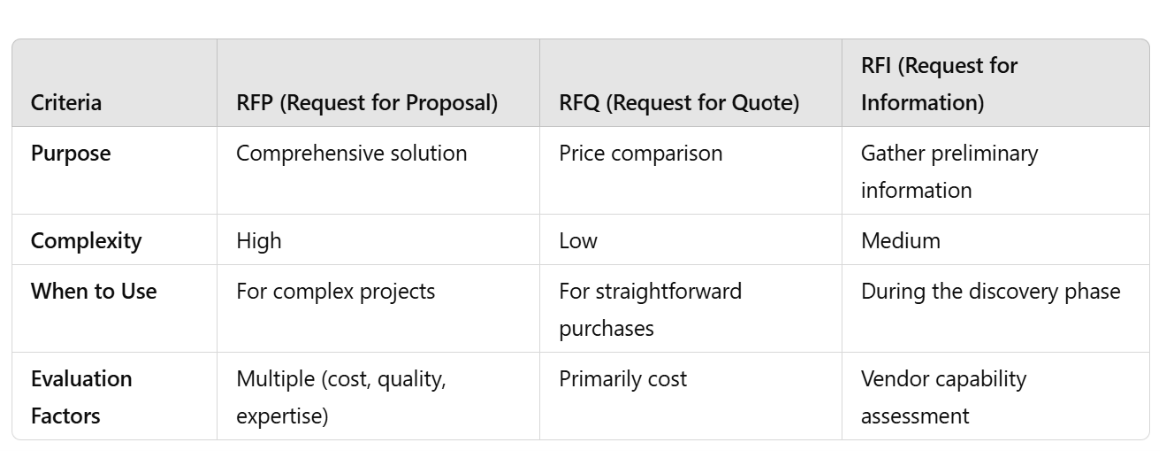
Key Difference: An RFP helps businesses source the right vendor by requesting detailed proposals, whereas an RFQ focuses on pricing alone, and an RFI is primarily used during the discovery phase to gather vendor information.
A large tech company recently utilizedAI-basedRFP automation to reduce their procurement cycle time by 30% while increasing vendor diversity. These examples highlight the importance of leveraging advanced tools in today’s competitive landscape.
By using automated workflows and content centralization, they streamlined the proposal evaluation process and ensured compliance with their selection criteria.
Such examples highlight the importance of incorporating advanced RFP platforms in today’s competitive procurement landscape. By doing so, businesses not only save time but also improve the quality of vendor selection, ultimately driving better project outcomes.
Conclusion: Master the Art of RFPs
Mastering the RFP process is a game-changer for businesses seeking to gain a competitive edge in today’s dynamic markets. From understanding the differences between RFPs, RFQs, and RFIs to leveraging AI-driven tools that improve speed and accuracy, adapting to modern trends and best practices is critical. Whether you’re in tech, construction, or marketing, knowing how to craft, manage, and respond to effective RFPs will set you apart and enhance organizational success.
Start Your RFP Optimization Journey
Ready to elevate your procurement game? Leverage the power of AI and automation tools to stay ahead of the curve. Sign up atGetGenerative.ai to unlock powerful, next-gen AI-based solutions that can simplify your proposal writing and evaluation processes.
What You’ll Get with GetGenerative.ai
Easy RFP Generation: Generate high-quality RFP responses and proposals within minutes using AI-powered templates.
Seamless Team Collaboration: Work together with team members and stakeholders in real time, ensuring faster feedback and approvals.
AI-Driven Insights: Receive intelligent recommendations designed to enhance proposal quality and boost your chances of success.
💡 Pro Tip: As procurement processes evolve, embracing AI tools and innovative practices will help you navigate complexities, ensuring that you remain competitive and secure the best possible project outcomes.
Don’t wait! Sign in now and begin transforming your RFP processes today—the future of efficient procurement depends on the strategies you implement today.
Frequently Asked Questions (FAQs)
1. What is the RFP process?
The RFP process is structured to respond to Requests for Proposals, ensuring thorough, competitive, and client-aligned proposals.
2. What are the 5 phases of the RFP process?
The five phases are Evaluate, Research, Plan, Draft, and Respond.
3. Why is an RFP process checklist important?
An RFP process checklist helps streamline tasks, track progress, and ensure no missed steps, leading to a timely and effective response.
4. What common pitfalls should I avoid in the RFP process?
Avoid bidding on unwinnable opportunities, missing important details, and lack of team preparation.
5. How can an RFP platform help?
An RFP platform centralizes content management, enhances collaboration, automates responses, tracks progress, and ensures compliance with RFP requirements.
How Einstein Email Insights Transforms Email Marketing with AI
How Einstein Email Insights Transforms Email Marketing with AI
According to recent studies, emails personalized through AI can see up to a 29% higher open rate and 41% higher click rate than non-personalized emails. Furthermore, as per Salesforce’s reports, marketers using AI-enhanced capabilities like Einstein Email Insights have seen up to a 50% decrease in time spent on email campaign analysis.
This blog post explores what Einstein Email Insights is, how it can transform your email marketing strategies, how to activate it, and how it compares with other AI tools in the market.
What is Einstein Email Insights and How Does It Change Email Marketing Strategies?
Einstein Email Insights is a sophisticated feature within Salesforce that utilizes artificial intelligence to analyze email content and recipient engagement deeply. This tool uses advanced algorithms to assess factors like subject line effectiveness, content relevance, and recipient engagement patterns.
It specifically pinpoints which sections of an email are grabbing attention and which are being overlooked. Additionally, based on historical data and interaction patterns, Einstein Email Insights can predict the likelihood of a recipient taking action, such as making a purchase or signing up for a webinar
This transformative tool allows marketers to:
Personalize Communications: Tailor email content for individual recipients based on their previous interactions and behavior, significantly increasing the relevance and impact of each message.
Optimize Send Times: Utilize predictive analysis to determine the optimal time to send emails to each recipient, which can vary widely across different segments of an email list.
Segment Effectively: Automatically segment email lists based on engagement likelihood, ensuring messages are targeted to the most responsive audiences.
Refine Content Strategy: Continuously learn from each campaign to refine messaging, design, and calls to action that resonate best with the target audience.
By integrating these insights, marketers can craft email campaigns that are more engaging and more effective at driving conversions.
How Do I Activate Einstein Email Insights in Salesforce?
Activating Einstein Email Insights requires a methodical approach within the Salesforce platform, ensuring the tool is properly set up to deliver maximum value. Here’s how you can activate and set up Einstein Email Insights:
Check System Requirements and Permissions: First, confirm that your Salesforce edition supports Einstein Email Insights and that you have the required administrative permissions to make changes.
Access Einstein Setup Assistant: Go to Setup in Salesforce, enter “Einstein” in the Quick Find box, and select “Einstein Sales” to access the Einstein Setup Assistant.
Enable Einstein Email Insights: Within the setup assistant, find the ‘Email Insights’ option and click ‘Enable.’ Follow the on-screen instructions to configure the feature according to your needs.
Configure Email Templates: Design and configure your email templates to include elements that Einstein can analyze, such as dynamic content blocks and varied call-to-action buttons.
Train Your Model: If applicable, train your Einstein model with historical email data to improve its predictive accuracy. This might involve tagging existing email content and outcomes to teach the model about success in your specific context.
Launch and Monitor: Once everything is set up, launch your campaigns and monitor the insights generated by Einstein. Use these insights to make real-time adjustments to your campaigns.
By following these steps, marketers can harness the power of AI to optimize their email marketing efforts directly within Salesforce.
Einstein Email Insights provides a granular view of email campaign performance by tracking a comprehensive set of metrics:
Engagement Metrics: This includes open rates and click-through rates, but it goes beyond that to analyze which parts of the email content interacted with the most.
Conversion Tracking: Measures not just the click, but follows the journey to see if the click led to a desired action like a download, a sign-up, or a sale.
Recipient Behavior Analysis: Studies how different audience segments interact with your emails, including time spent on email, interaction with different links, and whether the email was opened multiple times.
Email Sentiment Analysis: Uses natural language processing to gauge the tone of recipient responses, providing insights into how your audience perceives your brand or the email’s message.
Predictive Analytics: Projects future engagement based on past behaviors, helping to forecast the effectiveness of certain email strategies before they are fully deployed.
These metrics are not just numbers; they provide a narrative about what works and what doesn’t in your email campaigns, offering actionable insights that can drive substantial improvements in your marketing effectiveness.
“AI will probably most likely lead to the end of the world, but in the meantime, there’ll be great companies.”
Comparison of Einstein Email Insights with Other Email Marketing AI Tools
While Einstein Email Insights is a formidable tool in the Salesforce arsenal, comparing it with other prominent AI email marketing tools like HubSpot’s Email Health and Google Analytics for emails can help delineate its unique advantages and suitability for different marketing needs.
HubSpot’s Email Health
HubSpot’s Email Health tool focuses primarily on your email campaigns’ deliverability and overall health. It provides metrics such as delivery rates, bounce rates, spam complaint rates, and unsubscribe rates. These insights are crucial for maintaining a clean and engaged email list, indirectly influencing overall campaign success.
Unique Features:
Deliverability Focus: Offers detailed reports on factors that affect email deliverability, including sender reputation and email list health.
Health Score: This feature gives each email campaign a health score based on performance metrics, which can help quickly identify issues in email strategy.
Benefits:
Helps ensure that your emails reach the inbox, thereby increasing the effectiveness of your email marketing.
Allows for quick corrective actions through immediate feedback on campaign health.
Google Analytics for emails integrates with your email campaigns to track how they drive traffic to your website and what actions recipients take once they arrive. It provides insights into website behavior metrics such as session duration, pages per session, and conversion rates from email traffic.
Unique Features:
Website Integration: Seamlessly integrates with website analytics, allowing marketers to understand the full impact of emails on their web traffic and conversions.
Campaign Tracking: Uses UTM parameters to track the performance of email campaigns in driving website engagement.
Benefits:
Provides a broader view of how email campaigns contribute to overall marketing objectives, including website engagement and conversions.
It enables marketers to refine their emails based on their audience’s website actions, tailoring content to drive desired outcomes.
Einstein Email Insights
Einstein Email Insights stands out by providing in-depth AI-driven analysis of email content and recipient behavior. It tracks basic engagement metrics and uses machine learning to predict and influence recipient actions more effectively.
Unique Features:
Predictive Engagement Insights: Uses AI to predict how likely it is that a recipient will engage with an email, based on past behavior and content analysis.
Content Optimization: Provides recommendations for optimizing email content, subject lines, and send times to maximize recipient engagement.
Benefits:
Enables highly personalized email content at scale, leading to increased engagement rates.
Offers deep insights into individual recipient preferences and behaviors, allowing for more targeted and effective email marketing strategies.
How Einstein Email Insights Supports Omnichannel Marketing Strategies
1. Unified Customer Profiles
Einstein Email Insights uses data from Salesforce’s CRM to create a 360-degree view of the customer. This unified profile allows marketers to tailor email content based on interactions across other channels, such as social media, web activity, and customer service touchpoints.
2. Cross-Channel Engagement Predictions
By analyzing customer behavior across platforms, Einstein Email Insights predicts the likelihood of engagement on various channels. For instance, if a customer is more active on social media than email, the system can recommend integrating targeted social ads with email campaigns for greater impact.
3. Campaign Coordination
Einstein Email Insights can coordinate with Salesforce Marketing Cloud to ensure that email campaigns align with other marketing efforts, such as SMS alerts, in-app notifications, and even direct mail. This ensures a cohesive and consistent message across all touchpoints.
4. Feedback Loops for Continuous Improvement
Insights gathered from email campaigns are fed back into the broader Salesforce ecosystem, helping improve customer journeys on other platforms. For example, if email data suggests that customers prefer a specific product feature, this information can inform website design, app functionality, or even sales pitches.
5. Enhanced Customer Retention
By using Einstein Email Insights to deliver personalized email content that complements other channels, businesses can create a more engaging and rewarding customer experience. This holistic approach fosters loyalty and drives long-term retention.
Conclusion
Einstein Email Insights represents a significant advancement in integrating AI into email marketing. By providing detailed insights into how recipients interact with emails, Salesforce has given marketers a powerful tool to optimize their campaigns and achieve better results. Whether you’re a seasoned email marketer or new to the field, Einstein Email Insights can help you leverage the power of AI to enhance your email strategies.
At GetGenerative.ai, we’ve reimagined Salesforce implementation—built from the ground up with AI at the core. This isn’t legacy delivery with AI added on. It’s a faster, smarter, AI-native approach powered by our proprietary platform.
1. Is Einstein Email Insights suitable for all sizes of businesses?
Yes, businesses of all sizes can benefit from the insights provided by Einstein Email Insights as long as they have a Salesforce subscription that includes this feature.
2. Can Einstein Email Insights predict email campaign success?
While it can provide predictions based on past campaign data and recipient behaviors, success still depends on many factors, including content quality and market conditions.
3. How does Einstein Email Insights handle data privacy?
Salesforce complies with all standard data protection regulations, ensuring that Einstein Email Insights handles data securely.
4. Are there any additional costs associated with using Einstein Email Insights?
Depending on your current Salesforce plan, access to Einstein Email Insights may require a specific Salesforce subscription or an additional fee.
Salesforce Shield Implementation Guide 2025
Salesforce Shield Implementation Guide 2025
As of 2025, the average cost of a cloud data breach has soared to$4.88 million, with public cloud incidents topping $5.17 million. Shield empowers businesses to mitigate such risks through tools like Platform Encryption, Event Monitoring, Field Audit Trail, and Einstein Data Detect—all while enabling secure digital transformation.
This implementation guide helps senior leaders, security architects, and compliance officers strategically deploy Salesforce Shield to protect their most critical data assets.
What is Salesforce Shield?
Salesforce Shield is an advanced security and compliance feature that expands the robust security capabilities of Salesforce’s platform. It provides organizations with better data protection, monitoring, and governance tools, which assist them in meeting industry-standard regulatory requirements and protecting sensitive information.
How does Salesforce Shield work?
Let us examine how each of the Salesforce Shield components operates:
Platform Encryption: Ensuring Data Security at Rest
Data encryption is based on a tenant-specific secret derived from a customer-owned and managed master secret.
Deterministic encryption and probabilistic encryption support multiple use cases
TLS for transit encryption; Stored data encryption through AES-256
Search, validation rules, and workflow rules are intact
Event Monitoring: Tracking User Activity and Security Events
Captures fine-grained data about user activity.
It offers log files from events that can be transmitted to SIEM systems for review outside the system.
Also, it has live event monitoring and alerts through the Event Monitoring Analytics App.
Field Audit Trail: Maintaining a Complete Data History
Changes field-level data from records up to 60 fields per object.
It retains an entire history of changes, including old and new values, dates, and times of the change, and by whom such changes were made.
Support up to 10 years of field-level history. It can automatically purge data after a certain period.
Compliant or exceeds the requirement for GDPR, HIPAA, and SOX standards.
Purchase Shield Licenses: Confirm the Shield suite is enabled in your Salesforce org. You may choose full Shield or individual modules (e.g. Platform Encryption + Event Monitoring).
Generate the Tenant Secret:
Use Salesforce’s internal generator, or
Upload your own key from AWS KMS, Azure Key Vault, or on-prem HSM for BYOK.
Configure Encryption Policies:
Navigate to Setup > Platform Encryption > Encrypt Fields.
Select fields to encrypt (e.g. SSNs, Account Numbers, Health Data).
Choose between deterministic or probabilistic encryption based on business needs.
Test Before Deploying Broadly:
Use a full-copy sandbox.
Simulate encryption scenarios: filters, reports, SOQL queries, and integrations.
Enable File & Attachment Encryption: Toggle the “Encrypt Files and Attachments” setting to secure content uploads (Chatter, Salesforce Files, etc.).
Set Up Key Rotation:
Define frequency (e.g. quarterly or annually).
Use automated alerts and logs to track all key changes.
Test your key recovery procedure.
2. Enable Event Monitoring and Transaction Security
Actions:
Turn On Logging: Select from over 50+ event types (e.g. ReportExport, Login, APIUsage). Activate real-time logging for critical events.
Feed Logs into SIEM:
Use Salesforce Event Monitoring Analytics or
Stream to tools like Splunk, Sumo Logic, or ElasticSearch via APIs.
Set Transaction Security Policies: Create rules (e.g. “Block data export > 10,000 records”) using point-and-click UI or Apex conditions.
Create Dashboards & Alerts: Build visualization and alerting pipelines for high-risk activities (e.g. login anomalies, large record updates).
Define Escalation Procedures: Assign ownership to your security or incident response teams.
3. Configure Field Audit Trail
Actions:
Enable History Tracking:
Enable tracking on up to 60 fields per object.
Use Object Manager > Set History Tracking.
Define Retention Policies: Retain data for up to 10 years based on regulatory requirements.
Monitor Archive Logs: View archived field change history using Field Audit Trail UI or query via API.
Integrate with Governance Programs: Use audit logs to support SOX, FINRA, or GDPR evidence trails.
4. Deploy Einstein Data Detect (Optional but Valuable)
Actions:
Enable and Configure Scans: Define scanning scope (standard and custom objects, field types).
Identify Unsecured PII/PHI: AI will flag unencrypted or improperly stored data (e.g. SSNs in Description fields).
Remediate and Reclassify: Move sensitive data to encrypted fields or apply proper FLS restrictions.
Salesforce Shield provides enhanced security controls that extend the standard security features of Salesforce. These controls are specifically designed to protect sensitive data and meet strict compliance requirements. Shield offers advanced encryption, user activity tracking, and detailed audit trails, which help organizations better manage their data security.
Key Features:
Granular Data Access: Control access to specific data fields based on user roles, ensuring only authorized personnel can view or modify sensitive information.
Custom Key Management: Maintain full control over encryption keys, offering flexibility in how data is encrypted and who can decrypt it.
Comprehensive Visibility: Event Monitoring allows admins to have complete visibility into user actions, offering insights that are crucial for identifying potential threats.
2. Comprehensive Data Monitoring and Auditing
One of the standout features of Salesforce Shield is its ability to provide comprehensive data monitoring and auditing capabilities. This includes tracking changes to records and fields, capturing detailed logs of user activity, and providing real-time alerts for potential security issues.
Advantages:
Event Monitoring: Provides detailed, fine-grained logs of all user activities, which can be integrated with external monitoring systems for advanced analysis.
Field Audit Trail: Maintains a complete audit history of changes to important fields over time, helping with compliance reporting and forensic investigations.
Proactive Threat Detection: By setting up real-time alerts, organizations can quickly detect unauthorized access attempts or data leaks, allowing for immediate action.
3. Compliance Reporting and Automation
Salesforce Shield simplifies compliance by automating many of the tasks involved in ensuring regulatory adherence. With Shield, organizations can create automated reports that demonstrate how they are meeting industry-specific standards, such as GDPR, HIPAA, and SOX.
Key Benefits:
Automated Reporting: Create regular compliance reports to track the status of data protection measures and meet audit requirements.
Pre-Built Compliance Templates: Use predefined templates to generate reports for specific regulatory frameworks, saving time on manual report creation.
Customizable Retention Policies: Set automated retention and purging policies to manage sensitive data in line with compliance requirements, ensuring that data is securely stored or deleted after the necessary period.
How do I enable field history tracking in Salesforce Shield?
Steps to Enable Field History for Custom Objects
Enabling field history tracking in Salesforce Shield for custom objects is a simple but powerful way to keep track of changes over time. By enabling this feature, you can monitor changes to custom fields and ensure that historical data is readily available for audit or compliance purposes.
Steps:
Navigate to Setup and type “Field Audit Trail” into the Quick Find box.
Select the custom object for which you want to enable field history tracking.
Click on the Fields & Relationships tab, then select the fields you want to track.
Enable field history tracking by selecting the checkbox next to each field.
Save the changes and verify that field history is being correctly recorded.
Managing Field History for Sensitive Data Types
When handling sensitive data types such as Personally Identifiable Information (PII) or financial information, careful management of field history is essential. Salesforce Shield allows you to control which fields are tracked and how long the historical data is retained, ensuring compliance with data protection regulations.
Best Practices:
Limit Access: Ensure that only authorized personnel have access to field history records for sensitive data to prevent unauthorized use.
Custom Retention Policies: Set specific retention periods for sensitive data history to comply with regulations like GDPR, which may require data to be deleted after a certain period.
Data Encryption: Combine field history tracking with Platform Encryption to ensure that even historical data is encrypted and protected from unauthorized access.
“It’s going to be interesting to see how society deals with artificial intelligence, but it will definitely be cool.”
Best Practices for Ongoing Salesforce Shield Management
Implementing Salesforce Shield is just the beginning. To ensure optimal performance, security, and compliance over time, organizations must follow a set of best practices for ongoing management. Regular monitoring, key updates, access audits, and security alert automation are critical to keeping your Salesforce environment secure and compliant with industry regulations.
Monitoring and Updating Encryption Keys Regularly
One of the most critical aspects of managing Salesforce Shield is ensuring that your encryption keys are regularly monitored and updated. This minimizes the risk of key exposure or compromise and ensures that your data remains securely encrypted.
Key Management Best Practices:
Key Rotation: Regularly rotate your encryption keys to reduce the risk of them becoming compromised. Salesforce Shield allows for automated key rotation, simplifying the process and maintaining encryption strength.
Access Control: Restrict access to encryption keys to only a few trusted administrators. By limiting who can manage these keys, you reduce the risk of unauthorized access or accidental exposure.
Audit Key Usage: Periodically review how and where encryption keys are being used within the organization. Auditing ensures that encryption is applied to the right data fields and helps identify any potential misuse or security gaps.
Key Expiry and Renewal: Ensure that your encryption keys have expiry dates set to trigger automatic renewal or re-encryption of your data, maintaining compliance and strong encryption protocols.
By regularly monitoring and updating your encryption keys, your organization can ensure that sensitive data remains protected and in compliance with regulations like GDPR and HIPAA.
Continuous User Access Auditing and Optimization
Auditing user access is essential for ensuring that only authorized personnel can view or manipulate sensitive data within your Salesforce instance. Regular access reviews and optimizations are key to maintaining a secure environment.
Steps for Effective User Access Auditing:
Regular Access Reviews: Conduct periodic reviews of user roles and permissions, particularly for employees with access to sensitive data. These audits help ensure that only users with valid business needs can access confidential information.
Role-Based Access Control (RBAC): Optimize user roles and permissions based on job functions. Ensure that roles are assigned with the principle of least privilege, where users only have access to the data they need to perform their duties.
Deactivation of Inactive Users: Regularly deactivate users who no longer require access, such as employees who have left the company or shifted to roles that no longer involve sensitive data. Inactive accounts pose a security risk and can be exploited by malicious actors.
Permission Set Audits: Review and optimize permission sets regularly. Ensure that no over-permissioned accounts exist and that users have access only to what is necessary.
Optimizing and auditing user access helps prevent data breaches caused by unauthorized access, ensuring a more secure Salesforce environment.
Automating security alerts and creating a well-defined incident response plan is crucial for quickly identifying and addressing potential threats. Salesforce Shield’s Event Monitoring allows for real-time alerts that enable administrators to respond proactively to security incidents.
Best Practices for Automating Security Alerts:
Set Real-Time Alerts for Critical Events: Configure alerts for key security events, such as unauthorized data access, excessive login failures, or abnormal data exports. Real-time notifications help administrators react immediately to potential threats.
Integrate with SIEM Tools: Leverage Security Information and Event Management (SIEM) tools to centralize security monitoring across your organization. Salesforce Shield’s Event Monitoring logs can be exported to SIEM platforms for more comprehensive security analysis.
Create an Incident Response Plan: Develop a clear, actionable incident response plan. This plan should outline roles, responsibilities, and steps for mitigating risks once a security alert is triggered. Quick action is essential to contain breaches and minimize damage.
Proactive Threat Detection: Use machine learning and AI tools to enhance the detection of unusual or suspicious activities. By integrating Event Monitoring with these tools, you can identify anomalies faster and more accurately.
By automating security alerts and ensuring a robust incident response, your organization can reduce response time to threats and protect sensitive data more effectively.
Exploring Salesforce Shield’s Role in Zero Trust Architecture
1. Granular Data Access Control
Salesforce Shield enables organizations to implement role-based access controls (RBAC), ensuring that users only have access to the data necessary for their roles. This aligns perfectly with the Zero Trust principle of minimizing access to reduce potential security risks.
Custom Encryption Policies: Shield’s Platform Encryption ensures that sensitive data remains encrypted at rest and in transit, limiting exposure even if access controls are bypassed.
Fine-Tuned Permissions: By integrating Field Audit Trail, organizations can enforce detailed access policies, tracking every interaction with sensitive data fields.
2. Continuous Monitoring and Real-Time Alerts
Event Monitoring in Salesforce Shield provides a robust mechanism for tracking user activity, making it easier to detect and respond to anomalous behavior in real-time.
Threat Detection: Proactively identify unusual patterns, such as excessive data exports or multiple failed login attempts, which may indicate potential security breaches.
Behavioral Insights: Analyze user behavior trends to refine access policies and improve overall security posture.
3. Data Integrity and Recovery
With Field Audit Trail, organizations can maintain a detailed history of changes to critical data, ensuring accountability and compliance while enabling quick recovery in case of unauthorized alterations.
Auditability: Maintain a tamper-proof log of data interactions, which is essential for investigations and compliance reporting.
Recovery Mechanisms: Quickly revert unauthorized changes to data by leveraging the detailed historical records maintained by Field Audit Trail.
4. Integration with Security Ecosystems
Salesforce Shield integrates seamlessly with external Security Information and Event Management (SIEM) systems, enhancing an organization’s ability to correlate Salesforce events with other security data for comprehensive threat management.
Cross-Platform Visibility: Consolidate security data from Salesforce and other systems for a unified view of potential threats.
Automated Responses: Use SIEM tools to automate responses to high-risk events detected through Shield’s Event Monitoring.
Conclusion
Salesforce Shield is a robust security and compliance feature set that allows businesses to protect sensitive data, monitor user activity, and keep deep audit trails. It can strengthen your data security posture, meet stringent industry regulations, and, therefore, instill the confidence of customers and stakeholders in your commitment to protecting data with Salesforce Shield.
If you’re looking for help with Salesforce implementation, explore our AI Salesforce Consulting Services for expert guidance tailored to your business.
Frequently Asked Questions (FAQs)
1. Does a Salesforce license include a purchase of Salesforce Shield?
No, this is an optional package with specific licensing.
2. Can I apply Platform Encryption to every record within the org?
Platform Encryption supports almost all standard and custom fields, but not all of them. Before enabling encryption, you’ll want to review the list of supported fields.
3. How long will Salesforce retain Event Monitoring?
Event Monitoring data is retained by default for 30 days, but you can add storage for a longer retention period.
4. Can I selectively turn on Field Audit Trail on certain fields?
With Field Audit Trail, you can choose which objects and fields to track to provide granular controls over your auditing scope.
Salesforce Health Cloud Implementation Guide 2025
Salesforce Health Cloud Implementation Guide 2025
MarketsandMarketsforecasts that the global healthcare cloud computing market is expected to grow from $53.8 billion in 2024 to $120.6 billion by 2029, representing a compound annual growth rate (CAGR) of 17.5%. This trend is due to the adoption of cloud-based solutions across the healthcare industry, which increases storage space and compute power, making it more cost-effective.
According to a HIMSS survey, healthcare organizations juggle over 46 different systems on average, leading to inefficient processes and data silos. Meanwhile, 80% of patients report difficulties navigating their care journey, and 77% are open to virtual visits for non-emergency needs.¹ These trends make it clear: to deliver seamless, patient-first care, healthcare organizations need more than traditional EMRs. They need intelligent platforms like Salesforce Health Cloud.
The Salesforce Health Cloud is leading this change, offering integrated services to improve the care delivery process. This blog delves into the specifics of implementing the Salesforce Health Cloud, looking at its benefits and features and comparing them with healthcare regulations.
What is Salesforce Health Cloud?
Salesforce Health Cloudis a cloud-native CRM platform purpose-built for the healthcare and life sciences industry. Unlike electronic medical records (EMRs) that focus narrowly on clinical documentation, Health Cloud creates a 360-degree patient view by unifying demographic, clinical, and behavioral data in one platform. It integrates with EHRs, telehealth systems, wearables, and billing platforms—so care teams have the full patient story at their fingertips.
Since its launch in 2016, Health Cloud has evolved into a core component of Salesforce Customer 360 for Health, combining Data Cloud, AI (Einstein), and Flow Automation to drive smarter care. Key innovations like MuleSoft Direct for Health Cloud, native telehealth integrations, and Einstein Copilot for care management make it a flexible yet powerful solution for modern healthcare.
“Artificial super intelligence will evolve into Super Wisdom and contribute to the happiness of all humanity.”
Key Features and Benefits of Salesforce Health Cloud
1. Unified Patient Data (Patient 360)
Salesforce Health Cloud breaks down data silos by consolidating patient information across EHRs, claims, devices, and social determinants of health (SDoH). The Health Timeline feature visualizes every encounter, medication change, lab result, and clinical note, enabling providers to make informed decisions in real time.
2. Care Coordination and Personalization
Health Cloud enables the creation of personalized care plans, assigning goals, tasks, and milestones to each patient. With secure messaging, task automation, and cross-team collaboration, care managers and providers can stay aligned across the patient’s journey.
Example: Automated follow-ups for post-discharge patients can be triggered using Salesforce Flows, improving recovery and reducing readmissions.
3. Omnichannel Patient Engagement
Health Cloud supports SMS, email, patient portals, and video calls. Embedded two-way video visits via Salesforce SOS enhance virtual care experiences, allowing providers to update patient records in real time while engaging patients remotely.
4. Privacy, Security, and Compliance
Built with healthcare in mind, Health Cloud is HIPAA-compliant out of the box. Features include:
Role-based access
Multi-factor authentication (MFA)
End-to-end encryption (at rest and in transit)
These capabilities enable organizations to safeguard Protected Health Information (PHI) while still leveraging it to improve care delivery.
5. AI and Predictive Analytics
Einstein AI enables:
Risk stratification for chronic conditions
Proactive intervention alerts
Natural language care plan generation using Einstein Copilot
Salesforce’s integration with Tableau and Data Cloud further allows organizations to track patient outcomes, segment populations, and visualize KPIs across departments.
6. Integration and Interoperability
With FHIR-based APIs and MuleSoft Direct, Health Cloud integrates seamlessly with:
Major EHRs (e.g. Epic, Cerner)
Telehealth platforms
Remote monitoring devices
Insurance and billing systems
This makes Health Cloud the unifying layer across legacy and modern systems.
Align your objectives with broader organizational strategies like digital transformation or value-based care.
2. Build a Cross-Functional Team
Include:
Executive sponsor (e.g. CIO or VP of Clinical Ops)
Salesforce Administrator and Health Cloud consultants
Clinical SMEs (nurses, care managers)
IT integration experts
Project managers and adoption champions
3. Assess Current Data Landscape
Conduct a full audit of existing patient data—EHRs, spreadsheets, third-party CRMs. Clean up duplicate records and standardize field mappings to fit Health Cloud’s data model.
4. Configure & Customize the Platform
Configure:
Patient objects, care plans, and tasks
Sharing rules and data visibility
Custom dashboards and Lightning pages
Use “clicks not code” whenever possible, leveraging Salesforce Flows and Process Builder. Avoid over-customization to ensure future compatibility.
5. Integrate Early and Smartly
Prioritize EHR integrations using FHIR standards. Enable bidirectional data sync (e.g., new notes in Health Cloud updating the EHR). Don’t overlook pharmacy, billing, or telehealth system integrations—these add tremendous value.
6. Change Management and Training
Even the most advanced platforms fail without user adoption. Change management is not an afterthought—it’s a core success factor.
Best practices:
Develop role-specific training: Use hands-on sandbox demos tailored to actual workflows (e.g. “How to create a Care Plan task”).
Designate super-users: Empower departmental champions to train peers and gather feedback.
Communicate value: Show how Health Cloud simplifies daily work, like reducing time spent on scheduling or enabling faster patient follow-ups.
Gather feedback: Run regular listening sessions to uncover adoption blockers and opportunities for improvement.
7. Testing and Quality Assurance
Before go-live, thoroughly test:
System configuration: Ensure security roles, record access, and data model integrity.
Integration logic: Validate all APIs and FHIR connections are syncing bi-directionally with no data loss.
User Acceptance Testing (UAT): Simulate real-world use cases across departments—admissions, care transitions, billing—to ensure a smooth handoff.
8. Go-Live and Deployment
Organizations can choose either a phased rollout (e.g., pilot in one clinic) or a big bang launch. Phased approaches typically offer smoother transitions and room to iterate.
On go-live:
Set up on-site or virtual support teams.
Reiterate benefits to staff to boost morale and confidence.
Track early KPIs to catch any red flags quickly.
9. Monitoring, Support, and Optimization
Health Cloud is not a “set and forget” system.
Monitor adoption through usage metrics and feedback surveys.
Track performance using Tableau dashboards and login metrics.
Support users with a responsive help desk and documentation.
Iterate regularly—incorporate new Salesforce releases, address bottlenecks, and refine automations based on real-world usage.
10. Continuous Improvement
Adopt new features like Einstein Copilot, Tableau Pulse, or Advanced Therapy Management.
Conduct quarterly stakeholder reviews to realign system use with evolving business goals.
Optimize data quality and enrich records with new data sources over time.
Overcoming Implementation Challenges
Healthcare implementations are complex. Here’s how to anticipate and avoid common Health Cloud pitfalls:
Challenge
Solution
Replicating inefficient workflows
Rethink and redesign processes, don’t just digitize legacy tasks
Poor change management
Engage users early, train thoroughly, and highlight time-saving benefits
Data quality and migration issues
Allocate time for data cleansing and use experienced migration partners
Over-customization
Stick to Salesforce best practices; prioritize “clicks over code”
Integration delays
Use FHIR and pre-built MuleSoft connectors for faster interoperability
No long-term roadmap
Define a phased strategy aligned to broader transformation goals
Health Cloud’s power lies in connecting disparate systems:
Integration Point
Purpose
EHR Systems (e.g. Epic)
Sync diagnosis, labs, notes into patient timeline
Data Cloud (CDP)
Aggregate SDoH, device, and claim data into a single source of truth
Telehealth
Embed video visits, update care plans in real time
Remote Monitoring (IoT)
Trigger alerts from home-based readings (e.g. BP, glucose monitors)
Billing & Claims Systems
Automate eligibility checks and prior authorization workflows
As Amit Khanna, SVP at Salesforce Health, aptly states:
“The future of care is proactive, personalized, and connected. Health Cloud is the platform to build that future.”
Conclusion
With the help of Salesforce Health Cloud implementation, healthcare organizations can transform themselves into more efficient units towards better patient care in the challenging scenario of modern healthcare. Healthcare providers can integrate this powerful tool with current technologies to make patient care practices more personalized, insightful, and secure.
If you’re looking for help with Salesforce implementation, explore our AI Salesforce Consulting Services for expert guidance tailored to your business.
Frequently Asked Questions (FAQs)
1. What makes Salesforce Health Cloud different from other medical CRM systems?
Salesforce Health Cloud is specifically designed for healthcare, integrating deeply with clinical data and supporting compliance with healthcare regulations, which sets it apart from generic CRM systems.
2. Can Salesforce Health Cloud be integrated with any EHR system?
Yes, Salesforce Health Cloud can be integrated with various EHR systems through its interoperability capabilities, ensuring that patient data flows seamlessly between systems.
3. What is the typical implementation timeframe for Salesforce Health Cloud?
The implementation timeframe can vary based on the scale of the operation and specific needs but generally ranges from a few months to a year.
4. How is patient data secured in Salesforce Health Cloud?
Patient data is secured through encryption, both in transit and at rest, comprehensive access controls, and regular security audits.
5. Can Salesforce Health Cloud handle large volumes of patients?
Yes, it is built on the scalable Salesforce platform, which is capable of handling large volumes of data and patients efficiently.
6. How does Salesforce Health Cloud Handle Data Privacy?
The most significant concern in healthcare is data privacy. Salesforce Health Cloud is, therefore, equipped with a robust security layer to protect sensitive patient information. For instance, it uses some best-of-breed data encryption, verifies access through authentication of who’s trying to access an account, and maintains strict limits on access.
7. Is Salesforce Health Cloud Compliant with International Healthcare Regulations?
HIPAA (Health Insurance Portability and Accountability Act) ensures the confidentiality and security of healthcare information.
GDPR (General Data Protection Regulation) in Europe addresses data protection and privacy in the European Union and the European Economic Area.
Other regional regulations depend on the geographical area of operation.
These levels of compliance help healthcare organizations maintain standards and avoid data breaches and penalties for non-compliance.
Einstein Search: Revolutionizing Salesforce Search Experience
Einstein Search: Revolutionizing Salesforce Search Experience
Quick access to relevant information is crucial for success in today’s fast-paced business world. According to a McKinsey report, employees spend an average of 1.8 hours every day searching and gathering information, which equates to 9.3 hours per week. Salesforce, the leading CRM platform, has introduced a game-changing feature called Einstein Search to address this challenge.
This powerful tool leverages artificial intelligence to provide users with more accurate and efficient search results, ultimately enhancing productivity and decision-making. A recent survey by Salesforce found that 73% of sales teams using AI have increased their productivity, while 63% reported improved conversion rates. This blog post will explore Einstein Search, its benefits, and how to configure it for optimal performance.
What is Einstein Search?
Einstein Search is an AI-powered search feature within Salesforce that enables users to find the information they need quickly and accurately. It is designed to understand natural language queries, making it easier for users to search for information using conversational language rather than specific keywords. Einstein Search is built on the Einstein Platform, a set of AI services, including natural language processing (NLP), machine learning, and deep learning.
One of the key features of Einstein Search is its ability to provide personalized search results based on a user’s role, history, and context. For example, if a sales representative searches for “top opportunities,” Einstein Search will consider their role, the accounts they work with, and their past interactions to provide a tailored list of the most relevant opportunities. This personalization is made possible by Einstein Search’s ability to analyze and learn from vast amounts of Salesforce data, including object fields, record types, and user activities.
Einstein Search uses various AI technologies and analyzes massive amounts of Salesforce data to deliver highly relevant and personalized search results. Here’s a more detailed look at how Einstein Search works:
Natural Language Processing (NLP):
Einstein Search uses advanced NLP techniques to understand the intent behind a user’s search query, even if it is phrased in conversational language.
It breaks down the query into constituent parts, such as entities, actions, and context, to better comprehend the user’s information needs.
NLP allows Einstein Search to handle complex queries, synonyms, and acronyms, making the search experience more intuitive and user-friendly.
Machine Learning and Deep Learning:
Einstein Search employs machine learning algorithms to continuously learn from user interactions and feedback, improving search result relevance over time.
It analyzes user behavior, such as which search results are clicked on and how long users spend on each result, to refine its understanding of the most valuable information to each user.
Deep learning techniques enable Einstein Search to identify patterns and relationships between different data points, allowing it to make more accurate predictions and recommendations.
Personalization:
Einstein Search considers a user’s role, history, and context to provide personalized search results tailored to their needs.
It considers factors such as the user’s profile information, past search queries, records they have interacted with, and security settings to ensure that search results are relevant and accessible.
Personalization helps users find the most important information quickly without sifting through irrelevant results.
Einstein Search analyzes a wide range of Salesforce data, including standard and custom objects, fields, record types, and user activities.
It indexes this data and uses it to build a comprehensive understanding of the relationships between different entities within the Salesforce org.
By leveraging this wealth of data, Einstein Search can provide more accurate and comprehensive search results that consider the unique structure and content of each organization’s Salesforce instance.
Actionable Instant Results:
Einstein Search provides actionable instant results, allowing users to act directly from the search results page.
When a user searches for a contact, opportunity, or other record, Einstein Search displays key information about that record directly in the search results, such as phone numbers, email addresses, and record status.
Users can click on these instant results to initiate actions, such as making a phone call, sending an email, or editing a record, without navigating to the record’s detail page.
Benefits of Einstein Search in Salesforce
Improved search accuracy: Einstein Search delivers more precise results by understanding the intent behind the search query, reducing the time users spend sifting through irrelevant information.
Increased productivity: With faster access to the right information, users can make informed decisions and take action more efficiently, ultimately boosting overall productivity.
Enhanced user experience: Einstein Search offers a more intuitive and user-friendly search experience, making it easier for users to find what they need without extensive training.
Personalized results: By considering a user’s role, past interactions, and search history, Einstein Search provides personalized results tailored to each individual’s needs.
Einstein Search vs. traditional search
Traditional search methods in Salesforce rely on keyword matching and often return a broad set of results, which can be time-consuming to navigate. In contrast, Einstein Search uses AI to understand the context and intent behind a query, delivering more accurate and relevant results. This approach significantly reduces users’ time searching for information, allowing them to focus on more valuable tasks.
How to enable Einstein Search
To enable Einstein Search in Salesforce, follow these steps:
Navigate to Setup > Feature Settings > Search > Einstein Search.
Click on the “Enable Einstein Search” button.
Review and accept the terms and conditions.
Click on the “Enable” button to activate Einstein Search.
Einstein Search best practices
To get the most out of Einstein Search, consider the following best practices:
Encourage user adoption: Ensure that your team knows Einstein Search and its benefits, and provide training if necessary.
Maintain data quality: Regularly clean and update your Salesforce data to ensure that Einstein Search has accurate information.
Monitor search performance: Use the Einstein Search Feedback dashboard to track search performance and identify areas for improvement.
Customize search layouts: Tailor search layouts display the most relevant information for each object, making it easier for users to find what they need.
“As a technologist, I see how AI and the fourth industrial revolution will impact every aspect of people’s lives.”
–Fei-Fei Li, Co-Director of the Stanford Human-Centered AI Institute
How to configure Einstein Search for optimal performance
To ensure that Einstein Search delivers the best possible results for your organization, it’s important to configure it properly. Here are some key steps to optimize Einstein Search performance:
Identify and prioritize key objects:
Determine which Salesforce objects, such as accounts, contacts, opportunities, or custom objects, are most critical for your users’ search needs.
Prioritize these objects in the Einstein Search configuration settings to ensure they are more prominent in search results.
Regularly review and update these prioritized objects as your organization’s needs evolve.
Customize search layouts:
Customize the search layout for each object to display the most relevant fields and information.
Include fields that users frequently search for or provide key contexts about the record, such as name, title, email, phone number, or status.
You can use the “Einstein Search Fields” section in the object’s search layout settings to specify which fields should be used for Einstein Search indexing and relevancy ranking.
Review the fields available for each object and determine which ones should be searchable.
By default, most standard fields are searchable, but you may need to enable searching for custom fields or limit searching for sensitive fields.
You can use the “Searchable Fields” section in the object’s search layout settings to manage which fields are searchable and how they are indexed.
Set up synonyms:
Identify common terms, acronyms, or aliases that users might use when searching for specific objects or records.
Create synonym groups in the Einstein Search configuration settings to map these alternative terms to their standard counterparts.
For example, you might create a synonym group that maps “NDA” to “Non-Disclosure Agreement” to ensure that users can find relevant records regardless of their terminology.
Train users on best practices:
Provide training and resources to help users understand how to use Einstein Search effectively.
Encourage users to use natural language queries and provide examples of constructing searches for common scenarios.
Share best practices for refining searches, such as using filters or facets to narrow down results or using quotes for exact phrase matching.
Monitor and analyze search performance:
Use the Einstein Search Feedback dashboard to track key metrics, such as search volume, click-through rates, and average click position.
Identify low engagement or relevance searches and use this data to refine your search configurations or content.
Regularly solicit user feedback on search quality and use this input to improve the search experience continuously.
Keep Salesforce data clean and up-to-date:
Ensure your Salesforce data is accurate, complete, and up-to-date to provide the best search results.
Regularly cleanse your data to remove duplicates, fix errors, and ensure consistency across fields and records.
Encourage users to maintain high-quality data through training, documentation, and data validation rules.
Einstein Search is a powerful tool that revolutionizes how users find information within Salesforce. By leveraging AI and machine learning, Einstein Search delivers more accurate and relevant results, ultimately improving productivity and decision-making. By following best practices and configuring Einstein Search for optimal performance, organizations can unlock the full potential of this innovative feature.
1. Is Einstein Search available in all Salesforce editions?
Einstein Search is available in Enterprise, Performance, and Unlimited editions of Salesforce.
2. Does Einstein Search replace standard Salesforce search?
No, Einstein Search works alongside standard Salesforce search, providing additional intelligence and accuracy.
3. Is there an additional cost for using Einstein Search?
Einstein Search is included with compatible Salesforce editions at no additional cost.
4. Can Einstein Search be customized to fit an organization’s specific needs?
Einstein Search can be customized through search layouts, synonyms, and searchable object settings to better align with an organization’s requirements.
5. How long does it take for Einstein Search to learn and adapt to user behavior?
Einstein Search continuously learns and adapts based on user interactions and feedback. The more users interact with the search feature, the more accurate and personalized the results become.
In 2025, delivering personalized, timely, and connected customer experiences is no longer a competitive advantage—it’s a necessity. Salesforce Marketing Cloud (SFMC), recognized as a Leader in Gartner’s Magic Quadrant for Multichannel Marketing Hubs, has become the go-to platform for brands seeking scalable, AI-powered marketing automation.
With capabilities ranging from omnichannel journey orchestration to real-time customer data integration, SFMC empowers marketing teams to build stronger customer relationships and drive measurable business impact. But to unlock its full potential, implementation must be done strategically—with a focus on data, governance, automation, AI, and change management.
This comprehensive guide breaks down Salesforce Marketing Cloud Implementation, offering a step-by-step roadmap backed by best practices, emerging trends, and real-world case studies.
Salesforce Marketing Cloud Implementation: Step by Step Guide
1. Planning and Scoping Your Implementation
A successful SFMC rollout begins with clarity—on business goals, customer experience priorities, and technical scope.
Set Strategic Objectives
Before configuring anything in Marketing Cloud, identify what you aim to achieve. Are you focusing on improving lead nurturing? Increasing engagement and retention? Driving cross-sell/upsell? Ensure these goals align with broader KPIs like customer lifetime value (CLV), conversion rates, or Net Promoter Score (NPS).
Engage Stakeholders Early
Involve cross-functional teams—marketing, sales, service, IT, compliance—to map current systems, data flows, and pain points. This ensures buy-in, mitigates risk, and uncovers dependencies.
Define Scope and Success Metrics
Decide which SFMC modules (e.g., Email Studio, Journey Builder, Mobile Studio) you’ll implement initially. Identify pilot campaigns (such as onboarding journeys or abandoned cart reminders) and define KPIs like open rates, click-throughs, or revenue per message.
Create a Phased Roadmap
Break the implementation into logical phases:
Phase 1: Account setup and foundational data integration
Phase 2: Pilot campaign design and testing
Phase 3: Full-scale rollout and optimization
Don’t forget change management: schedule trainings, build governance models, and appoint project champions to drive adoption.
2. Account Configuration and Technical Foundation
Choose the Right Tenant Type
SFMC offers different tenant models—Enterprise 2.0 being the most common for large organizations. This supports multiple Business Units (BUs), enabling regional or brand-specific marketing from a centralized hub.
Business Unit Hierarchies and Permissions
Configure BU hierarchies thoughtfully. For example, determine whether unsubscribe requests should apply globally or be BU-specific. SFMC’s documentationoffers guidance on subscriber management and compliance.
Use role-based access controls to assign granular permissions—marketers, analysts, developers, and admins should only access what they need.
These steps enhance email deliverability and trust.
SFTP and IP Whitelisting
For large-scale data transfers, configure Secure FTP accounts. Also whitelist internal IPs for secure platform access, especially in firewall-restricted environments.
3. Data Integration and Strategy
Connect Salesforce CRM and Beyond
Using Marketing Cloud Connect, sync data between SFMC and your Salesforce CRM (Sales Cloud, Service Cloud). This allows:
Triggering campaigns from CRM events
Writing engagement data (opens, clicks) back to CRM
Consider implementing Salesforce Data Cloud for a real-time CDP layer that unifies identities and feeds rich profiles into SFMC for precise targeting.
Define a Clean, Consistent Data Model
Use Data Extensions (not just Lists) to structure your customer data. Choose a stable Contact Key (like CRM ID or hashed email) and normalize fields for segmentation and personalization.
Ensure consent flags (opt-ins), source system ownership, and update frequency are clearly documented.
Enable Smart Segmentation
Use SFMC’s Query Studio or Einstein Segmentation tools to build dynamic audiences. You can now generate segments using natural language prompts via Marketing GPT—e.g., “Create a segment of repeat customers in New York who haven’t purchased in 90 days.”
4. Journey Mapping and Campaign Design
Map Real-Life Customer Journeys
Start with core journeys such as:
Welcome series
Lead nurturing
Post-purchase engagement
Reactivation and win-back
Define triggers, time-based actions, and exit conditions. For example, exit a Welcome journey once a customer makes their first purchase and enter them into a loyalty track.
Design Omnichannel Experiences
Journey Builder supports cross-channel logic, such as email, SMS, push, and ads. For example:
Email sent on Day 1
Push notification on Day 3 if no engagement
Retargeting ad on Day 7
SMS with offer on Day 10
Consistency of messaging across channels is key to trust and conversions.
Use Content Builder for Personalization
Leverage Content Blocks, AMPscript, and dynamic content rules. Incorporate Einstein AI to recommend products based on behavior or generate optimized subject lines and copy using Einstein GPT.
5. Automation and Personalization
Implement Automation Studio
Schedule regular tasks like:
Nightly data refreshes
Trigger-based sends
Recalculating engagement scores
Automation Studio complements Journey Builder for backend orchestration.
Real-Time Triggered Sends
Use event-based APIs to trigger messages within seconds (e.g., order confirmations, abandoned cart alerts).
Personalize at Scale with Einstein AI
Send-Time Optimization: Tailor delivery timing per user
Einstein Recommendations: Insert product/content blocks based on behavior
Engagement Scoring: Classify audience as High/Medium/Low for segmentation
6. Privacy, Security, and Compliance
Respect Global Privacy Laws
Ensure GDPR, CCPA, CASL, and other regional compliance by:
Managing consent with Subscription Centers and Publication Lists
Enforcing “Right to Be Forgotten” via Contact Deletion tools
Not storing sensitive info in URLs or unsecured fields
Configure Access and Security Protocols
Enable Multi-Factor Authentication (MFA), apply IP whitelisting, and restrict admin access. Review API usage and apply token expiration best practices.
Follow Anti-Spam Best Practices
Use correct CAN-SPAM classifications, always include an unsubscribe link, and implement sender profiles with verified addresses and footer standards.
7. Testing, QA, and Go-Live
Build a Testing Environment
Use separate Business Units or subscriber previews to test journeys. SFMC doesn’t offer traditional sandboxes, but test BUs serve a similar function.
Run Journey Simulations
Use Journey Builder’s test mode to validate flows. For emails, check:
Personalization tags resolve correctly
Design renders in all email clients (Outlook, Gmail, etc.)
UTM parameters are consistent
Spam triggers are minimized
Conduct A/B Tests Pre-Launch
A/B test:
Subject lines
Call-to-actions
Timing
Layouts
Use results to select high-performing variants for full deployment.
Pilot First, Then Roll Out
Start with a small region or segment. Monitor results, fix bugs, and scale gradually. Follow Salesforce’s IP warming guidefor a healthy sender reputation.
8. Training, Change Management, and Adoption
Segment Training by Role
Use Salesforce Trailhead for e-learnings, and offer:
Establish a Center of Excellence (CoE) or train-the-trainer model. Provide Slack/Teams channels for ongoing peer support.
Drive Culture Change
Encourage a “test-and-learn” mindset and celebrate early campaign wins to motivate teams. Ensure roles and responsibilities are redefined in the documentation.
Trends Shaping Marketing Cloud Implementations in 2025
2025 isn’t just about marketing automation—it’s about adaptive, data-powered, AI-driven marketing. Key trends include:
✅ Generative AI for Marketing Execution
Tools like Marketing GPT enable:
Auto-generated email content and subject lines
Segment creation using natural language prompts
Suggested personalization logic for journeys
According to Salesforce’s AI research, 60% of marketers believe generative AI will transform their role, freeing time for strategic work.
✅ Real-Time CDP Integration with Data Cloud
Salesforce Data Cloud aggregates customer data across platforms—web, mobile, offline—and creates unified profiles that feed into SFMC. This allows for:
Hyper-targeted campaigns
Triggered messaging based on live behavior
Enriched segmentation from a 360° profile
Implementations now often include identity resolution setup and streaming ingestion pipelines.
✅ Omnichannel and WhatsApp Integration
SFMC is expanding into newer touchpoints:
WhatsApp (recently integrated into Journey Builder)
Personalization Studio (for real-time web and app content)
Modern implementations account not just for today’s channels, but tomorrow’s too.
✅ Ethical, Privacy-First Marketing
Marketers are redesigning campaigns to adapt to email privacy changes (like Apple MPP) and regulatory scrutiny. Compliance is no longer a barrier—it’s a brand trust enabler.
Integrating SFMC with Salesforce CRM
One of the key advantages of Salesforce Marketing Cloud is its seamless integration with Salesforce CRM. By connecting SFMC with your Salesforce CRM, you can:
Sync customer data between the two platforms for a unified view of your customers.
Trigger marketing campaigns based on customer actions and behaviors in Salesforce CRM.
Personalize marketing messages using data from Salesforce CRM.
Measure the impact of your marketing efforts on sales and revenue.
Comparing SFMC with Other Marketing Automation Platforms
When considering Salesforce Marketing Cloud, it’s important to compare it with other leading marketing automation platforms, such as Adobe Marketing Cloud and Oracle Marketing Cloud. Here are some key strengths and weaknesses of SFMC:
Strengths:
Tight integration with Salesforce CRM
Robust email marketing capabilities
Comprehensive social media management tools
Advanced automation and personalization features
Weaknesses:
Steeper learning curve compared to some other platforms
Higher cost compared to some competitors
Limited built-in content management capabilities
Real-World Success Stories
Ticketmaster
Used Journey Builder + real-time engagement data to send event alerts to 100M+ fans, boosting ticket sales and brand loyalty.
YETI
Built product-specific journeys based on purchase history, driving repeat revenue with personalized accessory and gear suggestions.
The Cosmopolitan of Las Vegas
Integrated on-property and CRM data for in-stay experiences, like sending mobile offers based on spa bookings or restaurant visits.
L’Oréal
Monitored 40,000+ daily beauty-related conversations and responded with hyper-personalized, brand-specific campaigns across 28 product lines.
Conclusion
Salesforce Marketing Cloud implementation offers businesses a robust solution for creating, managing, and automating their marketing campaigns across multiple channels. By leveraging SFMC’s core components, integrating with Salesforce CRM, and following best practices for implementation, companies can enhance their marketing efforts, improve customer engagement, and drive business growth.
If you’re exploring how to turn strategy into execution – GetGenerative.ai can help.
Our AI-powered workspace and agents support every step of your Salesforce implementation, from shaping the scope and timelines to generating proposals and managing the delivery.
Whether you’re at day one or mid-rollout, we’re here to simplify the complex.
If you’re looking for help with Salesforce implementation, explore our AI Salesforce Consulting Services for expert guidance tailored to your business.
Curious to see it in action?Book a walkthroughand explore how it fits your process.
Frequently Asked Questions (FAQs)
1. What is the pricing model for Salesforce Marketing Cloud?
SFMC offers various pricing options based on the specific components and features required. Contact Salesforce for a customized quote.
2. How long does it typically take for Salesforce Marketing Cloud implementation?
The implementation timeline varies depending on the complexity of your marketing needs and the project’s scope. It can range from a few weeks to several months.
3. Can Salesforce Marketing Cloud integrate with third-party tools and platforms?
Yes, SFMC offers various integrations with popular third-party tools and platforms like Google Analytics, Slack, and Zapier.
4. Is technical expertise required to use Salesforce Marketing Cloud?
While some technical knowledge can be beneficial, SFMC provides a user-friendly interface and extensive documentation to help marketers navigate the platform effectively.
5. What support and resources are available for Salesforce Marketing Cloud users?
Salesforce offers comprehensive documentation, online training, and a community forum to support SFMC users. Additionally, Salesforce partners and certified consultants can provide implementation and ongoing support services.
Salesforce Lightning Implementation Guide 2025
Salesforce Lightning Implementation Guide 2025
Salesforce Lightning Experience has evolved into the standard user interface for Salesforce CRM, offering more than just a sleek design. It delivers enhanced performance, automation, AI integration, and faster development cycles. As of 2025, organizations adopting Lightning report significant productivity gains and measurable ROI.
According to Salesforce and Forrester research, Lightning users save up to 10 hours per employee per week, and developers benefit from a 25–50% reduction in build time. A Forrester Total Economic Impact study even showed a 341% ROI and a $3.4 million net present value for companies making the switch.
As Salesforce describes it, “Lightning is not just a UI upgrade, it’s a complete productivity shift.” This guide breaks down the value, features, and strategic planning steps needed for a successful Lightning rollout in 2025.
What is Salesforce Lightning?
Salesforce Lightning is a modern, component-based user interface that changes the way users interact with the Salesforce platform. Several components make up its core, all of which work together to provide a more intuitive, efficient, and customizable experience:
Lightning Component Framework: It is the foundation of Lightning and enables developers to create reusable components based on JavaScript, HTML, and CSS for use across the pages and applications. They can easily assemble into custom pages and applications with a more modular flexible approach to application development.
Lightning App Builder: The drag-and-drop interface lets you create custom pages from a set of pre-built and custom Lightning components. Using it, one can design the layout of a page visually without requiring deep coding skills.
Lightning Design System: It is the comprehensive UI framework that offers the same look and feel of all the Lightning pages as well as its components. It includes several UI elements such as forms, buttons, and icons in accordance with the best practices and Salesforce’s design principles.
Lightning Console: This is the enhanced interface for service and sales users wherein a series of records or applications can now be managed all at once. It features a tabbed interface, keyboard shortcuts, and a utility bar to allow access to most used tools.
Lightning Bolt Solutions:These are a collection of prebuilt, industry-specific templates. They will help an organization quickly deploy and customize Lightning pages and components for commonly used business processes. This might help to dramatically shorten the time and effort associated with implementing Lightning for a particular use case.
Being able to tap on these factors, Salesforce Lightning enables organisations to create applications highly customized and user-friendly that may evolve with business requirements. Through the Lightning framework, integration into the other Salesforce capabilities like Einstein AI, Community Cloud, and AppExchange is facilitated, further extending the capabilities as well as the value it provides.
How to implement Salesforce Lightning?
Implementing Salesforce lightning follows a planned course of action to ensure that the actual process is smooth. A step-by-step guidance process is as follows:
Evaluate Your Current Salesforce Org for Lightning Compatibility:
Examine your current implementation of Salesforce.
Identify all custom objects, fields, workflows, and integrations in use.
Determine which features and functionalities are critical to your business.
Assess your readiness for lightning migration using tools such as the Lightning Experience Readiness Check.
Create a Project Plan and Timeline for Seamless Transition:
Precisely define objectives and goals for your Lightning implementation.
Outline a project timeline of the most significant milestones and deliverables.
Identify all the required personnel, budget, and technology resources.
Assign the duties to members of your project.
Create a communication plan that will keep stakeholders up-to-date throughout the entire implementation period.
Enable Lightning Experience in Your Salesforce Org: A Step-by-Step Guide:
Test and validate the functionality of Lightning in a sandbox environment before deployment to a production environment.
Check for any compatibility issues as regards existing customizations and integrations.
All customized components, pages, and apps should be Lightning-enabled.
Customize the Lightning Interface for Optimal User Experience:
Using the Lightning App Builder to design custom pages and layouts that will meet organizational requirements.
Leverage pre-built Lightning components and templates from the AppExchange to accelerate development.
Customized Lightning components through Lightning Component Framework to meet specific business needs
Personalize the Lightning Design System according to your organization’s brand and style guides.
Tune Lightning pages and components on performance responsiveness on mobile devices.
Train Your Users on Salesforce Lightning Features:
Create a detailed training program that covers all the features of Lightning and all factors impacting navigation.
Every user group should be trained role-based on how Lightning impacts their job functions.
Workshops and exercises should include hands-on introduction to the new interface and features for users.
User guides, video tutorials, and other support materials must be kept available for easy reference.
A support mechanism, such as a help desk or user forum, needs to be provided to the users to answer all the questions and issues that may arise during the transition.
Monitor User Adoption and Gather Feedback for Continuous Improvement:
Track key metrics, such as user login rates, number of page views, and usage of the different features, to understand adoption and engagement.
Send user surveys and interviews to hear directly from the users about their Lightning experience and what can be improved.
Analyzing support tickets and more user inquiries is necessary to figure out common pain points and challenges.
Use insights from monitoring and feedback to refine and continually optimize the Lightning implementation.
Iterate and Scale: Expanding Your Use of Salesforce Lightning Features:
Identify any problems or enhancements that should be prioritized and addressed from the monitoring and feedback phase.
Establish a roadmap of future enhancements and updates to Lightning based on user needs and business goals.
Scale your Lightning implementation to more teams, departments, or business units.
Establish governance processes and procedures to maintain consistency and manageability throughout your Lightning implementation.
“Anything that could give rise to smarter-than-human intelligence… wins hands down beyond contest as doing the most to change the world.”
– Eliezer Yudkowsky, Research Fellow at the Machine Intelligence Research Institute
Migrating Custom Code and Visualforce Pages to Lightning
Migrating custom code and Visualforce pages to Salesforce Lightning requires careful consideration and planning. Custom code developed for Salesforce Classic may not fully function in Lightning without modifications. Start by reviewing all Visualforce pages and custom components to determine compatibility.
The Lightning Component Framework offers a more modular and flexible way to develop applications, so consider rewriting or updating older code to take advantage of this. Salesforce provides tools such as the Lightning Experience Readiness Check, which helps identify which pages or components need updating. It’s important to test thoroughly in a sandbox environment before deploying to ensure a smooth transition for users.
Following this structured approach, organizations can implement Salesforce Lightning effectively and unlock its full potential for better productivity, a great user experience, and business outcomes.
By 2025, Lightning is no longer “new.” It’s a mature, enterprise-grade platform powering every Salesforce innovation. Here’s what makes it indispensable:
1. Lightning Web Stack
The platform now runs on modern standards:
Lightning Web Components (LWC): Fast, standards-based JavaScript components replacing Aura and Visualforce
Lightning Web Security (LWS): Improved sandboxing and secure code execution
Lightning Web Runtime (LWR): Faster rendering and lightweight UI builds
Salesforce reports up to 25% faster load times for LWC pages over older components.
2. Lightning App Builder & Dynamic Pages
Admins can:
Create custom home/record pages per profile
Use Dynamic Forms and Dynamic Actions to conditionally show fields and buttons
Build personalized experiences without code
3. Einstein AI & GPT Tools
Native AI is embedded throughout Lightning:
Lead & Opportunity Scoring
Next Best Action
Einstein GPT for generating email drafts, case responses, and analytics summaries
4. SLDS & Mobile Compatibility
Salesforce Lightning Design System (SLDS): Ensures brand consistency and accessibility
Mobile-Ready: The same Lightning pages render seamlessly in the Salesforce mobile app, with offline support and branded experiences via Mobile Publisher
5. Automation with Lightning Flow
Lightning Flow and Process Builder let teams build:
Multi-step guided processes
Record-triggered flows
External integrations (e.g. Slack, Data Cloud) with no code
Best Practices for Salesforce Lightning Implementation
To ensure a successful Salesforce Lightning implementation, consider the following best practices:
Prioritizing User-Centric Design in Lightning Customizations
When customizing Salesforce Lightning, it’s crucial to prioritize user-centric design. Your goal should be to create interfaces that are intuitive, efficient, and tailored to the specific needs of your users. The Lightning App Builder, combined with the Lightning Design System, offers a wide range of pre-built components that can be easily customized to improve usability. Use these tools to create dashboards, pages, and layouts that streamline workflows and enhance productivity.
Consider collecting user feedback early in the design process to ensure that the customizations you implement truly meet the needs of the end-users, ensuring high adoption rates and satisfaction.
Managing Change Effectively: Communication and Training Plans
Successful Salesforce Lightning implementations rely not only on technology but also on effective change management. Developing a robust communication and training plan is key to minimizing disruptions and ensuring users are comfortable with the new interface. Start by communicating the benefits of Salesforce Lightning to all stakeholders, emphasizing how it will improve their workflows and productivity.
Provide role-based training that allows users to become familiar with Lightning’s features relevant to their job functions. Consider using a variety of training formats such as workshops, video tutorials, and hands-on exercises to accommodate different learning preferences. Ongoing support and regular updates on progress will help reinforce user confidence during the transition.
Utilizing Lightning App Builder for Custom Dashboards and Workspaces
The Lightning App Builder is a powerful tool that allows you to create custom dashboards and workspaces tailored to your business needs. By leveraging its drag-and-drop functionality, you can build visually appealing and functional layouts without requiring coding skills. Pre-built components available in the App Builder, such as lists, charts, and forms, enable you to create a centralized view where users can access important data quickly.
Additionally, by customizing workspaces for specific teams (e.g., sales, marketing, service), you can increase productivity by offering tailored environments with easy access to key records, tools, and insights relevant to each role.
Optimizing Performance by Monitoring Lightning Page Load Times
One of the challenges organizations face when using Salesforce Lightning is maintaining optimal page load times. Performance issues can frustrate users and reduce overall productivity. To mitigate this, regularly monitor your Lightning pages for load times, especially after implementing custom components or new features. Tools like Salesforce Optimizer provide detailed reports on page performance and highlight areas that need improvement.
Best practices for optimizing performance include reducing the number of components on each page, lazy loading data when possible, and ensuring that any third-party integrations are optimized for speed. Continuously tweaking your pages based on these insights will lead to a smoother, faster user experience.
Regular Updates and Maintenance for a Smooth Lightning Experience
Salesforce regularly updates the Lightning platform with new features and security enhancements. To ensure a smooth and optimized experience, it’s important to keep your Salesforce instance up to date. Regularly review Salesforce’s release notes to stay informed about new functionalities and make any necessary adjustments to your customizations. Schedule routine maintenance checks to identify any issues related to custom components, integrations, or workflows.
Conducting proactive audits and updates will ensure that your Lightning environment remains stable, secure, and responsive to user needs, allowing your business to continuously benefit from the platform’s innovations.
Common issues in Salesforce Lightning
Although Salesforce Lightning has numerous positive aspects, some common problems occur during its implementation:
Troubleshooting Slow Page Load Times
Slow page load times can be a common issue in Salesforce Lightning, particularly when dealing with complex customizations or large datasets. To address this, start by analyzing the components on your page and determining if they are optimized. Minimizing the number of components per page, enabling lazy loading, and reducing the amount of data displayed at once are effective strategies to improve performance.
You can also use tools such as Salesforce Optimizer or the Lightning Usage App to identify performance bottlenecks. If third-party integrations are contributing to slow load times, consider optimizing or replacing those services for better performance.
Fixing Compatibility Issues with Custom Code in Lightning
Compatibility issues often arise when transitioning from Salesforce Classic to Lightning, especially if your organization relies on custom Visualforce pages or Apex code. Start by identifying which components are incompatible with Lightning through tools like the Lightning Experience Readiness Check. You may need to modify or rebuild custom code to align with the Lightning Component Framework, which offers more flexibility and a better user experience.
Test all custom code thoroughly in a sandbox environment before deployment to identify any issues early. If compatibility issues persist, consider consulting Salesforce developers or partners for further assistance in optimizing your code for Lightning.
Addressing User Adoption Challenges
User resistance to change is a common hurdle during Salesforce Lightning implementation. To overcome this, prioritize clear communication and user engagement throughout the process. Start by highlighting the benefits of Lightning to different user groups, focusing on how it will improve their day-to-day tasks. Provide role-specific training and resources, such as video tutorials and user guides, that are easily accessible.
Establish support mechanisms, like help desks or user forums, where employees can ask questions or report issues. Gathering feedback during the transition will also help in identifying pain points and addressing them promptly, fostering a smoother adoption experience.
Resolving Mobile Access and Usability Issues
While Salesforce Lightning offers improved mobile responsiveness, some users may experience usability issues, especially when accessing custom components or pages. To address this, ensure that all customizations are mobile-optimized by adhering to Salesforce’s mobile-first design principles. Use the Lightning Design System, which includes responsive components, to create interfaces that work seamlessly across different devices.
Regularly test mobile access in sandbox environments to ensure that features such as navigation, forms, and buttons function properly. Addressing these mobile usability challenges early on will ensure a consistent experience for users, whether they are working from a desktop or mobile device.
Conclusion
Salesforce Lightning can greatly impact your organization’s CRM experience and productivity. But how do you ensure the best possible transition with maximum value from your Salesforce investment? You must be familiar with its features, benefits, and best practices.
If you’re looking for help with Salesforce implementation, explore our AI Salesforce Consulting Services for expert guidance tailored to your business.
Frequently Asked Questions (FAQs)
1. How long does it take to implement Salesforce Lightning?
It is quite different across systems. The organization’s complexity and the extent of customization required would decide when you will implement it. It can take anywhere from a week or two to several months.
2. Can I switch back to Salesforce Classic after implementing Lightning?
Yes, you can switch back to Classic if needed but it’s highly recommended that you commit to Lightning to realize its full potential.
3. Do users need training to use Salesforce Lightning?
Yes, the users need training to get accustomed to the new interface and features.
4. Can I convert my existing customizations in Salesforce to Lightning?
Almost all customizations can be brought over to Lightning but some may require modification or rebuilding to fit the form.
5. Is the implementation of Salesforce Lightning costly?
The cost of implementation depends on whether your org is large in scale, the extent of customization necessary, and whether you opt to work with a Salesforce partner or handle it in-house.