Solutions
Implementation Org Review Org Monitoring Managed Services
Agents
Discovery Agent Metadata Agent Design Agent Build Agent Test Agent Governance Agent Support Agent
Industry Solutions
Financial Services
Healthcare & Life Sciences
NDIS & Disability Services
Nonprofit
Not-for-Profit
Other Industries
Recruitment & Staffing Real Estate Cosmetic Procedures
Agentforce Claudeforce Blogs Pricing

Salesforce Data Model Design: Best Practices and Tools

Salesforce Data Model Design: Best Practices and Tools


Salesforce lies at the core of customer-centric business strategies, and its data model is the backbone of every process across sales, service, marketing, and analytics. In large-scale Salesforce implementations, the structure of objects, fields, and relationships directly impacts agility, system performance, and long-term scalability.

A well-architected Salesforce data model enables cross-functional insights and clean integrations, while a poorly designed one results in technical debt, inflated maintenance costs, and user frustration. According to McKinsey, technical debt comprises 20–40% of the value of an organization’s tech estate, and Salesforce’s data sprawl often contributes significantly to this.

AD 4nXcmmdAnFtdXTenuTLIl PXgxiKHpiPIxG0uamUsEEz5p9BPE5u3LQfHRSaeFS87njMDsSgwplLxGCvxJEjKhRVVbG8ctwoeZqXCgoKRuyjkXe04JKTHFE6ozrEhvGXIismkdloGBQ?key=71KJO02a06zloS ErwZPJsXr

This comprehensive guide offers enterprise-grade best practices and tooling strategies to future-proof your Salesforce data model. Let’s dive in! 

The Strategic Importance of Salesforce Data Model

For CXOs and senior architects, the Salesforce data model is not a backend detail—it’s a strategic enabler.

  • It determines how data is captured, linked, secured, and analyzed.
  • It directly impacts KPIs like sales cycle speed, service resolution times, and campaign ROI tracking.
  • And it shapes the organization’s ability to scale CRM operations across products, geographies, and teams.

Key Best Practices

  • Use standard objects as the foundation (e.g., Account, Contact, Opportunity).
  • Design for data ownership clarity (one source of truth per entity).
  • Create a model that supports high-quality reporting and 360° views.
  • Regularly review and refactor to avoid sprawl.

Salesforce Data Model Fundamentals Across Core Clouds

Sales Cloud 

Sales Cloud revolves around core entities like Account, Contact, Opportunity, Lead, and Campaign. Misusing these—like duplicating Opportunity with a custom object—leads to integration loss, missed features, and analytics gaps.

Recommended patterns:

  • Use Lead → Account/Contact/Opportunity conversion for lead lifecycle.
  • For B2C models, use Person Accounts (one record for an individual) if consumer-centric sales dominate.
  • Use Opportunity Contact Roles and Account Contact Relationships for many-to-many mappings (e.g., consultants across multiple clients).
  • Leverage Campaigns and Campaign Members to tie marketing attribution to pipeline without custom fields.

Pro tip: Maintain a clean Product / Price Book / OpportunityLineItem structure for downstream CPQ and revenue operations compatibility.

Service Cloud 

Service Cloud adds layers like Cases, Entitlements, Knowledge, and Work Orders for customer service teams.

Model guidelines:

  • Always link Cases to Accounts and Contacts for unified customer history.
  • Use Case Contact Roles for collaborative support cases involving multiple stakeholders.
  • Deploy Entitlements and Service Contracts instead of custom SLA fields—this modularizes support tiers and warranty models.

If deploying Field Service, integrate Work Orders and Service Appointments with the Case hierarchy. For high-volume orgs, implement archival strategies (Big Objects, data tiering) to avoid Case object bloat.

Experience Cloud 

Experience Cloud (formerly Community Cloud) allows portals for partners or customers. Here, the data model must:

  • Rely on Contact records for users (with User record linkage).
  • Tie Contacts to an Account that represents their company or household.
  • Use Sharing Sets instead of complex custom sharing rules to control access (e.g., give users access to Cases tied to their Account).

Best practice: For partner portals, leverage Partner Accounts, partner roles, and role hierarchies to mirror channel partner structures with scalable access control.

Related Read – Considerations for Creating Experience Cloud Site Users

Tools to Visualize, Document, and Audit Your Data Model

Schema Builder  

Schema Builder is Salesforce’s visual tool to:

  • View all objects, fields, and relationships (lookups, master-detail).
  • Create new custom objects and fields directly.
  • Identify relationship types at a glance.

While it lacks export options and slows down in large orgs, Schema Builder is excellent for quick impact analysis and design review.

🔗 Official Guide to Schema Builder  

Lucidchart and Annotated ERDs

Tools like Lucidchart, draw.io, or Visio enable professional-grade ERD (Entity Relationship Diagram) documentation.

  • Use Salesforce’s free ERD templates from the Salesforce Architects site.
  • Add annotations like record volume, indexes, or integration points.
  • Create color-coded diagrams to show field types (e.g., encrypted, PII) or integration boundaries.

This enhances collaboration across admins, devs, and enterprise architects.

Metadata Intelligence and Clean-Up Tools

As orgs grow, so does metadata sprawl. Consider these tools:

  • Salesforce Optimizer – Highlights unused fields and layout bloat.
  • Elements.cloud – Tracks metadata usage, documents fields, and provides dependency maps.
  • Metazoa or Field Trip – Identify unused or redundant fields and objects.
  • Workbench + Developer Console – For advanced metadata analysis (SOQL, schema inspection).

Integrating Salesforce with External Systems

MuleSoft and API-Led Integration

MuleSoft, Salesforce’s integration platform, is the de facto standard for API-led architecture. It enables three-tier API strategies:

  • System APIs – Directly connect to backend systems (ERP, legacy databases)
  • Process APIs – Orchestrate and transform data between systems
  • Experience APIs – Serve frontend needs (mobile, web apps)

Key Best Practices:

  • Use External ID fields in Salesforce to store identifiers from ERP/legacy systems.
  • Design your model with integration endpoints in mind—decide upfront which system owns each data entity.
  • Use Platform Events or Change Data Capture (CDC) to drive real-time integrations.

Related Read – MuleSoft + Salesforce Integration Best Practices

For example, when an ERP system generates an order, MuleSoft can look up the corresponding Account in Salesforce using an external ID, then create an “Order” record as a custom object or related Opportunity.

Salesforce Connect and External Objects

Salesforce Connect enables real-time integration via External Objects, which appear like standard Salesforce objects but fetch data on demand from external systems.

  • Use when you need reference access (e.g., product catalogs, inventory) without consuming storage.
  • Supports OData, custom adapters, or even other Salesforce orgs (via Cross-Org Adapter).

This is particularly useful when the source data is large (e.g., 10 million inventory records) or updated frequently. Your data model must include relationship fields to link external data (e.g., External Object lookup on Opportunity).

Snowflake and Salesforce Data Cloud 

Many Salesforce customers are pairing CRM data with Snowflake for advanced analytics. Salesforce and Snowflake support zero-ETL integration via Data Cloud.

Benefits of Zero-ETL:

  • No need for nightly ETL jobs or pipelines
  • Live, governed data access between platforms
  • Enable “reverse ETL” – bring calculated insights (e.g., LTV, churn scores) back into Salesforce.

For example, a retail company uses Salesforce Data Cloud to unify customer profiles and shares this directly with Snowflake. Snowflake analysts can then join Salesforce CRM data with external web or POS data, all without moving or duplicating records.

Implications for Data Model Design:

  • Use standard fields and objects where possible to ensure Data Cloud recognition.
  • Allocate fields or custom objects to receive enrichment values (e.g., AI scores from Snowflake).
  • Avoid creating redundant reporting objects in Salesforce—offload to Snowflake when analytics scale.

Salesforce Data Cloud (Customer 360)

Salesforce Data Cloud, formerly CDP (Customer Data Platform), is your enterprise’s identity resolution and profile unification engine.

  • It ingests data from multiple Salesforce orgs, external platforms, and event streams
  • Generates a “Golden Record” – a single, trusted customer profile
  • Supports real-time segmentation, calculated insights, and AI scoring

Key Capabilities:

  • Harmonize disparate orgs using Data Cloud One
  • Create persistent IDs for cross-org entity linking
  • Push insights back into CRM for user consumption (e.g., on Account or Contact)

Real-World Use:

A global bank with 5 Salesforce orgs used Data Cloud to unify customer records using email, phone, and passport IDs. Instead of building point-to-point integrations, they linked all profiles into one “Global Party ID” and pushed summaries to each org. This provided cross-org customer visibility and reduced integration overhead by 40%.

Planning for Analytics & BI Integration

Most enterprises push Salesforce data into BI tools or data warehouses like:

  • Snowflake
  • Google BigQuery
  • Amazon Redshift
  • Tableau, Power BI, Looker

Whether via ETL or Data Cloud, the key is alignment between your CRM schema and analytics models.

Best Practices:

  • Use consistent identifiers across systems (e.g., Salesforce Record ID or External ID)
  • Mirror CRM object structures in the warehouse for traceability (e.g., Contact, Opportunity tables)
  • Capture data lineage – know which CRM field maps to which analytics metric

If enrichment flows back into Salesforce (e.g., churn probability), ensure your model has fields ready to receive that data.

Multi-Org & Multi-Cloud Data Modeling Strategy

Enterprises often operate with:

  • Multiple Salesforce orgs (regional or functional)
  • Multiple Salesforce clouds (Sales, Service, Marketing, Commerce, etc.)

Without a unified model, data silos emerge.

Strategy 1: Master Data Management (MDM)

  • Designate a System of Record (SoR) for each key object (Customer, Product, etc.)
  • Sync master records via MuleSoft or Data Cloud
  • Use External IDs to track record lineage across orgs

Strategy 2: Canonical Data Models

  • Create a global schema for fields and objects used across orgs
  • Standardize field API names, types, and picklist values

This allows cleaner merges, reporting, and Data Cloud ingestion.

Strategy 3: Data Cloud as Hub

  • Feed all orgs into Salesforce Data Cloud
  • Let Data Cloud resolve identities, calculate insights, and push unified data back to each org

This reduces duplication and enables a single-source-of-truth architecture.

Sharing Architecture Considerations

When exposing data between orgs or to external users:

  • Use role hierarchies and sharing sets for Experience Cloud
  • Implement Salesforce Connect (Cross-Org Adapter) to link objects virtually
  • Design lookup relationships that facilitate access control (e.g., Cases tied to Account)

Also Read – Salesforce Test Plan Template & UAT Checklist

Managing Technical Debt in the Salesforce Data Model

Technical debt is the silent killer of Salesforce’s scalability. It manifests as:

  • Redundant or unused fields
  • Poor naming conventions
  • Obsolete custom objects
  • Over-customized automation linked to legacy fields

According to McKinsey, companies spend 31% of IT budgets on maintaining technical debt. 

In Salesforce, this can mean:

  • An object with 300 fields, but only 50 in active use
  • Custom objects duplicating standard ones (e.g., a “Customer” object instead of an Account)
  • No documentation—69% of custom fields have no description 

Best Practices for Reducing Technical Debt

  1. Run Audits Quarterly
    • Use Salesforce Optimizer, Field Trip, or Elements.cloud to identify unused fields
    • Track field usage frequency and relevance in business processes
  2. Deprecate Before You Delete
    • Hide unused fields from page layouts
    • Monitor impact for 1–2 release cycles
    • Then remove safely (after data backup)
  3. Govern Metadata Creation
    • Every new field must have:
      • A business case
      • A field description
      • A named owner
    • Implement architecture review boards or Centers of Excellence (CoE) to vet schema changes
  4. Centralize Documentation
    • Use Lucidchart or Elements.cloud to maintain living ERDs
    • Create a data dictionary accessible to admins, analysts, and devs

Designing for Performance and Scalability

Salesforce can handle millions of records—but only with the right model design.

Key Considerations:

1. Data Skew

  • Happens when:
    • One Account has thousands of child records
    • One user owns 100K+ records

Fixes:

  • Distribute ownership (avoid shared “catch-all” records)
  • Implement record ownership hierarchies or logical “buckets” for large datasets

Salesforce recommends keeping object ownership below 10,000 records per user to avoid locking and recalculation delays.

2. Indexing and Query Optimization

  • Use External IDs and indexed fields for filtering
  • Avoid filtering on:
    • Formula fields
    • Multi-select picklists
    • Long text fields

For large datasets, request custom indexes via Salesforce Support or use Skinny Tables for faster reads.

3. Relationship Design

Use Case

Best Practice

Tight security + rollups

Use Master-Detail

Loose link or optional relation

Use Lookup

Complex many-to-many

Use Junction Objects

Avoid overusing Master-Detail on high-traffic objects—it can introduce lock contention and update delays.

4. Archive & Retain Intelligently

  • Move historical data to:
    • Big Objects
    • External Storage (via Snowflake, S3, etc.)
  • Keep production objects lean—archive closed Cases, Opportunities, and Logs

Set policies (e.g., “Archive Cases > 5 years old”) and align with regulatory compliance. 

5. Prepare for Growth

Design as if your org will:

  • 10x in data volume
  • 5x in user count
  • 3x in integration points

End Note

In today’s world of real-time insights, AI-driven sales, and multi-channel customer touchpoints, a rock-solid Salesforce data model is your most valuable CRM asset.
getgenerative.ai implement salesforce 10x faster

If managing Salesforce data models feels like stitching together scattered pieces with outdated tools, you’re not alone. GetGenerative.ai helps bring structure, clarity, and momentum to the entire implementation process—from shaping proposals to deploying with confidence. It’s not about adding more tools, but making the process less fragmented.

Curious how it fits into your workflow? Take a look at how it works. 

Book a demo today!  
Salesforce Test Plan Template & UAT Checklist

Salesforce Test Plan Template & UAT Checklist


In large-scale Salesforce implementations, success is not just about delivering features—it’s about delivering reliable, user-approved, and business-aligned functionality. A strategic test plan and a rigorous User Acceptance Testing (UAT) process are essential pillars of that success.

Consider this: nearly 70% of digital transformation initiatives fail primarily due to poor user adoption. Even more striking, the cost of fixing a bug in production can be 30 times higher than fixing it during development. These facts underscore the need for a mature quality assurance approach in any Salesforce project, especially those involving Sales Cloud, Service Cloud, CPQ, or industry-specific customizations.

This comprehensive guide provides a Salesforce test plan template and a UAT checklist, tailored specifically for Salesforce professionals. You’ll learn:

  • The key components of a Salesforce test plan
  • How to execute high-impact UAT
  • How to balance manual and automated testing
  • DevOps integration for continuous testing

Why a Salesforce Test Plan Is Mission-Critical

A Salesforce test plan isn’t just a document—it’s your quality blueprint. It aligns technical teams and business stakeholders around what needs to be tested, how it will be tested, when, and by whom. Here’s why it matters:

1. Avoid Expensive Failures

Bugs caught in production are 4x to 30x more costly to fix than those found early. A simple error in a lead assignment rule or approval process can cripple sales for weeks if it goes unnoticed.

2. Ensure Business Alignment

UAT embedded within the test plan ensures that the final product meets actual business needs, not just functional specifications. Engaging real users early improves adoption and avoids costly post-go-live adjustments.

3. Maintain Compliance & Auditability

In regulated sectors like finance or healthcare, documented test plans and sign-offs are often required. Even for non-regulated industries, test documentation boosts internal accountability.

4. Mitigate Project Risk

With integrations, custom code, Flows, and third-party tools in play, Salesforce orgs are complex ecosystems. A test plan breaks this complexity into manageable, testable units, reducing risk at every turn.

AD 4nXeJ A nsQaK7pp4 I8IbCxPg4EMHoRQ1kiQw9vQH850X53WpbqOmTdPVXUWgQu2nM7DdVHtyWWFz

Salesforce Test Plan Template: What to Include

Here’s a fully structured Salesforce test plan outline—adaptable to any Salesforce cloud or project type:

1. Objectives and Scope

  • Goals: Validate configuration, integrations, automations, and customizations.
  • In Scope: E.g., Opportunity-to-Quote workflows in Sales Cloud, Service SLA automation in Service Cloud, CPQ quote generation.
  • Out of Scope: E.g., legacy ERP integration not yet connected.

2. Test Types and Phases

  • Unit Testing: Minimum 75% Apex code coverage, ideally more for critical modules.
  • System Testing: Validate end-to-end functionality and regression.
  • Integration Testing: Test Salesforce-ERP, Salesforce-Marketing Cloud data flows.
  • User Acceptance Testing (UAT): Covered in detail in the next section.
  • Performance or Security Testing: Where applicable, especially in high-volume orgs.

3. Roles and Responsibilities

Role

Responsibilities

QA Analyst

Writes and executes test cases

Developer

Fixes defects, writes Apex tests

Business UAT Tester

Tests real-world processes

UAT Lead

Manages testers, test scripts

Project Sponsor

Final sign-off for go-live

4. Test Environments and Data Strategy

  • UAT Sandbox: Full-copy, refreshed monthly, with masked production data.
  • Developer Sandboxes/Scratch Orgs: Used for unit testing.
  • Data Seeding: Via Data Loader, SFDX scripts, or GetGenerative’s automated data setup.
  • Tools: Salesforce DevOps Center, Jira, TestRail, or Provar.

5. Test Cases and Scenarios

  • Traceability Matrix linking test cases to requirements
  • Real-world scenarios: e.g., Lead > Opp > Quote > Order flow
  • Positive + Negative + Edge Cases: e.g., validation rule failures, integrations down

Also Read – Salesforce Requirements with AI: Epics, User Stories & Acceptance Criteria

The Strategic Role of UAT in Salesforce Implementations

In the Salesforce implementation lifecycle, User Acceptance Testing (UAT) is more than a QA milestone—it’s the final gate where business stakeholders confirm that what’s been built actually serves their goals. It’s not about whether the code works—it’s about whether the solution works for the user.

For Salesforce, UAT is critical because the platform often supports core operations—sales, customer service, billing, partner portals—where even a small misstep can impact revenue or customer trust.

Key Reasons UAT Matters:

  • Validates Business Requirements: Functional testing confirms features work. UAT ensures they’re useful in real-life business contexts.
  • Boosts Adoption: Involving users early creates ownership and eases change management.
  • Ensures End-to-End Process Coverage: Especially important in integrated flows—e.g., Salesforce → ERP → Finance systems.
  • Uncovers Role-Specific Gaps: Missing permissions, broken visibility rules, or profile-specific issues often surface in UAT.
  • Formalizes Go-Live Readiness: UAT sign-off is a contract: the business confirms the system is ready.

Salesforce UAT Checklist  

Use this comprehensive checklist to ensure a structured and complete UAT process in any Salesforce rollout:

#

Task

Notes

1

Define clear business goals and acceptance criteria

Align each user story or requirement with expected UAT outcomes

2

Identify and onboard UAT testers

Include business owners, power users, and cross-functional reps

3

Provide training or walkthrough sessions

Especially for custom flows, new objects, or changed UI

4

Finalize UAT test scenarios

Base on real business workflows, not just system functions

5

Prepare UAT sandbox and data

Full-copy sandbox preferred; mask production data if needed

6

Validate user permissions and access

Ensure testers can execute flows and view relevant data

7

Execute UAT test cases

Track all outcomes: passed, failed, blocked, or needs retest

8

Log and triage issues in Jira or test tracker

Include screenshots, repro steps, business impact

9

Retest after fixes

Prioritize retests for showstoppers and integration failures

10

Final regression run (optional but recommended)

Confirm that critical paths still work after bug fixes

11

Obtain business sign-off

Secure email/document from sponsors approving go-live

12

Debrief and capture lessons

Feed findings into training, documentation, and future releases

Real-World Example 

Let’s say a healthcare services provider rolls out Salesforce Service Cloud to support patient interactions. During UAT, a customer service rep tries to escalate a high-priority case to a medical review team, but the case visibility doesn’t propagate due to role hierarchy misconfiguration.

This bug had passed functional testing (since escalation rules triggered correctly in QA). But in UAT, real users testing with realistic roles uncovered the visibility gap, preventing a critical handoff from happening. The fix was as simple as a sharing rule adjustment, but without UAT, the issue would’ve surfaced post-go-live, potentially affecting patient care and SLAs.

UAT Sign-Off: The Business “Green Light”

The ultimate goal of UAT is formal approval by stakeholders. Once:

  • All critical test scenarios pass,
  • Business-impacting bugs are resolved,
  • Any known issues are accepted with mitigation plans,

…the UAT sign-off document can be issued. This provides traceable accountability that the system is ready for deployment.

✍️ Recommendation: Use a standardized sign-off form with version control, signatories, and a summary of passed/failed tests.

Tools That Support UAT in Salesforce

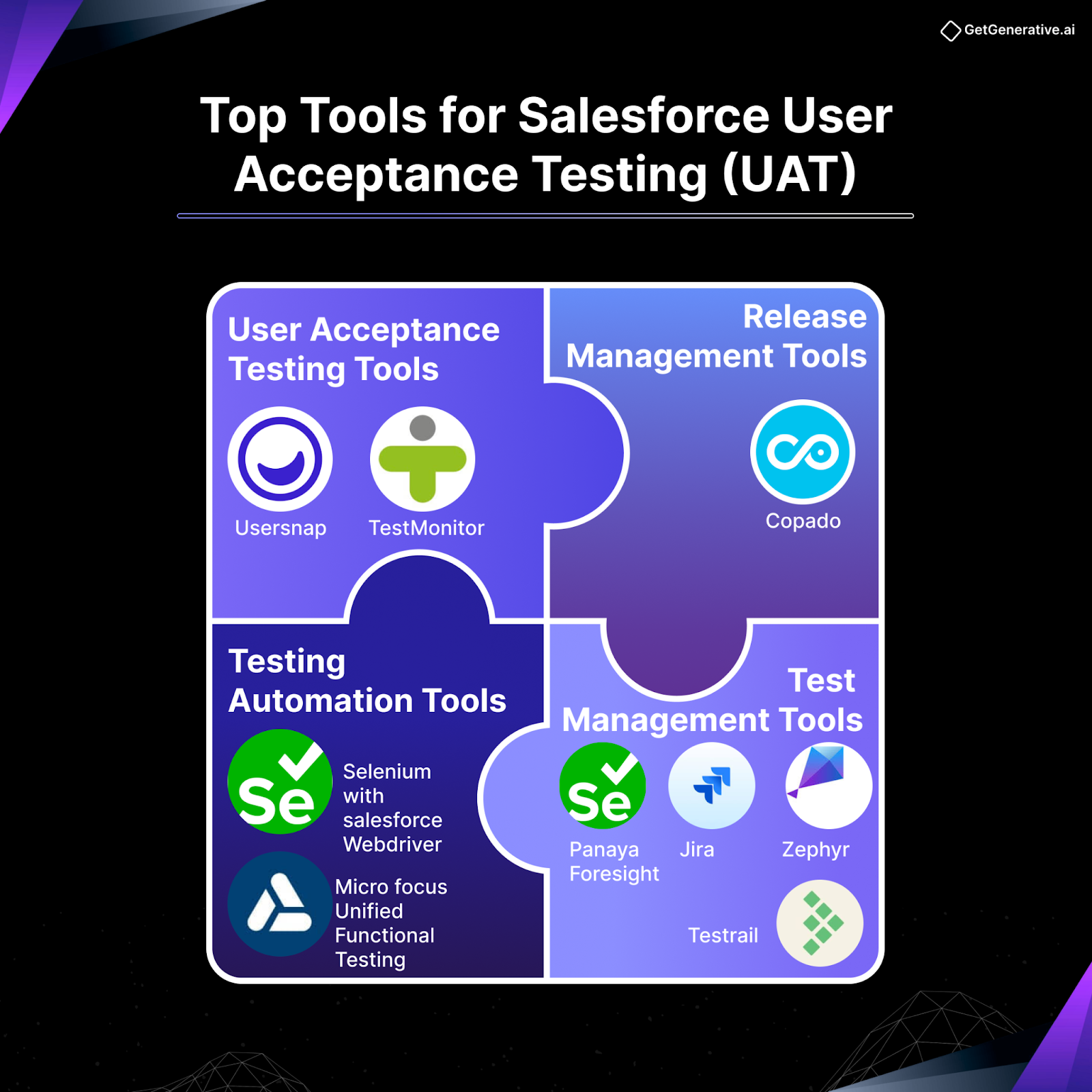
  • Jira or Azure DevOps: For issue logging, test case tracking, workflows
  • Salesforce DevOps Center: Track deployments and user stories aligned with UAT tasks
  • TestRail / Zephyr: Structured test case repositories, linked to requirements
  • GetGenerative.AI’s Testing Agent: Generates test plans, UAT scripts, and documents test evidence automatically

Time-saving Tip: Use GetGenerative.AI to generate your initial UAT test scripts and acceptance criteria directly from Salesforce user stories. It can even generate a first draft of your UAT summary report post-testing.

Transitioning from UAT to Go-Live

Before go-live, ensure:

  • All documentation from UAT is archived
  • Outstanding issues are logged for the next sprint
  • User training materials are updated based on UAT feedback

Also, communicate go-live readiness in an org-wide update: highlight UAT success, key improvements, and what to expect post-launch. This builds confidence and paves the way for a smoother transition.

Balancing Manual and Automated Testing in Salesforce QA

Both manual and automated testing play pivotal roles in a modern Salesforce quality assurance strategy. The key is knowing when to use which.

Manual Testing 

Manual testing shines where human judgment, visual feedback, or ad hoc exploration are required.

Use cases include:

  • UAT: Business users test real-world scenarios with context and intuition.
  • UX Evaluation: Testers evaluate screen layouts, error messages, and usability.
  • Exploratory Testing: Creative edge-case testing outside scripted paths.
  • Initial Feature Validation: Early feedback loops for new features not yet automated.

Limitations:

  • Time-consuming
  • Not scalable for regression
  • Prone to inconsistency

Automated Testing 

Automated tests reduce human error and excel at regression, performance, and code-level validation.

Key layers of Salesforce automation:

  • Apex Unit Tests: Required for deployment, with 75% minimum code coverage.
  • UI Automation: Tools like Selenium, Provar, and ACCELQ test Lightning components.
  • API Testing: REST/SOAP validations using Postman, JMeter, or ReadyAPI.
  • Performance Testing: Load simulation using JMeter or BlazeMeter.
  • CI/CD Regression: Run nightly test suites or post-deployment validations.

Example: Automating the Opportunity-to-Quote workflow via Provar saves 30+ hours across multiple sprints and prevents human error in multi-stage approvals.

Best Practice: Hybrid Testing Strategy

What to Automate

What to Keep Manual

High-volume regressions

One-off validations

Critical user flows

UAT edge-case testing

Backend rules & triggers

First-run feature tests

Data-driven workflows

UI/UX evaluations

Embedding QA into Salesforce DevOps

Modern Salesforce teams don’t treat QA as a phase—they embed it into DevOps pipelines and Agile release cycles.

DevOps QA Benefits:

  • Shift-Left Testing: Detect bugs at commit time, not UAT.
  • Faster Feedback Loops: Automate unit/integration tests in CI/CD.
  • Release Agility: Move from quarterly to bi-weekly releases with confidence.
  • Sandbox Strategy: Automate scratch org creation, testing, and teardown.

Common Tools:

  • Copado, Gearset, Flosum: Deployment and test orchestration
  • GitHub Actions, Azure DevOps: CI/CD pipelines with testing hooks
  • SFDX & Scratch Orgs: Temporary environments for automated test runs
  • Salesforce DevOps Center: Integrate user stories, deployments, and test validations

Case Study: A U.S. retail chain reduced UAT time by 50% after embedding automated regression testing in its GitLab pipeline. Their change failure rate dropped from 18% to under 5%, thanks to early bug detection.

AI-Powered Salesforce Testing with GetGenerative.AI

  1. Auto-Generate Test Plans & Test Cases
    • Converts user stories and metadata into test scenarios
    • Drafts structured test plans with traceability built-in
  2. Script Generation
    • Suggests Apex unit tests and Selenium-based test scripts
    • Integrates with Einstein GPT for developer-level test code
  3. AI-Powered Prioritization
    • Identifies high-risk areas based on past bugs and recent changes
    • Recommends regression test sequence intelligently
  4. UAT Support
    • Generates UAT documentation and test evidence
    • Summarizes test execution into approval-ready reports
  5. Continuous QA Collaboration
    • Syncs with Jira and DevOps tools
    • Seamlessly integrates with Build and Deploy Agents

6JkgZcbs9AAAAAElFTkSuQmCC

Also Read – How to Generate Apex Code with AI

Final Recommendations  

  • Institutionalize Test Plans and UAT: Use the templates provided as project baselines.
  • Adopt DevOps Testing Practices: Shift testing left, automate regression, and iterate faster.
  • Leverage AI-Driven Tools: Accelerate planning, execution, and documentation with platforms like GetGenerative.AI.
  • Focus on User-Centric Validation: Always include real users in testing cycles—not just for sign-off, but for feedback.

Conclusion 

A Salesforce project that skips testing is a gamble. But one that embraces structured planning, robust UAT, automation, and AI-enhanced QA is built for long-term success.

By following this complete guide from test planning and UAT to automation and AI, you’ll ensure that every release is smooth, every feature is trusted, and every user feels confident using your CRM.

getgenerative.ai implement salesforce 10x faster

If you’re looking to take the guesswork out of Salesforce projects, GetGenerative.ai offers a thoughtful way to plan, build, and test with clarity. From proposals to go-live, it helps teams stay focused and aligned. 

Book your demo today!

Writing Effective User Stories for Salesforce Implementation

Writing Effective User Stories for Salesforce Implementation


Imagine a Salesforce rollout where every sprint delivers features perfectly aligned with business needs, end-user adoption is enthusiastic, and the implementation stays on schedule and within budget. Now contrast that with a project derailed by vague requirements, scope creep, and constant rework. The difference? Clear, effective user stories.

According to industry research, poorly defined requirements contribute to nearly 35% of project failures. In complex Salesforce ecosystems, where custom development, third-party integrations, and process automation intersect, unclear user stories can result in significant delays, inflated costs, and subpar business value delivery.

AD 4nXfjnkS0y3lq8C bqBGLD 7Sgk6Uyj2Tzrilr IcduMhOMW3CBE7pXBmExJgls2JLFpDn2erpfcEvbL ZNFf

Crafting high-quality Salesforce user stories is not merely a task for business analysts—it’s a strategic imperative for implementation leaders and CXOs. This guide provides advanced insights and best practices tailored for senior Salesforce professionals and decision-makers. It covers:

  • Strategic user story frameworks and real-world examples
  • Proven Agile tools like Jira and Salesforce DevOps Center
  • Generative AI enhancements through platforms like GetGenerative.ai and Einstein GPT

Let’s get started!

Salesforce User Stories: Best Practices and Principles

Focus on Business Value and Outcomes

An effective user story goes beyond technical needs—it clearly articulates the business value. Consider this example:

  • ❌ “Create a workflow for approvals”
  • ✅ “As a Sales Manager, I want an automated approval process for discounts over 20%, so that we can accelerate deal closure while maintaining margin control.”

The second version communicates purpose and measurable outcome—accelerated deal closure and margin discipline. High-performing Salesforce teams tie each user story to a strategic business metric or KPI. During backlog grooming, ask: “How will we measure success for this story?”

💡 Tip: Adopt the INVEST criteria for user story validation:

  • Independent
  • Negotiable
  • Valuable
  • Estimable
  • Small
  • Testable

A story without value isn’t just unhelpful—it’s a liability, contributing to scope creep and lost productivity.

Clarity through Acceptance Criteria 

Well-defined acceptance criteria are critical for ensuring a shared understanding of functionality. For example:

User Story:
“As a Sales Manager, I want an automated approval for discounts over 20%…”

Acceptance Criteria:

  • Approval request is auto-routed when discount >20%
  • Sales Manager can approve/reject with notifications to rep
  • Approved discount reflects in the Opportunity record
  • All approval actions are audit-logged

In Salesforce, acceptance criteria must include:

  • Validation rules
  • Required fields
  • Permissions/security rules
  • Cross-object impacts

A best practice is using the “Given/When/Then” format from Behavior-Driven Development (BDD) for clarity:

Given a submitted quote with >20% discount,
When the sales rep requests approval,
Then an approval record is created and linked to the Opportunity.

✅ These criteria prevent ambiguity, reduce rework, and align developers, testers, and stakeholders around the same expectations.

The INVEST and 3Cs Frameworks

Two well-known Agile frameworks help assess user story quality:

INVEST Criteria (Salesforce context):

  • Independent: Can be delivered in any order (e.g., custom object story shouldn’t block workflow story).
  • Negotiable: Not a contract—meant to evolve through stakeholder conversation.
  • Valuable: Tied directly to a business objective or user pain point.
  • Estimable: Specific enough to estimate (avoid vague epics like “Improve sales process”).
  • Small: Completable within a sprint.
  • Testable: Pass/fail criteria defined.

The 3 Cs:

  • Card – A short description of the user need
  • Conversation – Dialog among stakeholders for clarity
  • Confirmation – Acceptance criteria confirming completeness

Pro Tip: Schedule regular backlog refinement sessions. Review user stories jointly with admins, devs, and business SMEs to clarify “what should happen if…” before development begins.

Also Read – How to Generate Apex Code with AI

Handling Non-Functional and Cross-Cutting Requirements

Many Salesforce requirements are not user-facing but critical: compliance, security, data integrity, integrations, and performance.

There are two ways to handle these:

1. Bake them into acceptance criteria of functional stories:

“Customer view includes billing data via integration and respects consent settings”
“Audit trail tracks who updated case status and when”

Industries like healthcare and financial services must often build in HIPAA or FINRA requirements.

2. Create standalone technical/enabler stories:

“As a Security Officer, I want nightly backups and encryption of data at rest…”

This ensures visibility and prioritization of technical needs. Overlooking them can derail go-lives and breach regulations.

Agile Methodologies and Tools 

Embracing Agile and Scrum in Salesforce Projects

Salesforce’s flexibility and rapid release cycle (three times annually) makes it a natural fit for Agile and Scrum methodologies. Instead of traditional waterfall approaches, most Salesforce teams now use 2-week sprints to deliver iterative business value.

The numbers speak for themselves:

  • 70% of Agile projects succeed, compared to just 58% for waterfall ones
  • Agile adoption enables rapid feedback, faster value realization, and continuous improvement.

Key Agile components in Salesforce implementations:

  • Daily standups to track blockers and progress
  • Sprint planning and demos to review stories
  • Retrospectives to improve the delivery process

A strong Product Owner is essential—ideally a business-aligned admin or stakeholder with decision-making authority. For complex programs, appoint domain-specific product owners (e.g., Sales Cloud vs. Service Cloud) under a Chief PO or Program Manager.

Jira and Backlog Management 

Atlassian Jira remains the most widely adopted Agile tool for Salesforce teams:

Jira is more than a backlog—it’s a source of truth. It manages:

  • User stories with descriptions, story points, and acceptance criteria
  • Workflow stages (To Do, In Progress, In Review, Done)
  • Epic and sub-task hierarchy
  • Attachments and mockups for richer context
  • Automations that enforce code reviews or link commits to stories

Story Mapping with Jira

Many Salesforce projects span multiple business processes—lead-to-cash, case resolution, etc. Story maps in Jira (via plugins like Easy Agile) visualize the customer journey and organize stories by release phases (MVP, Next, Future).

Example: Marketing → Sales → Finance steps each with their corresponding stories (e.g., form design, validation, approval logic). This structure prevents gaps and helps align tech delivery with user experience.

Ensure backlog grooming sessions are held weekly, with active collaboration between devs, admins, and stakeholders to:

  • Refine stories
  • Update priorities
  • Split or merge where needed

Salesforce DevOps Center 

The release of Salesforce DevOps Center in late 2022 marked a significant leap forward in Agile delivery. It bridges the gap between user story definition and deployment management, addressing a long-standing challenge for Salesforce teams.

Key Features:

  • Introduces Work Items—equivalent to user stories inside Salesforce
  • Ties Work Items to metadata changes and Git branches
  • Tracks Work Items through stages (Dev → Test → UAT → Prod)
  • Provides end-to-end traceability from requirement to deployed change

Example: A Work Item titled “Add Discount Approval Process” is linked to Apex classes, flows, and metadata. As the Work Item progresses, stakeholders can see exactly what is being built, tested, and released.

This eliminates ambiguity and enhances auditability, which is vital in regulated industries. Work Items also integrate with:

  • Version control systems (GitHub, Bitbucket)
  • CI/CD tools (Copado, Gearset)
  • Jira (via bidirectional linking)

Strategic Benefits for Leaders:

  • Enforces disciplined change management
  • Prevents rogue or undocumented deployments
  • Speeds up release cycles while reducing errors

A recent Salesforce DevOps survey noted that:

89% of top-performing Salesforce teams leverage DevOps to release more reliably and efficiently.”

User Story Processes with GetGenerative.ai

GetGenerative.ai is an AI-powered platform purpose-built to streamline Salesforce implementations across pre-sales, requirements gathering, design, testing, and deployment. It redefines how teams capture and manage user stories through:

1. Automated User Story Generation

With the Design Agent, teams can input unstructured notes or one-liners such as:

“Enable partner fund requests”

…and instantly receive structured, Salesforce-ready user stories with detailed acceptance criteria. For example:

User Story:
“As a partner user, I want to request marketing development funds through Salesforce so I can execute co-marketing campaigns.”

Acceptance Criteria:

  • A request form is available with mandatory fields
  • Submission triggers a configurable approval workflow
  • Notifications are sent upon approval or rejection
  • All user actions are audit-logged

Each story is auto-tagged with metadata, traceable to its epic and theme, and editable. Once finalized, stories can be pushed directly to Jira with a single click.

2. Jira Integration

Instead of documenting user stories manually after discovery workshops, teams can auto-generate them and sync to Jira or export in Excel for other tools like Azure DevOps. This drastically compresses Sprint 0 timelines—from weeks to days.

Benchmarks from real use cases:

  • 70% reduction in story writing time
  • 85–90% accuracy in AI-generated acceptance criteria vs. manual drafts

3. Test Case Automation via the Testing Agent

The Testing Agent reads acceptance criteria and user stories to auto-generate:

  • Given/When/Then-style test scenarios
  • Functional and edge-case validations
  • Categorized, prioritized test cases linked to themes and epics

These can be synced with Jira or exported for external QA systems—accelerating test cycles and improving early-stage test coverage.

6JkgZcbs9AAAAAElFTkSuQmCC

4. Embedded Salesforce Expertise

Trained on 30,000+ Salesforce help and reference pages, GetGenerative suggests standard features where applicable. For example, for a “chat support” use case, the system may recommend Salesforce Digital Engagement over custom development.

Results from the field:

  • A global consulting firm halved its documentation time across workshops
  • A Fortune 100 company used GetGenerative to analyze historical support tickets, surfacing hidden pain points and auto-generating stories for future sprint planning

Also Read – Salesforce Requirements with AI: Epics, User Stories & Acceptance Criteria

Conclusion 

Writing effective Salesforce user stories is more than a process. It’s a strategic differentiator. In high-stakes enterprise CRM projects, well-crafted user stories are the foundation for:

  • Faster sprints
  • Fewer bugs
  • Greater user adoption
  • And better ROI

getgenerative.ai implement salesforce 10x faster

If you’re working on a Salesforce project and want to reduce the manual effort in planning, scoping, and delivery –

GetGenerative.ai can help.

With AI agents designed to support each stage—from pre-sales to go-live—it brings structure, speed, and clarity to your implementation process.

Explore how it fits into your workflow – book a quick demo!

Salesforce Solution Design Document Template

Salesforce Solution Design Document Template

Salesforce is the digital nervous system of customer-centric operations. Yet despite its capabilities, 70% of digital transformation initiatives fail to meet their goals, often due to misaligned execution and poor upfront planning. 

With Salesforce commanding 21.7% of the global CRM market, failure isn’t a risk organizations can afford.

The solution? 

Strategic design and documentation — specifically, the Salesforce Solution Design Document (SDD)

For seasoned Salesforce professionals and enterprise executives alike, the SDD acts as the architectural blueprint that translates high-level business goals into actionable technical design. It prevents miscommunication, reduces risk, and keeps teams aligned from the start of the implementation through go-live.

This blog provides a comprehensive guide to creating a Salesforce SDD that drives clarity, accountability, and results. Whether you’re a Salesforce architect, delivery lead, or CXO, this resource outlines key sections, best practices, and real-world case insights to help your organization build right, the first time. 

Understanding the Salesforce Solution Design Document (SDD)

A Salesforce Solution Design Document bridges the gap between business intent and technical execution. It defines not only what a solution must accomplish, but also how Salesforce’s architecture, configuration, and integrations will achieve it.

Unlike basic requirements documents, an SDD is solution-oriented. For example, it won’t just say “enable automated case routing,” but instead outline whether this will be achieved via standard assignment rules, Omni-Channel, or custom Apex logic, and why that choice supports scalability and usability.

HLD vs. LLD: What’s the Difference?

Most enterprise Salesforce implementations split design documentation into:

  • High-Level Design (HLD): Focuses on architecture, systems involved, and solution overview — geared toward business and executive stakeholders.
  • Low-Level Design (LLD): Provides configuration details, object structures, field-level mappings, security models, and integration specifics — intended for technical teams.

Often, the SDD begins as an HLD and evolves to include LLD details. It becomes the single source of truth across the implementation, reducing the risk of misaligned development and scope creep.

Why the SDD Is a Strategic Asset for Enterprises

The SDD is not just documentation — it’s a risk management and alignment tool. For large organizations, especially those implementing Salesforce across regions or integrating with systems like ERP or e-commerce platforms, the SDD mitigates the most common pitfalls:

1. Aligns Stakeholders

In enterprise projects, lack of clarity leads to waste. According to PMI, $97 million is wasted for every $1 billion invested due to project misalignment and poor requirements. A thorough SDD ensures that executives, developers, consultants, and admins are all working from a shared vision.

2. Surfaces Risks and Assumptions Early

By forcing design decisions upfront — such as “custom vs. out-of-the-box,” “real-time vs. batch integrations,” or “single-org vs. multi-org” — the SDD uncovers dependencies, assumptions, and compliance concerns before build begins.

3. Promotes Salesforce Best Practices

SDDs are the place to encode best practices like:

  • Clicks over code
  • Use of standard data models
  • Reusability and scalability

Senior architects can guide the solution using Salesforce’s architectural guardrails.

4. Improves Governance and Executive Confidence

For CXOs, an SDD translates complex tech into understandable outcomes:

“Implementing Service Cloud with Omni-Channel routing is expected to reduce average case resolution time by 20%.”

It enables milestone reviews, executive sign-off, and forms a benchmark for project governance.

Core Components of a Salesforce Solution Design Document

A robust Salesforce SDD is structured around the following core sections:

1. Executive Summary

Concise overview for non-technical stakeholders:

  • Business drivers (e.g., “inefficiencies in sales quoting”)
  • Key goals and KPIs
  • Summary of Salesforce solution (e.g., “CPQ + ERP integration to streamline quote-to-cash”)

2. Business Requirements and Scope

Outlines:

  • High-level objectives and success metrics
  • Primary business requirements or epics
  • What’s in scope and out of scope
  • A requirements traceability matrix linking business needs to solution components

This section prevents scope creep and ensures traceability when requirements evolve.

3. Current State and Proposed Architecture Overview

Before jumping into the to-be design, a strong SDD begins by assessing the current state — what systems, tools, or manual processes are being replaced or integrated with Salesforce. This section answers:

  • What legacy systems are in place (e.g., on-premise CRM, ERP, spreadsheets)?
  • What are the major pain points (e.g., data silos, poor reporting, lack of automation)?
  • What is the current user experience or process flow?

This sets the stage for why transformation is necessary and positions Salesforce as the enabler.

Target Architecture Overview

This should include:

  • Salesforce products and org structure (e.g., single-org vs multi-org)
  • Connected systems (ERP, e-commerce, data warehouse, etc.)
  • Middleware or integration layer (e.g., MuleSoft, Informatica)
  • Direction and flow of data (inbound, outbound, bi-directional)

Every box and arrow in the diagram should be explained in the accompanying text. For example:

“Salesforce will integrate with SAP ERP via MuleSoft to fetch product availability and pricing in real-time, enabling accurate CPQ functionality.”

Be sure to explain key design decisions such as:

  • Why was one middleware chosen over another
  • Whether APIs are synchronous or asynchronous
  • Why multi-org was selected (e.g., due to data residency regulations)

Business Process Flows

Include diagrams that map Salesforce features to specific business processes. For example:

  • Lead lifecycle: from creation (via web-to-lead) to qualification, assignment, and conversion
  • Case management: from customer submission to agent routing, SLA enforcement, and resolution

These to-be process flows ground the architecture in real-world functionality and clarify how Salesforce will support or optimize daily operations.

4. Detailed Design: Data, Security, Application Logic, Integrations

This section is the most technical and should serve as a reference for developers, testers, and solution architects.

Data Model Design

Document:

  • Standard and custom objects
  • Key fields and relationships (lookup, master-detail)
  • Data volumes and storage considerations
  • Naming conventions and API names
  • Data archiving strategies (e.g., move closed cases older than 3 years to BigObjects)

Include ERDs (Entity Relationship Diagrams) where possible. Also note any assumptions:

“Product catalog will be synced nightly from SAP and is considered read-only in Salesforce.”

Security Model

Capture:

  • Role hierarchy
  • Sharing rules (organization-wide defaults, criteria-based sharing, etc.)
  • Profile and permission set design
  • Field-level security
  • Shield Platform Encryption or field masking for PII/PHI
  • Region-based access restrictions (important for GDPR, HIPAA)

This ensures regulatory compliance and helps reviewers assess risks early.

Application Logic

Clarify how automation is implemented, and follow the “declarative first” principle:

Business Requirement

Salesforce Feature

Notes

Auto-assign cases based on region

Omni-Channel Routing

Scales better than custom triggers

Validate close date for opportunities

Validation Rules

Avoids Apex for simple logic

Complex lead scoring

Apex Trigger + Custom Metadata

Due to scoring weights pulled from external systems

Also outline usage of:

  • Flows (Record-Triggered, Scheduled)
  • Process Builder (only if legacy)
  • Approval Processes
  • Apex Classes/Triggers
  • Lightning Web Components
  • Einstein AI or Next Best Action, if applicable

Integration Design

Detail each integration scenario using a consistent format:

Integration

Direction

Method

Frequency

Comments

SAP → Salesforce (Product Info)

Inbound

REST API (via MuleSoft)

Nightly

Read-only data

Salesforce → ERP (Order Info)

Outbound

Synchronous API

Real-time

For immediate fulfillment

Salesforce ↔ Marketo

Bi-directional

Middleware sync

Near real-time

Lead and campaign sync

Include sample field mappings or JSON payloads if useful.

Also Read – Salesforce Requirements with AI: Epics, User Stories & Acceptance Criteria

Best Practices for Creating a High-Impact SDD

The best Salesforce SDDs don’t just document — they guide, align, and protect the implementation. Here are expert-recommended practices:

✅ Favor Simplicity

  • Always default to configuration before code.
  • Use standard objects and fields unless there’s a compelling reason not to.
  • Avoid over-engineering: prioritize scalability, usability, and low maintenance.

“The best Salesforce solutions are invisible — users shouldn’t know if it’s Flow or Apex underneath.”

✅ Collaborate Early

  • Run design review workshops with business stakeholders, tech leads, and security teams.
  • Secure executive sign-off on architecture and scope before build starts.
  • Validate assumptions early (e.g., legacy data quality, integration feasibility).

✅ Explain the “Why” Behind Design Choices

Don’t just state what you’re doing — explain why it was chosen. This builds trust and creates a learning artifact for future teams.

“Apex was used over Flow here due to bulk processing limits in Flow for high-volume transaction records.”

✅ Keep the SDD Live

  • Version-control your SDD (e.g., via Confluence, SharePoint, or Git).
  • Update it as scope evolves or when implementation deviates from the original plan.
  • Refer to it during sprint planning, testing, and UAT phases.

A static document is forgotten. A living SDD becomes a powerful project guide and legacy asset.

Also Read – How to Generate Apex Code with AI

Case Study: How a Strong SDD Enabled a Global Salesforce Rollout

Let’s look at how a comprehensive SDD helped a multinational enterprise avoid project failure and drive measurable business outcomes.

Client Profile:

A Fortune 500 global manufacturing firm with operations across North America, EMEA, and APAC regions. The company aimed to consolidate three regional CRM platforms into a unified Salesforce instance supporting global sales, customer service, and partner management.

Challenge:

Previous CRM projects at the organization had suffered from:

  • Conflicting regional priorities
  • Inconsistent business processes
  • Poor visibility into customer data
  • Cost overruns and delayed go-lives

To avoid repeating these mistakes, the leadership mandated a design-first approach anchored by a robust Salesforce Solution Design Document.

Solution:

The program’s lead architect coordinated with regional stakeholders to co-develop an enterprise-grade SDD that included:

  • A global Salesforce architecture integrated with SAP ERP and Adobe Experience Cloud
  • A unified data model for customers, products, and service cases — including field-level definitions, master data sources, and deduplication logic
  • A role-based security model with data residency controls to comply with GDPR and regional privacy laws
  • Clearly defined region-specific variations in workflows (e.g., post-sales support processes differed in EMEA vs. APAC)
  • A detailed integration matrix outlining 15+ system touchpoints with direction, data mapping, and frequency
  • Assumptions and constraints (e.g., ERP will expose real-time APIs by Q2; product hierarchy is standardized globally)

Impact:

  • On-time, on-budget launch — a first for the client’s CRM initiatives
  • ~20% improvement in case resolution times in the first 6 months
  • +35% user adoption versus past projects, thanks to consistent UX and stakeholder buy-in
  • The SDD was reused as a template for onboarding future business units, shortening ramp-up for new rollouts

This case reinforces the idea that a strong SDD is not just a documentation deliverable — it’s a strategic multiplier for scale, speed, and stakeholder alignment.

Conclusion 

In an era where digital transformation can determine competitive advantage, an excellent Salesforce Solution Design Document is your edge. It separates organizations that improvise their way into technical debt from those that lead with intention.

Want a simpler way to manage your next Salesforce project?

salesforce consulting services

GetGenerative.ai brings everything into one place — from drafting proposals to going live — powered by AI agents that work alongside your team.

If you’re curious to see how it fits into your workflow, schedule a quick demo at your convenience.

How to Generate Apex Code with AI

How to Generate Apex Code with AI


Imagine describing your Apex requirement in plain English and having Salesforce generate production-ready code in seconds. This is no longer a developer’s dream—it’s the new reality, thanks to generative AI. 

Over 50% of developers adopted AI-assisted tools, and GitHub’s CEO forecasted that “sooner than later, 80% of the code is going to be written by Copilot”

In the Salesforce ecosystem, the implications are profound. From Einstein GPT for Developers to GetGenerative.ai and GitHub Copilot, AI-powered tools are reshaping how code is written, tested, and optimized. Recent studies show that:

  • Developers using AI code assistants report a 55% increase in coding speed
  • 85% feel more confident in code quality with AI review 
  • Over 30,000 Microsoft developers use Copilot in daily workflows
  • AI-generated code is helping large enterprises like Airbnb and Coca-Cola meet development timelines faster

This in-depth guide breaks down how to generate Apex code using AI tools, with strategic insights.

 AD 4nXclceqrFf7mo4PRBysP7XGXcOd1Cxvwr9i9RRq se81rcL7uFNznhLSeET29Z8rTiGx rhDQB3BvMLvr2bAt4n5TQMwPeG0j ojXmNmylsgW5o8lPs8iuuOSXBcjRFNrIW3GhFL?key=0ezInlV7PhyoXPfm6Lld9zVc

We’ll analyze leading platforms, compare AI vs. human-written code, and share industry use cases in finance, healthcare, and SaaS. 

Let’s get started!

The Rise of AI in Salesforce Apex Development

Salesforce’s AI evolution—from basic automation to code generation—represents a paradigm shift. What began with Einstein Analytics and Service Bots has now reached developers through Einstein GPT for Developers, powered by Salesforce’s CodeGen LLM.

Unlike generic AI assistants, CodeGen is purpose-built for the Salesforce ecosystem:

  • Trained on Apex, Visualforce, LWC, and Flow
  • Context-aware with metadata from your org
  • Built atop a secure Einstein Trust Layer
  • Integrated with Salesforce Code Analyzer for real-time static analysis

This means AI understands syntax and your specific org configuration, custom fields, and security rules. Enterprise-grade security and zero data retention ensure AI coding complies with HIPAA, GDPR, and FINRA standards, which are critical in regulated industries.

GitHub Copilot’s success has also shown that developers can shift their roles:

“You don’t need to write every line anymore. You orchestrate the intent, and AI writes the skeleton.” 

Thomas Dohmke, GitHub CEO

As we’ll explore below, this shift empowers experts to focus on architecture, logic, and governance, while AI handles boilerplate, speed, and structure.

Top AI Tools for Salesforce Apex Code Generation

1. Salesforce Einstein for Developers (CodeGen-Powered)

Salesforce’s official AI pair-programmer is embedded directly into Code Builder and VS Code. Here’s how it works:

  • Enable “Einstein for Developers” in Setup
  • Add the Einstein extension in VS Code
  • Use natural language prompts like:
    “Write a trigger to auto-close Cases inactive for 30+ days”
  • The model generates the class, methods, and even a test scaffold

Key strengths:

  • Accesses org-specific metadata
  • Understands Salesforce APIs and governor limits
  • Built-in Code Analyzer flags insecure patterns (SOQL in loops, missing sharing)
  • Secure by default: no code leaves your org

Use cases:

  • Auto-generating Apex classes, triggers, and tests
  • Explaining legacy code (e.g., “Explain this batch job”)
  • Fixing security bugs using AI feedback

2. GitHub Copilot for Apex Development

Built by GitHub and powered by OpenAI’s Codex, Copilot is a general-purpose code assistant that supports Apex among 30+ languages.

How it works:

  • Suggests code as you type
  • Completes loops, methods, and CRUD patterns
  • Responds to comments like // fetch all Opportunities for an Account

Why developers use it:

  • Boosts speed for boilerplate and repetitive patterns
  • Offers AI chat support for syntax errors or refactoring help
  • Works across Apex, LWC JavaScript, HTML, and more

Limitations:

  • Lacks Salesforce metadata awareness
  • Can suggest inefficient code (e.g., SOQL in loops)
  • Security best practices must be manually validated

Stats:

  • Used by 50,000+ organizations
  • Boosts code writing by 30-50% on average
  • Microsoft’s internal use: 30K+ devs using Copilot daily  

3. GetGenerative.ai – From User Story to Apex Code, Seamlessly

Unlike conventional AI tools that assist with code suggestions, GetGenerative.ai uses a chain of specialized AI agents to automate the entire Salesforce implementation lifecycle—from design to code to deployment. 

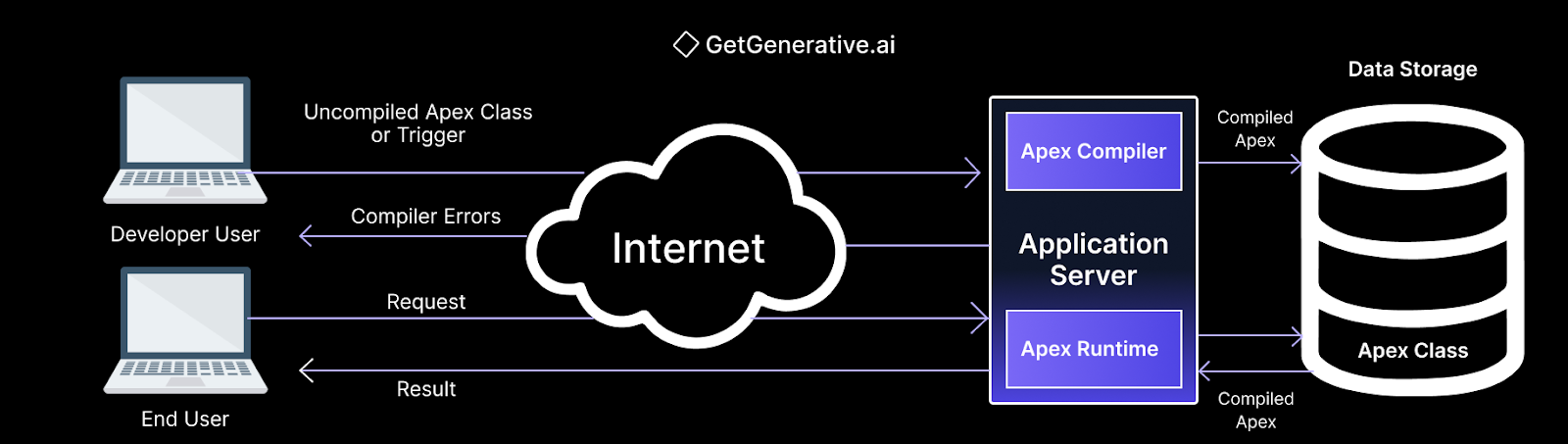
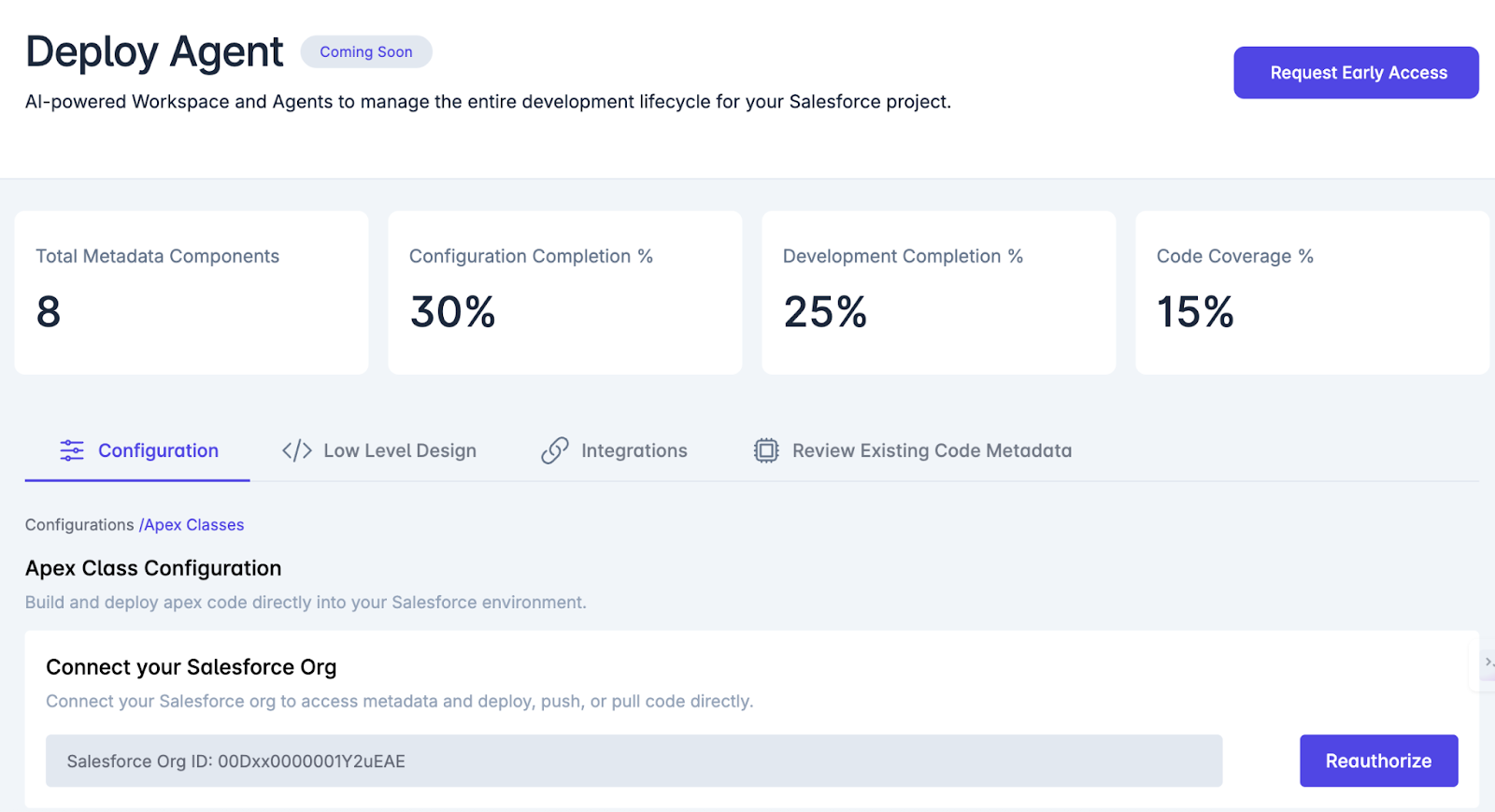
At the center of this automation is the Deploy Agent, which orchestrates code generation, testing, metadata configuration, and direct deployment into Salesforce environments.

  • Design Agent → Creates user story + acceptance criteria
  • Build Agent → Prepares solution architecture, metadata model
  • Deploy Agent
    • Generates Apex code (triggers, classes)
    • Connects to your Salesforce Org
    • Deploys and validates the code
    • Tracks configuration and code coverage
  • Test Agent → Auto-generates test classes + runs validations

6JkgZcbs9AAAAAElFTkSuQmCC

AD 4nXeThuoP X79c4StCeUl83wtiOTmQ9mBqFadyMOgUrzcHYhonSje7GMk EJz9xacplXrVABSFePi65FjpMhVLLmA

Why It’s Powerful:

  • True Design-to-Deploy Automation: Every user story flows seamlessly from functional requirements to working Apex code with metadata and test classes.
  • AI-Powered Apex Development: Generates Apex classes with built-in logic, metadata awareness, and integration readiness.
  • Push-Button Deployment: Instantly deploy code to Salesforce orgs with full version control and metadata alignment.
  • Integrated with Code IDEs: Use GitHub Copilot, XGen, or native GetGenerative.ai tools.

What the Deploy Agent Handles:

  • Apex Class Configuration: Create, configure, and push Apex classes with context-rich logic
  • Org Connection: Secure OAuth-based integration for pull/push of metadata
  • Code Quality Metrics: Tracks config completion, development completion, and code coverage
  • AI Instruction Parsing: Converts plain-English instructions into actionable Apex logic
  • Built-In Controls: Regenerate, Retest, and Deploy buttons for rapid iterations

Strategic Benefits:

  • Eliminates Developer Bottlenecks
  • Ensures Code + Metadata + Stories are in Sync
  • Ideal for Agile Teams & CI/CD Pipelines
  • Boosts Quality with Auto-Test Class Generation

4. Others: ChatGPT, CodeWhisperer, Tabnine,  

Tool

Strengths

Considerations

ChatGPT (GPT-4o)

Versatile, fast code snippets

Not org-aware, lacks security awareness

Amazon CodeWhisperer

AWS ecosystem integration

Apex support is limited

Tabnine

On-device models, customizable

Weaker for Salesforce-specific use

ApexGuru (Salesforce Scale Center)

Refactors Apex for performance

Enhances existing code, not generative

Each tool serves different purposes—from generating new code to optimizing and refactoring old Apex. Used together, they form a complete AI-enhanced toolkit for Salesforce professionals.

Also Read – Salesforce Implementation Showdown: AI vs. Traditional Methods

AI vs. Human-Written Apex Code: A Strategic Comparison

1. Accuracy and Code Quality

While AI-generated Apex code often compiles correctly, it doesn’t guarantee business logic accuracy. AI systems work by pattern recognition—not comprehension—so edge cases may be missed.

Pros:

  • Quick scaffolding for standard patterns
  • Reduces typos and syntax errors
  • Good for test classes, SOQL queries, and bulk patterns

Cons:

  • May skip validation logic unless specified
  • Edge-case handling is limited by prompt quality
  • Code is only as correct as the training data

2. Maintainability and Best Practices

AI tools tend to follow the most common code patterns, which often aligns with industry best practices—especially for frameworks like triggers and service layers.

Advantages:

  • Consistent method structures
  • Clear variable naming and comments
  • Reusable patterns like trigger handlers or batch apex

Risks:

  • May generate monolithic methods if not prompted to modularize
  • Possible code duplication if unaware of org-level reuse
  • Potential for “quick fix” logic accumulating technical debt

3. Security and Compliance

Security is one of the biggest concerns with AI-generated code.

Common flaws in AI-written Apex include:

  • Missing with sharing in controllers
  • SOQL injection vulnerabilities
  • No CRUD/FLS checks on sObjects
  • No try-catch error handling in integrations

Salesforce’s Einstein Trust Layer mitigates these by scanning output and preventing insecure patterns from being suggested.

Best Practices for Security:

  • Use static scanners like PMD, Checkmarx, or Snyk
  • Mandate use of with sharing and FLS checks in all AI-generated classes

Checkout – Salesforce Secure Coding Guidelines

Best Practices for AI-Generated Apex Implementation

Best Practice

Why It Matters

Start with pilots

Mitigates risk, builds internal confidence

Train developers on prompt engineering

High-quality prompts = better outputs

Enforce code reviews

Prevents bad patterns from slipping in

Generate tests + documentation via AI

Increases maintainability and clarity

Use multiple tools together

Einstein for metadata, Copilot for structure

Integrate CI scanning

Catch security bugs early (PMD, Snyk)

Tie code to user stories

Maintain traceability and intent

Track metrics

Measure velocity, churn, and defect rates

Keep humans in control

AI is assistant, not owner

Conclusion 

The days of writing Apex code line by line are fading. AI now writes the first draft—fast, secure, and often impressively correct. But human developers remain essential.

salesforce consulting services

If you’re exploring better ways to build and deliver Salesforce projects, GetGenerative.ai is the only platform you need.

From proposals and scope planning to go-live support, it brings together everything in one AI-powered workspace — so your team can focus more on solving real problems, not just managing tasks.

See how it works — Book a demo today!

Salesforce Requirements with AI: Epics, User Stories & Acceptance Criteria

Salesforce Requirements with AI: Epics, User Stories & Acceptance Criteria


Getting the Salesforce project requirements right is mission-critical. Whether it’s high-level epics or granular acceptance criteria, clarity in requirements directly drives on-time, on-budget, high-quality delivery. Yet, traditional methods of capturing Salesforce project requirements often fall short in today’s fast-paced, complex implementations.

With the launch of innovations like Einstein GPT—touted as “the world’s first generative AI for CRM” — Salesforce has set the stage for a fundamental shift. Generative AI is redefining how teams capture, refine, and manage requirements.

By combining Salesforce’s AI innovations with agile best practices, project teams now have the opportunity to reimagine the requirement lifecycle, making it faster, smarter, and more resilient to change.

This blog explores how AI is transforming Salesforce project requirements—specifically epics, user stories, and acceptance criteria. Let’s get started!

Epics, User Stories, and Acceptance Criteria 

In agile Salesforce projects, epics, user stories, and acceptance criteria form the critical foundation that transforms business vision into technical execution.

Each plays a distinct yet interconnected role:

  • Epics represent large business objectives—broad, strategic initiatives that require further breakdown.


  • User stories are smaller, actionable requirements nested within an epic, capturing a specific user need from an end-user’s perspective. They often follow the simple but powerful format:
    “As a [user], I want [goal] so that [reason].”


  • Acceptance criteria define the specific conditions that must be met for a user story to be considered complete, offering a shared understanding of success across all stakeholders.

In practice, well-written acceptance criteria serve as a safety net against ambiguity, guiding developers, testers, and business users alike toward a clear outcome. They also play a vital role in:

  • Reducing miscommunication
  • Guiding test case creation
  • Preventing scope creep by setting firm boundaries on what “done” looks like

In a Salesforce environment, where custom configurations, third-party integrations, and automations often converge, the cost of unclear requirements can be enormous. 

Research shows that poorly defined requirements contribute to 35% of project failures (PMI Pulse of the Profession Report).

Seasoned Salesforce professionals know the signs all too well:

Missed details lead to costly rework, delayed go-lives, frustrated users, and lost business value.

Strong epics, user stories, and acceptance criteria are not just documentation artifacts—they are the blueprint for successful Salesforce project delivery.

The High Stakes of Traditional Requirements Gathering

Despite the recognized importance of clear requirements, traditional methods for gathering Salesforce project requirements come with significant risks.

Conventional approaches—such as stakeholder workshops, whiteboarding sessions, and extensive BRD (Business Requirements Document) write-ups—are often:

  • Time-consuming
  • Resource-intensive
  • Prone to human error and misinterpretation

In large Salesforce programs, requirements typically evolve over weeks or months. In that time, gaps, misunderstandings, and assumptions can easily creep in.

Busy executives may describe business needs at a high level, leaving business analysts to fill in critical blanks. Developers then interpret those written stories, and even small misalignments can snowball into:

  • Mismatched solutions
  • Budget overruns
  • Rework cycles
  • Stakeholder dissatisfaction

It’s no surprise that poor requirements gathering is cited in 47% of project failures across industries (Project Management Institute).

Adding to the complexity, Salesforce’s “clicks-not-code” paradigm, which enables rapid declarative development, introduces frequent shifts during execution. Teams may uncover platform limitations or new out-of-the-box features mid-project, necessitating requirements adjustments.

Keeping requirements documents updated and synchronized with rapid Salesforce changes becomes an uphill battle.

For senior Salesforce consultants and CXOs, this leads to a familiar frustration:


“Why are we still discovering critical gaps in UAT or post-go-live?”

Clearly, a smarter, more dynamic approach is urgently needed to:

  • Capture requirements accurately
  • Maintain alignment across teams
  • Adapt swiftly to inevitable changes

This is where AI offers a true paradigm shift—bringing speed, consistency, and even predictive insights into the heart of the Salesforce requirements process.

How AI is Transforming Salesforce Requirement Practices

The rise of generative AI, powered by advanced large language models (LLMs), is revolutionizing the way Salesforce teams capture, refine, and manage requirements.

Instead of starting with a blank page, consultants can now leverage AI to:

  • Draft initial epics, user stories, and acceptance criteria
  • Summarize stakeholder discussions
  • Identify missing requirements or potential risks
  • Refine documentation at the speed of conversation

Importantly, AI is not replacing human expertise—it’s augmenting it.

Senior Salesforce professionals, architects, and business analysts remain critical to validate, customize, and strategically align the AI outputs.

How GetGenerative.ai Adds Value Across the Requirement Lifecycle:

Accelerating Discovery and Epic Definition

GetGenerative.ai starts by analyzing inputs such as stakeholder interviews, meeting notes, and uploaded documents. The Pre-Sales Agent automatically identifies high-level themes and breaks them down into epics, forming the backbone of the requirements structure. This layered approach ensures no major needs are overlooked, even when starting with unstructured data.

Example: Instead of manually summarizing a 2-hour discovery workshop, GetGenerative.ai can extract 5 major epics and 15 structured high-level user stories within minutes, reducing pre-sales cycle time and accelerating proposal creation.

AI-Assisted User Story Creation

With GetGenerative.ai’s Design Agent, consultants can transform each requirement or epic into well-structured user stories and associated acceptance criteria. The AI creates metadata-rich stories, tagging each one with its associated theme, epic, release cycle, status, and priority. Stories are editable, filterable, and fully traceable.

Example: A requirement like “Enable partner fund requests” becomes a user story with acceptance criteria such as form fields, approval rules, and error scenarios—auto-generated from context. The platform also integrates with Jira to push stories directly, streamlining agile collaboration.

Generating Acceptance Criteria and Test Scripts

The Testing Agent takes finalized user stories and auto-generates detailed acceptance criteria and matching manual test cases. These follow standard formats (e.g., Given-When-Then) and include edge cases, preconditions, steps, and expected results. This ensures full test coverage from the start.

6JkgZcbs9AAAAAElFTkSuQmCC

Benchmark Insight: In internal tests, GetGenerative.ai generated 900 test cases in minutes, cutting manual QA documentation time by up to 80%. The acceptance criteria matched human-created ones 85–90% of the time.

Acting as a Salesforce Expert Assistant

GetGenerative.ai isn’t just generating content—it’s trained on 30,000+ Salesforce help pages to recommend pre-built solutions for each requirement. Consultants can review and insert Salesforce-native options (e.g., Digital Engagement, Email-to-Case) directly into their implementation workbook, removing guesswork.

Salesforce’s AI-Powered Toolkit for Requirements Gathering

Recognizing the massive potential of AI, Salesforce has strategically expanded its own AI ecosystem to directly support project workflows, including requirements gathering, implementation, and management.

Today, Salesforce teams can tap into a growing set of native AI-powered tools designed to make the requirements lifecycle smarter, faster, and more secure.

DevOps Center 

Salesforce DevOps Center modernizes how changes are tracked, approved, and released on the Salesforce platform.

At its core, it introduces Work Items—records that act as linked user stories tied directly to source control branches and deployment pipelines.

For requirement gathering, this means:

  • Every user story and requirement is traceable from the backlog to the release.
  • Changes are governed by agile best practices rather than fragmented processes.

According to Salesforce, DevOps Center “brings DevOps best practices to your development team.”  

By leveraging DevOps Center, organizations lay the foundation for future AI integrations, where AI could recommend backlog grooming improvements, auto-generate release notes, or validate user story completeness dynamically.

Einstein GPT 

Einstein GPT represents Salesforce’s major leap into generative AI.
It’s designed to create content—whether that’s drafting emails, writing code snippets, or summarizing customer interactions—using natural language prompts.

For requirements gathering, Einstein GPT enables:

  • Drafting of user stories, validation rules, and Flows based on plain language inputs
  • Auto-summarization of case discussions and requirements workshops
  • Assistance in generating standard Salesforce configurations aligned with stated needs

Furthermore, Einstein GPT is built with an enterprise security mindset, incorporating Salesforce’s Einstein Trust Layer to ensure outputs maintain compliance and data privacy.

Salesforce AI Cloud: Trust, Scale, and Connected Intelligence

Salesforce AI Cloud brings all Salesforce AI innovations under one umbrella, designed to:

  • Deploy AI at enterprise scale


  • Ensure secure use of company data


  • Seamlessly integrate with Salesforce Customer 360


With AI Cloud, Salesforce customers can trust that AI outputs – user stories, requirement summaries, or automation suggestions – are grounded in secure, real-time CRM data.

Notably, AI Cloud leverages Salesforce’s Data Cloud as its engine, ensuring AI recommendations are highly contextualized to a company’s actual Salesforce environment. 

BluePrint For Salesforce + AI

Here’s a clear blueprint to capitalize on this new era:

1. Combine AI with Human Expertise

Treat AI as a highly capable team member—not a replacement.

Let AI generate first drafts of epics, user stories, and acceptance criteria, then have experienced consultants review, tailor, and validate them.

2. Invest in Enablement and AI Literacy

Train your teams on prompt engineering and AI tool capabilities (like Einstein GPT and GetGenerative.ai Agents).

Just as teams master Salesforce Clouds or AppExchange solutions, they must now master how to work with AI.

3. Start Small—Pilot AI in Real Projects

Identify a current or upcoming Salesforce project to pilot AI-enhanced requirements gathering.

Set clear goals such as:

  • Reducing story drafting time by 50%
  • Improving stakeholder clarity ratings

Track results rigorously.

Early wins will build momentum and confidence across teams and leadership.

4. Leverage Trusted Salesforce AI Platforms

Use Salesforce-native AI tools like Einstein GPT and AI Cloud to ensure:

  • Data security (protected by the Einstein Trust Layer)
  • Tight CRM integration
  • Compliance with enterprise governance standards.  

If experimenting with external AI, anonymize sensitive data and vet providers carefully.

Governance and data security must be non-negotiable priorities.

5. Integrate AI into Existing Processes

Don’t treat AI-assisted requirements as a separate side project.

Embed AI naturally into your agile, scrum, and DevOps workflows.

Examples:

  • Add “AI Draft Review” into your definition of done
  • Let AI auto-generate draft stories in Jira or DevOps Center
  • Use Slack GPT to summarize daily standup discussions into backlog updates

The key is to make AI a seamless part of delivery, not an afterthought.

6. Measure, Celebrate, and Scale

Treat AI adoption as a strategic initiative.

Measure KPIs like:

  • Reduction in requirements documentation time
  • Increase in first-pass UAT success rates
  • Stakeholder satisfaction scores

Final Thoughts

Blending AI with Salesforce requirements gathering isn’t about cutting corners—it’s about unlocking new levels of speed, precision, and agility.

getgenerative.ai implement salesforce 10x faster

See how simple Salesforce delivery can be.

With GetGenerative.ai, you can create complete proposals, scope plans, and user stories—start to finish—in one workspace.

Explore the AI-powered way to run better projects.

Book a demo today!

Salesforce Project Requirements: A Complete Guide for 2025

Salesforce Project Requirements: A Complete Guide for 2025

Over 35% of failed projects cite poor requirements gathering as a root cause. Even more concerning, over 80% of stakeholders believe the requirements process often fails to capture actual business needs, leading to rework, missed objectives, and frustration.

These stats are not just warnings — they are wake-up calls. In the high-stakes environment of enterprise CRM transformation, requirement gathering is not a checklist — it’s a strategic imperative.

This in-depth guide explores how Salesforce leaders can master the art and science of requirement gathering. Whether you’re a seasoned Salesforce architect, an enterprise program manager, or a C-suite sponsor overseeing digital transformation, this guide offers:

  • Strategic insights
  • Industry-specific examples (healthcare, finance, manufacturing)
  • Real-world case studies
  • Best practices from 2025’s most successful Salesforce projects

With the right frameworks and foresight, your requirements process can power a Salesforce solution that delivers on time, on budget, and beyond expectations. 

AD 4nXfHz4ZoVClML0BjsH1y uH1h6gaReNIRvVPmJuFklMMPjkmAXmcQPx7UI3CoSBRXfY5yZz HBFR3lZ3jFOJLV24E4Zax1ScjZyMv0Nv7s2PfPujniJvRleKS RlWy 

Let’s dive into what it takes to turn requirements into real results.

Importance of Effective Salesforce Project Requirements

Requirements serve as the critical bridge between business vision and technical execution. In a Salesforce implementation, the clarity, quality, and completeness of requirements determine whether you deliver a CRM solution that empowers or disappoints. Here are some important factors to consider:

1. Driving ROI and Business Value

Salesforce is a significant investment, and clear requirements are key to realizing its full return. A Nucleus Research study found that CRM systems deliver an average ROI of $8.71 per $1 invested — but only when properly aligned with business goals.

In a 2025 Salesforce context:

  • Well-defined requirements = A well-aligned solution
  • A well-aligned solution = Faster time to value
  • Most companies see Salesforce ROI in under 13 months when requirements are properly scoped.  

2. Ensuring Strategic Alignment Across the Enterprise

A CRM implementation must reflect broader business priorities. For example, if the corporate strategy is to enhance customer retention:

  • Requirements should focus on automating follow-up sequences
  • Integrating customer service interactions
  • Creating unified views of account activity

According to Salesforce, lack of strategic alignment is a leading cause of CRM project failure, often resulting from teams rushing into platform configuration without clearly defining success. 

Effective requirement gathering forces clarity: Why are we doing this? What metrics define success?

3. Securing Enterprise Buy-In

One of the most overlooked benefits of a rigorous requirements process is the organizational alignment it creates. Involving business users, IT, operations, and executives in requirement workshops fosters a sense of shared ownership. This directly translates into:

  • Fewer change requests later
  • Higher user adoption
  • Lower resistance at go-live

Remember: a CRM built without user input is often a CRM nobody uses.

4. Reducing Risk and Scope Creep

Scope creep — the silent killer of projects — often originates from weak requirements. Vague statements like “Improve reporting” lead to subjective interpretations and ballooning workloads. Precise, prioritized, and signed-off requirements create a shared contract between business and delivery teams.

By clearly defining what’s in-scope, what’s out, and what’s deferred to Phase 2, you contain complexity and control costs.

Related Read – Salesforce Requirement Gathering Template

Salesforce Implementation Planning in 2025

The requirement phase doesn’t exist in isolation — it’s a foundational pillar of your broader Salesforce implementation strategy. In 2025, experienced teams understand that rigid, outdated methodologies no longer cut it. 

The winning formula? 

Strategic flexibility with a disciplined backbone.

Choosing the Right Methodology

The first major decision in project planning is selecting your delivery approach:

  • Waterfall: Ideal for large-scale, compliance-driven initiatives (e.g., banking or pharma), where a clear blueprint must be established before development begins.
  • Agile: Best for dynamic environments with evolving business needs, enabling rapid prototyping and continuous user feedback.
  • Hybrid: The most popular approach in 2025. It combines structured discovery with agile delivery, giving you the best of both worlds.

Example: A global bank may start with a waterfall-style discovery phase to ensure regulatory compliance, but adopt agile sprints to build dashboards, user interfaces, or automation flows.

This hybrid flexibility allows for high-level scoping upfront while remaining responsive to mid-project changes — a common reality in Salesforce projects.

Establishing KPIs, Governance, and Clear Ownership

Without measurement and ownership, even the best-documented requirements will fail in execution. That’s why project governance must be embedded into the requirement phase:

  • Set measurable KPIs during scoping:
    • Improve case resolution time by 40%
    • Increase lead-to-opportunity conversion by 25%
  • Define roles early:
    • Executive Sponsor – Aligns project with business goals
    • Business Owner – Owns the problem being solved
    • Salesforce Architect – Oversees solution design
    • Power Users – Act as subject matter experts

Use a RACI matrix to assign ownership to requirement activities. This reduces ambiguity during scope changes and ensures stakeholder accountability.  

Pro tip: Review scope control mechanisms up front. Create a lightweight but effective change management process to handle requirement shifts without causing chaos.

Aligning with Broader Business and IT Strategy

Your Salesforce implementation isn’t just a departmental tool — it’s a platform for enterprise transformation. In the planning stage:

  • Involve technical teams to gather integration and data requirements
  • Engage security and compliance leaders early
  • Map each Salesforce capability to strategic business outcomes

For example, a requirement like “Give account managers a 360° view of customers” probably implies integrating Salesforce with ERP, customer support systems, and marketing tools.

Also consider future-readiness: AI integration, predictive analytics, and multi-cloud environments are becoming the norm, not the exception. Requirements should reflect this, even if features roll out in later phases.

IBM reports that 67% of Salesforce users are augmenting Salesforce with custom AI workflows.

Leveraging Salesforce Partners and Accelerators

In 2025, savvy enterprises don’t go it alone.

97% of enterprise Salesforce customers rely on partner support for implementations, especially around data, integrations, and regulatory compliance. 

Benefits of working with Salesforce consulting partners:

  • Access to industry-specific accelerators (like Manufacturing Cloud’s Sales Agreements)
  • Pre-built templates and frameworks for user stories, personas, and process maps
  • Expert facilitation of requirement workshops

Frameworks and User Stories 

Now that the strategic and planning context is clear, let’s get tactical. How do you actually gather Salesforce requirements “like a boss” in 2025?

User Stories & Use Cases: The Language of Agile Delivery

In 2025, user stories are the standard unit of value in Salesforce projects. They help translate business needs into system functionality without jumping straight into solutions.

✅ Example User Story:

“As a support agent, I want to see a customer’s recent cases, so I can resolve issues without repetition.”

Best practice includes:

  • Writing user stories collaboratively in workshops
  • Linking each story to acceptance criteria
  • Grouping stories into epics and themes for structure

For complex flows, consider supplementing with use cases — structured narratives that outline process steps, exceptions, and system behaviors.

Prioritization Frameworks: Managing the Backlog Smartly

You’ll always gather more requirements than you can deliver in one phase. Prioritization ensures you focus on business value first.

🔧 Popular Frameworks:

  • MoSCoW Method – Must have, Should have, Could have, Won’t have
  • Value vs. Effort Matrix – Helps identify “quick wins” (high value, low effort)
  • Phased Roadmapping – Deliver core requirements in MVP, defer others

Tip: Keep a living, prioritized requirements backlog — especially useful if you’re working in agile sprints or iterative releases.

Also Read – Salesforce Implementation Showdown: AI vs. Traditional Methods

Pitfalls to Avoid in Salesforce Requirement Management

❌ 1. Incomplete or Vague Requirements

One of the top project killers. Ambiguous requirements like “make it user-friendly” or “improve reporting” offer zero clarity to developers or stakeholders.

Why it’s dangerous:

  • Leads to assumptions during development
  • Increases rework and dissatisfaction
  • Creates delivery mismatches

What to do instead:

  • Ensure every requirement is specific, testable, and business-driven
  • Use SMART criteria: Specific, Measurable, Achievable, Relevant, Time-bound
  • Ask clarifying questions: What does success look like? Who is the user? What exactly needs to improve?

According to PM360 Consulting, poor planning (including vague requirements) remains the #1 reason for project failure.  

❌ 2. Lack of Executive Sponsorship and User Involvement

Projects flounder when driven solely by IT or third-party vendors, without active leadership or user feedback.

Symptoms:

  • Misaligned priorities
  • Weak adoption at go-live
  • Missed compliance or operational needs

Fix it with:

  • An engaged executive sponsor who communicates the “why” and clears roadblocks
  • Diverse stakeholder involvement during requirement workshops
  • Power users embedded in the project team to bridge the business-tech gap

❌ 3. Over-Customization and Scope Creep

Salesforce can be customized endlessly — and that’s the danger. Projects often spiral because of:

  • Stakeholders requesting “just one more feature”
  • Duplicating functionality that already exists natively
  • Losing sight of the MVP

Best practices to stay disciplined:

  • Map every requirement to business value
  • Leverage standard Salesforce capabilities first (Flows, native CPQ, Experience Cloud)
  • Use AppExchange apps before building from scratch
  • Implement a change control board for new requirements

Over 60% of over-budget Salesforce projects cite scope creep and over-customization as the main causes.  

❌ 4. Ignoring Data and Integration Requirements

Data and system integrations are often treated as “technical backend items.” Big mistake.

Why it matters:

  • These are core to delivering a unified customer view
  • Data quality issues or missing integrations can cripple workflows

How to avoid it:

  • Capture data sources, owners, and volumes as requirements
  • Define API needs, batch vs real-time, error handling logic
  • Involve integration architects and security experts during discovery

❌ 5. Underestimating Change Management and Training

You can deliver the best-configured Salesforce instance, but it still fails if no one knows how to use it.

The reality:

  • End users resist change unless supported and trained
  • Many organizations forget to budget time/resources for enablement

Solution:

  • Capture training and support as part of your requirements
  • Include metrics like “80% user login rate within 30 days” as success criteria
  • Identify change agents and build an internal champion network

Remember: User adoption is a requirement, not an afterthought.

Industry-Specific Perspectives on Salesforce Requirements

Healthcare 

Salesforce in healthcare (typically via Health Cloud) is used for care coordination, patient engagement, and operational efficiency. But compliance isn’t optional — it’s foundational.

Key Requirements:

  • HIPAA compliance: Documented encryption, access controls, audit logs
  • Consent management workflows: Track varying patient consents across care programs
  • EMR/EHR integration: Sync Salesforce with Epic, Cerner, or other clinical systems
  • Outcome-based reporting: Capture health metrics and track patient success KPIs
  • Care team collaboration: Enable multi-role access with defined permissions

CRM adoption in healthcare rose 30% in 2023 alone, signaling increased reliance on platforms like Salesforce for integrated care delivery (SNS Insider, 2025).

Financial Services 

In banking, wealth management, and insurance, CRM equals compliance, security, and high-touch engagement.

Key Requirements:

  • FINRA-compliant communication logs
  • KYC and AML data models (with change history)
  • Audit-ready change tracking (who changed what and when)
  • Complex account hierarchies: households, trusts, joint accounts
  • Client lifecycle automation: onboarding, upselling, servicing

Financial services is the fastest-growing vertical for CRM investment, even ahead of healthcare and retail (ConductCRM, 2023).

Manufacturing 

Manufacturers use Salesforce to modernize B2B sales, manage partner ecosystems, and align with production. The key word? Integration.

Key Requirements:

  • ERP and supply chain system integration (for quoting, order fulfillment, invoicing)
  • Sales agreements and forecast management (Manufacturing Cloud)
  • Partner portals and dealer access (via Experience Cloud or PRM)
  • IoT-triggered service cases (via Field Service and API feeds)
  • Warranty and asset lifecycle tracking

Manufacturers integrating Salesforce with operations see 5x gains in lead handling efficiency, especially when AI tools prioritize rep actions (Itransition, 2025). 

Wrapping Up

As we’ve seen throughout this guide, Salesforce project requirements are far more than documentation — they are the DNA of your implementation strategy. In 2025, as Salesforce becomes deeply embedded in enterprise transformation, the clarity, structure, and strategic alignment of your requirements will directly determine your ROI.

salesforce consulting services

Looking to simplify how you gather, plan, and deliver Salesforce projects?

With GetGenerative.ai, you can create detailed proposals, generate user stories, integrate with Jira, and streamline the entire implementation process using AI.

If you’re curious how it works in action, we’d be happy to show you.

👉 Explore the demo

The Future of Salesforce Consulting: Adapting to the Age of AI Agents

The Future of Salesforce Consulting: Adapting to the Age of AI Agents

In 2025, the landscape of Salesforce consulting is undergoing a seismic shift. The traditional playbook of system configurations, process automation, and platform integrations is being rewritten due to the rise of generative AI agents and intelligent automation within the Salesforce ecosystem. No longer is it just about setting up Salesforce environments. It is about reimagining how businesses engage with technology, data, and customers in real time.

At the center of this transformation is a new kind of digital workforce: AI agents, often integrated through tools like Salesforce Agentforce, Einstein Copilot, and Prompt Builder. These intelligent systems are changing what it means to be a Salesforce consultant, redefining the value they bring, the skills they require, and the role they play in delivering business outcomes.

From Technical Execution to Strategic Enablement

Historically, a Salesforce consultant’s job revolved around hands-on execution. They were responsible for:

  • Customizing Salesforce objects and fields
  • Setting up automation using Process Builder or Flow
  • Designing dashboards and reports
  • Managing third-party integrations
  • Deploying code with Apex and Visualforce

This work required a deep understanding of the platform, technical precision, and attention to detail. But in 2025, the rise of automated agents is changing the game.

For example, Salesforce Agentforce, a product designed to deploy autonomous agents within CRM environments, allows organizations to assign routine tasks like resolving customer issues, surfacing recommendations, or even responding to support tickets to AI-powered assistants. These agents are integrated with real-time data across systems and can act without manual intervention.

Take the case of Wiley, a global learning company. By integrating Agentforce into their customer support workflow, they reported a 40 percent increase in case resolution efficiency. This improvement was not just about speed. It reflected a new capability: intelligent, consistent decision-making at scale, without needing constant human input.

This shift is pushing Salesforce professionals out of the execution-only mindset and into the realm of strategic consultants and transformation advisors.

The Emergence of a New Skill Set

Today’s most impactful Salesforce experts are not just administrators or developers. They are AI-savvy consultants who bridge the gap between business needs and intelligent automation.

Here’s what sets the modern Salesforce consultant apart in 2025:

  • Prompt Engineering: Crafting precise prompts and agent instructions that guide AI behavior
  • Agent Optimization: Reviewing and analyzing how AI agents perform and adjusting workflows for better outcomes
  • Business Alignment: Translating strategic business goals into automated flows, conversational journeys, and agent responses
  • Cross-Functional Collaboration: Working across departments such as sales, service, IT, and legal to ensure AI systems are aligned with operations and compliance

According to Jayesh Govindarajan, Head of AI Engineering at Salesforce, understanding business problems and framing them correctly is now more important than knowing how to write code. In other words, critical thinking, communication, and AI design skills are the new currency.

This does not mean platform knowledge is obsolete. On the contrary, consultants must still understand Salesforce architecture, data models, and tools like Flow, Apex, and MuleSoft. But they now need to go a step further to think in systems, anticipate outcomes, and design for intelligence.

Consultants as AI Advisors, Not Just Builders

As AI becomes embedded across Sales Cloud, Service Cloud, Marketing Cloud, and Experience Cloud, the responsibilities of a Salesforce consultant are expanding.

Today’s consultant may be asked:

  • Where should AI agents be deployed in the customer journey?
  • How can automation improve sales team performance without reducing the human touch?
  • Is the AI’s decision-making process explainable and compliant with data regulations?
  • What guardrails are needed to reduce bias and mitigate error in AI recommendations?

These are not just technical questions. They are strategic ones. And that is why the Salesforce consultant of the future is part strategist, part technologist, and part ethical AI advocate.

What Does This Mean for Job Security?

A fair question that many professionals ask is whether AI will replace Salesforce consultants. A recent Business Insider article outlines how over 100 midmarket SaaS companies are being “squeezed” by AI-native competitors, reinforcing the urgent need for consultants to evolve or risk becoming obsolete.

The short answer is no. But it will replace those who do not evolve.

Repetitive, technical tasks that once required manual input such as lead routing, follow-up task creation, or ticket prioritization are now handled automatically by tools like Einstein GPT or Agentforce. This reduces the demand for purely task-based consultants.

However, it increases the demand for consultants who understand AI governance, automation strategy, customer behavior, and enterprise scalability.

The most in-demand Salesforce partners are:

  • Business-focused
  • Outcome-driven
  • AI-literate
  • Change-ready

In essence, AI agents are not eliminating consulting jobs. They are amplifying the need for human judgment, creativity, and business acumen.

How to Prepare for the AI-Powered Future of Salesforce Consulting

The shift to AI-enabled consulting is already underway. Consultants who want to remain relevant in this evolving environment must take proactive steps to expand their capabilities. It is no longer enough to just be a certified admin or a proficient Apex developer. To succeed, you need to understand how intelligent systems think, how they are built, and how they are aligned with real business value

Here are some concrete ways to stay ahead 

1. Learn How AI Agents Work

Start by understanding the architecture behind AI agents in Salesforce. These agents are typically built using combinations of natural language models, workflow automation, real-time data access, and API integrations. Tools such as Salesforce Prompt Builder, Einstein Copilot, and Salesforce Flow are essential to this setup.

If you are new to these tools, Trailhead, Salesforce’s official learning platform, offers a range of free courses. Begin with modules on generative AI, prompt design, and responsible AI implementation. Focus on understanding how these agents respond to inputs, how they can be fine-tuned, and how they interact with other Salesforce components.

Hands-on experimentation is key. Try creating your own AI-powered flow that responds to a customer service request or automates a quote approval process. These small projects will help you build intuition and confidence with the new tools.

2. Develop Prompt Engineering and Instruction Design Skills

Prompt engineering has become one of the most valuable skills in the AI era. It involves crafting instructions and questions that guide AI agents to produce useful and accurate responses. In Salesforce, this can mean designing agent instructions for customer support, creating guided flows in Copilot, or writing prompt templates for internal employee workflows.

Prompt engineering is both a science and an art. It requires you to think from the user’s perspective while also understanding the logic behind large language models. When done well, prompt design improves efficiency, reduces error, and increases user satisfaction.

Some consultants are now branding themselves as prompt designers, AI flow architects, or agent behavior specialists, reflecting this important skill set.

3. Position Yourself as an AI-Focused Salesforce Consultant

Your personal brand matters more than ever. As more clients look for help implementing AI in Salesforce, they will search for consultants who show expertise in this specific domain.

Make sure your LinkedIn profile, portfolio website, and certification listings highlight your experience with Salesforce AI tools. Include keywords like AI agent implementation, Einstein Copilot, agent design, and intelligent automation in Salesforce.

If you have completed projects involving AI, even in pilot form, document the process and the results. Show how AI reduced ticket volume, improved lead qualification, or enhanced campaign personalization. This builds trust and sets you apart from traditional consultants.

4. Publish Case Studies, Insights, and Best Practices

Clients do not just want consultants who can execute. They want advisors who can explain what works, what does not, and why. One of the best ways to build this credibility is to share your learnings publicly.

Write LinkedIn posts, blog articles, or YouTube tutorials that demonstrate your knowledge. For example:

  • A case study on how you used Einstein GPT to reduce sales cycle time
  • A walkthrough of how you implemented an AI-powered support chatbot using Agentforce
  • A step-by-step guide to building a compliant agent prompt for handling billing inquiries

You do not need to reveal proprietary client information. Focus instead on frameworks, results, lessons learned, and tips that others can apply. This turns you into a go-to resource and can generate inbound interest for your services.

To see how AI agents can be practically embedded into Salesforce implementations, explore this detailed Salesforce AI implementation with AI agents guide.

Where AI Is Being Used in Salesforce Today

AI is no longer confined to the innovation labs. It is being embedded across Salesforce’s cloud products and used by real businesses every day. According to a Salesforce Newsroom report, 83% of sales teams using AI reported revenue growth, while 92% of service teams noted cost reductions. This highlights the widespread value of AI integration.

Here are just a few examples:

Sales Cloud

  • Lead qualification: AI agents analyze incoming leads and assign them to the right rep based on past performance data, not just territory
  • Forecasting: Predictive models suggest pipeline adjustments and flag at-risk deals
  • Sales coaching: Copilot can surface talking points and next steps during live calls

Service Cloud

  • Case triage: Support tickets are automatically routed and prioritized based on urgency, sentiment, and customer tier
  • Auto-resolution: AI agents resolve repetitive queries, such as password resets or account status updates, instantly
  • Knowledge surfacing: Copilot suggests articles and templates for agents to use in real time

Marketing Cloud

  • Journey personalization: AI adjusts content, timing, and channels based on user behavior and intent
  • Subject line optimization: Copilot generates headlines that increase open rates
  • Campaign analysis: AI reviews campaign data and suggests improvements without manual review

These use cases are just the beginning. As organizations continue to adopt Salesforce AI infrastructure, consultants will be tasked with guiding the implementation, measuring results, and ensuring that AI solutions stay aligned with the brand’s voice and business ethics.

Leading the Future: Advanced Positioning for AI-First Salesforce Consultants

Now that AI tools have become an essential part of Salesforce implementations, the question is no longer whether consultants should evolve. The real challenge is how to position yourself as a trusted leader in AI-powered Salesforce consulting.

If you want to stand out in a competitive market, your focus should be on owning a niche, speaking the language of outcomes, and consistently proving your expertise through action.

1. Choose a Cloud or Industry to Specialize In

Salesforce is a broad platform. Consultants who focus on a specific cloud or vertical tend to build stronger reputations and attract higher-value clients. For example:

  • A Service Cloud consultant who focuses on AI-enhanced case deflection
  • A Marketing Cloud expert who uses AI to optimize journey orchestration
  • A consultant who specializes in AI solutions for the healthcare or financial services sector

This vertical focus helps you offer tailored insights. It also allows you to speak the language of your clients, which builds trust faster.

If you are already working with clients in a particular industry, begin documenting patterns. What challenges repeat? Where does AI make the biggest difference? Use that knowledge to create frameworks, checklists, or solution templates.

2. Solve Real Business Problems Using AI

Clients are not looking for fancy demos or complicated tech terms. They want to solve pressing issues such as slow response times, low lead-to-close conversion, agent burnout, and poor customer engagement.

AI agents can help solve all of these. But only if deployed correctly.

Your value as a consultant lies in identifying bottlenecks and architecting AI-powered solutions that improve key metrics. For example:

  • Reducing average handle time in a contact center by using intelligent Copilot prompts
  • Automating lead qualification to improve MQL to SQL conversion rates
  • Personalizing follow-up communication in the sales pipeline to increase win ratios

This is where your consulting intuition meets AI engineering. It is also where long-term relationships and referrals are built.

3. Offer AI Strategy Workshops

Many businesses are still unsure where to begin with AI. You can provide clarity through AI strategy sessions or discovery workshops.

These can include:

  • Mapping high-impact automation opportunities in their current Salesforce org
  • Evaluating existing workflows for potential AI augmentation
  • Identifying compliance and data security concerns in agent behavior
  • Aligning AI use with team capabilities and training plans

Offering paid workshops or including this as part of your onboarding process positions you as a thought leader. You are no longer seen as a technician. You are viewed as a business partner.

4. Stay Ahead of AI Ethics and Risk Management

Clients are increasingly concerned about how AI agents make decisions, what data they access, and how to maintain fairness and transparency.

A strong consultant should understand:

  • How to prevent AI hallucinations and data leaks
  • How to apply guardrails to restrict agent actions
  • How to design prompts that include legal disclaimers or sensitivity flags
  • How to audit AI outcomes for bias or compliance issues

The more prepared you are to answer these questions, the more confidence clients will place in you.

Why This Is a Golden Era for Salesforce Professionals

The combination of AI, data integration, and business automation has created a once-in-a-generation opportunity for Salesforce consultants. What used to be a backend support role has now become a front-line strategic asset for business growth.

The key benefits for consultants who adapt include:

  • Access to high-value, transformation-focused projects
  • Better client retention and larger project scopes
  • Increased visibility and authority within the Salesforce ecosystem
  • The ability to shape how AI impacts business decisions, customer relationships, and operational efficiency

This moment in time is similar to when cloud computing first disrupted traditional IT. Those who recognized the trend and leaned in early became the leaders and mentors of the next generation.

The same is happening now with AI. And Salesforce, with its robust infrastructure, partner ecosystem, and commitment to AI-first design, is right at the center of it.

Final Thoughts 

AI agents are not a threat to Salesforce consultants who are willing to evolve. They are a tool that can expand your influence, elevate your role, and help you deliver more value in less time.

By mastering prompt engineering, focusing on real-world business outcomes, and positioning yourself as a strategic advisor, you can future-proof your career and thrive in this new era.

salesforce consulting services

At GetGenerative.ai, we’ve reimagined Salesforce implementation—built from the ground up with AI at the core. This isn’t legacy delivery with AI added on. It’s a faster, smarter, AI-native approach powered by our proprietary platform.

👉 Explore our Salesforce AI consulting services

How Generative AI Is Transforming Salesforce Implementation

How Generative AI Is Transforming Salesforce Implementation

Salesforce has long served as the digital backbone for many organizations. With its powerful cloud-based CRM capabilities, businesses across industries have optimized operations, increased customer engagement, and unlocked new revenue opportunities. However, a new wave of innovation is changing the way Salesforce projects are delivered and managed. That change is powered by Generative AI.

Far from being just another technology trend, Generative Artificial Intelligence is becoming an integral part of modern Salesforce implementation. This shift is not just about automation. It is about redefining how strategy, design, development, and enablement happen inside the Salesforce ecosystem. Let us explore how this powerful combination of AI and CRM is reshaping the Salesforce consulting landscape.

1. Automating Tedious Configuration Tasks

Salesforce configuration has always been labor-intensive. Consultants and admins spend countless hours creating custom objects, defining validation rules, setting up page layouts, and mapping out flows. These are critical tasks but often repetitive and time-consuming.

Generative AI tools are now capable of interpreting natural language prompts and converting them into ready-to-use Salesforce metadata. For example, if a business user says, “Create a custom object named ‘Customer Feedback’ with fields for rating, comments, and submission date,” an AI-powered assistant can generate the necessary configuration within seconds.

This capability significantly reduces setup time. More importantly, it allows Salesforce professionals to focus their attention on design thinking, strategic alignment, and business impact rather than manual field creation.

2. Accelerating Solution Design and Proposal Generation

In traditional Salesforce consulting, much of the pre-implementation phase is spent gathering requirements, writing proposals, and outlining technical recommendations. This process often involves long discovery meetings, cross-functional documentation, and stakeholder reviews.

With Generative AI, consultants can feed transcripts from discovery calls or upload existing documentation and receive instant output. AI systems can suggest appropriate Salesforce Clouds, recommend integration partners, and even produce visual diagrams of solution architecture.

This not only speeds up the sales cycle but also ensures more accurate scoping, fewer misunderstandings, and faster alignment between business goals and technical execution.

3. Creating Structured User Stories and Test Plans

In agile Salesforce implementation projects, clarity and consistency in user stories and acceptance criteria are essential. Misunderstandings here can lead to delayed sprints, unclear development tasks, or flawed testing.

Generative AI excels in transforming business requirements into structured user stories.

For example: As a sales rep, I want to receive an email alert when a lead’s score exceeds 80 so I can follow up promptly.

From this, the AI can also generate test scenarios, UAT steps, regression test cases, and documentation for quality assurance. This leads to improved sprint velocity and better alignment between business users, developers, and testers.

4. Assisting Developers with Apex, Flows, and Validation Logic

Salesforce developers have long relied on Apex code, Lightning Web Components, and Flow Builder to deliver tailored solutions. In fact, AI already writes 20% of Salesforce’s code, according to recent reports. Now, Generative AI tools trained on Salesforce metadata and best practices are capable of producing code snippets based on functional prompts.

For instance, a developer might enter
“Write an Apex trigger that updates the Account status to ‘Active’ when a related Opportunity is marked Closed Won.”
Within seconds, the AI can generate a basic version of that trigger, including syntax, test classes, and comments.

These AI-generated scripts are not meant to replace developers. Instead, they serve as accelerators, reducing the time required to build and iterate on complex business logic. Review and customization remain essential, but the development process becomes significantly faster and more consistent.

5. Enhancing Data Migration and Integration Planning

Data migration remains one of the most complex parts of any Salesforce implementation. Legacy systems often contain unstructured, inconsistent, or duplicate data that must be cleaned, transformed, and mapped to Salesforce’s data model.

Generative AI helps simplify this process. Using context-aware models, AI can analyze flat files like spreadsheets or SQL exports and recommend field mappings based on naming conventions and data patterns.

For example: “Map column B (Client Name) to Account.Name and column C (Annual Spend) to Account.AnnualRevenue.”

Additionally, when integrating Salesforce with external platforms such as ERPs, marketing automation systems, or eCommerce backends, Generative AI can offer API design suggestions, recommend middleware like MuleSoft or Zapier, and generate sample documentation for integration flows.

6. Improving Change Management and End-User Training

One of the major challenges in any Salesforce rollout is change management. Even the most powerful implementation can fail if users do not understand or adopt the system effectively.

Generative AI is helping to close this gap by offering personalized onboarding experiences. For instance, new users can ask natural language questions like, “How do I create a pipeline report grouped by sales region?” and receive step-by-step guidance, screenshots, or even video walkthroughs in response. AI-driven support systems are already transforming customer service across industries, delivering faster, more contextual responses.

AI-driven chatbots embedded within Salesforce can serve as on-demand support tools, making training continuous and interactive rather than limited to one-time sessions. This improves user satisfaction and ensures better system utilization across departments.

7. Supporting Ongoing Optimization and Post-Go-Live Enhancements

Salesforce implementation does not stop at go-live. Businesses need to evolve their systems based on new goals, user feedback, and system performance.

Generative AI can analyze user engagement metrics, identify underutilized features, and suggest improvements. If a dashboard has low views or filters are rarely used, AI can recommend changes to layout, grouping, or even dataset focus.

Additionally, Salesforce admins can prompt AI to review audit logs, analyze ticket trends, and recommend new automations or process changes. This creates a continuous improvement cycle without overwhelming the internal team.

Real-World Tools Driving AI-Enhanced Salesforce Implementation

Salesforce is not merely integrating generative AI into its platform as an experiment. It has committed to delivering intelligent features across every cloud using a set of purpose-built tools. Let us explore some of the most prominent ones driving this change.

1. Einstein GPT

Einstein GPT is Salesforce’s generative AI engine, designed to deliver personalized content, responses, and insights across the platform. It can generate emails, chat replies, code suggestions, and sales content using CRM context combined with external AI models.

For Salesforce consultants and admins, Einstein GPT is becoming a key asset during configuration and user enablement. For example:

  • In Sales Cloud, Einstein GPT can suggest next best actions and auto-generate opportunity notes based on sales call summaries.
  • In Service Cloud, it can summarize support cases, recommend resolutions, and even generate knowledge articles from chat logs.
  • In Marketing Cloud, it helps create subject lines, social captions, and dynamic landing page copy based on persona insights.

These capabilities dramatically reduce manual effort and improve alignment between user intent and system output. Want a deeper dive into how it all works? Explore our full breakdown of Salesforce Einstein GPT features and benefits

2. Salesforce Prompt Builder

Prompt Builder is a low-code tool that allows Salesforce professionals to create reusable prompt templates tailored to their workflows. This tool helps design structured, context-rich prompts for Einstein GPT, ensuring consistent and safe generative responses.

Instead of writing ad-hoc prompts, users can define standardized templates like:

  • “Generate a follow-up email for a closed won opportunity with a value above $50,000.”
  • “Draft a knowledge article based on a support ticket summary and resolution notes.”

Prompt Builder ensures that these AI-generated outputs reflect the company’s tone, branding, and regulatory requirements, reducing the risk of misuse. Want to get the most out of Prompt Builder? Check out our Salesforce Prompt Builder Cheat Sheet

3. Flow GPT and Auto-Flow Recommendations

Salesforce Flow has become the backbone of automation across clouds. With the introduction of Flow GPT, users can describe the desired automation in natural language, and the system can construct the flow structure automatically.

For example, a user could input:
“When a high-value lead is created from a web form, assign it to the regional manager and send a Slack notification.”

Flow GPT can generate the basic flow logic, reducing the need to build each element manually. This accelerates prototyping and improves accessibility for non-technical users.

Salesforce also recommends automation templates based on usage patterns, which helps organizations discover best practices used across similar industries or customer segments.

Limitations, Risks, and the Role of Human Validation

While Generative AI brings speed and scale to Salesforce implementations, it is not infallible. Understanding the limitations is crucial for ensuring responsible usage.

Accuracy and Misinterpretation

AI models may occasionally misunderstand the context or generate incorrect suggestions. For instance, mapping incorrect fields in data migration or producing confusing Apex logic. Always review and test outputs thoroughly.

Compliance and Data Privacy

Some generative outputs may inadvertently expose sensitive data if proper access controls are not configured. Prompt Builder and Einstein Trust Layer are important tools that help enforce role-based data security and prevent confidential information from being used improperly.

Over-Automation

While automation saves time, excessive automation without oversight can reduce the system’s adaptability. Businesses must ensure that human control and exception handling remain part of the solution design.

Salesforce consultants must act as AI stewards, guiding clients on responsible implementation while validating every outcome with domain knowledge and user feedback.

Strategic Guidance for Teams Adopting Generative AI

As you plan to embed Generative AI into your Salesforce implementation approach, keep the following strategies in mind.

1. Start with Low-Risk Use Cases

Begin with non-critical functions like content generation, report suggestions, or email drafting. These use cases offer quick wins without major risk, allowing your team to gain confidence and establish guardrails.

2. Train Users on Prompt Crafting

Prompt engineering is becoming a skill every Salesforce team needs. Run workshops to help users write clear, outcome-focused prompts. Use Prompt Builder to create and share best practices across departments.

3. Establish an AI Governance Model

Create a framework for reviewing prompt templates, validating outputs, and monitoring usage. Assign responsibilities to specific team members to ensure accountability and alignment with business policies.

4. Monitor Metrics and Feedback

Use built-in analytics tools to track user adoption of AI-generated recommendations and outputs. Combine this with user surveys to understand satisfaction and refine your AI strategy over time.

5. Blend AI with Human Creativity

Use AI to reduce repetitive work, not to replace creative thinking or relationship-building. Encourage employees to focus on innovation, strategy, and customer empathy while letting AI handle structured tasks.

Evolving Roles: What This Means for Salesforce Consultants and Architects

The emergence of Generative AI is not eliminating the need for Salesforce professionals. It is, however, changing what success looks like in a consulting or implementation role.

In the past, consultants were often valued for their ability to configure systems, build automation, and customize UIs or data models. While those skills remain useful, clients today are looking for consultants who can architect intelligent systems, evaluate automation opportunities, and advise on ethical AI use.

Salesforce professionals must now adopt a broader set of responsibilities that include:

  • Leading AI strategy and prompt development workshops
  • Reviewing AI-generated flows, logic, and content for alignment with business objectives
  • Collaborating with legal and compliance teams to set up trust layers and usage guardrails
  • Helping business users become confident prompt engineers or AI co-pilots

The best consultants will be part technologist, part strategist, and part educator. They will guide clients through not just implementation but digital transformation fueled by generative systems.

Changing Delivery Models and Timelines

The integration of AI into the Salesforce implementation process is having a noticeable impact on how projects are scoped, priced, and delivered.

1. Faster Project Kickoffs

What used to take weeks of discovery and documentation can now be generated in days. AI tools can digest transcripts, analyze metadata, and output rough solution architecture, freeing consultants to begin development more quickly.

2. Agile Becomes More Predictive

Although agile methodologies are still relevant, the planning phase now benefits from AI assistance. Tools can anticipate scope creep, suggest story prioritization, and even flag backlog items that are too vague or incomplete.

3. Client Involvement Is More Interactive

With tools like Prompt Builder and Einstein GPT available directly within the Salesforce UI, clients can now experiment with automation, test prompt variations, and give real-time feedback. This turns implementation into a collaborative, continuous learning experience rather than a static delivery cycle.

4. Maintenance Becomes Continuous Optimization

Managed services are evolving into AI-powered enablement programs. Rather than just fixing bugs or updating fields, consultants are offering recurring insight reviews, agent prompt audits, and feature usage tracking as part of their support packages.

As AI continues to take over the mechanical parts of system configuration and documentation, value is shifting toward advisory services, enablement, and innovation guidance.

What Businesses Should Do Now

For business leaders planning a Salesforce rollout or enhancement, here are some immediate actions to take:

Assess Your Readiness

Evaluate your team’s familiarity with AI tools like Einstein GPT or Prompt Builder. Identify gaps in skills and understanding. Even a small amount of internal AI literacy can dramatically improve collaboration during implementation.

Set AI Objectives Early

Define what you want AI to accomplish during and after the Salesforce rollout. Whether it is faster support resolution, smarter lead routing, or better sales content, having these goals defined early will guide your prompt templates, automation flows, and training strategies.

Choose Partners Who Understand AI

Not every Salesforce implementation partner has experience with Generative AI. Look for firms or consultants who showcase actual projects using Einstein Copilot, Flow GPT, or Prompt Builder. Ask to see use cases, prompt templates, and sample outcomes.

Plan for Ongoing Training

AI is not a one-time setup. Make training part of your change management plan. Help your sales, service, and marketing users learn how to interact with AI assistants and personalize their usage over time.

Final Thoughts: Human-Led, AI-Accelerated Implementation

Salesforce implementation is no longer just about technical buildouts. It is about orchestrating intelligent, adaptive systems that align with your business strategy and customer expectations.

Generative AI enhances the speed, precision, and personalization of every stage of a Salesforce project. From design and development to adoption and optimization, AI is making it possible to move faster without compromising quality.

Yet, the role of human experts remains central. Consultants, architects, and admins are now facilitators of AI-driven transformation. Their deep business insight, domain knowledge, and empathy are what give AI-generated solutions context and relevance.

salesforce consulting services

That’s where platforms like GetGenerative.ai come in. Our AI-powered agents help you create, refine, and manage discovery questions in minutes, from Pre-Sales to Go-live. You can focus on what matters: strategy, stakeholder alignment, and outcomes. Let AI take care of the rest. 👉 Explore our Salesforce AI consulting services

The future of Salesforce implementation belongs to those who can blend technical acumen with creative thinking, process design with automation strategy, and system building with real-time intelligence.

If you are a consultant, the opportunity is massive. If you are a business leader, now is the perfect time to embrace AI-powered CRM as your next competitive advantage.

Salesforce Discovery Workshop – Questionnaire

Salesforce Discovery Workshop – Questionnaire


Start With the ‘Why’ 

Before any lines of code are written or custom fields are configured, one phase sets the foundation for everything that follows – the discovery workshop. It’s where clarity begins, assumptions are tested, and true alignment is built. But what makes or breaks a successful discovery session? The right questions.

This workshop isn’t just a checklist; it’s a collaborative deep dive. Done right, it uncovers critical business insights and prevents missteps down the line. It’s like building a blueprint before constructing a skyscraper—skip it, and everything wobbles later.

Why the Discovery Phase Matters

Avoiding Misaligned Solutions

Without clear requirements and shared understanding, your Salesforce implementation can veer off course. A robust discovery session prevents this by mapping out what success looks like—and how to get there.

Turning Goals Into Measurable Outcomes

The real magic lies in turning vague objectives like “We want better reporting” into SMART goals: Specific, Measurable, Achievable, Relevant, and Time-bound. Instead of “better,” you get “30% faster case resolution within six months.”

Capturing the Full Picture

Discovery isn’t just about technology—it’s about people, processes, and challenges. It helps you ask:

  • What systems are in play?
  • Where are the inefficiencies?
  • Who’s struggling—and why?

These insights set the stage for smarter solution design.

“Artificial intelligence and generative AI may be the most important technology of any lifetime.”

Key Objectives of the Discovery Workshop

Here’s what a strong discovery workshop should deliver:

  • Define the Vision and Success Criteria: Align on what success means. Higher NPS scores? Better lead conversion? Faster service turnaround? Nail it down early.
  • Understand the Current State and Pain Points: Map how the business works today—including the pain it’s feeling.
  • Clarify Requirements and Scope: Separate what’s needed now from what’s “nice-to-have later.” Prioritize ruthlessly.
  • Build Stakeholder Alignment: Get everyone from sales to IT on the same page. No surprises later.
  • Identify Constraints and Risks: Uncover data issues, integration dependencies, and budget limits before they derail the project.

Also Read – Salesforce Implementation Presales & Project Scoping

The Top-Down Approach: How to Structure Discovery Conversations

Start high-level. Work your way down. Here’s the proven sequence:

  1. Why – Why are we doing this? What’s the business goal?
  2. Who – Who’s involved? What roles and departments?
  3. How – How do current processes function?
  4. What – What are the exact system requirements?

This layered method helps ensure every question links back to a business outcome—not just a feature wishlist.

Salesforce Discovery Questionnaire: Key Categories to Cover

Let’s explore the essential categories to shape your discovery questionnaire.

1. Business Objectives and Success Metrics

This is your north star. Ask:

  • “What are the main business goals driving this Salesforce project?”
  • “What does success look like in measurable terms?”
  • “Are there deadlines or external pressures we should be aware of?”

Aligning on goals ensures every requirement supports the bigger picture. It also builds buy-in—when people see their objectives shaping the project, they get engaged.

2. Current Systems and Technology Landscape

This is where the tech talk begins. Ask:

  • “Which systems do you use for sales, support, marketing?”
  • “Which systems will stay, and which will Salesforce replace?”
  • “Do these tools talk to each other—or operate in silos?”

Integration requirements, legacy dependencies, and existing data challenges all come to light here. A common scenario? Data living in five places—none of them connected.

3. Data Management and Migration

No Salesforce project succeeds without clean, reliable data. Ask:

  • “What data needs to be migrated, and from where?”
  • “How accurate is your current data?”
  • “Who owns and maintains your data today?”

Poor data quality is a top reason CRM projects fail. Use discovery to flag risks and plan clean-up or consolidation strategies.

4. Sales Processes and Pipeline Management

Even if Sales Cloud isn’t the primary focus, sales workflows often intersect with other functions. Ask:

  • “Can you walk us through a typical lead-to-close journey?”
  • “What sales roles exist, and how do they collaborate?”
  • “Where do deals get stuck or delayed?”

Understanding the sales lifecycle informs lead routing, opportunity stages, and automation rules. And if CPQ or e-signatures are part of the process, you’ll uncover that here.

5. Customer Service and Support Workflows

Whether it’s via email, phone, or chat, support is often where the customer experience is won—or lost. Ask:

  • “How are support cases created, managed, and escalated?”
  • “What support channels do you offer?”
  • “Do you track SLAs or customer satisfaction?”

This reveals requirements for Service Cloud features like queues, macros, omnichannel routing, and knowledge articles.

Also Read – Salesforce Implementation Proposal Checklist

6. Reporting and Analytics Requirements

If you can’t measure it, you can’t manage it. Ask:

  • “What key metrics do leaders need to see?”
  • “What reports and dashboards are you currently using?”
  • “Are there reports that are difficult or time-consuming to generate?”

Salesforce is a goldmine for data—but only if it’s set up to capture and surface the right insights. Discovery ensures reporting isn’t an afterthought but a core part of the build.

7. User Adoption and Training Considerations

A brilliant system means nothing if no one uses it. Ask:

  • “Who will be using Salesforce, and how many users are there?”
  • “What’s their experience with CRMs?”
  • “What kind of training or support will they need?”

Discovery isn’t just about the platform—it’s about people. Understanding comfort levels and resistance points allows you to plan training, change management, and support accordingly.

8. Integration Points and External Interfaces

Salesforce rarely works alone. Ask:

  • “What other systems does Salesforce need to integrate with?”
  • “What data should flow in or out—and how often?”
  • “Are there any APIs, middleware tools, or custom connectors already in use?”

Integration complexity often gets underestimated. Discovery should identify all the systems Salesforce needs to “talk to” and whether that’s real-time or batch. Planning this early avoids last-minute scrambles.

9. Compliance and Security Requirements

Especially for regulated industries, this is non-negotiable. Ask:

  • “Are there any regulatory standards we must follow (e.g. GDPR, HIPAA)?”
  • “Does certain data need to be encrypted, masked, or retained for a set period?”
  • “What user access policies or audit tracking is required?”

Security and compliance need to be baked into the system design—not bolted on later. This part of discovery helps avoid costly rework or even legal risks.

10. Organizational Constraints and Risks

No project exists in a vacuum. Ask:

  • “Are there any time, budget, or resource constraints we should know about?”
  • “Will any key stakeholders be unavailable during the project?”
  • “Are there cultural or organizational hurdles that might impact rollout?”

Surfacing risks early allows the team to plan mitigations. For example, if a critical SME is on vacation during UAT, you can adjust timelines now—not scramble later.

“There’s no question we are in an AI and data revolution, which means that we’re in a customer revolution and a business revolution.”

Best Practices for Running a Discovery Workshop

Keep It Conversational, Not Interrogational

Your goal isn’t to read off a script—it’s to spark insights. Use questions to guide a story, not just check a box.

Document, Prioritize, and Confirm

Capture answers thoroughly, organize them into categories, and—most importantly—review them with the client. Discovery isn’t complete until everyone says, “Yes, that’s what we need.”

Visualize When Possible

Use flowcharts, process maps, and mock dashboards to clarify discussions. Many stakeholders understand pictures better than paragraphs.

Deliverables to Expect Post-Discovery

At the end of a thorough discovery process, you should have:

  • A clear vision statement and success criteria
  • A well-documented list of functional and non-functional requirements
  • An inventory of current systems, processes, and integration points
  • A gap analysis between current state and future state
  • A set of user stories or use cases for design and implementation
  • An initial risk and constraints log
  • Draft reporting/dashboard needs
  • A plan for data migration and user adoption

These aren’t just “nice to have”—they’re your playbook for execution.

Also Read – Salesforce Proposal Creation with AI Agents

End Note: Ask More, Guess Less

A Salesforce Discovery Workshop isn’t about guessing what a business needs—it’s about asking the right questions to find out. When done right, discovery ensures that every field, flow, and dashboard serves a real purpose. It aligns teams, eliminates surprises, and turns Salesforce into a solution that truly works.

salesforce consulting services

At GetGenerative.ai, we’ve reimagined Salesforce implementation—built from the ground up with AI at the core. This isn’t legacy delivery with AI added on. It’s a faster, smarter, AI-native approach powered by our proprietary platform.

👉 Explore our Salesforce AI consulting services

FAQs

1. How long should a Salesforce discovery workshop last?

Depending on complexity, a workshop can run from 2 hours to several full-day sessions. For enterprise implementations, multiple sessions across departments are common.

2. Who should attend the discovery workshop?

Key stakeholders from all relevant functions—sales, service, marketing, IT, and operations—should participate. Decision-makers and power users are especially critical.

3. What format should the discovery questionnaire take?

Use a structured, categorized template in Google Docs, Sheets, or your CRM notes tool. Tailor it per industry or department. Keep it collaborative and editable.

4. What happens if something is missed during discovery?

Missed requirements can lead to change requests, scope creep, or poor user adoption later. That’s why thoroughness and validation with stakeholders are essential.

5. Is the discovery workshop only for new implementations?

Nope! It’s equally valuable for optimization, re-implementation, or merging systems post-acquisition. Anytime you want to improve how Salesforce supports the business, start with discovery.