Solutions
Implementation Org Review Org Monitoring Managed Services
Agents
Discovery Agent Metadata Agent Design Agent Build Agent Test Agent Governance Agent Support Agent
Industry Solutions
Financial Services
Healthcare & Life Sciences
NDIS & Disability Services
Nonprofit
Not-for-Profit
Other Industries
Recruitment & Staffing Real Estate Cosmetic Procedures
Agentforce Claudeforce Blogs Pricing

Build AI Agents With Salesforce Agentforce 

Build AI Agents With Salesforce Agentforce

According to Statista, 82% of consumers stated they would use a chatbot instead of waiting for a customer representative to take their call. 

Salesforce has introduced Agentforce, a robust framework for building and deploying AI agents within Salesforce environments. Unlike traditional chatbots that follow predefined scripts, Agentforce AI agents are intelligent, autonomous, and capable of understanding context and responding dynamically to customer inquiries.

This guide provides a step-by-step approach to building AI agents with Salesforce Agentforce, covering everything from fundamental concepts to implementation best practices.

What is Salesforce Agentforce?

Salesforce Agentforce is an AI-powered platform that enables businesses to create and deploy assistive and autonomous AI agents within their CRM ecosystem. These agents automate repetitive tasks, enhance customer interactions, and drive business productivity by leveraging Salesforce Data Cloud, Prompt Builder, and Retrieval-Augmented Generation (RAG).
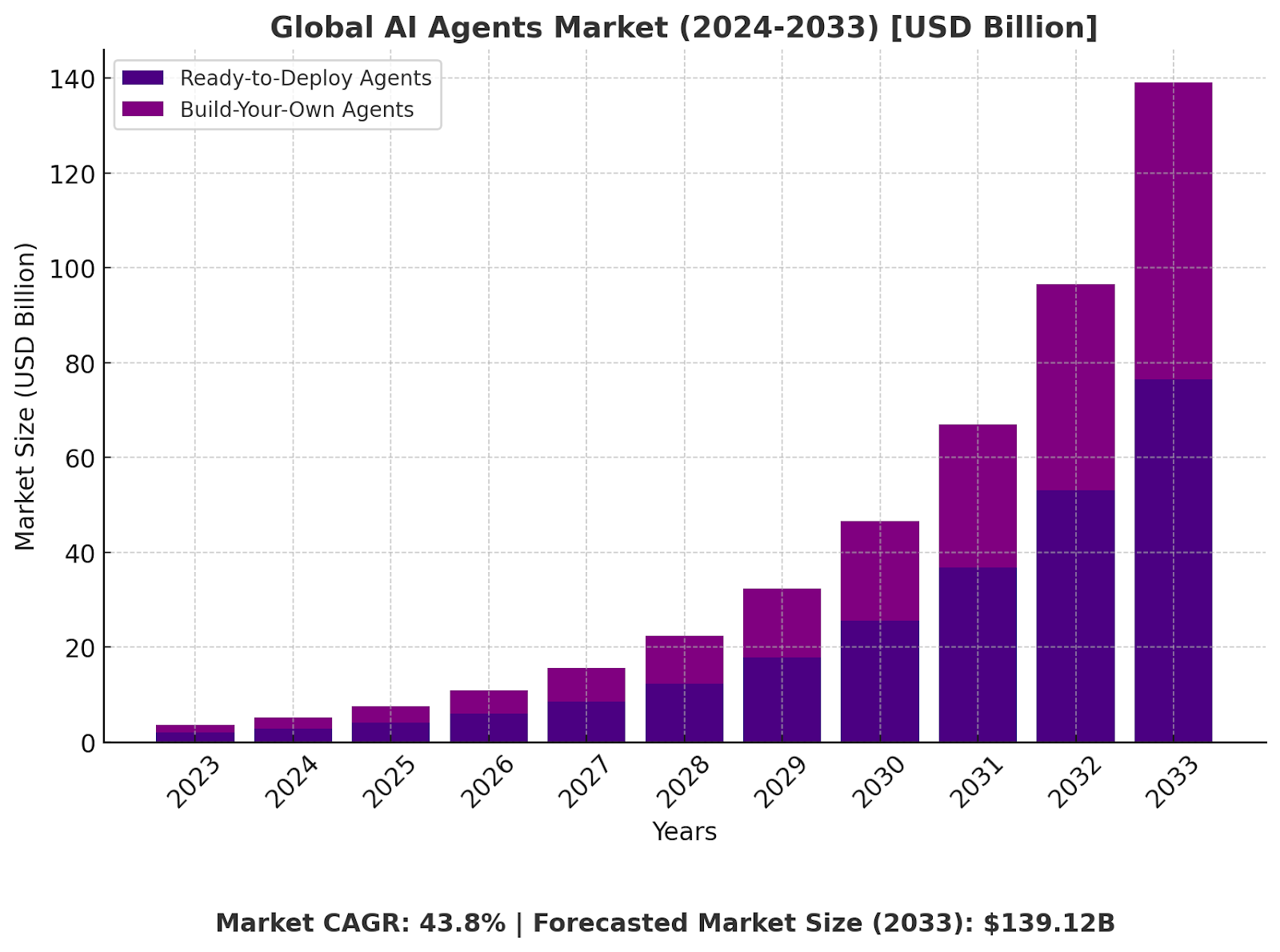
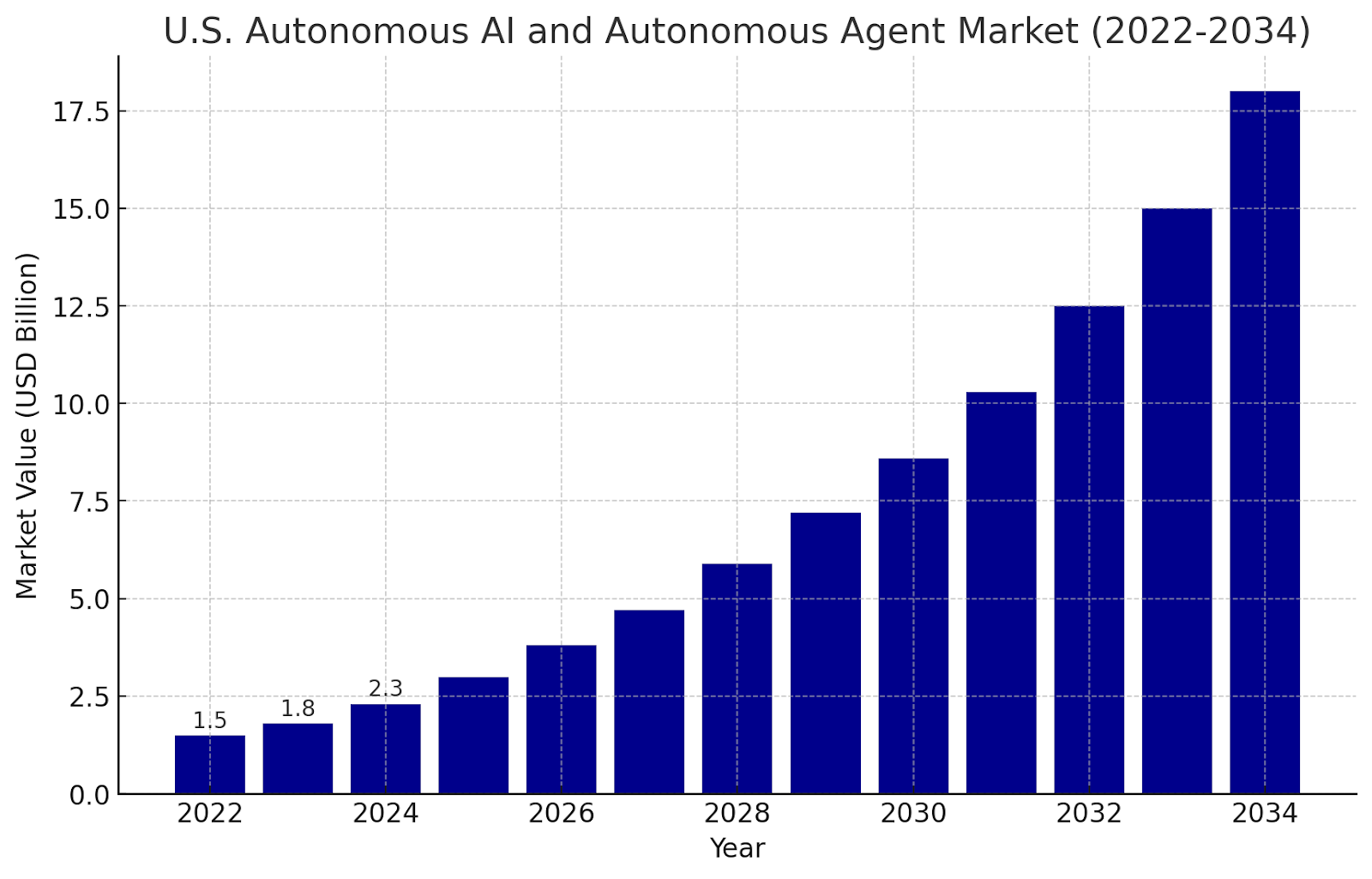
AD 4nXdLaxd9IIGcscTYeGfjrnGbp7YdoCwef0ZPXcRbhKSCF0zWSz5ZKqtuyZvhDVTYu1WV 6qhqmqBS85MJLPYSKknVrXEt2ygjLSgPRN 120 QYTDW1YA2AvPJPLlHH8Q6eOUBUoELw?key=QoHfgF4GGswgCLRfiFLLkcsh

Source: Market.us

Understanding AI Agents in Salesforce

AI agents are intelligent virtual assistants that process and respond to customer interactions using machine learning, NLP, and business logic. These agents are built to automate customer support, sales processes, and business workflows, making interactions seamless, intelligent, and highly responsive.

“Some people call this artificial intelligence, but the reality is this technology will enhance us. So instead of artificial intelligence, I think we’ll augment our intelligence.”

Types of AI Agents in Salesforce

Assistive AI Agents

Assistive agents, often referred to as copilots, support human agents by providing recommendations, insights, and contextual assistance. These agents enhance decision-making rather than completely automating workflows.

Autonomous AI Agents

Autonomous agents operate independently, handling end-to-end tasks without requiring human intervention. They process user inputs, retrieve data from Salesforce, execute workflows, and respond dynamically based on business logic.

Related Read – What are Different Types of AI Agents?

AI Guardrails and Compliance

Ensuring responsible AI is critical when deploying AI agents. Salesforce implements AI guardrails to maintain security, ethical AI use, and regulatory compliance.

  1. The Einstein Trust Layer – A security framework that protects company data from exposure to external AI models.
  2. Data Masking and Compliance Controls – Prevents personally identifiable information (PII) from being misused.
  3. Guardrails for Responsible AI – Prevents AI from generating hallucinations, biased responses, or incorrect information.

How to Build AI Agents with Salesforce Agentforce

Building an AI agent with Agentforce requires a structured approach, including defining objectives, integrating data sources, configuring AI models, and optimizing responses.

Step 1: Define the Use Case and Objectives

Before building an AI agent, define what problem it will solve and how it will interact with users. Examples of use cases include:

  • Customer Support AI Agent – Handles customer queries, troubleshooting, and FAQs.
  • Sales AI Agent – Assists sales teams by qualifying leads, scheduling meetings, and providing insights.
  • Knowledge Retrieval AI Agent – Searches internal knowledge bases and retrieves relevant information for employees and customers.

Defining a clear objective ensures the AI agent is designed to meet specific business needs efficiently.

Also Read – How Can AI Agents Improve Productivity?

Step 2: Prepare and Integrate Data Sources

AI agents require structured and high-quality data to function effectively. Salesforce Agentforce integrates with Salesforce Data Cloud, which allows AI agents to access real-time business data from multiple sources.

  1. CRM Data – AI agents pull customer profiles, past interactions, and sales history to personalize responses.
  2. Knowledge Base – AI agents retrieve answers from internal documentation, FAQs, and service manuals.
  3. External Data Sources – APIs and external databases help AI agents provide real-time insights and contextually relevant responses.

Cleaning and structuring data before integrating it with Agentforce ensures accurate AI responses and seamless automation.
getgenerativeai cta

Step 3: Configure AI Agent with Prompt Builder

Prompt Builder is a core tool in Salesforce Agentforce that allows businesses to define how an AI agent interacts with users. It helps in guiding AI-generated responses, ensuring contextually relevant interactions, and improving user experience.

Key aspects of configuring AI prompts:

  • Defining Natural Language Prompts – Setting up AI responses for various queries.
  • Contextual Awareness – Ensuring AI understands user history and prior interactions.
  • Fine-tuning with Salesforce Data Cloud – Grounding AI responses in business-specific data.

Effective prompt engineering improves the accuracy and reliability of AI responses, making interactions more natural and valuable to customers.

Step 4: Train and Fine-Tune Your AI Agent

Once the AI agent is configured with prompt templates and data sources, the next step is training and fine-tuning. Training ensures that the AI agent can understand user inputs, generate relevant responses, and refine its behavior over time.

Key Training Methods for AI Agents

  1. Supervised Learning – The AI model is trained using labeled datasets, teaching it how to respond accurately to different queries.
  2. Reinforcement Learning – AI agents improve through feedback, learning from real-world interactions.
  3. Fine-Tuning Pre-Trained Models – Salesforce AI models, such as GPT-based models, can be fine-tuned with industry-specific data.

During training, businesses should evaluate agent performance by analyzing response accuracy, coherence, and contextual relevance. Training iterations should be run frequently to enhance AI efficiency and minimize errors.

Step 5: Test and Optimize AI Responses

Before deploying the AI agent, extensive testing is necessary to ensure optimal performance, reliability, and user satisfaction. Testing helps identify response gaps, inconsistencies, and areas for improvement.

Testing Techniques for AI Agents

  1. Unit Testing – Evaluates individual AI components to verify their accuracy.
  2. A/B Testing – Compares different versions of the AI agent to determine which performs better.
  3. User Testing – Invites real users to interact with the AI agent and provide feedback.
  4. Performance Monitoring – Uses analytics tools to track response times, accuracy, and engagement rates.

Businesses should continuously refine prompts, retrain models, and adjust AI logic based on testing insights to optimize agent performance.

Step 6: Deploy AI Agents in Salesforce Environment

After successful testing, the AI agent is ready for deployment. Deployment involves integrating the agent into Salesforce applications, digital platforms, and customer-facing interfaces.

Deployment Options for AI Agents

  • Salesforce Service Cloud – AI agents assist customer support teams.
  • Sales Cloud – AI agents automate sales processes and lead qualification.
  • Experience Cloud – AI agents engage users on websites, portals, and mobile apps.
  • Custom Integrations – AI agents can be embedded into third-party applications via APIs.

Once deployed, businesses should monitor AI agent interactions in real-time, making necessary improvements based on user feedback.

Also Read – Preparing Employees for AI Agents – Salesforce Jobs Related

Best Practices for Building AI Agents with Agentforce

Ensuring Responsible AI and Data Privacy

Building AI agents requires strict compliance with data security and ethical AI principles. Businesses should:

  • Implement AI guardrails to prevent misinformation and biased responses.
  • Use data masking and anonymization to protect customer information.
  • Follow industry regulations such as GDPR, CCPA, and HIPAA.

“Success in creating AI would be the biggest event in human history. Unfortunately, it might also be the last, unless we learn how to avoid the risks.”

Leveraging Salesforce Data Cloud for Better AI Insights

Salesforce Data Cloud enhances AI agent intelligence by providing real-time, structured data. Businesses should:

  • Integrate CRM, sales, and customer data for AI-driven personalization.
  • Use Retrieval-Augmented Generation (RAG) to ensure AI responses are grounded in verified data.
  • Automate workflows using AI agents to improve efficiency.

Enhancing AI Agent Adoption and Performance Monitoring

For AI agents to be successfully adopted by employees and customers, businesses should:

  • Provide training sessions on how to work with AI agents.
  • Ensure seamless AI-human collaboration in workflows.
  • Monitor agent performance using analytics dashboards and adjust settings as needed.

Conclusion

Salesforce Agentforce is a powerful tool for automating workflows, enhancing customer interactions, and improving business efficiency. By building AI agents with Prompt Builder, Data Cloud, and AI guardrails, businesses can create highly intelligent and responsive AI solutions.

Leverage AI-powered Workspace + Agents from GetGenerative.ai to manage the entire implementation lifecycle—from Pre-Sales to Go-live—seamlessly in Salesforce. 

Optimize workflows, enhance automation, and accelerate project success with AI-driven precision.

How Can AI Agents Improve Productivity?

How Can AI Agents Improve Productivity?

Recent studies highlight this impact; for instance, research involving 5,000 customer support agents demonstrated a 14% increase in productivity when utilizing AI tools. 

With organizations and individuals constantly seeking ways to enhance productivity, AI Agents are emerging as a game-changer. But how do they actually improve efficiency? How can businesses and professionals leverage them for maximum impact? 

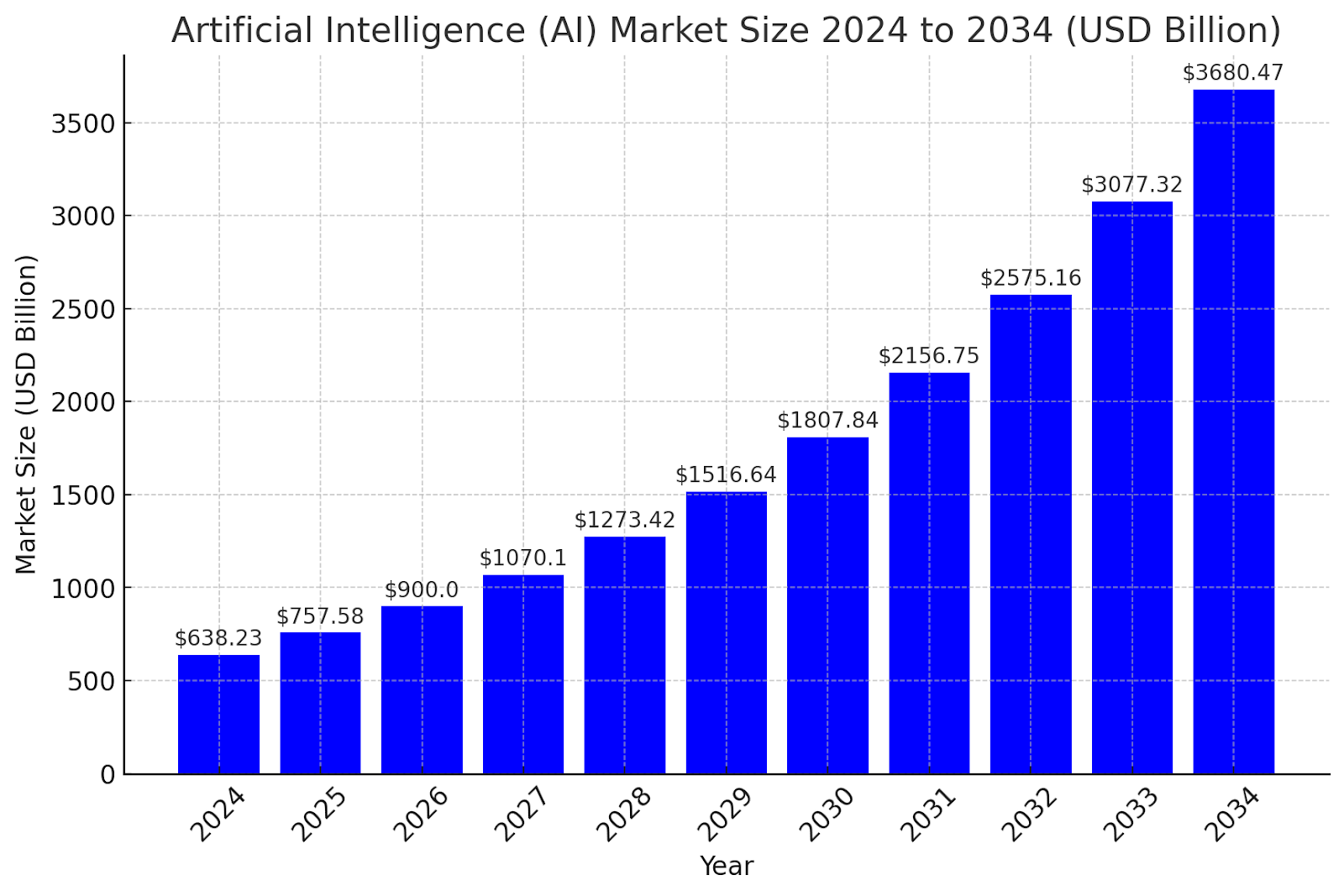
Output image

Source: Market.Us

This blog explores the vast potential of AI Agents in improving productivity, from automating repetitive tasks to transforming decision-making processes.

What Are AI Agents and How Do They Work?

Understanding AI Agents

An AI Agent is an advanced AI-powered software application designed to perform tasks autonomously. These agents use a combination of machine learning (ML), natural language processing (NLP), and large language models (LLMs) to analyze data, execute actions, and provide intelligent recommendations.

How AI Agents Differ from AI Assistants

Many people confuse AI Agents with AI Assistants, but the distinction is critical.

FeatureAI AssistantsAI Agents
FunctionalityRespond to user prompts and perform predefined tasks.Operate autonomously, executing multi-step tasks.
Learning AbilityLimited learning from past interactions.Continuously improve based on experience.
IndependenceRequires frequent human input.Can function with minimal human intervention.
Use CasesCustomer service, scheduling, answering FAQs.Risk management, workflow automation, complex decision-making.

AI Agents’ ability to work without constant oversight makes them indispensable in optimizing productivity.

“Artificial intelligence and generative AI may be the most important technology of any lifetime.”

Marc Benioff, Chair, CEO, and Co-Founder of Salesforce

AI Agents as a Catalyst for Productivity

Automating Repetitive Tasks

One of the primary ways AI Agents boost productivity is by eliminating manual, repetitive tasks. These tasks, while essential, often consume valuable time that could be spent on higher-value activities. AI Agents can:

  • Process large datasets rapidly, reducing the burden of manual data entry.
  • Sort and prioritize emails, flagging important messages and generating responses.
  • Schedule meetings automatically, considering availability across multiple calendars.
  • Manage invoices and transactions, ensuring timely approvals and error-free processing.

For example, in HR departments, AI Agents can streamline recruitment by screening resumes, scheduling interviews, and responding to applicant queries—a process that would otherwise take days or weeks.

Enhancing Decision-Making with AI Agents

AI Agents significantly improve decision-making by leveraging predictive analytics and data-driven insights. Businesses no longer have to rely on gut instinct; instead, they can make informed decisions based on real-time and historical data.

Some ways AI Agents aid decision-making include:

  • Analyzing market trends and providing investment recommendations.
  • Predicting equipment failures in manufacturing to prevent costly downtime.
  • Identifying fraud patterns in financial transactions before they escalate.
  • Optimizing supply chain operations, ensuring timely delivery of products.

By processing vast amounts of data in seconds, AI Agents empower organizations to make fast, accurate, and strategic decisions.

AI Agents in Business Operations

AI Agents in Customer Support

Customer service is one of the most time-consuming yet critical aspects of business. AI-powered chatbots and virtual agents have transformed the way companies interact with their customers.

AI Agents improve customer support by:

  • Providing instant responses to queries, reducing wait times.
  • Automating complaint resolution, analyzing previous cases for quick solutions.
  • Identifying customer sentiment and escalating complex issues to human agents.
  • Offering multilingual support, ensuring a seamless experience across global markets.

By implementing AI Agents in customer service, businesses can reduce operational costs, improve response efficiency, and enhance customer satisfaction.

Sales and Marketing Optimization

AI Agents are revolutionizing sales and marketing by personalizing customer interactions and automating lead generation. They can:

  • Segment customers based on behavior and preferences, ensuring targeted marketing.
  • Generate personalized email campaigns, increasing engagement.
  • Score and qualify leads, ensuring sales teams focus on high-potential customers.
  • Analyze competitor strategies, providing businesses with actionable insights.

By leveraging AI Agents, businesses increase conversion rates and improve marketing ROI without manually analyzing massive datasets.

getgenerativeai cta

AI Agents in Project Management

Effective project management is crucial for business success, and AI Agents are making it more efficient than ever.

  • Task Prioritization: AI Agents allocate resources based on deadlines and workload distribution.
  • Risk Assessment: They analyze past projects to predict potential risks and suggest mitigation strategies.
  • Automated Reporting: AI Agents generate project status reports in real time, ensuring transparency.
  • Collaboration Enhancement: They track team performance and recommend adjustments for better efficiency.

AI-powered project management reduces bottlenecks, enhances team coordination, and ensures on-time project delivery.

“Generative AI has the potential to change the world in ways that we can’t even imagine. It has the power to create new ideas, products, and services that will make our lives easier, more productive, and more creative.”

Bill Gates, Co-Founder of Microsoft

AI Agents for Personal Productivity

AI-Powered Scheduling and Time Management

Time management is essential for productivity, and AI Agents help individuals stay organized by:

  • Optimizing schedules based on task importance and deadlines.
  • Blocking distractions and enforcing focus time.
  • Suggesting productivity techniques, such as the Pomodoro Technique or time blocking.

An AI Agent can analyze a user’s work habits and provide personalized recommendations to improve efficiency.

Smart Email and Document Management

Email overload is a major productivity killer. AI Agents help professionals manage their inboxes more effectively by:

  • Sorting and prioritizing emails based on urgency.
  • Flagging spam and irrelevant messages automatically.
  • Drafting responses based on previous interactions.
  • Organizing documents and retrieving relevant files within seconds.

This reduces email clutter, ensuring users spend time on important communications rather than inbox maintenance.

Task and Goal Tracking

AI Agents assist in setting and achieving goals by:

  • Monitoring progress and adjusting schedules accordingly.
  • Sending reminders and breaking down complex projects into manageable steps.
  • Providing motivational nudges based on productivity trends.

With AI Agents, individuals can maximize efficiency while staying on track with their objectives.

AI Agents in Workplace Collaboration

Enhancing Virtual Meetings

Remote and hybrid work models have increased reliance on virtual meetings, but inefficient meetings can drain productivity. AI Agents optimize virtual meetings by:

  • Generating real-time transcripts and summaries for reference.
  • Identifying key discussion points and action items.
  • Scheduling follow-ups automatically to ensure accountability.
  • Analyzing meeting participation to suggest ways to improve engagement.

By reducing manual note-taking and organizing discussions, AI Agents make meetings more efficient and result-driven.

Intelligent Document and Knowledge Management

Employees spend hours searching for documents and information. AI Agents streamline knowledge management by:

  • Categorizing and tagging files, ensuring easy retrieval.
  • Summarizing lengthy documents, saving time on reading.
  • Providing instant search results, reducing delays in information access.

Organizations implementing AI-driven document management reduce wasted time and improve workflow efficiency.

AI Agents for Internal Communication

Workplace communication is vital, but excessive emails and messages create noise. AI Agents improve internal communication by:

  • Filtering and prioritizing messages, ensuring only relevant updates reach employees.
  • Summarizing company announcements, reducing the need for lengthy emails.
  • Analyzing employee engagement, suggesting ways to boost morale.

By managing workplace communication, AI Agents help teams stay informed without distractions.

Also Read – What are Different Types of AI Agents?

AI Agents in Data Processing and Analysis

AI for Data-Driven Insights

Businesses generate vast amounts of data, and AI Agents help extract valuable insights from this information. They can:

  • Analyze customer behavior, optimizing marketing strategies.
  • Detect fraud and anomalies in financial transactions.
  • Improve inventory management, reducing wastage and overstocking.
  • Provide real-time analytics, helping businesses adapt quickly.

With AI Agents, companies turn raw data into actionable intelligence for better decision-making.

Predictive Analytics for Business Growth

Predictive AI helps organizations forecast trends and make proactive decisions. AI Agents utilize predictive analytics to:

  • Identify market demands, ensuring timely product launches.
  • Optimize pricing strategies, maximizing profitability.
  • Prevent equipment failures, reducing maintenance costs.
  • Predict employee turnover, allowing HR to take preventive measures.

Predictive AI ensures businesses stay ahead of challenges and capitalize on opportunities.

Overcoming Productivity Bottlenecks with AI

Eliminating Human Errors

Manual errors can be costly and time-consuming to fix. AI Agents enhance accuracy and reliability by:

  • Reducing data entry mistakes with automated processing.
  • Ensuring compliance by cross-checking regulatory guidelines.
  • Identifying inconsistencies in reports and financial documents.

By minimizing errors, AI Agents ensure higher quality work and reduced rework.

Reducing Time-Consuming Tasks

AI Agents help professionals save time by:

  • Automating report generation instead of manually compiling data.
  • Filtering job applications in recruitment, speeding up hiring.
  • Managing IT support requests, resolving common issues automatically.

This allows employees to focus on strategic tasks rather than administrative burdens.

AI Agents and Remote Work Efficiency

Improving Remote Collaboration

Remote work often suffers from communication gaps and lack of oversight. AI Agents improve remote work productivity by:

  • Tracking progress on tasks and projects, ensuring transparency.
  • Scheduling automated check-ins, keeping teams aligned.
  • Providing AI-driven coaching, helping remote employees stay engaged.

Companies leveraging AI for remote work enhance collaboration and maintain efficiency.

Automating Task Assignments

Managers often struggle with fair task distribution. AI Agents optimize task assignments by:

  • Analyzing employee workloads, preventing burnout.
  • Matching tasks to skills, ensuring efficiency.
  • Rescheduling tasks dynamically, adapting to changing priorities.

AI-driven task allocation ensures workflows remain balanced and productive.

Challenges of Using AI Agents for Productivity

Ethical Concerns and Data Privacy

While AI offers significant advantages, it also raises concerns regarding:

  • Data security: Sensitive information handled by AI must be protected.
  • User privacy: Employees and customers must have transparency over data usage.
  • AI accountability: Decision-making processes should be explainable and unbiased.

Businesses need strict AI governance policies to address these ethical challenges.

AI Limitations and Bias

AI Agents are only as good as the data they are trained on. Bias in AI can lead to:

  • Unfair hiring decisions in recruitment AI.
  • Incorrect risk assessments in financial sectors.
  • Customer service inconsistencies due to biased language models.

Regular auditing and human oversight ensure AI Agents operate fairly and effectively.

How to Effectively Integrate AI Agents

Choosing the Right AI Tools

To successfully implement AI Agents, businesses must:

  • Identify pain points AI can address.
  • Select AI solutions that integrate with existing workflows.
  • Ensure employee buy-in, reducing resistance to change.

Choosing the right AI tools ensures maximum impact on productivity.

Training Employees for AI Adoption

Employees must be trained to work alongside AI Agents. Organizations should:

  • Provide hands-on AI training, ensuring smooth adoption.
  • Address AI misconceptions, reducing fear of job displacement.
  • Encourage AI-human collaboration, maximizing efficiency.

A well-trained workforce leverages AI to its full potential.

Related Read – Preparing Employees for AI Agents – Salesforce Jobs Related

Conclusion

AI Agents are revolutionizing productivity by automating tasks, enhancing decision-making, and optimizing workflows. From business operations to personal efficiency, AI Agents empower individuals and organizations to achieve more with less effort.

Unlock the full potential of AI-driven productivity with GetGenerative.ai. Your AI-powered workspace + agents to manage the entire Salesforce implementation lifecycle, from Pre-Sales to Go-live. 

Boost efficiency, automate workflows, and streamline collaboration.

FAQs

1. How do AI Agents differ from traditional automation?

AI Agents are autonomous, proactive, and can make decisions, whereas traditional automation follows pre-defined rules without adaptability.

2. Can AI Agents completely replace human workers?

No, AI Agents enhance productivity by automating repetitive tasks, allowing humans to focus on creative and strategic work.

3. Are AI Agents secure for handling sensitive business data?

Yes, but businesses must implement strong data security measures and regularly audit AI systems to prevent misuse.

4. How can AI Agents improve customer service?

They provide instant responses, sentiment analysis, and multilingual support, reducing resolution times and enhancing customer experience.

5. What industries benefit the most from AI Agents?

Industries like finance, healthcare, marketing, retail, and HR gain immense productivity boosts by implementing AI-driven automation.

Preparing Employees for AI Agents – Salesforce Jobs Related

Preparing Employees for AI Agents – Salesforce Jobs Related

Preparing employees to work alongside AI agents isn’t just a nice-to-have – it’s a necessity. As Salesforce’s President and COO Brian Millham puts it, “The advent of AI and agents represents the biggest technological shift of our generation, and will radically change how people work.”

In other words, AI is set to transform roles across the board. To stay relevant and effective, Salesforce professionals and the organizations that employ them must be proactive in AI training and upskilling. This article explores why preparing employees for AI agents is so critical, what challenges companies might face, and actionable steps to ensure your workforce is ready for the AI-driven future of Salesforce jobs.

Understanding AI Agents in Salesforce

What are AI agents?

In the context of Salesforce (and business technology in general), AI agents are software programs powered by artificial intelligence that can autonomously perform tasks or assist humans in carrying out tasks. They often operate within your CRM or business systems to handle things like data analysis, customer inquiries, predictions, and recommendations. 

How AI is transforming Salesforce jobs

The rise of AI in the Salesforce ecosystem is transforming job roles and responsibilities in significant ways. Tasks that used to be manual are now AI-assisted or fully automated. Consider a Salesforce Sales Cloud user: instead of manually sifting through hundreds of leads, a sales rep now gets an AI-generated ranking of hottest prospects, allowing them to focus their energy on high-probability deals. In customer service, AI chatbots (like Einstein Bots) handle common queries 24/7, so human support agents tackle more complex customer issues. 

Marketing professionals using Salesforce Marketing Cloud might rely on AI to segment audiences or personalize content at scale, something that would be incredibly time-consuming to do by hand.

It’s an exciting transformation – one that promises increased efficiency and productivity. However, it also means employees must adapt and learn new skills. Understanding how to work with AI agents, interpret their outputs, and fine-tune their behavior is now part of the job. In the next sections, we’ll discuss why training for these AI integrations is essential and how to go about it.

“AI is a mirror, reflecting not only our intellect, but our values and fears.”

–  Ravi Narayanan, VP of Insights and Analytics at Nisum

Why AI Integration Training is Essential

Growing need for AI literacy in Salesforce roles

With AI becoming embedded in Salesforce tools, there’s a growing need for AI literacy among all professionals in the ecosystem. AI literacy means having at least a basic understanding of how AI works, knowing the capabilities of AI agents, and being able to use them effectively in one’s role. This isn’t about turning every employee into a data scientist, but rather ensuring they are comfortable with AI-driven features and can collaborate with them.

The urgency for AI skills is backed by data. A recent Salesforce survey highlighted that more than 60% of employees say they lack the skills to use generative AI safely and effectively​

In fact, another study found only about 15% of workers feel they have the training necessary to use AI effectively at work​

This significant skills gap can hold companies back from fully leveraging AI. Executives recognize this as well – leadership urgency to implement AI has skyrocketed in the past year​.

Benefits of AI training for employees and businesses

Investing in AI integration training yields significant benefits for both employees and the organization:

  • Empowering employees: When employees are trained in using AI tools, they become more confident and productive in their roles. Instead of feeling threatened by AI, they start to see it as a helpful assistant. For example, a Salesforce marketing specialist who learns how to use an AI-driven segmentation tool will be able to run more sophisticated campaigns, yielding better results and job satisfaction.  
  • Increased productivity and efficiency: For businesses, having an AI-literate Salesforce team translates to efficiency gains. Teams that know how to use AI agents can automate time-consuming processes like data cleansing, report generation, or initial customer outreach. This frees up human time for creativity, strategy, and problem-solving. The outcome is a more agile operation that can do more with the same number of people.
  • Better ROI on AI investments: Companies are investing heavily in AI tools and features (Salesforce Einstein being a prime example). If employees aren’t trained to use these tools, that investment goes to waste. Proper training ensures high adoption rates of AI features and maximizes their impact.  
  • Improved adaptability and innovation: An AI-trained workforce is generally more adaptable to new technologies. The process of learning AI teaches employees how to learn continuously – an essential trait in the fast-evolving tech landscape. These employees are more likely to experiment with new ideas and drive innovation.  

Also Read – Salesforce Proposal Creation with AI Agents

Challenges in Employee AI Upskilling

Let’s address some common fears and misconceptions that can hinder employee upskilling, and why resistance to change might occur:

  • Fear of job loss: Perhaps the biggest elephant in the room is the fear that AI will replace human jobs. Salesforce employees might worry, “If an AI agent can do part of my work, will my role be eliminated?” This anxiety can make them hesitant to assist in implementing AI or to fully use it. It’s important to reassure teams that AI is meant to augment their work, not replace it. In fact, many experts note that AI will create more jobs than it automates, especially for those who gain new skills (the World Economic Forum, for instance, predicts AI will net create millions of new jobs by 2025, balancing out the automated ones​.
  • Misconceptions about AI (complexity and trust): Some employees have the impression that AI is a black box that only data scientists understand. They might think “I’m not a tech person – I can’t learn AI” or mistrust the AI’s decisions. In Salesforce roles that have traditionally been more about business or customer interaction than coding, the term “AI” can sound intimidating. There’s also a misconception that AI always makes correct decisions, which can lead to either over-reliance or total distrust if the AI makes a mistake. 
  • Overcoming this requires demystifying AI – through training that starts with basics (what AI can and cannot do) and showing practical, easy-to-use AI tools. When employees see, for example, how an Einstein AI recommendation works and that it’s just another feature of Salesforce, they realize it’s not magic or rocket science. Building a baseline understanding helps them trust AI outputs appropriately (with healthy skepticism when needed).
  • Resistance to change and “we’ve always done it this way” mentality: Change is hard, especially if employees have been doing their jobs in a similar way for years. Introducing AI-driven processes can upend comfortable routines.  
  • Workplace culture plays a big role here – if the culture doesn’t encourage learning and experimenting, employees will be more resistant. It’s crucial to frame AI not as a threat or a fad, but as the next logical step in the evolution of their role.
  • Lack of immediate incentives or support: Another challenge can be the feeling that upskilling in AI is not recognized or rewarded by the organization. If an employee perceives that management isn’t truly invested in training (for example, not giving time during work hours to learn, or not providing resources), they may not put in the effort. Upskilling requires time and practice.   

getgenerativeai cta

Steps to Prepare Employees for AI Agents

Getting your team ready for AI integration in Salesforce involves a structured approach. Here are some practical steps to prepare employees to work with AI agents:

  1. Assess current skill levels and knowledge gaps: Start by understanding where your employees stand. Conduct a skills assessment or survey focused on AI and digital skills. For example, you might ask Salesforce team members if they’ve used tools like Einstein or any AI-driven features, and how comfortable they feel with them. 
  2. Review the results to identify skill gaps. Perhaps your sales team is unfamiliar with Salesforce’s AI-driven lead scoring, or your service team hasn’t used the AI-recommended reply feature. Knowing this helps tailor your training.  
  3. Implement AI training programs: With gaps identified, roll out targeted AI training programs. Effective training can take many forms:
    • Workshops and hands-on training: Organize interactive sessions where employees can play with AI features in a sandbox Salesforce environment. For instance, a workshop on “Using Einstein AI for Salesforce” could let users try building a prediction or using a chatbot, with guided instruction.
    • Online courses and certifications: Leverage e-learning platforms. Salesforce’s own Trailhead is a fantastic resource – it offers free modules on AI fundamentals and even specific Salesforce AI features.
    • Internal AI champions: Identify or train a few enthusiastic employees to become AI champions or super-users. They can be the go-to people in each department for AI questions and can help mentor their peers.
    • Integrate AI in everyday learning: Include AI topics in regular training or team meetings. For example, start a short “AI tip of the week” in your Salesforce team’s newsletter or weekly stand-up, where someone shares a quick insight or use-case about AI in Salesforce.
    • Vendor or expert sessions: Bring in experts – maybe Salesforce consultants or partners – to talk about how AI is used in the platform and industry. Hearing success stories and practical tips from outside can inspire your team.
  4. The training should be role-specific where possible. A Salesforce developer might get more into how to integrate AI APIs or use AI in Apex code, whereas a sales user might focus on interpreting AI-driven sales insights. Make sure the programs are also continuous (not just one-and-done, which we’ll cover next).

AI in the Workplace: How It’s Changing Roles

  • From doing tasks to supervising tasks: Traditionally, a lot of time in Salesforce-related jobs is spent doing repetitive tasks — entering data, pulling reports, handling routine customer queries, etc. AI is increasingly taking over these low-value, repetitive tasks. For example, instead of a sales operations analyst manually cleaning up duplicate records in Salesforce, an AI agent might handle the deduplication. 
  • Higher-value focus: AI’s ability to churn through data and handle routine matters means humans can concentrate on higher-value activities. In a marketing role, for instance, an AI might generate a set of personalized email content for different customer segments. The marketer’s job then becomes to refine those suggestions, inject creativity or brand voice, and design the campaign strategy.  
  • Collaboration between humans and AI: It helps to think of AI agents as part of the team – a new kind of “colleague.” This means learning how to collaborate with AI. For example, a customer support agent might work in tandem with an AI: the AI listens to a live chat and suggests responses in real-time, and the human decides which suggestions to use or when to take over manually.  

Also Read – What are Different Types of AI Agents?

The Role of Organizational Change Management

  • Creating a vision and communicating it: Leadership should start by clearly articulating why the organization is adopting AI and how it will benefit both the company and employees. People are more likely to get on board if they understand the purpose behind the change. 

For instance, communicate that the goal of introducing AI agents in Salesforce is to reduce manual drudgery, improve customer satisfaction, and open up opportunities for employees to work on more interesting projects.  

  • Leadership and management support: Change management works best when it’s championed from the top. Leaders should not only talk the talk but also walk the walk. This means managers and executives should actively participate in AI training themselves, use AI tools in their own workflows, and share their experiences. 
  • Employee involvement and feedback: A big part of OCM is involving employees in the process. Rather than imposing AI tools from on high, smart organizations involve end-users early. For example, you might form a focus group of Salesforce users to pilot a new AI feature and provide feedback before a wider rollout. 
  • Addressing fears and providing reassurance: As we discussed in the challenges section, fears about AI are common. OCM involves proactively addressing these. This could mean hosting Q&A sessions or workshops specifically to talk about “What the rise of AI means for our jobs” where leadership can candidly discuss that some tasks will change but also highlight plans for reskilling and new opportunities. 
  • Gradual implementation and support: Change management often recommends a phased approach to implementing new technologies. Instead of flipping the switch on a complex AI system overnight, roll it out gradually. Maybe start with one AI agent in a certain process, get folks comfortable, then add more. 

Employee Reskilling Strategies

As AI reshapes job requirements, companies need to decide how to reskill and upskill their workforce. We’ve talked about upskilling (enhancing current skills), but sometimes roles will shift so much that reskilling (learning completely new skills for a different role) is needed. Let’s break down upskilling vs. reskilling and discuss strategies for each in the Salesforce context:

Upskilling vs. Reskilling: What’s the difference?

  • Upskilling is about teaching employees new skills that help them in their current roles as those roles evolve. For example, a Salesforce business analyst might upskill by learning how to use a new AI analytics tool that becomes part of their job. They are still a business analyst, but now a more advanced one with AI capabilities. Upskilling is the typical approach when AI agents automate only part of someone’s job. The person remains in their role but needs to handle the more advanced aspects (like supervising the AI, interpreting its output, etc.).
  • Reskilling is about training employees with new skills so they can transition to a different role. This is common when a job might be heavily automated or even made redundant by AI, but the company still values the employee and wants to place them in a new position where human skills are needed. For example, consider a data entry specialist whose tasks are now mostly done by AI. That person could be reskilled to take on a new role, say as a Salesforce data quality analyst or a junior administrator, where they learn more about Salesforce functionality, reporting, or maybe AI oversight. Reskilling often means a bigger learning curve, as it might involve foundational training in a new domain.

Conclusion

AI agents are set to become indispensable allies in the Salesforce world. Far from rendering humans obsolete, they promise to elevate what Salesforce professionals can achieve by automating the tedious and augmenting our capabilities.  

Leverage AI-powered Workspace + Agents to streamline your entire implementation lifecycle—from Pre-Sales to Go-Live. Get started with GetGenerative.ai today!

Salesforce Proposal Creation with AI Agents

Salesforce Proposal Creation with AI Agents

Creating proposals for Salesforce implementation projects is a complex and time-consuming task. It involves gathering requirements, designing solutions, estimating timelines, and ensuring alignment with client needs. Traditionally, this process required extensive manual effort from pre-sales teams, leading to inconsistencies and inefficiencies.

Enter AI-powered agents, transforming the way Salesforce proposals are created. These AI-driven assistants, such as the Pre-Sales Agent from GetGenerative.ai, automate proposal generation, enrich needs analysis, and optimize solution design. 

This results in faster, more accurate, and personalized proposals, ultimately improving client satisfaction and accelerating Salesforce implementations.

The Role of AI in Salesforce Proposal Creation

AI is reshaping the pre-sales landscape by automating and optimizing key proposal creation tasks. AI agents analyze client requirements, generate Salesforce-specific solutions, and produce structured, data-backed proposals.

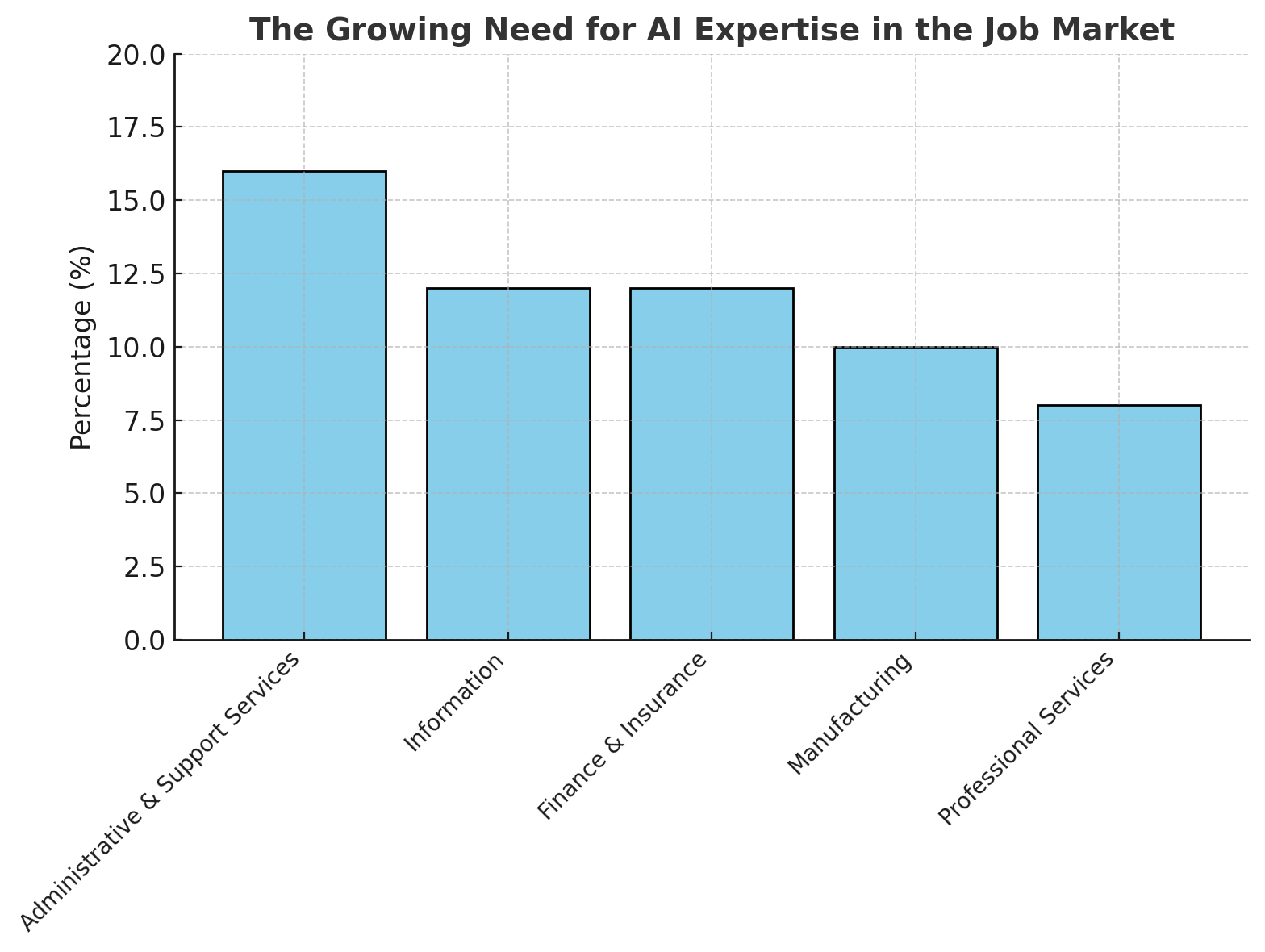
AD 4nXdZ5bLrAW0D6s40kv4ulQzLRaQsqvIYR44ECoAniKaAVFyxYV6bFSSqUg9ZA7MzuDkmD0fGmSaYdUTR0y

Source: gminsights

With AI-powered proposal generation, Salesforce consultants and pre-sales teams can:

  • Reduce manual effort and eliminate repetitive tasks
  • Enhance accuracy by leveraging data-driven insights
  • Improve proposal consistency across different clients and industries
  • Speed up the sales cycle with faster, automated proposal generation

Also Read – Salesforce Proposal Creation With AI: Streamline & Win Deals

Understanding AI Agents in Salesforce Proposal Generation

What Are AI Agents?

AI agents are intelligent assistants that leverage large language models (LLMs) and machine learning to automate and enhance different stages of a Salesforce implementation. These agents analyze inputs, process contextual data, and generate structured outputs based on predefined logic and templates.

How AI Agents Work in Proposal Creation

  1. Multi-Modal Input Analysis – AI agents gather information from text, voice, and other input sources, ensuring a holistic understanding of client needs.
  2. Solution Generation – AI proposes Salesforce Cloud and Industry-specific solutions based on the client’s business requirements.
  3. Project Planning & Scheduling – AI generates detailed project schedules, outlining resource allocation and implementation timelines.
  4. Collaboration Enablement – AI fosters seamless collaboration between sales, pre-sales, and technical teams, ensuring a unified approach to proposal development.

“Artificial intelligence and generative AI may be the most important technology of any lifetime.”

Marc Benioff, Chair, CEO, and Co-founder of Salesforce

Key Benefits of AI-Driven Proposal Generation

AI-powered proposal creation offers significant advantages over traditional manual methods. Here’s why Salesforce professionals are increasingly adopting AI agents for this process:

1. Faster Proposal Turnaround

AI agents significantly reduce the time required to generate Salesforce proposals. Instead of spending days compiling documents, AI creates well-structured, customized proposals in minutes.

2. Increased Accuracy & Data-Driven Insights

AI ensures high accuracy by leveraging Salesforce data, best practices, and industry-specific knowledge. This minimizes errors and ensures the proposal aligns with customer needs and expectations.

3. Enhanced Personalization

AI-driven proposals aren’t generic. They incorporate client-specific details, industry standards, and customized recommendations, making each proposal highly relevant to the prospect.

4. Improved Collaboration Across Teams

AI-powered proposal tools facilitate seamless communication between different teams (pre-sales, solution architects, and sales executives), ensuring that everyone is aligned.

5. Optimized Resource Allocation

AI agents analyze project complexity, scope, and team availability to suggest the best resource allocation strategy, preventing bottlenecks during Salesforce implementation.

Also Read – What are Different Types of AI Agents?

AI Agents in Action: Automating Salesforce Proposal Creation

Step 1: Capturing Client Needs with AI

Traditional proposal creation often relies on manual discovery sessions and scattered notes, leading to inconsistencies. AI agents automate this process by analyzing client conversations, emails, and other inputs to extract key requirements efficiently.

  • AI analyzes multi-modal inputs (text, voice, chat logs).
  • It identifies business needs, pain points, and desired outcomes.
  • It categorizes findings into functional and technical requirements.

This results in a well-structured needs analysis, forming the foundation of an accurate proposal.

Step 2: AI-Generated Salesforce Solutions

Once AI understands client requirements, it suggests the most relevant Salesforce solutions based on best practices and industry benchmarks.

  • Identifies suitable Salesforce Clouds (Sales, Service, Marketing, etc.).
  • Recommends industry-specific solutions aligned with business goals.
  • Maps out integrations and customizations required for seamless deployment.

The AI agent ensures that proposed solutions are tailored, strategic, and backed by data, increasing client confidence.

“AI could reach the intelligence level of a PhD student by 2026,”

Eric Schmidt, Former CEO of Google

Step 3: Automated Project Scheduling & Resource Planning

Manually estimating project timelines and resource requirements is prone to human error. AI agents automate this by generating detailed schedules and allocation plans.

  • Predicts realistic implementation timelines based on project complexity.
  • Suggests optimal team composition (developers, consultants, testers).
  • Allocates resources efficiently, ensuring smooth project execution.

This level of precision reduces risks and enhances project planning accuracy.

Step 4: AI-Powered Proposal Generation

AI agents compile all the gathered insights into a professional, structured proposal. The proposal includes:

  • Executive Summary – Outlining key business benefits.
  • Solution Overview – Detailing recommended Salesforce solutions.
  • Implementation Roadmap – Presenting project phases and timelines.
  • Pricing & Resource Estimates – Providing transparent cost breakdowns.

With pre-built templates and natural language generation (NLG), AI ensures proposals are concise, compelling, and client-focused.

Step 5: Enabling Real-Time Collaboration

AI agents facilitate seamless collaboration across teams, ensuring that pre-sales, solution architects, and sales executives are aligned.

  • Allows teams to edit, review, and refine proposals collaboratively.
  • Enables real-time feedback loops, improving proposal quality.
  • Ensures that proposals remain consistent with branding and methodology.

This eliminates silos and enhances efficiency in the proposal approval process.

Also Read – Step-by-Step Salesforce Implementation with AI Agents

Why Enterprises Are Adopting AI-Driven Proposal Creation

Leading enterprises, including Cognizant, Accenture, Infosys, HCL, and Deloitte, are leveraging AI agents to accelerate Salesforce implementation projects. The adoption of AI in pre-sales is driven by several key factors:

  • Scalability – AI-powered proposal tools scale to handle large enterprise deals.
  • Data Security – AI solutions ensure robust encryption and compliance.
  • Integration Capabilities – Seamlessly connect with CRM and project management tools.
  • Customization – Tailor AI agents to align with business-specific methodologies.

Conclusion

AI agents are transforming Salesforce proposal creation, bringing automation, accuracy, and efficiency to pre-sales teams. By leveraging AI, organizations can accelerate proposal development, enhance personalization, and improve collaboration.

salesforce consulting services

Streamline Salesforce Implementation with AI! Leverage AI-powered Workspace + Agents from GetGenerative.ai to automate your entire implementation lifecycle – from Pre-Sales to Go-Live. 

👉 Talk to our Salesforce Expert Today and see how we can transform your implementation experience.

👉 Explore our Salesforce AI consulting services

Boost efficiency, reduce effort, and accelerate success! Try it today!

Essential Skills for Developing AI Agents in Salesforce

Essential Skills for Developing AI Agents in Salesforce


According to Salesforce’s latest State of IT report, 86% of IT leaders anticipate that generative AI will soon play a prominent role in their organizations. AI-powered agents are transforming Salesforce by enabling businesses to streamline workflows, provide personalized experiences, and improve efficiency.

In this blog, we’ll dive deep into the technical, AI, and soft skills required to excel in AI-driven Salesforce development.

Understanding AI Agents in Salesforce

What Are AI Agents in Salesforce?

Unlike traditional AI models, which require predefined rules and human oversight, AI agents learn, adapt, and make real-time decisions based on data and user interactions.

AD 4nXc50R Ya49XEeM H6maKLb7X8RSPcmiyAwLy1SWIwZvFngaDhUtqbc0omvMbKbFw4Hg5Qy63ZaCPl65o0cHdBDLGCe1Ia6iBFTdOJK pJzslpun4VV0x5q6xHecWx 8ZwSVvw8SXg?key=1DQaYWSiHzaDGF khmBi7kAn

Source: Precedence Research

Why Are AI Agents Important?

  • Automate repetitive tasks, reducing manual effort.
  • Enhance customer interactions with real-time recommendations.
  • Personalize user experiences, improving customer satisfaction.
  • Optimize sales and marketing strategies using predictive analytics.
  • Scale operations effortlessly, handling large datasets efficiently.

As Salesforce continues to expand its AI capabilities through Einstein AI, Agentforce, and other AI-driven innovations, understanding how to build and implement AI agents has become a highly valuable skill set.

“Artificial intelligence and generative AI may be the most important technology of any lifetime.” 

The Role of AI in Automating CRM Workflows

AI-powered automation in Salesforce eliminates inefficiencies by streamlining key CRM processes:

  • Sales Automation: AI agents analyze customer data to identify leads, suggest follow-ups, and optimize deal closures.
  • Customer Service: AI chatbots and virtual assistants handle common inquiries, reducing response times.
  • Marketing Campaigns: AI-driven recommendations personalize marketing efforts and enhance customer engagement.
  • Data Analysis & Forecasting: AI-powered insights help businesses predict trends, identify opportunities, and mitigate risks.

Understanding these applications is the first step in becoming proficient in AI agent development within Salesforce. Now, let’s explore the essential technical skills required to build these intelligent agents.

Key Technical Skills for AI Agent Development

Proficiency in Apex and Lightning Web Components

At the core of Salesforce development lies Apex, Salesforce’s proprietary programming language. To build AI agents, developers must:

  • Master Apex triggers and classes to enable AI-driven automation.
  • Use Lightning Web Components (LWC) to create dynamic, AI-powered interfaces.
  • Implement SOQL and SOSL to query, filter, and retrieve structured CRM data efficiently.

Since AI agents rely on real-time data, understanding how to optimize Apex code for performance and scalability is critical. Additionally, front-end development skills with JavaScript and LWC help create interactive dashboards and AI-powered widgets.

Understanding Salesforce Einstein and AI Integration

Salesforce’s Einstein AI brings advanced predictive analytics and automation to CRM processes. Developers must familiarize themselves with:

  • Einstein Prediction Builder: Used to create AI models without code, predicting customer behavior and sales outcomes.
  • Einstein Bots: Chatbots that leverage NLP to automate customer support and assist sales teams.
  • Einstein Next Best Action: AI-powered decision-making for personalized customer interactions.

AI agents in Salesforce are deeply integrated with Einstein’s capabilities, enabling smarter recommendations, automated workflows, and intelligent sales strategies.

Machine Learning Fundamentals for AI Agents

AI agents require machine learning (ML) expertise to analyze patterns, recognize trends, and improve over time. Key ML concepts include:

  • Supervised Learning: Training models using labeled datasets for predictions.
  • Unsupervised Learning: Identifying hidden patterns in unlabeled data.
  • Reinforcement Learning: Enabling AI agents to make decisions based on rewards and penalties.

Developers should also explore deep learning techniques such as neural networks for more sophisticated AI models. Understanding model training, tuning, and evaluation is vital for optimizing AI agents in Salesforce.

API Integration and Data Management

AI agents often interact with external systems, requiring seamless API integration. Developers must:

  • Work with Salesforce REST and SOAP APIs for real-time data exchange.
  • Utilize OAuth authentication for secure API access.
  • Integrate AI-powered applications such as OpenAI’s GPT, IBM Watson, or Google Cloud AI for advanced NLP and machine learning capabilities.

In addition, data management skills are crucial, including:

  • ETL (Extract, Transform, Load) processes for handling large datasets.
  • Data cleansing and preprocessing to improve AI model accuracy.
  • Real-time data streaming to enable AI agents to respond dynamically.

By mastering API integration and data handling, developers can enhance AI agents’ ability to interact with various platforms and optimize CRM workflows.

Key AI and Machine Learning Skills for Salesforce AI Agents

Natural Language Processing (NLP) for AI Chatbots

NLP is essential for creating intelligent chatbots and virtual assistants within Salesforce. Developers should:

  • Learn text classification, sentiment analysis, and entity recognition.
  • Implement intent recognition models to understand customer queries.
  • Use pre-trained NLP models to improve chatbot responses and accuracy.

Salesforce Einstein Bots utilize NLP to enhance customer conversations, reduce response times, and improve support automation.

Predictive Analytics for AI-Driven Decision Making

AI agents use predictive analytics to make real-time business decisions. Developers should understand:

  • Regression models for sales forecasting.
  • Decision trees for customer segmentation.
  • Clustering algorithms for identifying trends and insights.

“Some people call this artificial intelligence, but the reality is this technology will enhance us. So instead of artificial intelligence, I think we’ll augment our intelligence.”

Essential Soft Skills for AI Agent Developers

AI solutions do not work in isolation—they require collaboration, problem-solving, and adaptability to evolving business needs.

Problem-Solving and Analytical Thinking

Developing AI agents involves handling large datasets, optimizing algorithms, and troubleshooting issues. Problem-solving skills help in:

  • Identifying inefficiencies in AI workflows.
  • Debugging machine learning models to improve accuracy.
  • Optimizing AI-driven automation for better CRM performance.

Analytical thinking enables developers to interpret data patterns, recognize anomalies, and fine-tune AI decision-making models.

Communication and Collaboration

AI agent development requires close collaboration with stakeholders, product managers, data scientists, and end-users. Effective communication ensures:

  • AI aligns with business goals and user needs.
  • Development teams can translate technical insights into actionable business strategies.
  • Seamless integration of AI agents into existing Salesforce workflows.

Clear documentation and training materials are also essential for user adoption and maintenance of AI agents.

Adaptability and Continuous Learning

AI technology is constantly evolving. Developers must:

  • Stay updated on Salesforce’s AI advancements.
  • Learn about emerging AI frameworks, models, and APIs.
  • Participate in AI communities, webinars, and certification programs.

Best Practices for Building AI Agents in Salesforce

Ensuring Data Accuracy and Quality

AI models depend on high-quality data. Poor data can lead to biased models and inaccurate predictions. Best practices include:

  • Cleaning and preprocessing data to remove inconsistencies.
  • Using balanced datasets to prevent bias in AI recommendations.
  • Implementing data validation checks to maintain model accuracy.

Salesforce’s Data Cloud helps AI agents access reliable, real-time data for better decision-making.

Implementing Ethical AI and Bias Mitigation

AI bias is a major concern in customer-facing applications. Developers must:

  • Audit AI decision-making to identify biases.
  • Use diverse training datasets to reduce bias in recommendations.
  • Follow ethical AI guidelines, such as GDPR and responsible AI policies.

Salesforce has integrated bias detection tools into its AI framework to ensure fair and ethical AI.

Testing and Continuous Improvement

AI agents require constant monitoring and improvement. Developers should:

  • Use A/B testing to compare different AI models.
  • Analyze customer interactions and feedback to enhance AI performance.
  • Implement real-time monitoring to detect and resolve issues quickly.

A well-optimized AI agent evolves based on usage patterns, business needs, and new AI advancements.

Conclusion

Developing AI agents in Salesforce requires a blend of technical expertise, AI proficiency, and soft skills. From mastering Apex and Einstein AI to understanding machine learning and ethical AI, professionals must stay ahead of AI innovations.

salesforce consulting services

At GetGenerative.ai, we’ve reimagined Salesforce implementation—built from the ground up with AI at the core. This isn’t legacy delivery with AI added on. It’s a faster, smarter, AI-native approach powered by our proprietary platform.

👉 Explore our Salesforce AI consulting services

FAQs

1. What programming skills are essential for AI development in Salesforce?

Developers should have expertise in Apex (Salesforce’s programming language), JavaScript (for Lightning Web Components), Python (for AI/ML modeling), and SQL (for data management) to build AI agents effectively.

2. How does Salesforce Einstein AI enhance AI-driven automation?

Salesforce Einstein leverages machine learning, predictive analytics, and NLP to automate decision-making, enhance customer interactions, and optimize sales and marketing strategies.

3. Can AI agents be integrated with third-party applications in Salesforce?

Yes, AI agents can integrate with external applications using REST APIs, SOAP APIs, and Salesforce Connect for seamless data exchange and enhanced functionality.

4. What are some common challenges in developing AI agents in Salesforce?

Challenges include data quality issues, AI model bias, integration complexities, and maintaining continuous AI performance improvements. Developers must ensure AI agents are ethical, secure, and reliable.

5. Is AI development in Salesforce suitable for beginners?

While AI development requires a strong technical foundation, beginners can start with Einstein Bots, low-code AI solutions, and Trailhead courses before advancing into machine learning and AI model training.

Pre-Sales Agent for Streamlined Salesforce Implementation Projects

Pre-Sales Agent for Streamlined Salesforce Implementation Projects

According to Salesforce, companies worldwide report an average of 25% IT cost savings and a 26% increase in employee productivity after implementing Salesforce solutions.

Salesforce implementation is a critical process that demands precision, efficiency, and comprehensive planning. From understanding client needs to delivering tailored solutions, every stage must be executed seamlessly. This is where GetGenerative.ai’s Pre-Sales Agent transforms the game. 

By leveraging AI to automate and enhance the pre-sales phase, businesses can streamline their Salesforce projects, ensuring faster delivery, reduced costs, and optimized solutions.

The Importance of Pre-Sales in Salesforce Implementation

The pre-sales phase is the cornerstone of successful Salesforce implementation. It involves in-depth analysis of client requirements, creating customized proposals, and outlining project scopes and timelines. Traditionally, this phase is time-consuming and prone to human error. However, with the Pre-Sales Agent from GetGenerative.ai, companies can automate these processes, ensuring accuracy, consistency, and efficiency from the outset.

A robust pre-sales process not only improves the chances of winning deals but also sets the stage for smooth project execution. By automating proposal creation, resource planning, and solution design, the Pre-Sales Agent minimizes manual efforts and accelerates the implementation lifecycle.

Key Features of GetGenerative.ai’s Pre-Sales Agent

Automated Needs Analysis and Proposal Creation

The Pre-Sales Agent simplifies the complex task of analyzing client needs by processing multi-modal inputs such as meeting notes, voice recordings, and documents. This AI-powered analysis ensures that no critical detail is missed, laying a strong foundation for proposal creation.

Once the analysis is complete, the agent generates tailored Salesforce solutions specific to various industries, such as finance, healthcare, and retail. It creates comprehensive project schedules and resource plans, saving countless hours of manual work.

Industry-Specific Salesforce Solutions

With the Pre-Sales Agent, businesses can generate Salesforce Cloud-specific solutions that align with industry standards and client expectations. This feature ensures that every proposal is not only customized but also relevant to the client’s industry, increasing the chances of project approval.

Seamless Collaboration Across Teams

Collaboration is crucial during the pre-sales phase. The Pre-Sales Agent facilitates seamless communication between sales, technical, and project management teams. It ensures that everyone is on the same page, reducing miscommunication and enhancing productivity.

Customizable and Adaptive Workspace

One of the standout features of GetGenerative.ai is its customizable workspace. Users can choose their preferred Large Language Model (LLM) for tailored and industry-specific responses. This flexibility ensures that businesses can adapt the platform to their unique needs, enhancing the quality and relevance of their proposals.

Related Read – The Ultimate Guide to LLM Benchmarks

Efficient Data Integration

The platform’s Studio enables seamless integration of data sources, ensuring that all relevant datasets are utilized efficiently. This integration not only enhances the accuracy of proposals but also provides valuable insights that can be leveraged throughout the project lifecycle.

Prompt Refinement for Precision

Refining prompts to direct the AI’s output towards specific business objectives is another critical feature. It allows users to guide the AI in generating precise and relevant content, ensuring that every proposal aligns with the client’s requirements and business goals.

getgenerativeai cta

Comprehensive Project Planning with AI

The Pre-Sales Agent goes beyond proposal creation by offering detailed project planning features. It identifies high-level themes, business outcomes, and project scopes, ensuring that every aspect of the implementation is well-defined from the beginning.

Scope of Work and Resource Planning

The agent provides a detailed scope of work, including in-scope and out-of-scope items, technical requirements, and project deliverables. It also generates phase-wise project plans, including resource allocation, timelines, and cost estimates. This level of detail ensures that both clients and internal teams have a clear understanding of the project’s scope and expectations.

AI-Driven Insights and Dynamic Proposal Updates

In Salesforce implementation, client requirements often evolve, making it essential to adapt quickly. The AI Insights Panel in GetGenerative.ai’s Pre-Sales Agent ensures that proposals remain accurate and up-to-date by generating discovery questions and integrating new information effortlessly.

Dynamic Proposal Regeneration

As new client data becomes available, the AI Insights Panel prompts users with relevant questions to uncover critical details. Users can answer these questions directly or upload supporting documents, and the system regenerates the proposal with the latest insights. This dynamic approach ensures that proposals are always aligned with the client’s evolving needs, increasing the likelihood of project success.

“Artificial intelligence and generative AI may be the most important technology of any lifetime.”

Accelerated Document Analysis with AI

Document analysis is often one of the most time-consuming tasks during pre-sales. Document AI within the Pre-Sales Agent automates this process, enabling users to upload documents such as RFPs, SOWs, and meeting notes in various formats.

Seamless Document Processing

The AI efficiently processes large and complex documents, extracting and organizing critical insights like project requirements, timelines, budget constraints, and stakeholder roles. These insights are automatically saved in the platform’s Insights Panel, making them easily accessible for proposal creation and project planning.

Interactive Q&A for Quick Insights

With Document AI, users can ask specific questions about any uploaded document and receive accurate, context-aware answers instantly. This feature eliminates the need to manually search through extensive documents, saving time and reducing errors.

Metadata AI for Brownfield Implementations

For organizations enhancing existing Salesforce instances, Metadata AI is a game-changer. It simplifies the complex process of understanding and analyzing existing configurations, customizations, and technical debt within a Salesforce org.

Comprehensive Metadata Extraction

Metadata AI extracts all relevant metadata, including objects, fields, flows, Apex classes, triggers, and page layouts. It categorizes and stores this data in a structured format, making it easy to navigate and analyze.

Natural Language Summaries and Technical Insights

The tool provides natural language summaries of technical components, allowing even non-technical stakeholders to understand the existing Salesforce setup. Users can ask questions like, “What is the lead assignment process in the org?” or “Explain the functionality of a specific Apex class,” and receive clear, concise answers. This capability ensures that all team members, regardless of technical expertise, are well-informed.

Also Read – Step-by-Step Salesforce Implementation with AI Agents

Impact Analysis for Seamless Integration

Metadata AI also conducts impact analysis to identify potential risks when introducing new processes or changes. It highlights dependencies and conflicts, ensuring that new implementations do not disrupt existing configurations, thus maintaining system integrity.

Conclusion

Salesforce implementation is no longer a daunting task with GetGenerative.ai’s Pre-Sales Agent. From enriching needs analysis to automating proposal creation and managing project scopes, this AI-powered tool ensures streamlined and efficient project execution. Embrace the power of AI and revolutionize your Salesforce implementation process with GetGenerative.ai.

What are Different Types of AI Agents?

What are Different Types of AI Agents?

According to a recent report, the AI agents market is projected to grow from $5.1 billion in 2024 to $47.1 billion by 2030, reflecting a compound annual growth rate of 44.8%.

AI agents are revolutionizing industries by automating processes, making intelligent decisions, and enhancing operational efficiency. From simple automated tasks to complex decision-making systems, AI agents offer diverse capabilities that cater to a wide range of needs. But what exactly are AI agents, and why are they becoming indispensable in modern technology? 

Let’s explore the types of AI agents, their unique functionalities, and how they shape our digital world.

What are AI Agents?

An AI agent is a software entity that operates autonomously, perceiving its environment through sensors, making decisions through reasoning, and acting upon its surroundings to achieve predefined goals. This autonomy sets AI agents apart from traditional software, allowing them to operate independently without constant human intervention. 

Core components include perception (gathering and interpreting data), reasoning (analyzing information to make decisions), and action (executing decisions to affect the environment).

Also Read – AI Consultant Career Path 2025: The Ultimate Guide to High-Paying Roles

Types of AI Agents: An Overview

AI agents are classified according to their complexity and operational capabilities. Key categories encompass Simple Reflex Agents, Model-Based Reflex Agents, Goal-Oriented Agents, Utility-Driven Agents, Adaptive Learning Agents, Hierarchical Agents, and Multi-Agent Systems (MAS). Each category offers unique attributes and serves distinct roles across diverse industries.

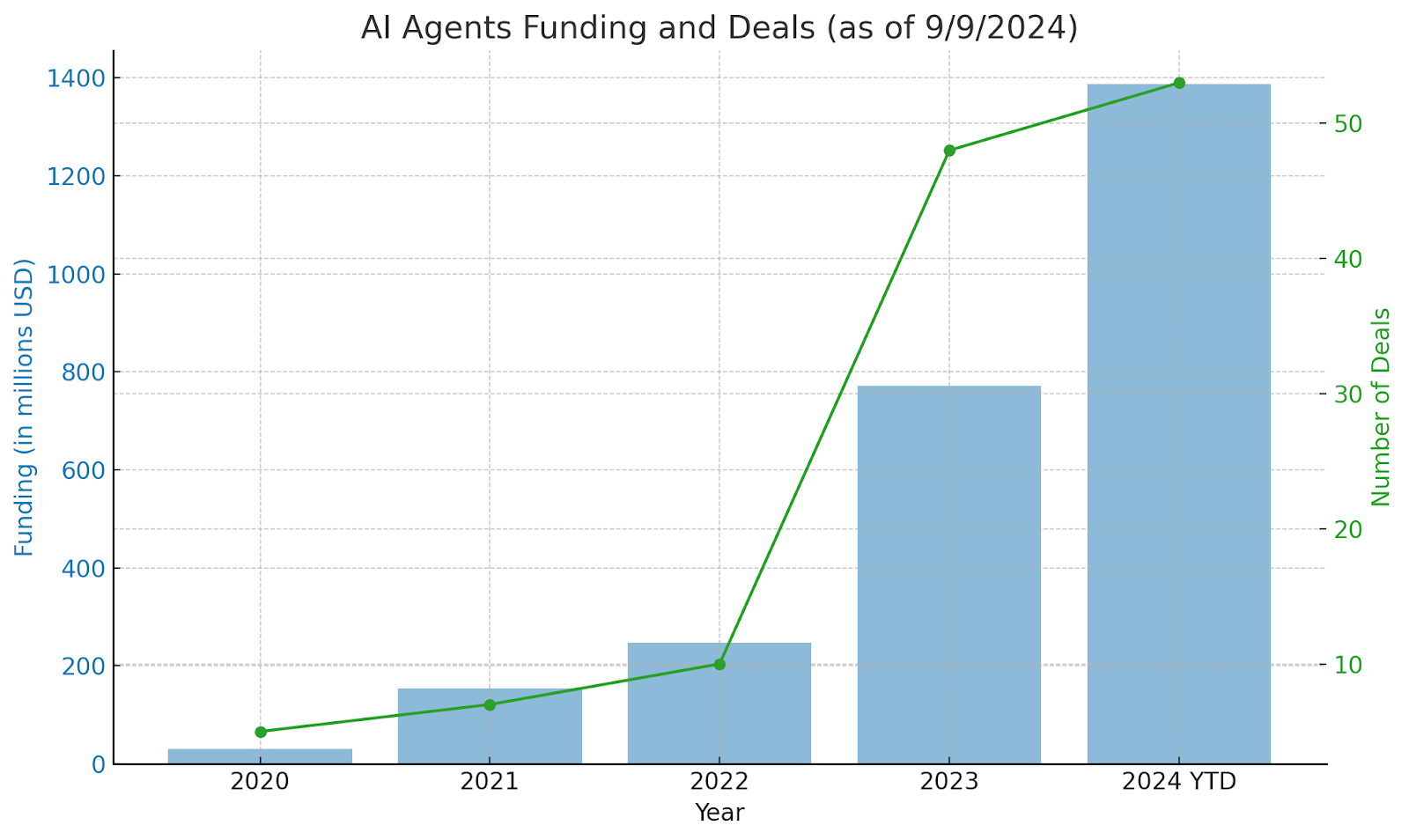
Source: CBInsights

Simple Reflex Agents

Simple reflex agents operate based on immediate perceptions, following predefined condition-action rules without memory or learning capabilities. They respond to specific inputs with corresponding actions, making them suitable for straightforward tasks.

These agents consist of sensors that gather environmental data, condition-action rules that dictate responses, and actuators that execute actions. For example, industrial safety sensors that shut down machinery upon detecting an obstruction or automated sprinklers that activate when smoke is detected are simple reflex agents in action.

While their simplicity ensures quick and efficient responses, their lack of memory and adaptability limits their application in complex, dynamic environments.

Model-Based Reflex Agents

Model-based reflex agents enhance basic reflex agents by maintaining an internal model of the environment. This internal state helps them infer unobservable aspects and make informed decisions.

Key components include a state tracker that monitors the environment, a world model that understands environmental dynamics, and a reasoning component that determines actions. Smart home security systems that distinguish between routine activities and potential threats exemplify model-based agents.

Although more adaptable and versatile than simple reflex agents, their complexity and resource requirements can be challenging, especially in highly dynamic settings.

getgenerativeai cta

Goal-Based Agents

Goal-based agents focus on achieving specific objectives by evaluating future outcomes of their actions. Unlike reflex agents, they plan and select actions that bring them closer to their goals.

These agents utilize a goal state defining their objectives, a planning mechanism to devise action sequences, and an evaluation system to assess progress. Autonomous vehicles navigating through traffic or personal assistant apps managing schedules are examples of goal-based agents.

Their strategic approach and adaptability make them suitable for complex tasks, but they require significant computational power and precise goal definitions, which can be resource-intensive.

“Innovation cannot exist without safety.” 

Utility-Based Agents

Utility-based agents prioritize actions that maximize overall utility, balancing multiple objectives and making optimal decisions based on a utility function that assigns numerical values to outcomes.

Components include a utility function that quantifies desirability, state evaluation methods, and decision mechanisms. Recommendation systems on platforms like Netflix and algorithmic trading in finance leverage utility-based agents for personalized suggestions and optimized trading decisions.

While they excel in optimizing outcomes and handling trade-offs, the complexity of utility calculations and resource demands pose significant challenges, especially in large-scale applications.

Learning Agents

Learning agents are dynamic AI systems that improve their performance over time by learning from their environment and past experiences. Unlike static agents, they adapt their strategies and decisions through continuous interaction and feedback.

The architecture of learning agents includes a learning element that updates knowledge, a critic that evaluates actions, a performance element that selects actions, and a problem generator that explores new possibilities. AI in gaming, such as DeepMind’s AlphaGo, and personalized healthcare systems that refine treatment plans based on patient data are prime examples.

Their adaptability and autonomy make them powerful tools, but they require extensive data and computational resources. Overfitting and bias are also potential risks, demanding careful design and continuous monitoring.

Hierarchical Agents

Hierarchical agents are structured in layers, with higher-level agents overseeing lower-level ones. This tiered system allows complex tasks to be broken down into manageable subtasks, each handled by specialized agents.

Key components include task decomposition for breaking down objectives, a command hierarchy for control flow, and coordination mechanisms for ensuring cohesive operation. Manufacturing control systems and building automation, where different agents manage heating, lighting, and security, illustrate the utility of hierarchical agents.

While they enhance efficiency and scalability, managing inter-agent coordination and resource allocation can be challenging, particularly in large-scale applications.

“We’re about to empower people more than ever before.”

Multi-Agent Systems (MAS)

Multi-agent systems consist of multiple autonomous agents working together, either cooperatively or competitively, within a shared environment. Each agent operates independently but communicates and collaborates to achieve individual or collective goals.

MAS includes cooperative systems where agents share resources, competitive systems where agents compete for dominance, and mixed systems that combine both. Warehouse management with multiple robots and autonomous drone swarms for agricultural monitoring are common MAS applications.

Despite their advantages in coordination, scalability, and robustness, MAS face challenges in resource management, conflict resolution, and maintaining system efficiency as the number of agents increases.

Also Read – Top Agentic Frameworks Powering Generative AI in 2025

Comparing AI Agents

AI Agent TypeComplexityDecision-MakingAdaptabilityApplications
Simple Reflex AgentsLowCondition-action rulesLowSafety sensors, auto-responders
Model-Based AgentsMediumInternal state-basedMediumSmart security, network monitoring
Goal-Based AgentsHighGoal-driven planningHighAutonomous vehicles, task management
Utility-Based AgentsHighUtility function optimizationHighRecommendations, financial trading
Learning AgentsVery HighExperience-based learningVery HighGaming AI, personalized healthcare
Hierarchical AgentsHighLayered controlMedium to HighManufacturing, building automation
Multi-Agent SystemsVery HighCollaborative and competitiveVery HighWarehouse robots, drone swarms

Conclusion

AI agents are not just futuristic concepts; they are present-day tools reshaping industries with their intelligent capabilities. From simple reflex responses to complex multi-agent collaborations, these digital entities are pushing the boundaries of automation and intelligence. As technology evolves, the role of AI agents will only expand, making them essential for businesses aiming to stay ahead in the digital race. 

Ready to transform your Salesforce implementation with cutting-edge AI?

GetGenerative.ai offers AI-powered Workspace + Agents to seamlessly manage your entire Salesforce implementation lifecycle—from Pre-Sales to Go-Live. Boost efficiency, enhance accuracy, and streamline every stage of your project with AI.

FAQs

1. What are AI agents used for?

AI agents are used for automating tasks, enhancing decision-making, managing large-scale operations, and providing personalized user experiences in industries like finance, healthcare, manufacturing, and customer service.

2. How do AI agents differ from traditional software?

Unlike traditional software that follows static instructions, AI agents operate autonomously, learning and adapting from their environment to make intelligent decisions.

3. Which type of AI agent is best for real-time decision-making?

Utility-based agents are best suited for real-time decision-making as they continuously evaluate and optimize actions based on a utility function.

4. Can AI agents operate without human intervention?

Yes, many AI agents operate autonomously, making decisions and executing tasks without human intervention, though initial programming and occasional monitoring are required.

5. What is the most complex type of AI agent?

Learning agents and Multi-Agent Systems are among the most complex, as they involve continuous learning, adaptation, and collaboration among multiple agents.

Top Agentic Frameworks Powering Generative AI in 2025

Top Agentic Frameworks Powering Generative AI in 2025

In 2025, the adoption of agentic AI is accelerating, with 25% of companies utilizing generative AI launching agentic AI pilots or proofs of concept, a figure projected to reach 50% by 2027.

Generative AI is evolving beyond simple automation, moving towards intelligent, autonomous systems capable of decision-making, collaboration, and continuous learning. The key to this transformation lies in agentic AI frameworks—specialized platforms that empower AI agents to operate independently while coordinating tasks across different environments. These frameworks act as the backbone of next-gen AI applications, enabling businesses to automate complex workflows, integrate AI into enterprise systems, and optimize efficiency at scale.

2025 marks a pivotal year for agentic AI, with several frameworks leading the charge. These frameworks enhance generative AI capabilities, from workflow automation to multi-agent collaboration and real-time decision-making. 

This blog explores the most powerful agentic frameworks of the year, their key features, applications, and how they’re reshaping the AI landscape.

What Are Agentic AI Frameworks?

Agentic AI frameworks provide the structural foundation for creating AI agents that function autonomously. Unlike traditional AI models that operate in isolation or require constant human input, these frameworks enable AI agents to interact, learn, and execute tasks independently. They combine large language models (LLMs), APIs, memory systems, and reasoning engines to build intelligent AI-powered workflows.

These frameworks are designed for industries requiring AI agents to handle complex, multi-step tasks, such as enterprise automation, research assistance, intelligent customer support, and self-improving AI applications.

getgenerativeai cta

Key Features of Agentic AI Frameworks

To power advanced generative AI applications, agentic frameworks include several key features:

  • Multi-Agent Systems – These frameworks allow multiple AI agents to work collaboratively, distributing tasks efficiently to optimize performance.
  • Tool Integration – AI agents can interact with APIs, databases, and third-party services to retrieve data, perform calculations, or automate processes.
  • Autonomy and Decision-Making – Agents can independently analyze tasks, make decisions, and execute workflows without requiring direct supervision.
  • Stateful Memory Management – AI models retain context and learn from previous interactions, improving efficiency over time.
  • Task Orchestration – Frameworks enable AI agents to break down complex problems into structured workflows, ensuring smooth execution.

Also Read – What Is DeepSeek? A Complete Breakdown

Why Agentic Frameworks Are Essential for Generative AI

The demand for generative AI solutions that go beyond simple text generation is growing rapidly. Organizations need AI systems that can reason, plan, and take action based on evolving data and objectives. Agentic AI frameworks provide this capability by enabling generative AI to:

  • Automate Complex Tasks – AI agents can handle multi-step workflows with logical dependencies, reducing human intervention.
  • Enhance Productivity – Businesses can deploy AI agents to manage operational processes, improving efficiency and scalability.
  • Integrate AI Seamlessly – These frameworks ensure AI interacts smoothly with existing business systems, databases, and APIs.
  • Enable Autonomous AI Collaboration – AI agents can communicate with each other, delegate tasks, and refine outputs in real-time.

With these benefits, agentic AI is becoming indispensable across industries, from IT automation to healthcare and finance.

“We’re about to empower people more than ever before.”

Top Agentic AI Frameworks to Watch in 2025

Several agentic AI frameworks stand out in 2025 for their ability to orchestrate multi-agent workflows, enhance decision-making, and optimize AI-driven processes. These frameworks are shaping the future of generative AI by enabling scalable, intelligent automation.

Microsoft AutoGen: Orchestrating Multi-Agent Systems

Microsoft AutoGen is a pioneering agentic framework designed to create multi-agent systems capable of solving complex problems autonomously. It provides developers with a modular and scalable approach to AI orchestration, enabling AI agents to work together efficiently.

Key Features

  • Multi-Agent Collaboration – AutoGen facilitates the coordination of multiple AI agents, allowing them to share tasks and optimize workflow execution.
  • Event-Driven Architecture – AI agents respond to events dynamically, adapting to real-time data changes.
  • Integration with APIs and External Tools – Supports seamless interactions with cloud services, databases, and software applications.
  • Reasoning and Task Prioritization – AI agents prioritize tasks based on urgency and dependencies, ensuring efficient execution.

Why It Matters

AutoGen is a game-changer for industries that require automated problem-solving and intelligent workflow orchestration. It allows businesses to build AI-driven systems that proactively manage IT infrastructure, automate software development, and optimize cloud operations.

Use Case

A cloud service provider uses AutoGen to detect server misconfigurations, assign problem-solving tasks to specialized AI agents, and automatically implement fixes—reducing downtime and improving system reliability.

LangChain: Streamlining AI Workflows

LangChain is one of the most versatile frameworks for building generative AI applications. It enables developers to construct seamless AI workflows by chaining together multiple components such as memory, tools, and external APIs.

Key Features

  • Modular AI Pipeline – Developers can design structured AI workflows using reusable components.
  • Integrated Memory Management – Ensures AI agents retain context across interactions for improved decision-making.
  • Compatibility with Multiple LLMs – Supports integration with OpenAI, Hugging Face, and other AI models.
  • Extensive Tool Support – Enables AI agents to interact with databases, perform web searches, and retrieve external data.

Why It Matters

LangChain’s flexibility makes it an essential tool for building AI-powered assistants, retrieval-augmented generation (RAG) systems, and research automation tools. Its ability to connect AI agents with data sources ensures that AI-driven applications generate accurate, context-aware responses.

Use Case

A financial institution uses LangChain to develop an AI assistant that retrieves customer data, analyzes financial trends, and generates personalized investment recommendations—enhancing client engagement.

LangGraph: Managing Stateful AI Workflows

LangGraph extends LangChain’s capabilities by introducing a graph-based approach to AI workflow management. It is ideal for applications requiring stateful, multi-step AI interactions.

Key Features

  • Graph-Based Dependency Management – AI agents execute tasks based on logical dependencies, ensuring workflows follow a structured order.
  • Support for Stateful AI Applications – Enhances generative AI by enabling models to maintain long-term context.
  • Seamless API and Database Integration – Connects AI workflows with enterprise data systems for real-time analytics.

Why It Matters

LangGraph is particularly useful in industries where precise task sequencing is essential. It helps organizations build AI solutions for research automation, complex document processing, and healthcare diagnostics.

Use Case

A healthcare provider uses LangGraph to develop an AI-driven diagnosis assistant that retrieves patient medical history, analyzes symptoms, and recommends potential treatments—improving diagnostic accuracy.

Microsoft Semantic Kernel: Integrating AI with Enterprise Systems

Microsoft Semantic Kernel is a robust agentic framework designed for enterprise AI integration. It enables businesses to embed AI reasoning capabilities into their existing software infrastructure.

Key Features

  • Context-Aware AI Reasoning – Allows AI to understand user intent and generate relevant responses.
  • Pre-Built Connectors for Enterprise Systems – Seamless integration with Microsoft’s ecosystem and other business applications.
  • Semantic Understanding Capabilities – AI models interpret and process complex queries more accurately.

Why It Matters

Semantic Kernel bridges the gap between AI and enterprise workflows, making it easier to integrate AI-driven decision-making into corporate systems. It enhances automation in customer support, IT operations, and business analytics.

Use Case

An IT helpdesk uses Semantic Kernel to automate ticket resolution by interpreting user requests, classifying issues, and providing immediate AI-generated solutions—reducing workload for human support teams.

CrewAI: Facilitating Multi-Agent Collaboration

CrewAI focuses on multi-agent collaboration, allowing AI agents to work in teams, each specializing in different tasks. This framework is designed for industries that need seamless teamwork among digital agents, mimicking human organizational structures.

Key Features

  • Role-Based Agent Architecture – Assigns specific roles to AI agents, enhancing specialization and efficiency.
  • Task Planning and Delegation – AI agents dynamically plan and delegate tasks based on workload and priority.
  • Flexible Module Integration – Supports various tools and APIs, making it adaptable across industries.

Why It Matters

CrewAI’s emphasis on collaboration makes it invaluable for complex problem-solving tasks, such as logistics management and resource allocation. Its structured approach ensures that AI agents work cohesively, improving operational efficiency.

Use Case

A logistics company uses CrewAI to manage deliveries, with AI agents handling route planning, inventory tracking, and real-time delivery adjustments, ensuring timely and cost-effective shipments.

Comparing Top Agentic AI Frameworks

Selecting the right agentic framework can be challenging, given the variety of options. Here’s a comparison to help guide your choice:

FrameworkKey FocusStrengthsBest For
Microsoft AutoGenMulti-agent orchestrationScalability, API integration, reasoningIT operations, cloud automation
LangChainAI workflow automationFlexibility, modularityChatbots, RAG systems, research automation
LangGraphStateful workflow managementDependency management, state retentionHealthcare, document processing
Microsoft Semantic KernelEnterprise AI integrationContext-aware reasoning, system connectorsBusiness analytics, customer support
CrewAIMulti-agent collaborationTeamwork, task delegationLogistics, resource planning

Benefits of Agentic Frameworks for Generative AI

Agentic frameworks are revolutionizing generative AI by providing robust infrastructures for complex operations. Key benefits include:

  • Scalability – Easily manage multiple AI agents and scale operations without manual intervention.
  • Flexibility – Integrate various tools and APIs, adapting to industry-specific needs.
  • Efficiency – Automate repetitive tasks, freeing up human resources for strategic activities.
  • Continuous Learning – Agents retain and learn from past interactions, improving performance over time.
  • Enhanced Decision-Making – AI agents analyze data, prioritize tasks, and execute decisions autonomously.

Also Read – The Ultimate Guide to LLM Benchmarks

Challenges in Implementing Agentic Frameworks

While promising, implementing agentic AI frameworks comes with challenges:

  • Complexity – Setting up multi-agent systems requires significant expertise and time.
  • Resource Intensiveness – Running multiple AI agents can demand substantial computational power and costs.
  • Integration Issues – Ensuring seamless integration with existing systems can be challenging, especially in legacy environments.
  • Maintenance – Continuous monitoring and updating are essential to maintain efficiency and accuracy.

“It’s not inconceivable that AI could wipe out humanity”

How to Choose the Right Agentic Framework

Choosing the right framework depends on your project needs, budget, and technical capabilities. Consider:

  • Project Complexity – For complex, multi-step workflows, LangGraph or CrewAI are ideal.
  • Industry Needs – Enterprise-focused tasks may benefit from Microsoft Semantic Kernel.
  • Scalability – AutoGen is perfect for large-scale, multi-agent orchestration.
  • Flexibility – LangChain offers versatility across various applications.
  • Collaboration – CrewAI excels in multi-agent teamwork scenarios.

Conclusion

Agentic frameworks are no longer a futuristic concept—they are the present and future of generative AI. As AI systems become more autonomous, businesses need robust frameworks that can handle complex tasks, integrate seamlessly with existing systems, and scale effortlessly.  

Supercharge your Salesforce implementation with GetGenerative.ais AI-powered Workspace + Agents, managing your entire lifecycle from Pre-Sales to Go-live seamlessly!

FAQs

1. What are agentic AI frameworks?

Agentic AI frameworks are software platforms that enable AI agents to operate autonomously, managing tasks, interacting with tools, and improving through learning.

2. Why are agentic frameworks important for generative AI?

They provide the structure for AI agents to handle complex tasks independently, enhancing scalability, efficiency, and automation in AI applications.

3. Which is the best agentic framework for enterprise AI?

Microsoft Semantic Kernel is ideal for enterprise AI integration due to its context-aware reasoning and seamless connectivity with business systems.

4. Can agentic frameworks support multi-agent collaboration?

Yes, frameworks like CrewAI and AutoGen are specifically designed for multi-agent collaboration, enabling AI agents to work together on complex problems.

5. How do I choose the right agentic AI framework?

Assess your project needs, industry requirements, and scalability goals. For versatility, choose LangChain; for multi-agent orchestration, AutoGen; for enterprise integration, Semantic Kernel.

Agentforce for Admins: A Complete Guide

Agentforce for Admins: A Complete Guide


Agentforce is transforming Salesforce administration by introducing AI-powered agents that handle repetitive tasks, improve efficiency, and enhance user experiences. For admins, this means less manual work and more time for strategic initiatives. But what makes Agentforce unique, and how can admins leverage it for day-to-day operations? 

Let’s dive into this complete guide crafted specifically for Salesforce admins.

What is Agentforce and Why Admins Need It?

Agentforce is a suite of assistive and autonomous AI agents built within the Salesforce platform. Designed to execute specific tasks based on user input or environmental triggers, it reduces the burden on admins and enhances CRM functionality. With features like contextual reasoning, multi-turn conversations, and data-grounded actions, Agentforce is more than just another automation tool—it’s an intelligent assistant for every Salesforce admin.

“Artificial intelligence and generative AI may be the most important technology of any lifetime.”

Key Features of Agentforce for Admins

Agentforce stands out for its robust capabilities tailored to Salesforce administration. Here are its top features:

  • Atlas Reasoning Engine: Acts as the brain behind Agentforce, offering multi-turn chat, topic classification, and advanced data retrieval, ensuring accurate and contextual responses.
  • Assistive and Autonomous Agents: Admins can deploy agents that assist users in real-time or operate autonomously to manage backend processes.
  • Customization with Agent Builder: A visual workspace where admins can design and implement custom actions, preview agent conversations, and refine workflows without coding.
  • Integration with Data Cloud: Agents leverage CRM and external data for decision-making, ensuring relevant and timely assistance.
  • Out-of-the-Box (OOTB) Agents: Pre-built agents like Service Agents for customer support, SDR Agents for sales processes, and Sales Coach Agents for training, all customizable to fit specific admin needs.

Setting Up Agentforce: A Step-by-Step Guide for Admins

Before diving into automation, setting up Agentforce correctly is essential. Here’s how admins can get started:

  • Check System Requirements: Ensure your Salesforce instance has API access, Data Cloud integration, and the necessary permissions.
  • Assign Permissions and Enable Agentforce: Use Salesforce Foundations to enable Agentforce and assign permission sets to admin profiles.
  • Configure Initial Settings: Set up user roles, define data access rules, and establish automation preferences within Agent Builder.
  • Leverage Trailhead for Hands-On Setup: Salesforce’s Trailhead modules provide step-by-step guidance to configure agents and explore their capabilities in a demo environment.

Daily Admin Tasks Simplified with Agentforce

Agentforce makes managing routine admin tasks effortless. Here’s how:

  • User Management: Automate user creation, role assignments, and permission updates, ensuring seamless onboarding and offboarding.
  • Data Maintenance: Schedule data imports, exports, and clean-ups, maintaining data accuracy without manual intervention.
  • Workflow Automation: Build and deploy automated workflows for approvals, notifications, and data updates, saving hours of admin time.

Also Read – Agentforce for Developers: How to Build AI-Powered Solutions

Advanced Capabilities Admins Will Love

Agentforce offers advanced features that elevate Salesforce administration:

  • Modular Flows: Create smaller, reusable automation flows that enhance system performance and simplify maintenance.
  • Data Security and Access Control: Implement stringent security measures, monitor user activities, and manage access rights effectively.
  • Custom Scripts and API Access: For advanced admins, Agentforce supports custom scripts and API integrations, expanding its functionality beyond standard features.

Best Practices for Admins Using Agentforce

To make the most of Agentforce, Salesforce admins should follow these best practices:

  • Journey Mapping Before Deployment: Collaborate with stakeholders to identify key admin tasks that can be automated. Mapping out the user journey helps in designing agents that genuinely add value.
  • Use Modular Automation Flows: Instead of creating large, complex workflows, build smaller, modular flows that can be reused across different agents, ensuring efficiency and maintainability.
  • Limit Actions per Agent: Overloading an agent with too many actions can degrade its performance. Aim to limit each agent to a maximum of 15 actions for optimal functionality.
  • Test Thoroughly Before Going Live: Utilize the Agentforce Testing Center for simulating agent actions with synthetic data, ensuring that your live Salesforce instance remains unaffected during testing.
  • Craft Clear and Precise Instructions: Agents perform better when provided with clear, actionable instructions. Use simple language, break down complex processes, and avoid unnecessary jargon.

Overcoming Common Challenges with Agentforce

Admins may face some challenges while implementing Agentforce, but these can be addressed with proper strategies:

  • Installation and Setup Issues: Refer to Salesforce’s setup documentation and Trailhead modules for step-by-step guidance on enabling Agentforce and assigning permissions.
  • Performance Optimization: Regularly review automation rules, clean up unused flows, and ensure adequate system resources to keep Agentforce running smoothly.
  • User Training and Adoption: Conduct training sessions for users to familiarize them with Agentforce, reducing the number of support requests and increasing adoption rates.

Also Read – Starting with Agentforce: A Confident and Clear Approach

Conclusion

Agentforce is a game-changing tool for Salesforce admins, offering AI-powered agents that automate repetitive tasks, enhance user experiences, and ensure data accuracy. Its robust features, like the Atlas Reasoning Engine and customizable workflows, provide admins with the flexibility to create tailored solutions without complex coding.

salesforce consulting services

At GetGenerative.ai, we’ve reimagined Salesforce implementation—built from the ground up with AI at the core. This isn’t legacy delivery with AI added on. It’s a faster, smarter, AI-native approach powered by our proprietary platform.

👉 Explore our Salesforce AI consulting services

FAQs

1. What makes Agentforce unique for Salesforce admins?

Agentforce offers AI-powered agents with advanced reasoning capabilities, customizable workflows, and seamless Data Cloud integration.

2. Can admins create custom agents in Agentforce?

Yes, using Agent Builder, admins can design custom agents with tailored actions and workflows without coding.

3. How does Agentforce improve admin efficiency?

It automates repetitive tasks, reduces manual errors, and ensures data accuracy, allowing admins to focus on strategic initiatives.

4. What are the best practices for using Agentforce?

Journey mapping, modular flows, action limits, thorough testing, and clear instructions are key to successful Agentforce deployment.

5. Where can admins learn more about Agentforce?

Salesforce Trailhead offers hands-on modules for learning Agentforce setup, customization, and best practices.

How to Set Up Salesforce AI Agent

How to Set Up Salesforce AI Agent

The global artificial intelligence (AI) market is expanding rapidly, expected to surge from $184.15 billion in 2024 to $2.53 trillion by 2033, with a CAGR of 33.83%.

Salesforce AI Agents are transforming how businesses automate processes, handle customer interactions, and optimize internal operations. These agents act as intelligent virtual assistants that can process natural language, execute tasks, and integrate seamlessly with Salesforce workflows. Whether used in customer service, sales automation, or HR functions, AI agents improve efficiency and decision-making.

AI agents in Salesforce are powered by Agentforce, a system that enables businesses to deploy AI-driven automation within their Salesforce ecosystem. Unlike traditional rule-based bots, AI agents leverage machine learning and natural language processing (NLP) to understand queries, retrieve relevant data, and take appropriate actions.

Why Use Salesforce AI Agents?

Enhanced Customer Experience

AI agents ensure faster response times and personalized engagement by analyzing past interactions and customer data.

Increased Operational Efficiency

By automating repetitive tasks, AI agents free up employees to focus on high-value work, increasing productivity.

Seamless Integration with Salesforce Ecosystem

Salesforce AI agents integrate directly with Sales Cloud, Service Cloud, and Data Cloud, making it easier to manage workflows across departments.

Continuous Learning and Improvement

These agents evolve over time by learning from interactions, ensuring better responses and decision-making capabilities.

AD 4nXcgbCLp34iE ncha4ujhjTfKgvtqf4NFovXzgsKo WsIMvqze0Ver0yDjIB ZcMwbzyjvDgw8rvTqV4rjz garvZT7JepKidckOpmqB2bgDVPHKDdoeiTT2P8RxufZ6arc2Hv

Source: CEPR

Step-by-Step Process to Set Up Salesforce AI Agent

Setting up a Salesforce AI Agent requires strategic planning and careful implementation. Below is a structured approach to building and deploying AI agents successfully.

Step 1: Define the Purpose and Scope of Your AI Agent

Before setting up an AI agent, it is crucial to determine what problems it will solve and how it will assist users.

  • Identify the Use Case
    Will the agent be handling customer inquiries, assisting employees with HR policies, or automating sales processes? Clearly defining the Jobs to Be Done (JTBD) helps create a well-structured agent.
  • Determine the Scope
    Start with a narrow, well-defined function to avoid complexity. For example, an AI agent could first handle FAQs in customer service before expanding to process orders or manage refunds.
  • Understand the Audience
    The AI agent should be tailored to the target users. For instance, an AI agent for customer support must have a conversational tone, while an internal HR agent should provide precise, policy-driven answers.

Step 2: Gather and Prepare Training Data

An AI agent is only as good as the data it is trained on. Poor-quality data leads to inaccurate responses, so ensuring clean, relevant data is essential.

  • Collect Training Data
    The agent needs conversational data, such as:
    • Chat transcripts from customer interactions
    • Support tickets that reflect real-world queries
    • Knowledge base articles and FAQs
    • Structured CRM data from Salesforce
  • Clean and Process Data
    Data should be de-duplicated, labeled, and structured so that the AI model can accurately learn from it. Removing errors, inconsistencies, and outdated information improves training quality.
  • Use Data Labeling for Better Context Understanding
    Labeling the data with intent categories (e.g., “Billing Inquiry,” “Product Support”) helps the AI agent recognize different user requests effectively.

Also Read – Agentforce for Developers: How to Build AI-Powered Solutions

Step 3: Choose the Right AI Model

Salesforce AI agents rely on machine learning models to process queries and generate responses. Choosing the right model ensures better performance.

  • Pre-trained AI Models
    Salesforce provides access to pre-trained AI models like GPT and BERT, which can be fine-tuned for specific business needs.
  • Neural Networks for Natural Language Understanding (NLU)
    If the AI agent needs to comprehend complex language patterns, a neural network-based model is ideal.
  • Reinforcement Learning for Adaptive Learning
    Agents that require continuous improvement based on user feedback can leverage reinforcement learning to refine their responses over time.

Step 4: Build the AI Agent in Salesforce

Now that you have the purpose, data, and model selected, it’s time to build the agent using Agentforce in Salesforce.

  • Create an AI Agent Instance
    Navigate to Agentforce in Salesforce Setup and define a new AI agent. Assign it a name and specify its intended function.
  • Define the Topics and Actions
    • Topics are the categories of interactions the agent handles (e.g., “Password Reset,” “Order Status”).
    • Actions are what the agent can do in response (e.g., “Fetch Customer Order Data,” “Update Account Details”).
  • Set Up the AI Agent’s Metadata
    Metadata configurations ensure that the agent interacts with Salesforce seamlessly. This includes:
    • Apex Triggers for executing automation
    • Flow Builder for managing workflows
    • Prompt Templates for structuring responses
  • Train the Agent with Sample Conversations
    Before deployment, the agent should be tested with realistic conversation scenarios to fine-tune responses and ensure it understands different query formats.
 

getgenerativeai cta

Step 5: Test and Optimize the AI Agent

Before launching the agent, rigorous testing is required to validate its performance and make necessary adjustments.

  • Unit Testing for Individual Components
    Each function of the agent (e.g., fetching customer details, updating CRM records) should be tested separately to ensure it works as expected.
  • User Testing for Real-world Scenarios
    Deploy the AI agent to a small test group of employees or customers and gather feedback on accuracy, response time, and usability.
  • A/B Testing for Multiple Response Styles
    Experiment with different response formats, tones, and engagement styles to determine what works best for users.
  • Error Handling and Edge Case Optimization
    Identify scenarios where the agent fails to understand queries and train it on those specific edge cases to improve accuracy.

Step 6: Deploy the AI Agent in a Live Environment

Once testing is complete, the AI agent is ready to go live.

  • Choose the Deployment Channel
    AI agents can be embedded in various platforms:
    • Salesforce Service Cloud for customer support
    • Salesforce Sales Cloud for sales automation
    • External Websites and Chatbots for direct customer interactions
  • Integrate with Business Systems
    The AI agent should be connected with CRM databases, third-party APIs, and Salesforce Data Cloud to pull real-time information.
  • Enable Performance Monitoring
    Deploy analytics tools to track:
    • Accuracy of responses
    • User satisfaction scores
    • Common queries and issues
  • Establish a Feedback Loop for Continuous Learning
    Collect user feedback directly in Salesforce and use it to refine the agent’s performance over time.

Step 7: Monitor and Improve AI Agent Performance

Once your Salesforce AI Agent is live, the next crucial step is continuous monitoring and optimization to ensure it delivers accurate and efficient results. AI models evolve based on data and interactions, so maintaining an improvement cycle is essential.

Track Key Performance Metrics

  • Accuracy Rate – Measure how well the agent understands and responds to queries correctly.
  • Response Time – Ensure the AI agent is delivering quick and efficient responses.
  • Handoff Rate – Track how often the AI agent needs to escalate interactions to a human agent.
  • User Satisfaction Scores – Gather feedback on how helpful and intuitive the agent is for end-users.

Analyze User Interactions

Regularly review conversation logs and analyze common failure points, such as queries the agent doesn’t understand. This will help fine-tune its responses and expand its training dataset.

Implement Continuous Learning Mechanisms

  • Supervised Learning – Regularly retrain the AI agent using real-world interactions to refine its accuracy.
  • Feedback Loops – Collect user feedback and incorporate it into model improvements.
  • Adaptive Responses – Use reinforcement learning so the AI agent can adjust its responses based on past interactions.

Optimize Response Strategies

By refining Prompt Templates, adjusting Flow Automation, and enhancing Natural Language Processing (NLP) capabilities, your AI agent will become more effective over time.

“Generative AI has the potential to change the world in ways that we can’t even imagine. It has the power to create new ideas, products, and services that will make our lives easier, more productive, and more creative.”

Bill Gates, Co-Founder of Microsoft

Advanced Features and Enhancements for Salesforce AI Agents

Once the AI agent is fully functional, you can enhance its capabilities by integrating advanced features that maximize its efficiency and user experience.

Enhance AI with Data Cloud Integration

Salesforce Data Cloud allows AI agents to access structured and unstructured data, providing richer and more contextual responses. By integrating Data Cloud, AI agents can:

  • Pull real-time customer information for hyper-personalized interactions.
  • Use historical data to predict customer behavior and needs.
  • Analyze past issues and provide automated solutions based on trends.

Expand AI Capabilities with Multi-Channel Deployment

Your Salesforce AI agent should be accessible across various customer touchpoints. Deploy it on:

  • Live Chat & Messaging Apps (WhatsApp, Slack, Teams)
  • Self-Service Portals & Knowledge Bases
  • Voice Assistants (Alexa, Google Assistant)
  • Email & SMS Automations

By omnichannel deployment, businesses ensure seamless and unified AI-driven interactions.

Enable Smart Workflows & Automations

Leverage Salesforce Flow Builder to automate tasks such as:

  • Lead qualification and scoring
  • Customer case resolution with pre-built workflows
  • Automatic follow-ups for abandoned inquiries

AI-driven workflows help businesses minimize manual intervention and maximize operational efficiency.

Implement Guardrails for AI Agents

To maintain accuracy, compliance, and ethical AI usage, businesses should:

  • Define clear escalation points for human intervention.
  • Use role-based access controls to restrict sensitive data exposure.
  • Implement bias detection algorithms to prevent unfair decision-making.

By setting up these guardrails, companies ensure AI agents operate responsibly and transparently.

Also Read – AI Consultant Career Path 2025: The Ultimate Guide to High-Paying Roles

Scaling AI Agents Across Business Functions

Once an AI agent successfully manages one area, businesses can scale its capabilities to other functions.

Customer Support AI Agent

  • Handles FAQs, troubleshooting, refund processing, and order tracking.
  • Reduces workload for human agents while improving response times.

Sales AI Agent

  • Automates lead scoring, follow-ups, and CRM updates.
  • Engages with prospects via personalized email campaigns.

HR & Employee Assistance AI Agent

  • Assists with policy inquiries, PTO requests, and onboarding processes.
  • Streamlines HR operations by answering repetitive employee questions.

By gradually expanding AI capabilities, businesses create a cohesive AI ecosystem that drives efficiency across departments.

“Artificial intelligence and generative AI may be the most important technology of any lifetime.”

 – Marc Benioff, Chair, CEO, and Co-Founder of Salesforce 

Challenges in Implementing Salesforce AI Agents & How to Overcome Them

While Salesforce AI agents offer numerous benefits, businesses may encounter challenges during implementation. Here’s how to address them:

1. Poor Data Quality

AI agents rely on accurate and well-structured data to function effectively.
Solution:

  • Regularly clean and update Salesforce records.
  • Use data validation rules to eliminate errors.
  • Implement data governance policies to maintain data consistency.

2. AI Agent Misunderstanding Queries

If an AI agent struggles to interpret user intent, it may deliver irrelevant responses.
Solution:

  • Improve Natural Language Processing (NLP) training.
  • Expand the training dataset with diverse queries.
  • Continuously update intent mapping to improve accuracy.

3. User Resistance to AI Adoption

Employees and customers may be hesitant to interact with an AI-powered system.
Solution:

  • Educate users on AI benefits and provide easy onboarding tutorials.
  • Offer hybrid AI-human support to build confidence.
  • Collect feedback regularly to address pain points and refine interactions.

By proactively tackling these challenges, businesses ensure a smooth transition to AI-powered automation.

Final Thoughts 

Salesforce AI Agents are redefining how businesses interact with customers, manage workflows, and enhance productivity. As AI capabilities evolve, companies that strategically implement AI agents will gain a competitive edge in automation and customer experience.

FAQs

1. What are the licensing requirements for Salesforce AI Agents?

Salesforce AI Agents require Agentforce licensing, and depending on the integration level, additional licenses such as Data Cloud and Einstein AI may be necessary.

2. How long does it take to deploy a Salesforce AI Agent?

The deployment timeline varies based on complexity. A basic AI agent can be set up within a few weeks, while a fully integrated enterprise-grade agent may take several months.

3. Can AI agents replace human customer support?

AI agents enhance customer support efficiency but work best alongside human agents, especially for complex queries and emotional interactions.

4. How can I measure the success of my AI agent?

Key performance metrics include response accuracy, resolution time, customer satisfaction, and agent escalation rates.

5. Is it possible to retrain a Salesforce AI Agent after deployment?

Yes, Salesforce AI Agents can continuously learn and improve by integrating new training data, optimizing workflows, and refining NLP capabilities.