Salesforce Business Analyst Skill Set Cheat Sheet

Salesforce Business Analyst Skill Set Cheat Sheet

A Salesforce Business Analyst plays a pivotal role in bridging the gap between business needs and technological solutions. 

Here’s a comprehensive guide to the essential skills and processes that define a successful Salesforce Business Analyst.

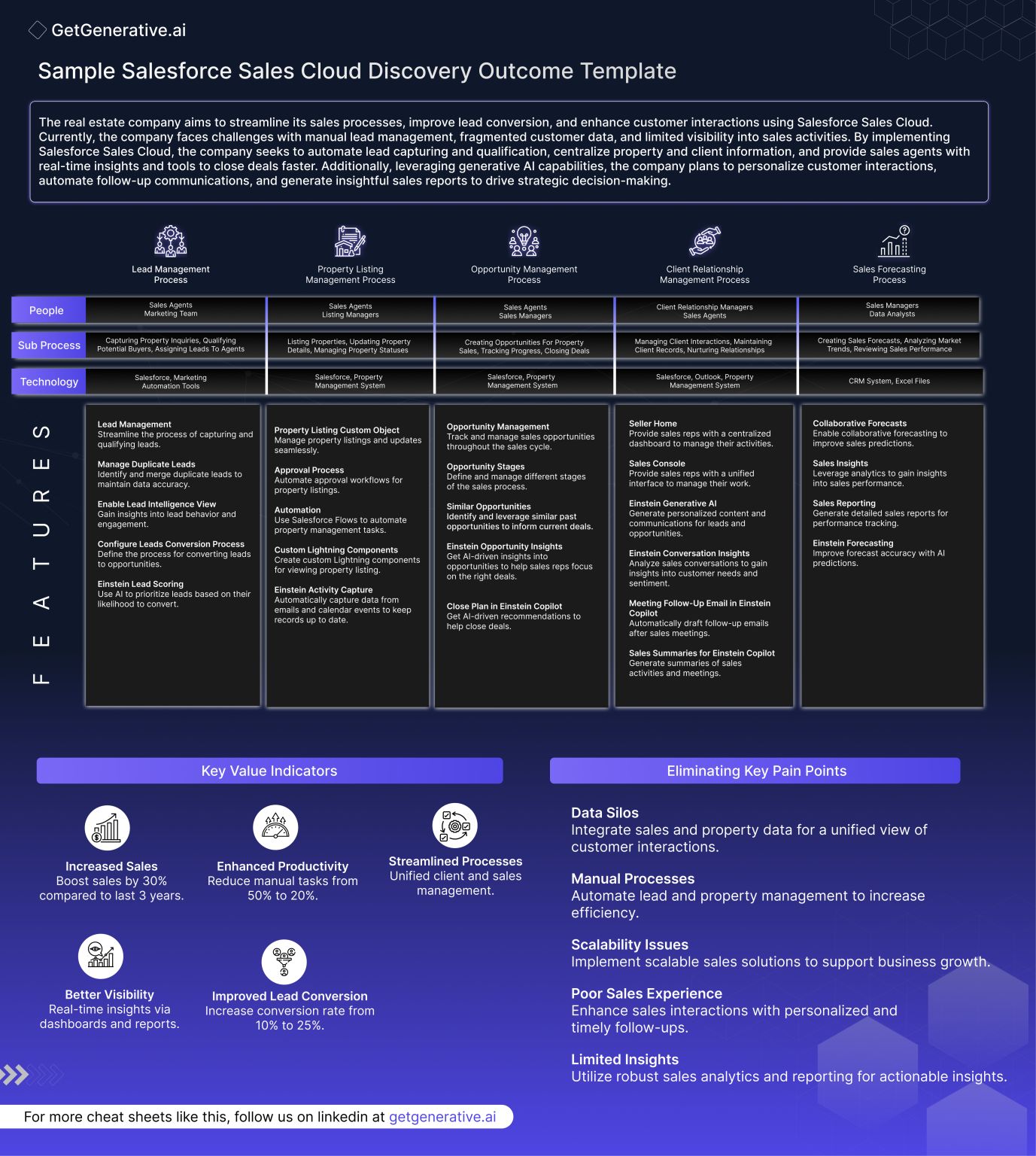
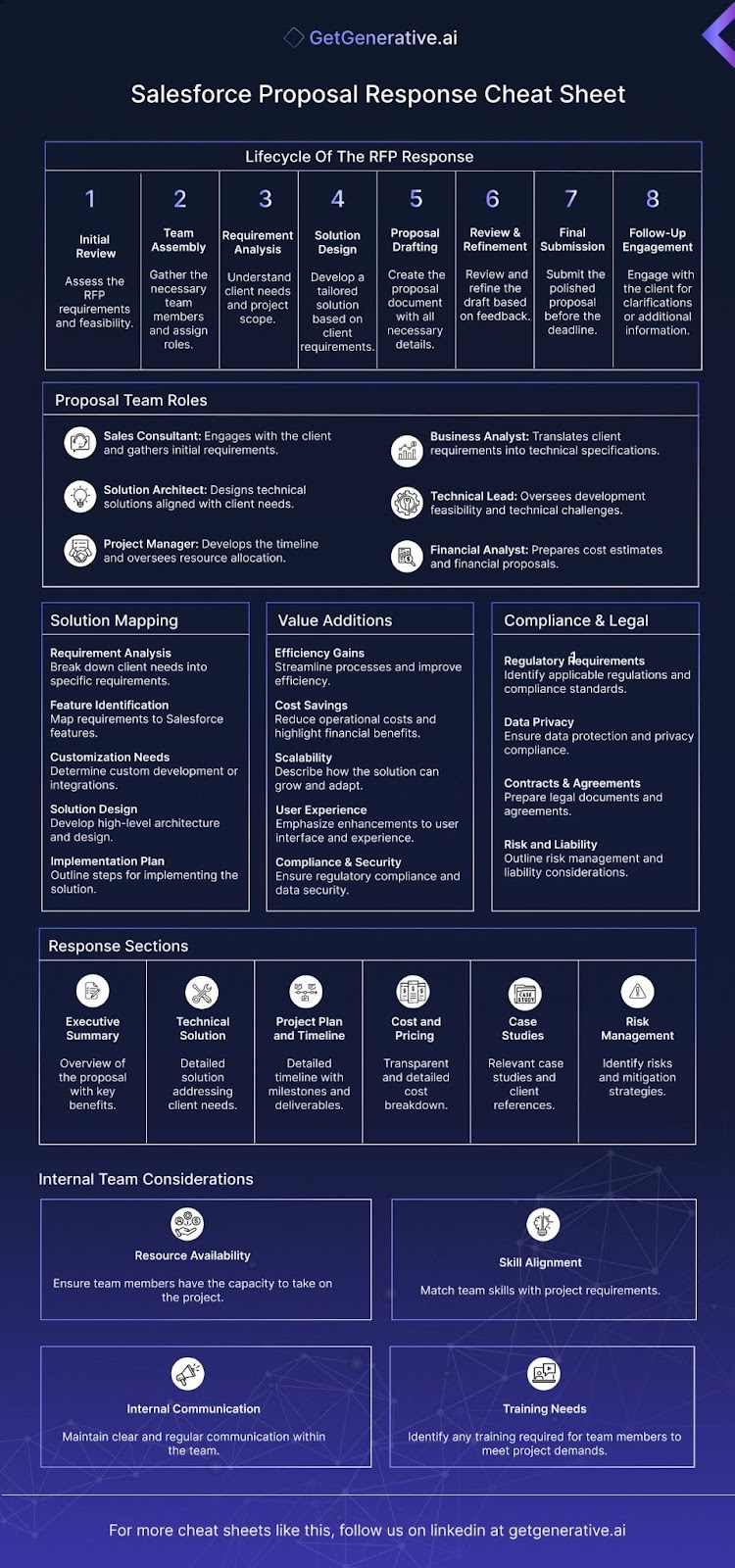
AD 4nXeza8UZAuUBjHEY7zOXAadMg7DgdIp95a gwpik0FY

Key Steps for Effective Salesforce Business Analysis

1. Understanding the Context

Initial Review: A Salesforce Business Analyst begins by reviewing all available information to understand the context and scope of the project. This step is crucial for gaining a comprehensive overview of the business environment and the project’s specific requirements.

Identify Key Objectives: Clarifying the business’s objectives ensures that the analysis aligns with strategic goals. By understanding what the business aims to achieve, the analyst can tailor their approach to meet these objectives effectively.

2. Critical Questioning

Formulate Key Questions: Developing a set of targeted questions helps probe for deeper insights and identify information gaps. This step ensures that the analysis covers all necessary aspects and uncovers critical data points.

Engage Stakeholders: Interacting with stakeholders to gather diverse perspectives is essential. By using prepared questions, the analyst ensures that all voices are heard and considered, fostering a comprehensive understanding of the project’s requirements.

3. Data Gathering

Comprehensive Collection: Data is gathered from various sources, including interviews, surveys, operational data, and existing documentation. This holistic approach ensures that the analysis is based on a broad spectrum of information.

Observational Techniques: Employing observational methods helps the analyst understand workflows and processes firsthand. This direct observation can reveal insights that might be missed through other data collection methods.

4. Note-Taking and Documentation

Systematic Recording: Carefully noting down all findings and observations in a structured manner ensures data integrity and traceability. This systematic approach is vital for maintaining accurate and reliable records.

Document Patterns and Anomalies: Keeping an eye out for recurring themes or discrepancies helps identify underlying issues or opportunities. Recognizing these patterns is crucial for developing effective solutions.

5. Analysis and Synthesis

Data Analysis: Using analytical tools and techniques, the analyst dissects the collected data to understand patterns, relationships, and root causes. This step is fundamental for transforming raw data into actionable insights.

Synthesize Information: Integrating findings into a coherent narrative focuses on how individual data points relate to broader business objectives. This synthesis is key to providing meaningful and relevant recommendations.

Also Read – Salesforce Business Analyst: A Complete Guide

6. Validation and Refinement

Validate Findings: Cross-verifying data and conclusions with stakeholders ensures accuracy and relevance. This validation step is essential for building trust and confidence in the analysis.

Iterative Refinement: Refining understanding and approaches based on feedback and additional data often involves returning to earlier steps. This iterative process ensures a thorough and comprehensive approach to problem-solving.

7. Strategic Insights and Recommendations

Develop Insights: Translating analyzed data into actionable business insights is the hallmark of a successful business analyst. These insights drive strategic decisions and business improvements.

Recommend Actions: Suggesting strategic actions based on insights aligns with business goals and stakeholder expectations. Effective recommendations are practical and actionable, guiding the business toward achieving its objectives.

8. Presentation and Implementation Support

Communicate Findings: Preparing clear and persuasive presentations conveys findings, insights, and recommendations to stakeholders. Effective communication is key to ensuring that stakeholders understand and support the proposed solutions.

Support Implementation: Providing ongoing support and guidance during the implementation of recommendations ensures adherence to the proposed solutions. This support is crucial for successful execution and achieving the desired outcomes.

This cognitive process reflects how a business analyst systematically tackles complex information, focusing on delivering meaningful insights that drive business improvement. Each step builds upon the previous one, ensuring a thorough and comprehensive approach to problem-solving.

Also Read – The Ultimate Salesforce Consultant Cheat Sheet

Additional Key Skills for a Salesforce Business Analyst

Core Analytical Skills

Data Analysis & Interpretation: The ability to dissect large volumes of data, identify trends, and extract actionable insights is crucial for driving business decisions.

Problem-Solving: Utilizing logical reasoning to address complex business challenges helps provide clear and effective solutions.

Requirements Gathering: Expertise in eliciting needs from stakeholders through interviews, surveys, and observation ensures that all business requirements are thoroughly understood and documented.

Technical Proficiency

Salesforce Platform Knowledge: A deep understanding of Salesforce functionalities, customizations, and integrations is essential to optimize business processes.

Data Management Tools: Proficiency with tools like SQL for data manipulation and analysis, and familiarity with BI tools such as Tableau or PowerBI for data visualization, is vital.

System Configuration: Skills in configuring Salesforce to meet business needs, including the setup of custom fields, workflows, and user interfaces, are necessary for tailoring the platform to specific requirements.

Interpersonal and Communication Skills

Stakeholder Engagement: Effectively communicating with and managing the expectations of stakeholders at all levels of the organization ensures alignment with business objectives. This skill is crucial for maintaining strong relationships and facilitating successful project outcomes.

Presentation Skills: Being capable of synthesizing complex information into clear, persuasive presentations and reports is essential. This ability helps convey key insights and recommendations in an understandable and compelling manner.

Team Collaboration: Working seamlessly with cross-functional teams to facilitate project success demonstrates strong leadership and teamwork skills. Collaboration is vital for integrating diverse perspectives and achieving common goals.

Project Management Capabilities

Agile and Scrum Methodologies: Familiarity with agile project management frameworks allows a Salesforce Business Analyst to lead projects efficiently and adaptively. Understanding these methodologies helps in managing projects dynamically and responsively.

Timeline and Resource Management: Skills in managing project timelines, resources, and budget allocations are crucial for ensuring project deliverables are met on time and within scope. Effective resource management contributes to the overall success and sustainability of projects.

Change Management: The ability to lead and manage change is essential for ensuring the smooth transition and adoption of new processes and systems within the organization. This capability helps in minimizing resistance and maximizing acceptance of changes.

Strategic Business Understanding

Business Process Reengineering: Expertise in analyzing and redesigning business processes to enhance efficiency and productivity is key. This skill helps in optimizing workflows and improving overall business performance.

Market Analysis: Conducting market analysis to understand industry trends and align business strategies accordingly is crucial. This ability ensures that the business remains competitive and can capitalize on market opportunities.

Financial Acumen: Understanding financial metrics and their impact on business decisions enhances the ability to drive profitability through analytical insights. This knowledge is vital for making informed and strategic business decisions.

Discover more helpful Salesforce cheat sheets by visiting our Salesforce Cheat Sheets page.

Continuous Learning and Adaptation

Professional Development: A commitment to ongoing learning and certification in areas like Salesforce updates, new tools, and business analysis techniques is important. Continuous professional development ensures that the analyst remains up-to-date with the latest industry trends and best practices.

Innovative Thinking: Encouraging innovative approaches to solve business problems promotes a culture of continuous improvement. This mindset helps in finding creative and effective solutions to complex challenges.

Adaptability: Flexibility to adapt to new challenges and changes in the business environment is crucial for maintaining effectiveness across varying situations. Adaptability ensures that the analyst can respond proactively to evolving business needs.

The Future of Salesforce Business Analysis: Emerging Trends to Watch

As the Salesforce ecosystem continues to evolve, the role of the Salesforce Business Analyst is expanding beyond traditional responsibilities. Here are some emerging trends that professionals in this field should watch and prepare for:

1. AI-Driven Insights

Artificial Intelligence (AI) is revolutionizing data analysis within the Salesforce platform. Tools like Einstein AI are enabling business analysts to uncover deeper insights, predict customer behaviors, and automate routine tasks. Developing expertise in AI-driven features can significantly enhance an analyst’s effectiveness.

2. Low-Code and No-Code Solutions

With the rise of low-code and no-code tools, Salesforce Business Analysts are becoming key enablers for rapid app development. Understanding how to leverage these tools for creating custom workflows, automations, and applications without heavy coding is an invaluable skill.

3. Focus on Customer Experience (CX)

Businesses are increasingly prioritizing customer experience, and Salesforce tools are at the forefront of this shift. Analysts who can align business processes with customer-centric strategies using Salesforce capabilities will drive competitive advantages for their organizations.

4. Integration of IoT with Salesforce

The integration of Internet of Things (IoT) devices with Salesforce is opening up new avenues for data collection and business insights. Analysts familiar with IoT-driven data and its applications in customer service, predictive maintenance, and operational efficiency will stand out.

5. Sustainability and Ethical Data Practices

With growing emphasis on sustainability and data privacy, analysts are expected to navigate ethical considerations in data collection and use. Understanding regulatory compliance and championing transparent data practices will become essential responsibilities.

6. Expanding Remote Work Environments

The shift to remote and hybrid work models has influenced how businesses operate. Analysts are now focusing on enabling seamless collaboration through Salesforce tools, ensuring teams stay connected and productive regardless of their physical location.

Conclusion

This comprehensive cheat sheet offers an in-depth look at the skills and processes essential for a Salesforce Business Analyst. By mastering these areas, professionals can effectively bridge the gap between business needs and technological solutions, driving meaningful improvements and achieving strategic goals. Whether it’s through critical questioning, data analysis, stakeholder engagement, or continuous learning, each aspect plays a crucial role in the success of a Salesforce Business Analyst.

getgenerative.ai implement salesforce 10x faster

Enhance your Salesforce consulting with GetGenerative.ai. Effortlessly craft outstanding proposals, enabling you to dedicate more time to providing exceptional client service. 

Start today!

AI Prompts Cheatsheet To Master Salesforce PreSales Discovery 2024

AI Prompts Cheatsheet To Master Salesforce PreSales Discovery 2024

In today’s rapidly evolving business landscape, Salesforce consultants face the challenge of delivering tailored solutions that meet the unique needs of diverse industries. The key to success lies in conducting effective discovery sessions that uncover critical insights and lay the foundation for transformative projects. 

This comprehensive guide will explore how artificial intelligence (AI) can revolutionize your PreSales discovery process, enabling you to master the art of Salesforce consultation.
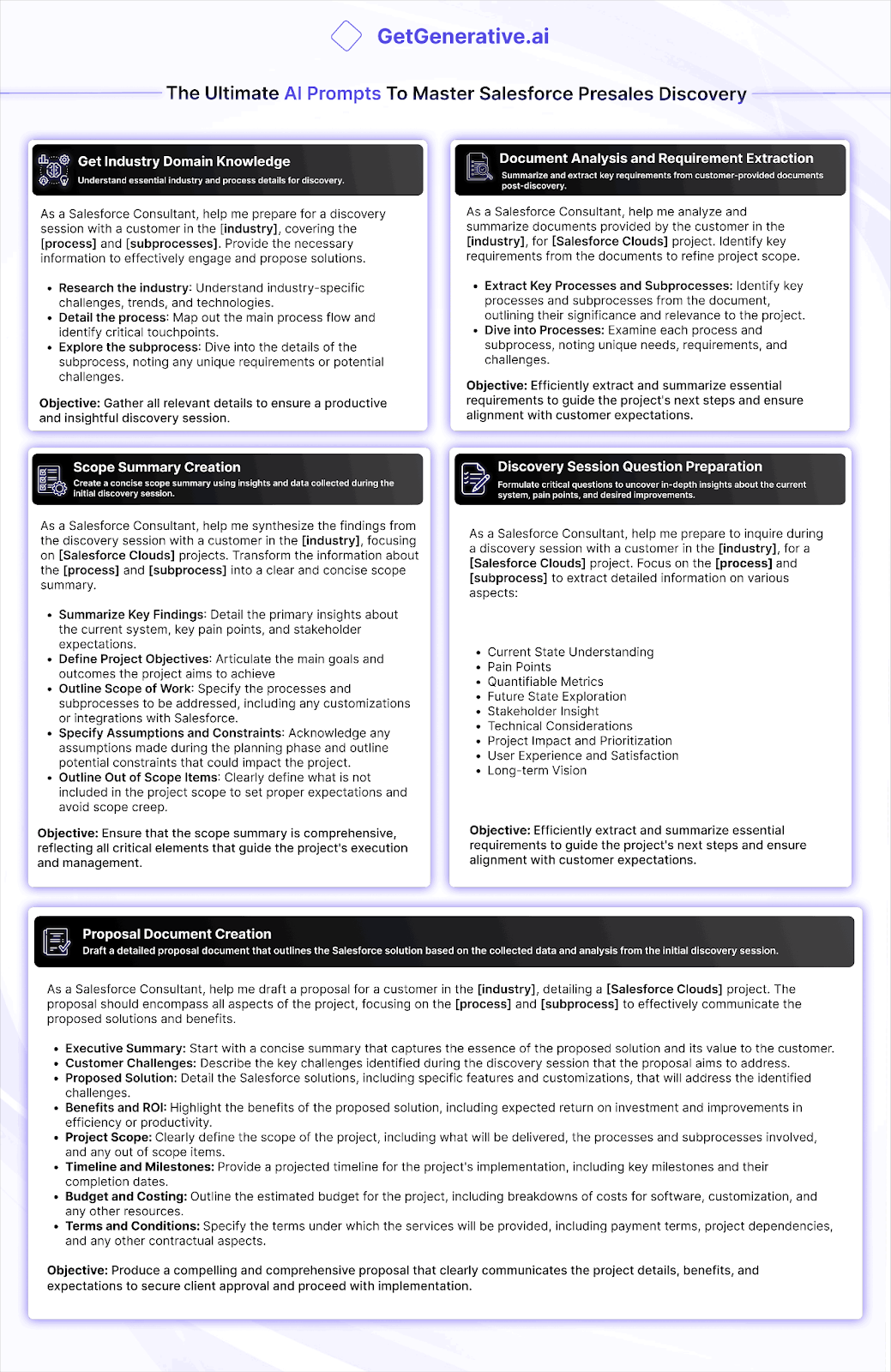
AD 4nXcSMlVKGm7aVEKEHqx4UckDsh6d6z m14NnRy3jhFEO 9zs4M3bntbWQw89pzhXMP2 u9 oHiTZI5YMTjRA6o gEOsrWe0d3uK0WF XJs8QsNV4XQDSB yHVR3Fn8gZWY4ehfp5Vltwa8juBjw g C0NpxA?key=G 2RyfaWgeY 9q4FgOEJWA

Get Industry Domain Knowledge

Before stepping into a discovery session, it’s crucial to arm yourself with in-depth industry knowledge. AI-powered prompts can significantly enhance your preparation by providing you with a wealth of information tailored to your client’s specific sector.

Key AI Prompt: “As a Salesforce Consultant, help me prepare for a discovery session with a customer in the [industry] industry, covering the [process] and [subprocesses]. Provide the necessary information to effectively engage and propose solutions.”

This prompt will guide the AI to deliver comprehensive insights, including:

  1. a) Industry-specific challenges: Gain a deep understanding of the unique obstacles faced by businesses in your client’s sector.
  2. b) Current trends: Stay ahead of the curve by identifying emerging technologies and methodologies shaping the industry.
  3. c) Process mapping: Visualize the main process flow and pinpoint critical touchpoints that could benefit from Salesforce integration.
  4. d) Subprocess deep dive: Explore the intricacies of relevant subprocesses, uncovering potential pain points and opportunities for optimization.

By leveraging AI in this way, you’ll enter the discovery session with a robust foundation of knowledge, allowing you to ask more insightful questions and demonstrate your expertise from the outset.

Document Analysis and Requirement Extraction

After the initial discovery session, clients often provide additional documentation that requires thorough analysis. AI can streamline this process, helping you extract key requirements and refine the project scope with unprecedented efficiency.

Key AI Prompt: “As a Salesforce Consultant, help me analyze and summarize documents provided by the customer in the [industry] industry, for [Salesforce Clouds] project. Identify key requirements from the documents to refine project scope.”

This prompt will enable the AI to:

  1. a) Extract key processes and subprocesses: Quickly identify and categorize the most important workflows described in the documentation.
  2. b) Highlight unique needs: Pinpoint industry-specific requirements that may require custom Salesforce solutions.
  3. c) Flag potential challenges: Identify areas where standard Salesforce functionality may need to be adapted or extended.
  4. d) Summarize critical information: Provide a concise overview of the most relevant details, saving you hours of manual review.

By employing AI for document analysis, you’ll be able to process large volumes of information rapidly, ensuring that no crucial requirement is overlooked in your project planning.

Also Read – The Ultimate Salesforce Consultant Cheat Sheet

Scope Summary Creation

Synthesizing the wealth of information gathered during the discovery phase into a clear, concise scope summary is a critical skill for any Salesforce consultant. AI can assist in this process, helping you create a comprehensive yet digestible overview of the project’s parameters.

Key AI Prompt: “As a Salesforce Consultant, help me synthesize the findings from the discovery session with a customer in the [industry] industry, focusing on [Salesforce Clouds] projects. Transform the information about the [process] and [subprocess] into a clear and concise scope summary.”

Using this prompt will enable you to generate a well-structured scope summary that includes:

  1. a) Key findings: A detailed overview of the client’s current system, primary pain points, and stakeholder expectations.
  2. b) Project objectives: Clearly articulated goals and desired outcomes for the Salesforce implementation.
  3. c) Scope of work: A precise definition of the processes and subprocesses to be addressed, including any required customizations or integrations.
  4. d) Assumptions and constraints: A list of any presumptions made during the planning phase and potential limitations that could impact the project.
  5. e) Out-of-scope items: A clear delineation of what is not included in the project, helping to manage expectations and prevent scope creep.

This AI-assisted approach ensures that your scope summary is comprehensive, reflecting all critical elements that will guide the project’s execution and management. It also helps in maintaining consistency across different projects and team members, leading to more accurate project planning and estimation.

Discover more helpful Salesforce cheat sheets by visiting our Salesforce Cheat Sheets page.

Crafting Insightful Discovery Session Questions with AI

The quality of your discovery session largely depends on the questions you ask. AI can be an invaluable tool in formulating probing, insightful questions that uncover the depth of information needed for a successful Salesforce implementation.

Key AI Prompt: “As a Salesforce Consultant, help me prepare to inquire during a discovery session with a customer in the [industry] industry, for a [Salesforce Clouds] project. Focus on the [process] and [subprocess] to extract detailed information on various aspects.”

This prompt will help you generate questions covering crucial areas such as:

  1. a) Current state understanding: “Can you walk me through your current [process] from start to finish?”
  2. b) Pain points: “What are the most significant challenges you face in your current [subprocess]?”
  3. c) Quantifiable metrics: “How do you currently measure the success of your [process]?”
  4. d) Future state exploration: “In an ideal world, how would you envision your [process] functioning?”
  5. e) Stakeholder insight: “Who are the key stakeholders involved in the [subprocess], and what are their primary concerns?”
  6. f) Technical considerations: “Are there any existing systems or databases that need to integrate with the new Salesforce solution?”
  7. g) Project impact and prioritization: “Which improvements to the [process] would have the most immediate positive impact on your business?”
  8. h) User experience and satisfaction: “How do your team members currently feel about the tools they use for the [subprocess]?”
  9. i) Long-term vision: “How do you see your [process] evolving over the next 3-5 years?”

By using AI to generate these questions, you ensure a comprehensive exploration of all relevant aspects of the client’s needs, leading to a more thorough understanding and, ultimately, a more effective Salesforce solution.

Also Read – The Complete Guide to Crafting Winning Salesforce Proposal Responses

AI-Enhanced Proposal Document Creation

The culmination of your PreSales discovery process is the creation of a compelling proposal document. This is where you showcase your understanding of the client’s needs and present your tailored Salesforce solution. AI can significantly enhance this process, helping you craft a comprehensive and persuasive proposal.

Key AI Prompt: “As a Salesforce Consultant, help me draft a proposal for a customer in the [industry] industry, detailing a [Salesforce Clouds] project. The proposal should encompass all aspects of the project, focusing on the [process] and [subprocess] to effectively communicate the proposed solutions and benefits.”

Using this prompt will help you generate a well-structured proposal that includes:

  1. a) Executive Summary: A concise overview that captures the essence of your proposed solution and its value to the client.
  2. b) Customer Challenges: A detailed description of the key issues identified during the discovery session, demonstrating your understanding of the client’s pain points.
  3. c) Proposed Solution: A comprehensive outline of your Salesforce solution, including specific features and customizations that address the identified challenges.
  4. d) Benefits and ROI: A clear explanation of the expected return on investment and improvements in efficiency or productivity that your solution will deliver.
  5. e) Project Scope: A well-defined scope of work, including deliverables, processes involved, and any out-of-scope items to set clear expectations.
  6. f) Timeline and Milestones: A projected implementation timeline with key milestones, giving the client a clear picture of the project’s progression.
  7. g) Budget and Costing: A transparent breakdown of estimated costs for software, customization, and other resources.
  8. h) Terms and Conditions: Clear specification of service terms, payment schedules, project dependencies, and other contractual aspects.

By leveraging AI in this way, you can ensure that your proposal is not only comprehensive but also tailored specifically to your client’s needs and industry context.

Conclusion

The integration of AI into the Salesforce PreSales discovery process represents a significant leap forward in consulting efficiency and effectiveness. By harnessing the power of AI-driven prompts, Salesforce consultants can:

  1. Rapidly acquire deep industry knowledge
  2. Efficiently analyze client documents and extract key requirements
  3. Create clear and comprehensive scope summaries
  4. Develop insightful discovery session questions
  5. Craft compelling and tailored proposal documents

This AI-enhanced approach not only saves time but also ensures a higher level of consistency and thoroughness across all client engagements.
getgenerative.ai implement salesforce 10x faster 

Enhance your Salesforce consulting with GetGenerative.ai. Effortlessly craft outstanding proposals, enabling you to dedicate more time to providing exceptional client service. 

Start today!
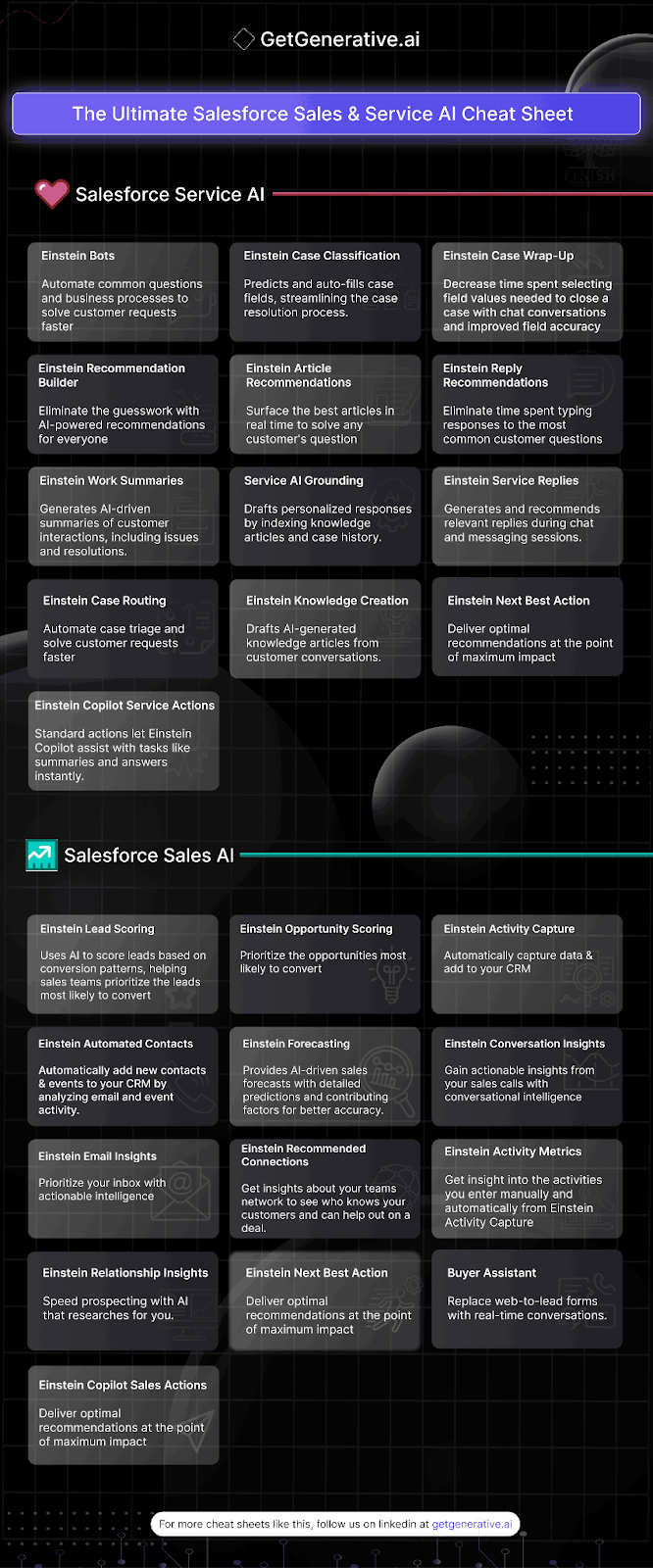
The Ultimate Salesforce Sales and Service Einstein Cheat Sheet

The Ultimate Salesforce Sales and Service Einstein Cheat Sheet

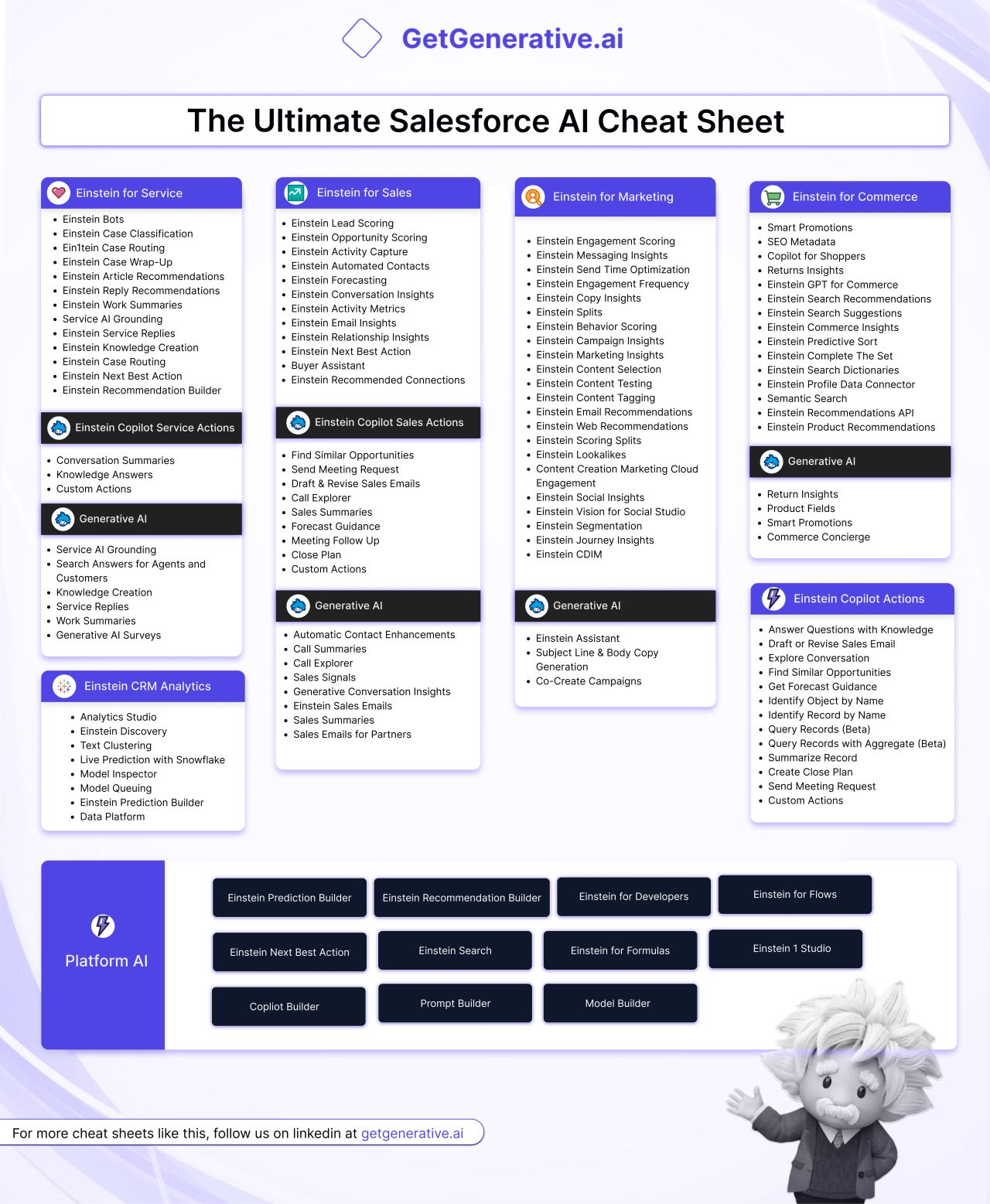
Salesforce continues to be a game-changer in customer relationship management (CRM), and its integration of artificial intelligence (AI) into sales and service processes is revolutionizing business operations. 

This blog will delve into the comprehensive Salesforce Sales and Service AI cheat sheet, covering all the essential AI-powered tools that can supercharge your business operations.

AD 4nXctl88vV7TuHtFZR2ntj55OnRUdrEN FdV9saykWV9OHoT 6zjhH2YrB0s1MicsMxPre nICaPoRaDv3dFur4wzoqc7GRU ldQmoXQ0fRtbn

Salesforce Service AI

Einstein Bots

Einstein Bots automate common customer inquiries and business processes, providing faster solutions to customer requests. These bots can handle routine tasks, freeing up your human agents for more complex issues.

Einstein Case Classification

This tool predicts and auto-fills case fields, streamlining the case resolution process. By automating this step, businesses can significantly reduce the time it takes to classify and resolve cases.

Einstein Case Wrap-Up

Einstein Case Wrap-Up reduces the time spent selecting field values to close a case. This is particularly useful in chat conversations, ensuring improved field accuracy and quicker case resolution.

Einstein Recommendation Builder

With AI-powered recommendations, Einstein Recommendation Builder eliminates the guesswork, providing tailored suggestions for everyone involved in the service process.

Einstein Article Recommendations

This feature surfaces the best articles in real-time to address any customer question. It ensures your service agents can access the most relevant information, enhancing the support experience.

Einstein Reply Recommendations

Einstein Reply Recommendations help eliminate the time spent typing responses to common customer questions. This tool generates suggested replies, speeding up response times and improving efficiency.

Einstein Work Summaries

Einstein Work Summaries generate AI-driven summaries of customer interactions, including issues and resolutions. This helps manage customer history and ensures continuity in service.

Service AI Grounding

Service AI Grounding drafts personalized responses by indexing knowledge articles and case history. This ensures that responses are both accurate and contextually relevant.

Einstein Service Replies

This tool generates and recommends relevant replies during chat and messaging sessions, ensuring that agents respond swiftly and accurately.

Einstein Case Routing

Automating case triage and Einstein Case Routing speeds up the process of solving customer requests. It ensures that cases are directed to the right agent or team promptly.

Einstein Knowledge Creation

Einstein Knowledge Creation drafts AI-generated knowledge articles from customer conversations, effortlessly helping build a robust knowledge base.

Einstein’s Next Best Action

Einstein’s Next Best Action feature delivers optimal recommendations at the point of maximum impact. It guides agents on the next steps to take, enhancing decision-making and improving service outcomes.

Einstein Copilot Service Actions

Standard actions with Einstein Copilot assist with tasks like summaries and instant answers, providing agents with the tools to resolve issues quickly.

Discover more helpful Salesforce cheat sheets by visiting our Salesforce Cheat Sheets page.

Salesforce Sales AI

Einstein Lead Scoring

Einstein Lead Scoring uses AI to score leads based on conversion patterns. This helps sales teams prioritize the leads most likely to convert, optimizing their efforts.

Einstein Opportunity Scoring

Einstein Opportunity Scoring prioritizes opportunities that are most likely to convert. This ensures that sales teams focus on high-potential deals, maximizing their chances of success.

Einstein Activity Capture

This tool automatically captures data and adds it to your CRM. It ensures all interactions are logged without manual input, providing a comprehensive view of customer engagement.

Einstein Automated Contacts

Einstein Automated Contacts automatically adds new contacts and events to your CRM by analyzing email and event activity. This ensures that your database is always up-to-date.

Einstein Forecasting

Providing AI-driven sales forecasts, Einstein Forecasting delivers detailed predictions with contributing factors for better accuracy. This helps in planning and strategy formulation.

Einstein Conversation Insights

With conversational intelligence, you can gain actionable insights from your sales calls. Einstein Conversation Insights analyzes calls to provide valuable feedback and trends.

Einstein Email Insights

Prioritize your inbox with actionable intelligence from Einstein Email Insights. This tool helps you focus on the most important emails, ensuring that critical communications are not missed.

Einstein Recommended Connections

Get insights about your team’s network to see who knows your customers and can help on a deal. Einstein Recommended Connections leverages internal networks for better collaboration.

Einstein Activity Metrics

Einstein Activity Metrics provides insights into the activities you enter manually and automatically from Einstein Activity Capture. This ensures a complete picture of your engagement efforts.

Einstein Relationship Insights

Speed up prospecting with AI that researches for you. Einstein Relationship Insights identifies and prioritizes potential leads, helping you connect with the right people.

Einstein’s Next Best Action

Just like in service, Einstein’s Next Best Action in sales delivers optimal recommendations at the point of maximum impact, guiding sales reps on the best steps to take.

Einstein Copilot Sales Actions

Einstein Copilot Sales Actions deliver optimal recommendations at the point of maximum impact, assisting sales teams in making informed decisions quickly.

Buyer Assistant

The Buyer Assistant replaces web-to-lead forms with real-time conversations. This interactive tool engages potential customers instantly, improving lead capture and qualification.

Conclusion

Salesforce’s integration of AI into its sales and service offerings transforms how businesses operate. By leveraging these AI-powered tools, companies can enhance efficiency, improve customer satisfaction, and drive better business outcomes. Whether you’re looking to streamline customer service processes or boost sales effectiveness, Salesforce’s Sales and Service AI tools provide the ultimate solution.

salesforce consulting services

👉 Talk to our Salesforce Expert Today and see how we can transform your implementation experience.

👉 Explore our Salesforce AI consulting services

Start today!

Frequently Asked Questions (FAQs)

1. What is Salesforce Service AI?

Salesforce Service AI includes tools like Einstein Bots, Case Classification, and Article Recommendations to automate and enhance customer service.

2. What is Einstein Case Classification?

It predicts and auto-fills case fields, streamlining the case resolution process for faster customer support.

3. How does Einstein Recommendation Builder help?

It provides AI-powered recommendations to eliminate guesswork and enhance decision-making.

4. What does Einstein Lead Scoring do?

It uses AI to score leads based on conversion patterns, helping sales teams prioritize high-potential leads.

5. What is Einstein Opportunity Scoring?

It prioritizes sales opportunities most likely to convert, optimizing sales efforts.

The Ultimate Salesforce Consultant Cheat Sheet 2024

The Ultimate Salesforce Consultant Cheat Sheet 2025

Salesforce, as a leading Customer Relationship Management (CRM) platform, offers expansive opportunities for businesses to enhance their client relations and operational efficiencies. However, the complexities of Salesforce require expert navigation to maximize its potential, which is where Salesforce consultants play a crucial role.

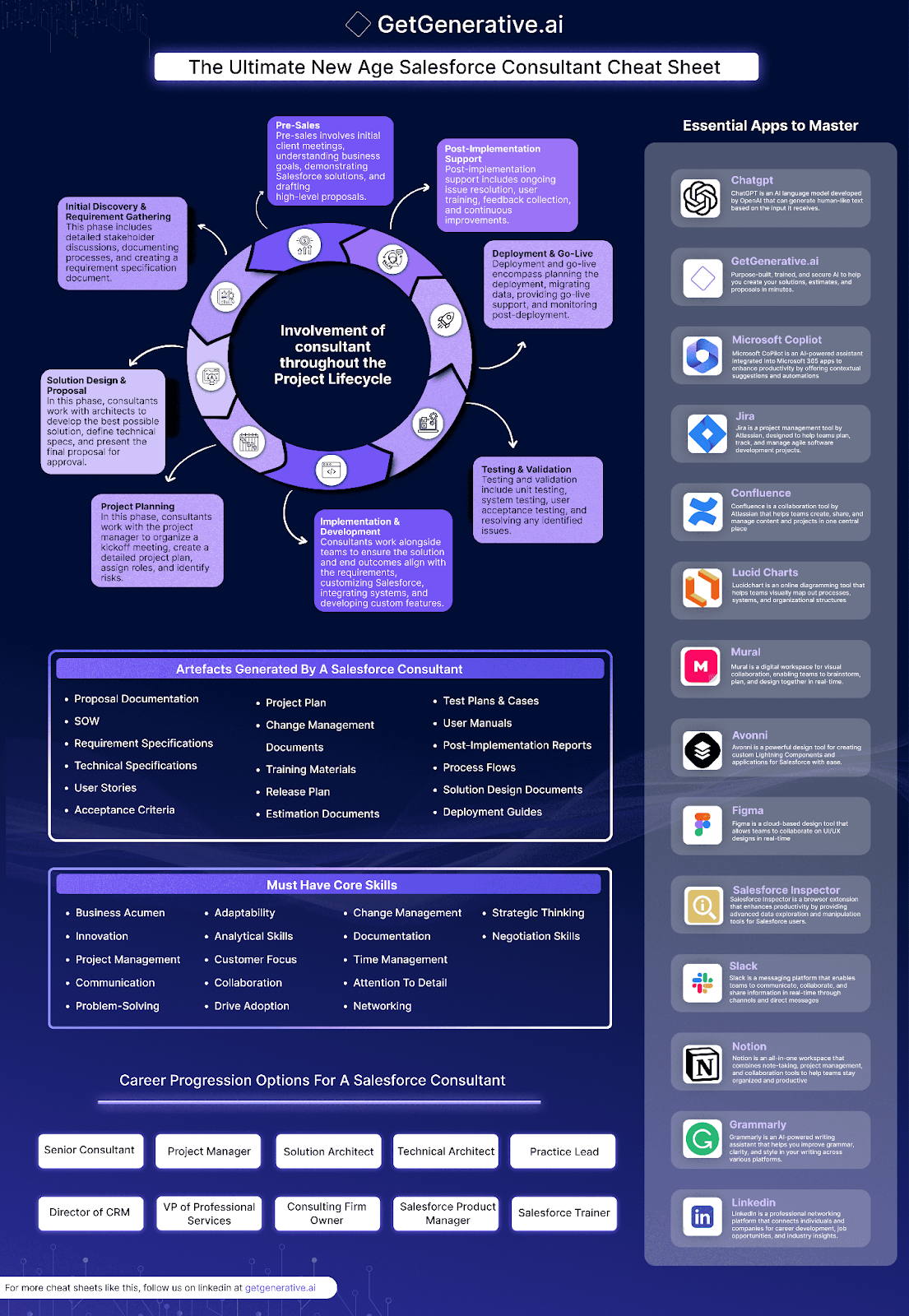
Salesforce consultants are integral to both implementing Salesforce solutions and ensuring their continuous improvement to align with client business goals. This blog post delves into the multifaceted role of Salesforce consultants, outlining their involvement throughout the project lifecycle, essential skills required, and career progression opportunities.

AD 4nXdujgQlXzpjQ2bATGH72LVNh Vax89lY40RegnUeX6BkNRRnrg6fFbVOmg7mg9u vWMulBw8Co1qrCEIpeDJmJyPqzqaUU08053AECSYozUXp8d5uSp5EtzJQBj9AH6JJJX5eeWYLPeReTAqaMofQAdQpbQ?key=OBSB17O63oE7 vYGIFitFg

The Salesforce Consultant Project Lifecycle

1. Pre-Sales and Discovery

The consultant’s journey starts in the pre-sales stage, involving initial client meetings to understand business objectives, demonstrate Salesforce’s capabilities, and draft preliminary proposals. This phase is critical as it sets expectations and frames the project scope.

2. Initial Discovery & Requirement Gathering

Following project initiation, Salesforce consultants engage in detailed stakeholder discussions to document processes and create a requirements specification document. This meticulous documentation is foundational, guiding all subsequent phases of the project.

3. Solution Design & Proposal

In collaboration with architects, consultants design a tailor-made solution for the client. This phase involves developing technical specifications and culminates with the presentation and approval of the final project proposal.

4. Project Planning

Consultants then transition to project planning, working closely with project managers to organize kickoff meetings, detail the project plan, assign roles, and identify potential risks. Effective planning is key to ensuring project success.

5. Implementation & Development

During implementation, consultants customize Salesforce features, integrate systems, and develop new functionalities to meet the project’s unique requirements. This stage is hands-on and crucial for transforming the proposed solution into a functional system.

6. Testing & Validation

This phase is vital to ensure that the implemented solutions function as intended. Salesforce consultants oversee unit testing, system testing, user acceptance testing, and address any issues uncovered during these tests. It’s a rigorous process aimed at ensuring the solution’s reliability and performance before it goes live.

7. Deployment & Go-Live

Deployment is the critical transition from a development environment to live production. Salesforce consultants manage the data migration, provide go-live support, and monitor the system’s initial performance closely. This phase is about turning the strategy into operational success.

8. Post-Implementation Support

After the system goes live, consultants continue to provide value through ongoing support. This includes troubleshooting issues, training users, collecting feedback for future enhancements, and ensuring the Salesforce implementation continues to meet business needs effectively.

Also Read – Becoming a Salesforce Consultant – The Ultimate Guide

Artifacts Generated by a Salesforce Consultant

Throughout these phases, Salesforce consultants produce a variety of documents that are essential for project clarity and continuity:

  • Proposal Documentation and Statement of Work (SOW) define the project scope and deliverables.
  • Requirement and Technical Specifications provide detailed descriptions of system requirements and technical directions.
  • User Stories and Acceptance Criteria guide development by describing features from an end-user perspective.
  • Project Plan and Change Management Documents keep the project on track and manage transitions.
  • Training Materials, User Manuals, and Release Plans prepare the client for system adoption and updates.
  • Estimation Documents, Test Plans & Cases, and Post-Implementation Reports offer insights into project progress and post-launch performance.
  • Process Flows, Solution Design Documents, and Deployment Guides ensure that all stakeholders have a clear understanding of the system’s functionality and integration.

These artifacts not only aid in the systematic execution of the project but also ensure that all stakeholders are aligned with the project’s goals and progress.

Essential Skills for Salesforce Consultants

To navigate the complexities of Salesforce projects successfully, consultants need a blend of technical, business, and interpersonal skills:

  • Business Acumen and Strategic Thinking: Understanding business operations and strategic alignment is crucial for crafting solutions that drive real business outcomes.
  • Innovation and Problem-Solving: Consultants must continually seek innovative solutions to complex problems, ensuring that the Salesforce implementation delivers effective results.
  • Project Management and Time Management: These skills are vital for keeping projects on schedule and within budget, managing resources efficiently, and coordinating team efforts.
  • Communication and Collaboration: Effective communication is essential for working with diverse teams and stakeholders, ensuring clear understanding and cooperation throughout the project.
  • Technical Proficiency and Analytical Skills: A deep understanding of Salesforce’s capabilities, along with the ability to analyze data and processes, is crucial for designing effective solutions.
  • Adaptability and Customer Focus: Being adaptable to changing project needs and focusing on enhancing customer satisfaction are key to the role.
  • Documentation and Attention to Detail: Producing detailed documentation and maintaining a focus on the nuances of project requirements ensure nothing is overlooked.
  • Networking and Negotiation Skills: These skills help consultants navigate business relationships and advocate effectively for project needs.

Also Read – The Ultimate Salesforce Einstein AI Cheat Sheet

Essential Software Tools for Salesforce Consultants

To support these skills and enhance their workflow, Salesforce consultants rely on a suite of essential software tools:

1. ChatGPT

ChatGPT is utilized extensively by Salesforce consultants for generating human-like text. It’s instrumental in crafting clear and engaging communications, drafting comprehensive documentation, and creating supportive materials such as user guides and FAQs. Its natural language processing capabilities aid consultants in effectively conveying complex ideas and instructions to clients and team members alike.

2. GetGenerative.ai

GetGenerative.AI is revolutionizing the Salesforce consulting landscape with its advanced AI-powered co-pilot. Designed to make Salesforce consultants 10 times more effective, productive, and innovative, this purpose-built platform aids in swiftly creating solutions, estimates, and proposals within the Salesforce ecosystem. 

GetGenerative.AI has helped consultants generate proposals worth over $500 million for leading companies. Crafted by seasoned consultants with over 20 years of experience in tech consulting and a history of working on billion-dollar projects, GetGenerative.AI leverages deep industry insights to transform how Salesforce consultants work. By integrating this tool, consultants can deliver extraordinary client outcomes, ensuring success through exceptional Salesforce project results.

getgenerativeai

3. Microsoft Copilot

Integrated with Microsoft 365, Microsoft Copilot enhances the productivity of Salesforce consultants through AI-powered assistance. It provides contextual suggestions and automates routine tasks such as scheduling meetings, drafting emails, and organizing documents. By analyzing data and patterns within Microsoft 365, Copilot offers insights that aid consultants in making informed decisions swiftly, thereby optimizing workflow efficiency and overall project management.

4. Jira

As a project tracking tool, Jira enables Salesforce consultants to manage tasks, track project progress, and implement agile methodologies effectively. It facilitates the organization of project workflows, assignment of tasks, and tracking of issues and resolutions, ensuring projects stay on schedule and within scope.

5. Confluence

Serving as a collaboration platform, Confluence allows consultants to create, share, and collaborate on project content such as requirements documents, meeting notes, and technical specifications. It fosters transparency and ensures that all stakeholders are aligned on project goals and progress, promoting efficient communication and documentation management.

6. Lucid Charts

Used for diagramming and visual collaboration, Lucid Charts assists Salesforce consultants in mapping out project processes, creating flowcharts, and visualizing data structures. It facilitates clear communication of complex ideas and workflows, helping teams to align on project strategies and identify potential improvements.

7. Mural

Mural enhances visual collaboration through digital whiteboarding, enabling consultants to brainstorm ideas, create interactive workshops, and collaborate on design thinking exercises. It fosters creativity and innovation within project teams, supporting iterative problem-solving and enhancing project outcomes.

8. Avonni

Avonni is specifically designed for Salesforce consultants to create custom Lightning Components and applications. It enhances the Salesforce platform by allowing consultants to develop tailored solutions that meet unique client requirements. Avonni simplifies the process of customizing Salesforce implementations, enabling consultants to deliver robust and scalable solutions efficiently.

9. Figma

Figma is a cloud-based design tool crucial for UI/UX collaboration among Salesforce consultants. It supports the creation of user-friendly and aesthetically pleasing client interfaces by providing collaborative design features. Figma enables consultants to prototype, iterate, and refine designs in real-time, ensuring that Salesforce applications are intuitive and visually appealing to end-users.

10. Salesforce Inspector

Salesforce Inspector is a browser enhancement tool that provides advanced data exploration capabilities directly within Salesforce environments. It allows consultants to analyze data structures, debug configurations, and optimize system performance. Salesforce Inspector enhances consultants’ ability to troubleshoot issues, customize solutions, and ensure the integrity and efficiency of Salesforce implementations.

11. Slack

Slack facilitates team communication and collaboration through real-time messaging, file sharing, and integration with other tools and services. It enables consultants to coordinate project tasks, discuss updates, and resolve issues promptly, enhancing team productivity and cohesion.

12. Notion

Notion is an all-in-one workspace for consultants to manage project documentation, tasks, and knowledge sharing. It allows for the creation of databases, wikis, and collaborative notes, streamlining information management and project organization.

13. Grammarly

Ensures clear, error-free written communication by providing grammar and spell-checking suggestions. Grammarly helps consultants maintain professional communication standards in emails, reports, and client-facing documents, enhancing clarity and credibility.

14. LinkedIn

LinkedIn offers networking opportunities, industry insights, and professional growth for Salesforce consultants. It serves as a platform for consultants to connect with industry peers, showcase their expertise through posts and articles, and stay updated on industry trends and developments. LinkedIn facilitates career advancement by providing access to job opportunities and professional communities, supporting consultants in expanding their professional network and achieving their career goals.

Each tool complements the diverse skill set of Salesforce consultants, enabling them to execute their roles with greater efficiency and impact.

We now conclude our exploration of the Salesforce consultant role by looking at the various career progression opportunities available within this field. This pathway not only highlights the potential for growth but also emphasizes the diverse roles that consultants can aspire to as they advance their careers.

Career Progression Options for Salesforce Consultants

The journey of a Salesforce consultant doesn’t have to remain static; numerous advancement and specialization opportunities await those looking to expand their expertise:

  1. Senior Consultant: As experienced professionals, Senior Consultants handle more complex projects and play a key role in strategic decision-making, guiding less experienced team members.
  2. Project Manager: Moving into project management allows consultants to oversee entire Salesforce projects, ensuring they meet deadlines, stay within budget, and achieve the intended business outcomes.
  3. Solution Architect: This role involves designing holistic Salesforce solutions that integrate seamlessly with all aspects of client businesses, focusing on both the technical and functional components of Salesforce.
  4. Technical Architect: For those with a deep technical expertise, becoming a Technical Architect means focusing on the intricate technical challenges of Salesforce implementations, including system integrations and technical strategy.
  5. Practice Lead: Practice Leads manage a specific line of business within a consultancy, driving business development, managing client relationships, and leading strategic initiatives.
  6. Director of CRM: As a Director of CRM, professionals oversee a company’s overall CRM strategy, ensuring that Salesforce solutions are effectively enhancing customer relationships and business processes.
  7. VP of Professional Services: This executive role is responsible for leading a consultancy’s professional services division, focusing on optimizing client service and maximizing project profitability.
  8. Consulting Firm Owner: Entrepreneurial Salesforce consultants might choose to start their own consulting firm, offering specialized services and custom solutions to a variety of clients.
  9. Salesforce Product Manager: This role focuses on managing the lifecycle of Salesforce products within a company, from development through to deployment and enhancements.
  10. Salesforce Trainer: Trainers specialize in educating users and professionals on Salesforce, ensuring that they are proficient in using the platform and understanding its capabilities.

These career paths illustrate the breadth and depth of opportunities available in the Salesforce ecosystem, allowing consultants to tailor their career trajectories based on their interests, skills, and the demands of the industry.

Real-World Impact of Salesforce Consultants

1. Retail: Enhancing Customer Loyalty

  • Challenge: A retail chain struggled with fragmented customer data, making personalized marketing campaigns ineffective.
  • Solution: Salesforce consultants implemented Marketing Cloud and integrated it with Sales Cloud to centralize customer data. They used Einstein AI to analyze shopping behaviors and create targeted campaigns.
  • Impact: The chain saw a 25% increase in repeat purchases and a 15% rise in customer satisfaction scores.

2. Healthcare: Streamlining Patient Management

  • Challenge: A healthcare provider faced inefficiencies in tracking patient interactions and managing appointments.
  • Solution: Consultants deployed Health Cloud, enabling real-time tracking of patient journeys, integrated scheduling, and HIPAA-compliant data management.
  • Impact: Patient wait times reduced by 30%, and appointment booking efficiency improved by 40%.

3. Manufacturing: Optimizing Supply Chains

  • Challenge: A manufacturing company needed better visibility into its supply chain to reduce delays and improve inventory management.
  • Solution: Salesforce consultants implemented Manufacturing Cloud, integrating it with ERP systems for seamless data flow and predictive analytics.
  • Impact: The company achieved a 20% reduction in supply chain costs and improved on-time delivery rates by 35%.

4. Financial Services: Driving Cross-Selling Opportunities

  • Challenge: A financial institution struggled to identify cross-selling opportunities for its wealth management clients.
  • Solution: Consultants utilized Financial Services Cloud and Einstein Analytics to uncover patterns in client portfolios and recommend tailored financial products.
  • Impact: Cross-sell success rates increased by 18%, boosting overall revenue

Conclusion

Becoming a Salesforce consultant offers a dynamic and rewarding career with endless opportunities for growth and specialization. Through continuous learning, mastering key software tools, and developing a robust set of core skills, consultants can effectively navigate their career path and contribute significantly to any organization’s success. Whether choosing to deepen technical expertise or move into managerial roles, Salesforce consultants are essential in driving business innovation and transformation.

Enhance your Salesforce consulting with GetGenerative.ai. Effortlessly craft outstanding proposals, enabling you to dedicate more time to providing exceptional client service. 

Begin your journey today!

The Ultimate Salesforce Einstein AI Cheat Sheet

The Ultimate Salesforce Einstein AI Cheat Sheet

Salesforce Einstein AI is transforming the way businesses operate by infusing artificial intelligence into various facets of their operations. Whether it’s enhancing customer service, boosting sales productivity, or optimizing marketing strategies, Salesforce Einstein offers a comprehensive suite of AI-powered tools to help businesses thrive.

This cheat sheet delves into the key features, functionalities, and benefits of Salesforce Einstein AI, helping businesses unlock its full potential across service, sales, marketing, and commerce.

What is Salesforce Einstein AI?

Salesforce Einstein AI is an AI-powered extension of Salesforce CRM that enables businesses to automate routine tasks, derive actionable insights, and create highly personalized customer experiences. By leveraging advanced technologies such as machine learning, predictive analytics, and natural language processing, Einstein AI empowers businesses to make data-driven decisions and optimize customer interactions.

Whether you’re aiming to improve sales forecasting, streamline service processes, or enhance marketing campaigns, Einstein AI serves as a versatile toolkit to meet your goals.

AD 4nXdwZwmdJ1x6pYYqAAf1HhEv FtAQOmRgjckM832hHNrDdrXTqP1To9 FDEZZrCgqdcQhACIrH92r9PYxA0hoGNIXtIl68CgPqRe nm9nQnNpf KOwt0ge181xool0H1Ujg1Xi9stuFkA8NYBQip6ZYW05Lr?key=TOrQcUXOthJPHEekqk l8g

Key Components of Salesforce Einstein AI

  1. Einstein Prediction Builder: Create custom AI models to predict outcomes like lead conversions or case resolutions without writing code.
  2. Einstein Bots: Provide automated responses to routine queries, freeing up agents for more complex issues.
  3. Einstein Discovery: Analyze patterns in your data to uncover trends, predict outcomes, and suggest actionable insights.
  4. Einstein Vision and Language: Use AI to recognize images and analyze text for a deeper understanding of customer interactions.

Einstein for Service

Customer service has become a key differentiator for businesses, and Einstein for Service equips support teams with the tools to deliver faster, more effective solutions.

Primary Features of Einstein for Service

  • Einstein Bots: Automate customer interactions to provide quick and accurate responses to common inquiries.
  • Einstein Case Classification: Automatically classify cases to route them to the right agents.
  • Einstein Case Routing: Ensure that cases are directed to the most suitable agent based on their expertise and workload.
  • Einstein Case Wrap-Up: Streamline the case closure process with automated summaries and next steps.
  • Einstein Article Recommendations: Suggest relevant articles to agents to resolve cases faster.
  • Einstein Reply Recommendations: Provide agents with suggested responses to common customer questions.
  • Einstein Work Summaries: Generate summaries of customer interactions and cases for better context and follow-up.
  • Service AI Grounding: Enhance the accuracy and relevance of AI-driven recommendations and responses.
  • Einstein Service Replies: Automate responses to routine customer service emails.
  • Einstein Knowledge Creation: Create and update knowledge base articles automatically based on case resolutions.
  • Einstein Next Best Action: Recommend the next best steps for agents to take in resolving customer issues.
  • Einstein Recommendation Builder: Customize and build AI-driven recommendations tailored to your service processes.

Einstein Copilot Service Actions:

  • Conversation Summaries: Summarize customer conversations for quick reference.
  • Knowledge Answers: Provide accurate answers from your knowledge base.
  • Custom Actions: Create custom automated actions to enhance service efficiency.

Generative AI:

  • Service AI Grounding: Improve the grounding of AI responses for better accuracy.
  • Search Answers for Agents and Customers: Facilitate quick search answers for both agents and customers.
  • Knowledge Creation: Automate the creation of knowledge articles.
  • Service Replies: Generate automated service replies to common queries.
  • Work Summaries: Create detailed summaries of work and interactions.
  • Generative AI Surveys: Design and distribute AI-generated surveys for customer feedback.

Benefits for Customer Service Teams

  1. Faster Case Resolution: Automate repetitive tasks and reduce handling times.
  2. Improved Accuracy: Ensure consistent, high-quality responses with AI recommendations.
  3. Scalable Support: Handle a larger volume of inquiries without increasing headcount.
  4. Enhanced Customer Satisfaction: Deliver personalized, timely solutions that exceed customer expectations.

Also Read – Einstein Generative AI Features Across Salesforce Clouds – The Ultimate Guide

Einstein for Sales

Sales teams often face challenges in prioritizing leads, managing relationships, and forecasting revenue. Einstein for Sales provides AI tools to simplify these processes, enabling sales professionals to focus on building connections and closing deals.

Key Features of Einstein for Sales

  • Einstein Lead Scoring: Score leads based on their likelihood to convert.
  • Einstein Opportunity Scoring: Prioritize opportunities based on their potential to close.
  • Einstein Activity Capture: Automatically log sales activities to ensure accurate records.
  • Einstein Automated Contacts: Auto-create contact records from emails and calendar events.
  • Einstein Forecasting: Predict future sales performance with AI-driven forecasts.
  • Einstein Conversation Insights: Gain insights from sales conversations to improve strategies.
  • Einstein Activity Metrics: Track and measure sales activities for better performance management.
  • Einstein Email Insights: Analyze email interactions to optimize communication strategies.
  • Einstein Relationship Insights: Understand and manage relationships with key stakeholders.
  • Einstein Next Best Action: Recommend the next best steps for sales reps to close deals.
  • Buyer Assistant: Provide sales reps with real-time assistance and recommendations.
  • Einstein Recommended Connections: Suggest new connections that could lead to potential sales opportunities.

Einstein Copilot Sales Actions:

  • Find Similar Opportunities: Identify opportunities similar to successful ones.
  • Send Meeting Request: Automate the scheduling of sales meetings.
  • Draft & Revise Sales Emails: Generate and refine sales email drafts.
  • Call Explorer: Analyze and optimize sales call strategies.
  • Sales Summaries: Summarize sales activities and interactions.
  • Forecast Guidance: Provide guidance on sales forecasts.
  • Meeting Follow Up: Automate follow-up actions after sales meetings.
  • Close Plan: Develop detailed plans for closing deals.
  • Custom Actions: Create custom automated sales actions.

Also Read – Salesforce Proposals Cheat Sheet

Generative AI:

  • Automatic Contact Enhancements: Automatically enrich contact information.
  • Call Summaries: Generate summaries of sales calls.
  • Call Explorer: Provide insights and recommendations for sales calls.
  • Sales Signals: Detect and act on key sales signals.
  • Generative Conversation Insights: Generate insights from sales conversations.
  • Einstein Sales Emails: Create AI-generated sales emails.
  • Sales Summaries: Summarize sales activities.
  • Sales Emails for Partners: Generate sales emails tailored for partners.

Benefits for Sales Teams

  1. Increased Productivity: Automate repetitive tasks to give reps more time to sell.
  2. Enhanced Decision-Making: Use AI insights to prioritize leads and forecast sales outcomes.
  3. Improved Collaboration: Share actionable insights across teams for cohesive strategies.
  4. Higher Conversion Rates: Focus on opportunities with the highest likelihood of success.

How Einstein Conversation Insights Transforms Customer Interactions

Einstein Conversation Insights uses AI to analyze voice and video call transcripts, surfacing meaningful patterns in customer interactions. By detecting key moments—such as pricing discussions, competitor mentions, or objections—it empowers sales and service teams with actionable data to improve future engagements.

Key Capabilities:

  • Keyword & Sentiment Analysis: Detects key phrases, emotional tone, and intent across conversations.

  • Call Summaries: Automatically generates recaps highlighting next steps, commitments, and concerns.

  • Coaching Opportunities: Identifies calls where a rep may need guidance based on talk ratios, missed cues, or handling of objections.

  • CRM Integration: Links insights directly to lead, contact, and opportunity records—creating a feedback loop for strategy improvement.

Real-World Impact:

A sales manager can review Einstein Insights from 100 calls and instantly identify which reps are struggling with objections, which deals are at risk, and which keywords correlate with higher conversion.

By turning conversations into structured intelligence, Einstein transforms every interaction into a learning opportunity, enhancing both rep performance and customer satisfaction.

Einstein for Marketing

Einstein for Marketing helps businesses design campaigns that resonate with customers. From audience segmentation to engagement scoring, this tool offers a range of features to refine marketing strategies.

Primary Features of Einstein for Marketing

  • Einstein Engagement Scoring: Score customer engagement to prioritize efforts.
  • Einstein Messaging Insights: Analyze messaging performance and optimize communications.
  • Einstein Send Time Optimization: Determine the best time to send messages for maximum engagement.
  • Einstein Engagement Frequency: Optimize how often to engage customers to avoid fatigue.
  • Einstein Copy Insights: Gain insights into the effectiveness of marketing copy.
  • Einstein Splits: Test different marketing strategies to find the most effective approach.
  • Einstein Behavior Scoring: Score customer behaviors to predict future actions.
  • Einstein Campaign Insights: Analyze campaign performance to optimize strategies.
  • Einstein Marketing Insights: Gain comprehensive insights into marketing performance.
  • Einstein Content Selection: Automatically select the best content for each customer.
  • Einstein Content Testing: Test content variations to determine effectiveness.
  • Einstein Content Tagging: Automatically tag content for better organization and retrieval.
  • Einstein Email Recommendations: Suggest the best emails to send based on customer behavior.
  • Einstein Web Recommendations: Provide personalized web content recommendations.
  • Einstein Scoring Splits: Analyze different scoring models for customer segmentation.
  • Einstein Lookalikes: Identify and target customers similar to your best ones.
  • Content Creation Marketing Cloud Engagement: Enhance content creation within the Marketing Cloud.
  • Einstein Social Insights: Gain insights from social media interactions.
  • Einstein Vision for Social Studio: Use AI to analyze social media images.
  • Einstein Segmentation: Automatically segment customers for targeted marketing.
  • Einstein Journey Insights: Analyze customer journeys to improve engagement.
  • Einstein CDIM: Centralize customer data for more effective marketing.

Generative AI Capabilities in Marketing

  • Einstein Assistant: AI-powered assistant to enhance marketing tasks.
  • Subject Line & Body Copy Generation: Generate compelling subject lines and body copy for emails.
  • Co-Create Campaigns: Collaborate with AI to create effective marketing campaigns.

Benefits for Marketing Teams

  1. Personalized Campaigns: Deliver content tailored to individual customer preferences.
  2. Improved ROI: Optimize resources by targeting high-value audience segments.
  3. Streamlined Workflows: Automate segmentation, scoring, and content testing to save time.
  4. Deeper Insights: Use AI to uncover patterns in customer behavior and refine strategies.

Einstein for Commerce

E-commerce thrives on delivering personalized, seamless, and engaging shopping experiences. Einstein for Commerce equips businesses with AI tools to enhance customer interactions and drive sales through intelligent product recommendations and insights.

Key Features of Einstein for Commerce

  • Smart Promotions: Automate and optimize promotional offers.
  • SEO Metadata: Improve search engine optimization with AI-driven metadata.
  • Copilot for Shoppers: Assist shoppers with AI-driven recommendations.
  • Returns Insights: Analyze return data to improve products and processes.
  • Einstein GPT for Commerce: Leverage AI-generated content for commerce applications.
  • Einstein Search Recommendations: Provide personalized search recommendations.
  • Einstein Search Suggestions: Suggest relevant search terms to shoppers.
  • Einstein Commerce Insights: Gain insights into shopping behaviors and trends.
  • Einstein Predictive Sort: Sort products based on predicted customer preferences.
  • Einstein Complete The Set: Recommend complementary products to complete a set.
  • Einstein Commerce Insights: Analyze commerce data for better decision-making.
  • Einstein Search Dictionaries: Enhance search accuracy with custom dictionaries.
  • Einstein Profile Data Connector: Connect and analyze profile data for personalized experiences.
  • Semantic Search: Improve search results with semantic understanding.
  • Einstein Recommendations API: Integrate personalized recommendations into your commerce platform.
  • Einstein Product Recommendations: Provide personalized product recommendations to shoppers.

Generative AI in Commerce:

  • Return Insights: Generate insights from return data.
  • Product Fields: Enhance product information with AI.
  • Smart Promotions: Optimize promotions with AI-driven insights.
  • Commerce Concierge: Provide personalized shopping assistance.

Benefits for E-Commerce Businesses

  1. Increased Conversion Rates: Deliver personalized shopping experiences that resonate with customers.
  2. Optimized Inventory: Use insights to stock products that align with customer demands.
  3. Enhanced Customer Retention: Provide value-added recommendations and assistance for repeat business.
  4. Improved Search Experiences: Make product discovery intuitive and efficient.

Also Read – Salesforce Project Cost Estimation Cheat Sheet

Einstein Copilot Actions

Salesforce Einstein Copilot introduces a suite of AI-driven actions to automate and enhance everyday CRM tasks, ensuring efficiency and accuracy.

Copilot Features Across Domains

  • Answer Questions with Knowledge: Automatically provide accurate answers using knowledge base articles.
  • Draft or Revise Sales Email: Generate and refine sales email drafts to improve communication.
  • Explore Conversation: Analyze and gain insights from customer and sales conversations.
  • Find Similar Opportunities: Identify sales opportunities similar to successful ones.
  • Get Forecast Guidance: Receive AI-driven guidance on sales forecasts.
  • Identify Object by Name: Quickly find and identify objects within Salesforce by name.
  • Identify Record by Name: Locate specific records within Salesforce by name.
  • Query Records (Beta): Query records using AI-driven insights (currently in beta).
  • Query Records with Aggregate (Beta): Perform aggregate queries on records (currently in beta).
  • Summarize Record: Generate summaries of records for quick reference.
  • Create Close Plan: Develop detailed plans for closing sales deals.
  • Send Meeting Request: Automate the scheduling of sales and customer meetings.
  • Custom Actions: Create and automate custom actions tailored to specific needs.

Generative AI-Enabled Copilot Actions

  1. Explore Conversations: Use AI to extract insights from customer and sales interactions.
  2. Close Plan Creation: Develop detailed action plans for closing deals efficiently.
  3. Query Records: Perform advanced searches and aggregate queries within Salesforce.

These tools ensure teams can focus on strategic goals while repetitive tasks are handled seamlessly by AI.

Einstein CRM Analytics

  • Analytics Studio: A comprehensive analytics platform for visualizing and analyzing data.
  • Einstein Discovery: Use AI to uncover insights and predictive analytics.
  • Text Clustering: Automatically cluster and categorize text data.
  • Live Prediction with Snowflake: Integrate live predictive analytics with Snowflake data warehouse.
  • Model Inspector: Inspect and understand AI models used in predictions.
  • Model Queuing: Manage and queue multiple AI models for efficient processing.
  • Einstein Prediction Builder: Create custom AI predictions without needing to code.
  • Data Platform: A robust platform for managing and analyzing large datasets.

Benefits of Einstein CRM Analytics

  1. Enhanced Reporting: Gain a clearer picture of performance metrics and KPIs.
  2. Proactive Decision-Making: Use predictive insights to anticipate trends and challenges.
  3. Simplified Data Analysis: Let AI handle complex data operations, delivering user-friendly results.
  4. Integrated Solutions: Combine analytics with other Einstein tools for cohesive strategies.

Platform AI

Platform AI empowers developers and admins with tools to integrate and utilize AI across the Salesforce platform. Key features include:

  • Einstein Prediction Builder: Create custom AI predictions tailored to your business needs without any coding required.
  • Einstein Recommendation Builder: Develop personalized recommendation systems to enhance customer experiences.
  • Einstein for Developers: Provide developers with tools and APIs to embed AI capabilities into applications.
  • Einstein for Flows: Integrate AI predictions and recommendations into Salesforce Flows to automate business processes.
  • Einstein Next Best Action: Offer intelligent, context-aware recommendations for the next best action in various scenarios.
  • Einstein Search: Leverage AI-powered search capabilities for more accurate and relevant search results within Salesforce.
  • Einstein for Formulas: Use AI to enhance and optimize Salesforce formulas for better business logic and decision-making.
  • Einstein 1 Studio: A development environment for building and deploying AI models and applications within Salesforce.
  • Copilot Builder: Create and customize AI-driven copilot assistants to help users navigate and utilize Salesforce more efficiently.
  • Prompt Builder: Develop and fine-tune AI prompts to guide user interactions and improve AI responses.
  • Model Builder: Build, train, and deploy custom AI models tailored to specific business requirements.

With these powerful tools, businesses can seamlessly integrate AI into their operations, enhancing efficiency, decision-making, and customer satisfaction.

Benefits for Developers and Admins

  1. Customizable Solutions: Design AI tools specific to unique business requirements.
  2. Simplified Integration: Seamlessly integrate AI into existing workflows.
  3. User Empowerment: Provide users with AI-powered tools to enhance productivity

Conclusion

Salesforce Einstein AI offers an extensive range of tools designed to enhance various aspects of your business, from customer service and sales to marketing and commerce. By leveraging these AI-driven features, you can improve efficiency, make data-driven decisions, and provide personalized experiences for your customers.

salesforce consulting services

Get started with GetGenerative.ai to craft impressive proposals effortlessly. Save valuable time and focus on what matters most. Ideal for Salesforce consultants looking to take their expertise to the next level.

Don’t wait – embrace the future of Salesforce consulting with GetGenerative.ai today!

FAQs

1. What is Einstein AI in Salesforce?

Einstein AI is Salesforce’s AI-powered suite that automates tasks, provides predictive insights, and personalizes customer interactions across sales, service, marketing, and commerce.

2. Is Einstein GPT available in Salesforce?

Yes, Einstein GPT is available, combining generative AI with Salesforce tools to automate content creation and enhance personalization in customer interactions.

3. Can you use AI with Salesforce?

Yes, Salesforce integrates AI through Einstein AI, enabling automation, predictive analytics, and smarter workflows for enhanced CRM operations.

4. What is Einstein Bots in Salesforce?

Einstein Bots are AI-powered chatbots in Salesforce that automate customer interactions, providing instant, accurate responses to common queries.

Einstein Generative AI Features Across Salesforce Clouds – The Ultimate Guide

Einstein Generative AI Features Across Salesforce Clouds – The Ultimate Guide

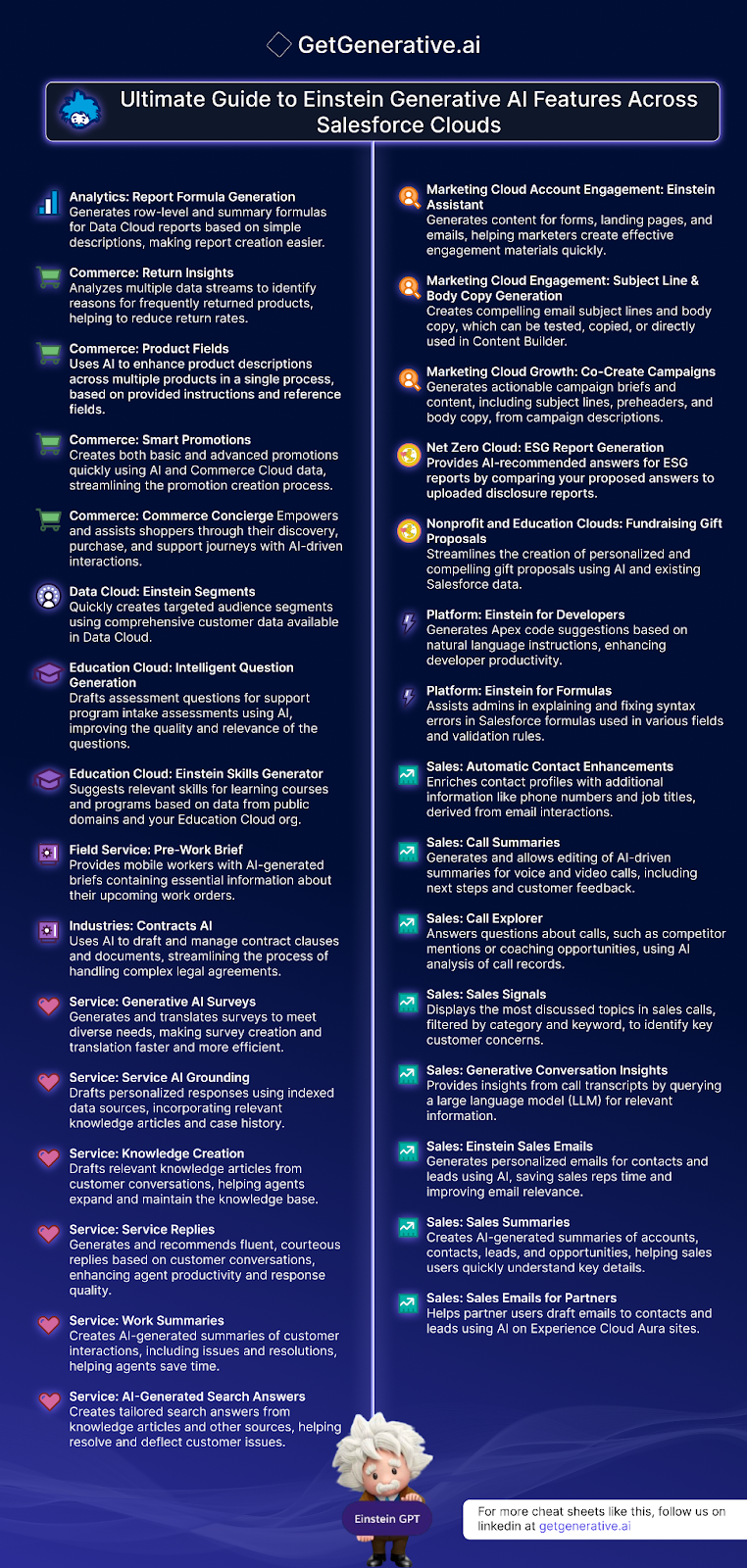
Salesforce’s Einstein Generative AI is revolutionizing how businesses interact with their data and customers across various clouds. By leveraging advanced AI capabilities, Salesforce offers tools that enhance productivity, improve customer engagement, and streamline complex processes. 

This guide explores the diverse features of Einstein Generative AI across Salesforce clouds, showcasing how these innovations can benefit your organization.

Analytics Cloud

Report Formula Generation 

Einstein Generative AI simplifies the creation of Data Cloud reports by generating row-level and summary formulas based on simple descriptions. This feature makes it easier for users to build comprehensive reports without deep technical expertise, allowing for more efficient data analysis and decision-making.

AD 4nXdyXunMhw64H5HmAcsAI2BmnMlEzZFe0Nd6yIQz1EK0Uu1EpAptlEkOUiXUOJauGOV1unUkYCdvp38qdz3pHoPJ3umKqJKmcd vKNgPLZ2xoeB1Scj8Ou D6fS50dSuU loI6X41WC4wAIMAhJk b5elLnc?key= twbHOU7A01lWqLX 2AvzA

Commerce Cloud

Return Insights 

AI-driven analysis of multiple data streams identifies the reasons behind frequently returned products. By understanding these patterns, businesses can take proactive measures to reduce return rates, enhancing customer satisfaction and operational efficiency.

Product Fields

Einstein Generative AI enhances product descriptions across multiple products simultaneously. By following provided instructions and reference fields, the AI ensures consistency and quality in product listings, which can significantly boost online sales and customer experience.

Smart Promotions 

Creating promotions can be a time-consuming task. With AI, businesses can quickly generate both basic and advanced promotions using existing Commerce Cloud data. This streamlines the promotion creation process, allowing for timely and relevant marketing campaigns.

Commerce Concierge 

Empowering shoppers through their journey, the AI-driven Commerce Concierge provides assistance during product discovery, purchase, and support interactions. This feature enhances the overall shopping experience, driving customer loyalty and satisfaction.

Also Read – Salesforce Proposals Cheat Sheet

Data Cloud

Einstein Segments 

This feature enables the rapid creation of targeted audience segments using comprehensive customer data. By leveraging the wealth of information available in Data Cloud, businesses can deliver personalized marketing campaigns and experiences, leading to higher engagement and conversion rates.

Education Cloud

Intelligent Question Generation 

Einstein Generative AI drafts assessment questions for program intake assessments, improving the relevance and quality of these questions. This leads to more accurate evaluations of student needs and program effectiveness.

Einstein Skills Generator 

The AI suggests relevant skills for learning courses and programs based on data from public domains and your Education Cloud organization. This helps in designing curricula that meet current industry standards and learner needs.

Field Service

Pre-Work Brief 

Field service workers receive AI-generated briefs containing essential information about their upcoming work orders. This feature ensures that mobile workers are well-prepared and informed, leading to higher efficiency and customer satisfaction.

Industry Solutions

Contracts AI 

Managing complex legal agreements can be streamlined with AI. Contracts AI drafts and manages contract clauses and documents, simplifying the process and reducing the risk of errors or omissions.

Marketing Cloud

Account Engagement: Einstein Assistant 

Marketers can quickly generate content for forms, landing pages, and emails using Einstein Assistant. This feature helps in creating effective engagement materials that resonate with the audience.

Engagement: Subject Line & Body Copy Generation 

AI generates compelling email subject lines and body copy, which can be tested, copied, or directly used in Content Builder. This ensures that marketing communications are impactful and drive higher open and click-through rates.

Also Read – Salesforce Project Cost Estimation Cheat Sheet

Growth: Co-Create Campaigns 

From campaign descriptions, AI generates actionable campaign briefs and content, including subject lines, preheaders, and body copy. This accelerates the campaign creation process, allowing marketers to focus on strategy and execution.

Net Zero Cloud

ESG Report Generation 

AI provides recommended answers for ESG reports by comparing proposed answers to uploaded disclosure reports. This feature helps organizations maintain compliance and transparency in their environmental, social, and governance reporting.

Nonprofit and Education Clouds

Fundraising Gift Proposals 

Creating personalized and compelling gift proposals is made easier with AI. By using existing Salesforce data, nonprofits and educational institutions can streamline their fundraising efforts, improving donor engagement and success rates.

Platform Cloud

Einstein for Developers 

Generates Apex code suggestions based on natural language instructions. This feature significantly enhances developer productivity by simplifying the coding process, allowing developers to focus on more complex tasks.

Einstein for Formulas 

Assists administrators in explaining and fixing syntax errors in Salesforce formulas used across different fields and validation rules. This tool ensures that formulas are accurate and functional, reducing downtime and increasing efficiency.

Sales Cloud

Automatic Contact Enhancements 

Enriches contact profiles with additional information such as phone numbers and job titles derived from email interactions. This helps sales teams maintain up-to-date and comprehensive contact information.

Call Summaries 

Generates and allows editing of AI-driven summaries for voice and video calls. These summaries include next steps and customer feedback, ensuring that follow-ups are timely and relevant.

Call Explorer 

Answers questions about calls, such as competitor mentions or coaching opportunities, using AI analysis of call records. This feature provides valuable insights that can inform sales strategies and training programs.

Sales Signals 

Displays the most discussed topics in sales calls, filtered by category and keyword. By identifying key customer concerns, sales teams can tailor their approaches to better meet client needs.

Generative Conversation Insights 

Provides insights from call transcripts by querying a large language model (LLM) for relevant information. This feature helps sales teams understand customer sentiments and trends.

Einstein Sales Emails 

Generates personalized emails for contacts and leads using AI. This saves sales representatives time and ensures that communications are relevant and engaging.

Sales Summaries 

Creates AI-generated summaries of accounts, contacts, leads, and opportunities. This helps sales users quickly understand key details and make informed decisions.

Sales Emails for Partners 

Assists partner users in drafting emails to contacts and leads using AI on Experience Cloud Aura sites. This feature enhances communication and collaboration with partners.

Also Read – Salesforce Sales Cloud Features Cheat Sheet

Service Cloud

AI-Generated Search Answers 

Creates tailored search answers from knowledge articles and other sources, helping resolve and deflect customer issues efficiently. This improves customer satisfaction by providing quick and accurate solutions.

Generative AI Surveys 

Generates and translates surveys to meet diverse needs. This makes survey creation and translation faster and more efficient, ensuring that feedback collection is streamlined.

Service AI Grounding 

Drafts personalized responses using indexed data sources, incorporating relevant knowledge articles and case history. This feature enhances the quality and relevance of customer service responses.

Knowledge Creation 

Drafts relevant knowledge articles from customer conversations. This helps agents expand and maintain the knowledge base, ensuring that it remains comprehensive and up-to-date.

Service Replies 

Generates and recommends fluent, courteous replies based on customer conversations. This enhances agent productivity and response quality, leading to better customer experiences.

Work Summaries 

Creates AI-generated summaries of customer interactions, including issues and resolutions. This helps agents save time and ensures that all relevant information is documented.

Conclusion

Salesforce’s Einstein Generative AI features are transforming business operations across various clouds by introducing advanced AI capabilities that enhance productivity, improve customer engagement, and streamline complex processes. From generating Apex code and simplifying report creation to drafting personalized emails and providing AI-driven insights, these tools empower organizations to leverage their data more effectively.

getgenerative.ai implement salesforce 10x faster  

Sign up with GetGenerative.ai now to create stunning proposals in minutes. Save countless hours and focus on what truly matters. Perfect for Salesforce consultants aiming to elevate their game. 

Don’t wait—experience the future of Salesforce consulting with GetGenerative.ai today!

The Ultimate Salesforce Sales Cloud Features Cheat Sheet

The Ultimate Salesforce Sales Cloud Features Cheat Sheet

In the fast-paced world of customer relationship management (CRM), Salesforce stands out as a leading platform, offering an extensive suite of features designed to streamline sales processes and enhance productivity. The Salesforce Sales Cloud, in particular, is robust, offering diverse functionalities tailored to various sales operations.

This blog post delves into the Salesforce Sales Cloud Features, providing a comprehensive overview and practical insights into implementing these features effectively. Let’s get started!

Salesforce Sales Cloud Features

1. Account Management

Account Management in Salesforce Sales Cloud is foundational for maintaining comprehensive and organized customer information. Key features include:

  • Account Object: The core entity representing companies in your CRM.
  • Account Hierarchies: Allows users to view related accounts in a hierarchical structure, ideal for managing company groups or families.
  • Account Sharing: Enables selective sharing of account data across different teams, maintaining privacy and data integrity.
  • Person Accounts: Supports B2C relationships by combining individual consumer records into the account model.
  • Account Teams: Facilitates collaboration by allowing multiple users to be assigned to an account.
  • Default Account Team: Automatically assigns team members to new accounts based on predefined settings.
  • Einstein Account Management: Utilizes AI to provide insights and recommendations, enhancing account management strategies.
  • Merge Duplicate Accounts: Helps maintain data quality by merging redundant account records.
  • Account Intelligence View: Offers a consolidated view of key account metrics and insights, aiding strategic decision-making.
AD 4nXc1q37ybKiHSIQ8tlthW LAmjtQFth05nZ SJehE v3UY0ASrd CZffBuelOJuW556f qsgYYBaM B6zHGTWYvtKZPiQON4qw1KJGmba7XHtbUI RStHZWDNJXtszryWnyZRIz432lDHVFz2no0D1PU9277?key=blmZdS1bViTk0E1nBzleQw

2. Lead Management

Lead Management is crucial for tracking potential customers from the initial point of contact through to conversion. This category includes:

  • Lead Object: The primary record type used to track individual leads.
  • Web-To-Lead: Automates the capture of leads from websites directly into Salesforce.
  • Leads From LinkedIn Lead Gen Ads: Seamlessly integrates leads generated from LinkedIn advertising into Salesforce.
  • Leads With Buyer Assistant: Employs AI to assist in prioritizing and engaging leads.
  • Lead Automations: Streamlines lead management processes through automation, reducing manual effort.
  • Manage Duplicate Leads: Prevents data redundancy by identifying and merging duplicate lead entries.
  • Lead Intelligence View: Provides a detailed view of lead activities and metrics to refine lead management strategies.
  • Seller Home: A personalized dashboard that offers sellers a snapshot of their leads and sales performance.

3. Opportunity Management

Opportunity Management features help track sales deals from prospecting to closure, including:

  • Opportunity Object: Manages details of potential sales and tracks them through various stages.
  • Opportunity Stages: Defines the stages of sales deals, facilitating pipeline management.
  • Opportunity Products: Associates products with specific opportunities, essential for revenue forecasting.
  • Similar Opportunities: Identifies opportunities similar to the current one, offering insights into potential upsell or cross-sell paths.
  • Track Your Competitors: Enables tracking of competitor actions within opportunity records, providing a competitive edge.
  • Opportunity Splits: Allows revenue to be split among multiple team members, reflecting their contribution to the deal.
  • Opportunity Product Splits: Manages revenue distribution at the product level within opportunities.
  • Opportunity Teams: Supports collaborative selling by allowing multiple users to work on the same opportunity.
  • Opportunity Team Roles: Defines the roles of each team member in an opportunity team, clarifying responsibilities.

4. Product Management

Product Management in Salesforce enhances the ability to manage and sell products effectively:

  • Products: Represents items or services for sale.
  • Product Schedules: Manages the timeline for product delivery or revenue realization.
  • Manage Products With Product Families: Organizes products into families for easier management and reporting.
  • Create Price Books: Used to maintain different pricing structures for different markets or customer segments.
  • Manage Product Prices: Allows for the adjustment and setting of product prices within price books.

5. Order Management

Order Management ensures that the process from sales quote to fulfillment is smooth and efficient:

  • Orders: Tracks the details and status of customer orders.
  • Order Products Object: Links products to specific orders.
  • Orders Without Price Book: Manages orders that do not require a linked price book.
  • Share Orders: Facilitates the sharing of order information with team members or across departments.
  • Zero Quantity Orders: Allows for tracking orders with zero quantity, useful in certain promotional scenarios.
  • Reduction Orders: Manages any reductions in order quantities.
  • Negative Quantities For Order Products: Handles returns or cancellations by recording negative quantities in order products.

Also Read – Salesforce Project Cost Estimation Cheat Sheet

6. Campaign Management

Campaign Management in Salesforce enables effective organization and tracking of marketing campaigns from conception to execution. This module includes:

  • Campaign Object: Acts as the central hub for managing individual marketing campaigns.
  • Campaign Types: Allows categorization of campaigns based on their nature and objectives (e.g., email, webinar, trade show).
  • Campaign Hierarchy: Organizes campaigns into a hierarchical structure, enabling aggregation of data and more precise tracking of related marketing efforts.
  • Connected Campaigns: Links campaigns directly with sales performance, providing a clear view of marketing ROI.
  • Campaign Influence: Analyzes how various campaigns influence opportunities, helping to allocate marketing resources more effectively.
  • Configure Campaign Members: Manages who is part of the campaign and their roles.
  • Import Campaign Members: Streamlines the process of adding members to a campaign from external sources.
  • Share Campaigns: Facilitates collaboration by allowing team members to view and work on campaigns together.

7. Revenue Intelligence

Revenue Intelligence uses advanced analytics to transform data into actionable insights, helping teams optimize their sales strategies:

  • Revenue Insights: Offers deep insights into sales trends and performance metrics.
  • Revenue Insights Dashboard: Provides a visual representation of key revenue metrics at a glance.
  • Sales Rep Command Center Dashboard: Equips sales representatives with personalized analytics to improve their sales tactics.
  • Advanced Features For Revenue Intelligence: Includes predictive analytics and machine learning tools to forecast future sales and identify patterns.
  • Revenue Intelligence Apps: Specialized applications that integrate with Salesforce to enhance revenue intelligence capabilities.

8. Contract Management

Contract Management within Salesforce helps manage the entire lifecycle of contracts, from creation to renewal:

  • Contract Object: The primary record for storing contract details.
  • Contract Lifecycle: Manages all phases of the contract process, including drafting, negotiation, approval, and storage.

9. Quote Management

Quote Management streamlines the process of creating and managing sales quotes, which are crucial for closing deals:

  • Create And Manage Quotes: Allows for the generation of detailed sales quotes based on customer requirements and available products.
  • Sync Quotes And Opportunities: Ensures that changes in quotes or opportunities are reflected across both records to maintain accuracy.
  • Create Quote Templates: Facilitates the creation of pre-defined templates that can be used to speed up the quote generation process.
  • Email Quote PDF: Enables the sending of quotes directly to customers in a PDF format via email, enhancing the professionalism and efficiency of communications.

10. Digital Engagement for Sales Cloud

Digital Engagement for Sales Cloud enhances interactions with customers through various digital channels, ensuring a seamless customer experience:

  • Messaging For Sales: Allows sales teams to communicate with clients via SMS, chat, or other messaging platforms directly within Salesforce.
  • Web Chat For Sales: Integrates web chat capabilities into Salesforce, letting sales reps chat live with website visitors.
  • Einstein Bots For Sales: Uses AI-powered bots to handle routine customer inquiries automatically, freeing up sales reps to focus on more complex tasks.
  • Channel-Object Linking: Links various communication channels to specific Salesforce objects, providing a unified view of all interactions.
  • Omni-Channel For Sales: Ensures that customer interactions across all channels are tracked and managed centrally, improving customer service and response times.

11. Collaborative Forecasts

Collaborative Forecasts in Salesforce allows teams to work together to create more accurate sales forecasts. This feature includes:

  • Collaborative Forecasts: Enables teams to share and view forecasts, improving alignment and accuracy.
  • Forecast Types: Supports different types of forecasts such as revenue, quantity, and custom types to suit various business needs.
  • Forecast Currency: Allows forecasting in multiple currencies, catering to global businesses.
  • Territory Forecasts: Links forecasts to specific sales territories, aiding in regional planning and strategy.
  • Overlay Splits Forecasts: Facilitates the allocation of sales credit to multiple team members, reflecting their contributions accurately.
  • Users For Collaborative Forecasts: Defines which team members can view or modify the forecasts.
  • Forecast Managers And Their Subordinates: Establishes a hierarchy within the forecasting process, ensuring that oversight and reporting are streamlined.
  • Quotas: Allows management of sales quotas to measure performance against targets.
  • Project Sales: Enables projection of future sales based on current data and trends.
  • Share Forecasts: Promotes transparency by allowing team members to share forecast information.
  • Collaborative Forecasts Reports: Generates reports to analyze forecast data and assess team performance.
  • Reports On Sales Projections: Provides detailed insights into future sales, helping with strategic decision-making.

12. Enterprise Territory Management

Enterprise Territory Management organizes and manages sales territories to optimize market coverage and resource allocation:

  • Enterprise Territory Management: Systematically manages sales territories within Salesforce.
  • Territory Models: Designs and structures territories according to organizational needs.
  • Territory Types And Territories: Defines various types of territories, each tailored to specific market segments or geographic areas.
  • Create Territory Model Record: Allows for the creation and tracking of individual territory records.
  • Territories: Organizes sales regions or areas into manageable units.
  • Territory Hierarchy: Establishes relationships between different territories, enhancing reporting and management.
  • Default User Access For Territory Records: Configures default access settings for territory data.
  • Collaboration On Territory Models: Facilitates team input and consensus on territory structures.
  • Assignment Rules To Territories: Automates the assignment of accounts, leads, and opportunities to the appropriate territories.
  • Managing Territory Assignments: Ensures that sales assignments are aligned with territory configurations.
  • Assign Territory Managers To Territories: Appoints managers to oversee specific territories, ensuring effective leadership and accountability.
  • Manage Users And Roles Within Territories: Handles permissions and roles within each territory.
  • Territory Forecasts: Integrates forecasting into territory management to predict sales performance regionally.
  • Reporting With Territories: Provides comprehensive reports on territory performance and efficiency.

13. Pipeline Inspection

Pipeline Inspection offers tools to closely monitor and manage the sales pipeline for enhanced visibility and control:

  • Pipeline Inspection: Allows detailed examination of the sales pipeline to identify bottlenecks and opportunities.
  • Pipeline Inspection Chart: Visual representation of the pipeline, showing stages and statuses of various deals.
  • Einstein Features In Pipeline Inspection: Leverages AI to provide insights and predictive analytics within the pipeline.
  • Einstein Deal Insights: Offers AI-driven insights into potential deals, highlighting factors that may affect the outcome.
  • Tiered Einstein Opportunity Scores: Uses tiered scoring systems to prioritize opportunities based on their likelihood of closing.
  • Advanced Features For Pipeline Inspection: Includes advanced analytics and machine learning tools to refine pipeline management.

14. AI Solutions In Sales Cloud

AI Solutions in Sales Cloud offers a suite of advanced tools leveraging artificial intelligence to enhance sales operations and decision-making. This comprehensive integration of AI helps streamline processes and provides deeper insights:

  • Einstein Activity Capture: Automates the logging of sales activities, ensuring data accuracy and freeing up sales reps to focus on selling.
  • Einstein Lead Scoring: Utilizes AI to evaluate and score leads based on their likelihood to convert, allowing sales teams to prioritize their efforts effectively.
  • Einstein Opportunity Insights: Provides predictive insights about opportunities, suggesting actions that could increase the likelihood of closing a deal.
  • Einstein Forecasting: Employs AI to project sales outcomes more accurately, using historical data and identifying trends.
  • Einstein Automated Contacts: Keeps contact information up to date automatically, enhancing customer relationship management.
  • Einstein Account Insights: Delivers actionable intelligence on accounts, helping sales teams to target their efforts where they are most likely to succeed.
  • Einstein Conversational AI: Engages customers with automated, natural language interactions to improve service and gather insights.
  • Einstein Generative AI: Generates content and communications tailored to customer interactions and sales data.
  • Meeting Follow-Up Email In Einstein: Automates the drafting and sending of follow-up emails after meetings, ensuring timely and relevant communication.
  • Close Plan In Einstein Copilot: Guides sales representatives through a strategic approach to close deals, leveraging AI to suggest the most effective actions.
  • Copilot: Offers automated assistance across various sales tasks, enhancing productivity and effectiveness.
  • Sales Summaries For Einstein Copilot: Provides summarized overviews of sales activities, helping sales teams and management quickly grasp key outcomes and areas for attention.

15. Other Sales Cloud Features

Other Sales Cloud Features include a variety of tools to support and enhance overall sales operations:

  • Sales Console: Provides a unified interface for managing all sales activities.
  • Salesforce Maps Lite: Integrates geographic data to help visualize and plan sales territories.
  • Resolve Latitude And Longitude Discrepancies With Salesforce Maps Lite: Ensures accurate geographic data.
  • LinkedIn Sales Navigator To Sales Cloud: Integrates LinkedIn insights for better lead and opportunity engagement.
  • Configure Paths: Customizes the steps in the sales process to align with organizational methods.
  • Multiple Currencies: Supports transactions in multiple currencies.
  • Advanced Currency Management: Manages currency conversion and related financial settings accurately.

Also Read – Salesforce Proposals Cheat Sheet

Sample Salesforce Sales Cloud Discovery Outcome Template

The real estate company aims to streamline its sales processes, improve lead conversion, and enhance customer interactions using Salesforce Sales Cloud. Currently, the company faces challenges with manual lead management, fragmented customer data, and limited visibility into sales activities. 

AD 4nXcPnIV5PkZV2ABY rGNRr9EvV dHtzT kkHhIBLNCJo ui6H3PB18Nifwh0hUUPzdYKRBFDibWbdeRhS hkJS66ZODGIJpcaEYjtz1DxYDN4evF4HhjqeWUvEH3MuQiwWcQpUFG yT1Gz0f7Iw 5LsJZwLX?key=blmZdS1bViTk0E1nBzleQw

By implementing Salesforce Sales Cloud, the company seeks to automate lead capturing and qualification, centralize property and client information, and provide sales agents with real-time insights and tools to close deals faster. Additionally, leveraging generative AI capabilities, the company plans to personalize customer interactions, automate follow-up communications, and generate insightful sales reports to drive strategic decision-making.

1. Lead Management Process

  • People: Sales Agents, Marketing Team
  • Sub Process: Capturing property inquiries, qualifying potential buyers, assigning leads to agents.
  • Technology: Salesforce, Marketing Automation Tools
  • Features:
    • Lead Management: Streamline the process of capturing and qualifying leads.
    • Manage Duplicate Leads: Identify and merge duplicate leads to maintain data accuracy.
    • Enable Lead Intelligence View: Gain insights into lead behavior and engagement.
    • Configure Leads Conversion Process: Define the process for converting leads to opportunities.
    • Einstein Lead Scoring: Use AI to prioritize leads based on their likelihood to convert.

2. Property Listing Management Process

  • People: Sales Agents, Listings Managers
  • Sub Process: Listing properties, updating property details, managing property statuses.
  • Technology: Salesforce, Property Management System
  • Features:
    • Property Listing Custom Object: Manage property listings and updates seamlessly.
    • Property Process: Automate approval workflows for property listings.
    • Automation: Use Salesforce Flows to automate property management tasks.
    • Custom Lightning Components: Create custom Lightning components for viewing property listings.
    • Einstein Activity Capture: Automatically capture data from emails and calendar events to keep records up to date.

3. Opportunity Management Process

  • People: Sales Agents
  • Sub Process: Creating opportunities for property sales, tracking progress, closing deals.
  • Technology: Salesforce, Property Management System
  • Features:
    • Opportunity Management: Track and manage sales opportunities throughout the sales cycle.
    • Opportunity Stages: Define and manage different stages of the sales process.
    • Similar Opportunities: Identify and leverage similar past opportunities to inform current deals.
    • Einstein Opportunity Insights: Get AI-driven insights into opportunities to help sales reps focus on the right deals.
    • Close Plan in Einstein Copilot: Get AI-driven recommendations to help close deals.

4. Client Relationship Management Process

  • People: Client Relationship Managers, Sales Agents
  • Sub Process: Managing client interactions, maintaining client records, nurturing relationships.
  • Technology: Salesforce, Outlook, Property Management System
  • Features:
    • Seller Home: Provide sales reps with a centralized dashboard to manage their activities.
    • Sales Console: Provide sales reps with a unified interface to manage their work.
    • Einstein Generative AI: Generate personalized content and communications for leads and opportunities.
    • Einstein Conversation Insights: Analyze sales conversations to gain insights into customer needs and sentiment.
    • Meeting Follow-Up Email in Einstein: Automatically draft follow-up emails after sales meetings.
    • Sales Summaries for Einstein Copilot: Generate summaries of sales activities and meetings.

5. Sales Forecasting Process

  • People: Sales Managers, Data Analysts
  • Sub Process: Creating sales forecasts, analyzing market trends, reviewing sales performance.
  • Technology: CRM System, Excel Files
  • Features:
    • Collaborative Forecasts: Enable collaborative forecasting to improve sales predictions.
    • Sales Insights: Leverage analytics to gain insights into sales performance.
    • Sales Reporting: Generate detailed sales reports for performance tracking.
    • Einstein Forecasting: Improve forecasting accuracy with AI predictions.

Key Value Indicators

  1. Increased Sales: Boost sales by 30% compared to the last 3 years.
  2. Enhanced Productivity: Reduce manual tasks from 50% to 20%.
  3. Better Visibility: Real-time insights via dashboards and reports.
  4. Improved Lead Conversion: Increase conversion rate from 10% to 25%.
  5. Streamlined Processes: Unified client and sales management.

Eliminating Key Pain Points

  1. Data Silos: Integrate sales and property data for a unified view of customer interactions.
  2. Manual Processes: Automate lead and property management to increase efficiency.
  3. Scalability Issues: Implement scalable sales solutions to support business growth.
  4. Poor Sales Experience: Enhance sales interactions with personalized and timely follow-ups.
  5. Limited Insights: Utilize robust sales analytics and reporting for actionable insights.

Conclusion 

As we’ve explored in this cheat sheet, Salesforce Sales Cloud offers a robust suite of features designed to enhance every aspect of sales and customer relationship management. From streamlined lead and opportunity management to sophisticated forecasting and territory management, Salesforce empowers organizations to not only meet but exceed their sales goals. 

getgenerative.ai implement salesforce 10x faster

For more insights and resources, visit GetGenerative.ai and stay updated with the latest in Salesforce solutions.

Salesforce Project Cost Estimation: A Comprehensive Guide

Salesforce Project Cost Estimation: A Comprehensive Guide


In the dynamic world of Salesforce implementations, accurate project cost estimation is pivotal. It not only ensures that projects are delivered within budget but also helps in managing resources effectively. 

This guide delves into the systematic approach required to master cost estimation for Salesforce projects, ensuring stakeholders are well-informed and budgets are meticulously managed.

Steps Involved in Cost Estimation

1. Requirement Gathering

This initial phase involves collecting crucial project information to fully understand the scope and specific needs of the Salesforce project. Effective requirement gathering is foundational, as it sets the stage for all subsequent planning and estimation processes.

2. Resource Identification

Identifying the right mix of personnel, tools, and technology is essential. This step involves a detailed analysis of the human and technical resources needed to complete the project, ensuring that all necessary capabilities are accounted for.

3. Solution Architecture

Defining the high-level solution and architecture is crucial for visualizing the end state of the project. This involves outlining the system’s structure, functionalities, and the interdependencies that exist within it.

4. Effort Estimation

Estimating the effort involves approximating the amount of work and time required for each component of the project. This is crucial for setting realistic timelines and allocating resources effectively.

5. Cost Calculation

Here, the costs are calculated based on the estimated effort and resources. This step is critical for budget formulation and ensures that all financial resources are accounted for appropriately.

6. Contingency Planning

Including a budget for unexpected expenses is essential for risk mitigation. This step prepares the project for potential overruns and unforeseen costs, safeguarding the project’s financial health.

7. Review and Validation

The final step involves reviewing and validating the estimated costs and plans with all project stakeholders. This ensures that the estimates are accurate and feasible, thereby setting the project up for success.

AD 4nXfzhG2Sn8szGM6YE3ED1rCOHUVGkylbi qupDZi5YvYDrqyVwgMcQySDRH3CvZJ8l7b ba8 Fh3JMcWMs5YntIA6xtIwNW1qvL HDCdCLxy47FBc70lJTxIgguEvACv4tDU5mlunkIf856lWF l0LHsAkX2?key=bRd7XTIa4psNE5QqXiCwvw

Key Effort Areas in Salesforce Project Estimation

  1. Requirement Analysis: Involves gathering and analyzing requirements to ensure all needs are accurately captured.
  2. Design & Architecture: Focuses on the blueprint and structure of the solution, determining the technical framework and design.
  3. Testing: Essential for verifying the functionality and performance of the Salesforce solution.
  4. Development: The actual coding and creation of the Salesforce solution.
  5. Data Migration: Involves transferring data from existing systems to the new Salesforce platform.
  6. Integrations: Connecting the Salesforce solution with other systems and software.
  7. Project Management: Overseeing the project to ensure it meets deadlines, stays on budget, and aligns with client expectations.
  8. Documentation: Creating detailed documents that outline the use and maintenance of the Salesforce system.
  9. Stakeholder Management: Engaging with and managing expectations of all parties involved.
  10. Support & Maintenance: Providing ongoing assistance and updates for the Salesforce solution.
  11. Training: Educating users on how to effectively utilize the new system.
  12. Deployment: The process of implementing the Salesforce solution into a live environment.

Also Read – Salesforce Proposals Cheat Sheet

Key Roles in Salesforce Project Estimation

Project Manager

The Project Manager is crucial, overseeing the entire cost estimation process. They ensure accuracy, manage the budget, and are the linchpin in keeping the project aligned with its financial goals.

Consultant

Consultants play a key role in providing detailed, actionable requirements that shape the cost estimation process, ensuring that all estimates are grounded in the project’s practical demands.

Architect

The Architect estimates costs related to the technical design and architecture. Their expertise is crucial in forecasting the technical expenses that will shape the project’s budget.

Finance Team

A dedicated Finance Team reviews cost estimates and provides the necessary financial oversight. This ensures that the project remains financially viable and the estimates are maintained within the budgetary constraints.

Aspects of Solution Estimation

  1.  Scope Definition: Define precisely what will be delivered to prevent scope creep, ensuring all parties have clear expectations.
  2. Solution Overview Diagrams: Create visual diagrams of the solution architecture to facilitate understanding and communication among stakeholders.
  3. Detailed Requirements: Break down the project requirements into smaller, manageable tasks for more accurate estimation.
  4. Feature List: Compile a comprehensive list of all features and functionalities that the solution will offer.
  5. Complexity Analysis: Evaluate the complexity of each feature to refine the cost and time estimates.
  6. Technology Stack: Specify the products and additional tools that will be used, ensuring compatibility and efficiency.
  7. Integration: Plan for the integration of the Salesforce solution with both internal and external systems.
  8. Effort Estimation per Feature: Estimate the time and resources needed for each feature, helping to allocate budget and resources effectively.
  9. Configuration vs. Custom Development: Determine whether features require standard configurations or custom development, affecting the project’s complexity and cost.
  10. Dependencies and Sequencing: Identify any dependencies between tasks and the sequence of development, crucial for project planning and timing.
  11. Existing vs. Greenfield Implementation: Decide if the solution will integrate with existing systems or if it will be a completely new implementation.
  12. Functional and Non-Functional Requirements: Consider all requirements, including those related to system performance and security, to ensure the solution is robust and compliant.

Also Read – Salesforce Proposal Creation With AI: Streamline & Win Deals

Project Costing Details

  1. Resource Costing: Costs for all personnel including developers, analysts, and project managers.
  2. Contractors vs. Employees: Differentiate costs between contractors and full-time employees, which can impact overall budgeting and cost management.
  3. Infrastructure Costs: Include expenditures for software licenses, hardware, and cloud services which are crucial for the project’s technical backbone.
  4. Operational Costs: Cover office space, utilities, and miscellaneous expenses which are often overlooked in initial estimates.
  5. Contingency Budget: Allocate 10-20% of the budget for unexpected costs and risk mitigation to manage unforeseen expenses effectively.
  6. Travel and Accommodation: Account for costs associated with on-site visits and regular client meetings which are necessary for project success.
  7. Training and Support: Include costs for client training and post-implementation support to ensure smooth operation and adoption of the Salesforce solution.

The Role of AI in Salesforce Cost Estimation

As Salesforce projects become more complex, incorporating AI-driven tools for cost estimation is emerging as a game-changer. AI-powered platforms can analyze historical data, predict effort areas, and identify potential risks more accurately than traditional methods. These tools, integrated seamlessly into Salesforce ecosystems, offer benefits such as:

  • Improved Accuracy: AI minimizes human error by leveraging large datasets to generate precise estimates.
  • Predictive Analytics: Advanced algorithms help foresee potential roadblocks, allowing teams to allocate resources proactively.
  • Scenario Modeling: AI tools can simulate different project scenarios, enabling organizations to explore cost-saving strategies before implementation.
  • Dynamic Adjustments: Unlike static estimates, AI solutions provide real-time updates as project parameters evolve, ensuring budgets stay on track.

Tips to Reduce Project Costs

  1. Leverage Standard Configuration: Use built-in options to minimize the need for custom development, reducing time and cost.
  2. Leverage Prebuilt Components: Reuse existing components to save time and effort, enhancing project efficiency.
  3. Shared Responsibilities: Assign tasks like data entry and training to the customer to distribute workload and reduce labor costs.
  4. Consider Offshore Resources: Utilize lower-cost offshore resources for certain development tasks to lower overall project costs.
  5. Partial Resource Loading: Assign resources part-time to multiple projects to maximize efficiency and reduce idle time.
  6. Use Agile Methodologies: Implement agile practices to improve project efficiency and adaptability.
  7. Streamline Communication: Use effective tools and strategies to avoid misunderstandings and delays.
  8. Monitor and Control Costs: Continuously track and adjust project costs to stay within budget.
  9. Negotiate Vendor Contracts: Secure better terms and discounts for software and services to reduce expenditure.
  10. Automate Testing: Implement automated testing to save time on manual tests and speed up the development process.

This comprehensive approach not only helps in estimating costs accurately but also provides actionable strategies to keep costs under control while maintaining project quality and timeliness.

Conclusion

Accurately estimating the costs associated with Salesforce projects is a multifaceted process that requires attention to detail, careful planning, and strategic execution. By understanding the key roles, effort areas, and effective cost-reduction strategies, organizations can ensure that their Salesforce implementations are not only successful but also financially sound. 

salesforce consulting services

At GetGenerative.ai, we’ve reimagined Salesforce implementation—built from the ground up with AI at the core. This isn’t legacy delivery with AI added on. It’s a faster, smarter, AI-native approach powered by our proprietary platform.

👉 Explore our Salesforce AI consulting services

The Complete Guide to Crafting Winning Salesforce Proposal Responses

The Complete Guide to Crafting Winning Salesforce Proposal Responses

In today’s competitive business environment, delivering compelling proposals is crucial for securing projects and partnerships. For Salesforce consultants and service providers, understanding how to effectively respond to a Request for Proposal (RFP) can significantly increase the likelihood of winning new clients. 

This guide delves into the structured approach to crafting persuasive Salesforce proposals, ensuring your responses are not only comprehensive but also aligned with client expectations.

AD 4nXfEXiHmjg8hIhVA0c5kLewI7dfHmegp6v0p5sCmD0krfNfECpKoQ1VlOa3b MTRgYVOsqYXP8RB95yM0NT7lQs4Jqk4sMADF5r3gaKaGkpsAF KYeTSErMZ oQfXYGq1a7pLnMuaeOF 5lAFtp

The Lifecycle of an RFP Response

The success of a Salesforce proposal largely depends on how well each stage of the response lifecycle is executed. Here’s what you need to know:

  1. Initial Review: Start by meticulously evaluating the RFP. Understand the requirements and determine the project’s feasibility. This stage sets the foundation for your response strategy.
  2. Team Assembly: Assemble a team equipped with the necessary skills and expertise. Assign roles strategically to cover all aspects of the proposal process, ensuring a comprehensive approach.
  3. Requirement Analysis: Dive deep into the client’s needs and the project’s scope. This analysis is crucial for aligning your proposal with the client’s expectations and objectives.
  4. Solution Design: Design a solution tailored to the client’s specific requirements. This involves developing a robust architecture that not only meets but exceeds client expectations.
  5. Proposal Drafting: Craft a detailed document incorporating all essential elements of your proposed solution. Ensure clarity and thoroughness to effectively communicate your proposal’s value.
  6. Review & Refinement: Refine your proposal based on internal and client feedback. This iterative process is key to polishing your proposal and addressing any potential concerns.
  7. Final Submission: Deliver a well-polished proposal within the stipulated timeframe. Timeliness and attention to detail are crucial in this final step.
  8. Follow-Up Engagement: After submission, maintain open lines of communication with the client. Be prepared to clarify any points and provide additional information to support your proposal.

Defining Team Roles for Success

Each member of the proposal team plays a pivotal role in crafting a successful response. Understanding these roles can enhance collaboration and efficiency:

  • Sales Consultant: Acts as the primary point of contact with the client, gathering all initial requirements and setting the stage for a tailored response.
  • Solution Architect: Designs the technical framework of the solution, ensuring it aligns perfectly with client needs.
  • Project Manager: Coordinates the project, ensuring that all tasks are completed on schedule and resources are effectively allocated.
  • Business Analyst: Converts client requirements into actionable technical specifications.
  • Technical Lead: Manages technical challenges and ensures the feasibility of the proposed solution.
  • Financial Analyst: Develops comprehensive cost estimates and financial models to support the proposal.

Also Read – Salesforce Proposal Creation With AI: Streamline & Win Deals

Solution Mapping and Value Additions

A successful Salesforce proposal is one that not only meets but also anticipates the client’s needs, offering clear value additions. Here’s how to effectively map solutions and highlight their benefits:

Solution Mapping:

  • Requirement Analysis: Break down the client’s needs into specific, actionable requirements.
  • Feature Identification: Map these requirements to Salesforce features that can effectively address them.
  • Customization Needs: Identify necessary customizations or integrations that will enhance the solution.
  • Solution Design: Develop a comprehensive architecture that integrates all aspects of the proposed solution.
  • Implementation Plan: Outline clear and actionable steps for the solution’s rollout, ensuring a seamless transition and execution.

Value Additions:

  • Efficiency Gains: Demonstrate how your solution will streamline operations and enhance process efficiency.
  • Cost Savings: Highlight potential cost reductions and financial benefits of your solution.
  • Scalability: Explain how the solution can evolve with the client’s growth needs.
  • User Experience: Emphasize enhancements to the user interface that improve overall user satisfaction.
  • Compliance & Security: Ensure the solution meets all regulatory requirements and enhances data security.

getgenerativeai

Navigating Compliance and Legal Considerations

Compliance and legal integrity are paramount in proposal responses. Address these concerns upfront:

  • Regulatory Requirements: Clearly identify all applicable regulations and demonstrate your solution’s compliance.
  • Data Privacy: Assure clients of stringent data protection measures and privacy compliance.
  • Contracts & Agreements: Prepare thorough legal documentation that supports the contractual obligations and agreements.
  • Risk and Liability: Detail risk management strategies and liability considerations, providing confidence in the robustness of your proposal.

Also Read – Top 15 Apps for Salesforce Consultants

Internal Team Considerations

Effective management of the project team is critical for the success of the proposal. Consider the following:

  • Resource Availability: Ensure all team members are available and capable of taking on the project.
  • Skill Alignment: Align team skills with the project requirements to maximize efficiency and effectiveness.
  • Internal Communication: Maintain clear and consistent communication to ensure all team members are aligned with the project goals.
  • Training Needs: Identify any gaps in skills and arrange for necessary training to equip your team for success.

Tips for Crafting Standout Salesforce Proposal Responses

1. Personalize Your Response

Tailor your proposal to the specific client by referencing their business challenges, industry trends, and goals. Use their language and highlight how Salesforce solutions align with their unique objectives.

2. Focus on ROI

Go beyond features and emphasize the tangible benefits your solution brings. Highlight potential cost savings, revenue growth, and efficiency gains. Use case studies and metrics to substantiate your claims.

3. Visualize the Solution

Incorporate visuals like flowcharts, process maps, and mock-ups to help clients visualize your solution. A clear implementation roadmap with milestones can instill confidence in your approach.

4. Address Risks Proactively

Identify potential risks associated with the project and present a proactive mitigation plan. This demonstrates your preparedness and builds trust with the client.

5. Leverage AI for Enhanced Proposals

Use tools like Einstein AI or GetGenerative.ai to automate repetitive tasks such as data analysis, cost estimation, and even draft creation. This not only saves time but also ensures accuracy and consistency.

6. Showcase Your Expertise

Include a section on your team’s qualifications, certifications, and past successes. Demonstrate your experience with similar projects to position your team as the best choice for the client.

7. Incorporate Testimonials and Case Studies

Client testimonials and detailed case studies are powerful proof points. Highlight successful Salesforce implementations and their impact on past clients to build credibility.

8. Create a Compelling Executive Summary

Start your proposal with an engaging executive summary that succinctly addresses the client’s pain points, your proposed solution, and the expected outcomes. This sets the tone and captures the client’s attention immediately.

9. Emphasize Scalability and Future-Proofing

Clients want solutions that can grow with their business. Highlight how your proposal accommodates future expansion, integrates with emerging technologies, and evolves with industry trends.

10. Include a Clear Call to Action

Conclude your proposal with a strong call to action, encouraging the client to take the next steps. Provide a clear timeline for follow-ups, decision-making, and project initiation.

Conclusion

Creating a winning Salesforce proposal requires a deep understanding of the client’s needs, a strategic approach to solution design, and meticulous attention to compliance and team dynamics. By following the structured approach outlined in this guide, businesses can enhance their proposal success rate and build stronger, more productive relationships with their clients.

For more insights and resources, visit GetGenerative.ai and stay updated with the latest in Salesforce solutions and proposal strategies.