RAG vs. CAG Cheat Sheet: Key Differences You Must Know
RAG vs. CAG Cheat Sheet: Key Differences You Must Know
AI is to contribute up to $15.7 trillion to the global economy by 2030, surpassing the current combined output of China and India. This monumental growth underscores the critical role AI technologies play across various industries.
Among these technologies, two advanced techniques have gained prominence in this space: RAG (Retriever-Augmented Generation) and CAG (Cache-Augmented Generation). Both methods have their own unique strengths and applications, making it crucial to understand their differences and determine which one is best suited for your use case.
Whether you’re a developer, AI enthusiast, or business leader, knowing when to use RAG or CAG can significantly impact the efficiency and accuracy of your AI systems. In this cheat sheet, we’ll break down the key differences, advantages, and best-use scenarios for both techniques. Let’s dive right in!
What is RAG (Retriever-Augmented Generation)?
RAG, or Retriever-Augmented Generation, is an innovative AI technique that combines data retrieval with natural language generation. It leverages a retriever model to fetch relevant data from a large corpus of documents and a generator model to produce coherent and accurate responses.
How Does RAG Work?
The process of RAG can be summarized as follows:
Query Initiation: The user inputs a question or query.
Document Retrieval: The retriever model searches through external data sources, like databases or documents, to find relevant information.
Response Generation: The generator model formulates an answer by combining the retrieved data and generating a cohesive response.
Why Use RAG?
RAG is particularly effective in scenarios where accuracy is paramount and real-time data is required. Since it retrieves factual information from external sources before generating responses, it significantly reduces inaccuracies. However, it can be computationally expensive and may exhibit variable response times, as each query triggers a fresh data retrieval process.
“AI will affect the whole world … It’s going to change everything.”
CAG, or Cache-Augmented Generation, takes a different approach by focusing on response caching. It relies on pre-computed responses that are stored in a cache and retrieved based on similarity metrics. This technique is designed to deliver fast and consistent responses, especially in scenarios where questions are repetitive or the data remains relatively static.
How Does CAG Work?
The CAG process includes:
Query Matching: The system looks for similar queries that have been processed and cached previously.
Response Retrieval: If a match is found, the cached response is retrieved and presented.
Cache Update: Periodically, the cache is refreshed to reflect changes in the underlying knowledge base.
Why Use CAG?
CAG is well-suited for use cases where speed and consistency are prioritized over the real-time freshness of data. It is less computationally intensive compared to RAG since it does not fetch new data with every query. This makes it ideal for chatbots, customer support systems, and other applications that handle repetitive queries.
Selecting the right approach between RAG (Retriever-Augmented Generation) and CAG (Cache-Augmented Generation) largely depends on the specific use case and requirements. Let’s break down the best scenarios for each technique:
Best Scenarios for RAG
Knowledge-Intensive Applications: RAG excels in situations where accurate and factual responses are crucial, such as medical advice systems, legal document processing, or academic research assistants.
Real-Time Data Requirements: When the data is constantly changing or being updated (like financial market analysis), RAG ensures the responses reflect the latest information.
Customer Support and Troubleshooting: Use RAG to fetch up-to-date solutions from vast knowledge bases, ensuring accurate guidance and problem resolution.
Long-Tail Queries: Applications that handle a wide range of user queries, including rare or unusual questions, benefit from RAG’s dynamic data retrieval capabilities.
Best Scenarios for CAG
Static Knowledge Environments: When data is less likely to change frequently, such as FAQs or product documentation, CAG provides consistent responses.
Conversational Bots and Chat Interfaces: Quick responses to repetitive questions are essential, making CAG a perfect choice.
Content Curation and Delivery: Pre-generated content stored in cache can be quickly delivered without the need for constant data lookup.
Performance-Critical Applications: When speed and low computational cost are priorities, CAG is the ideal solution.
“AI won’t replace people — people will boss AI around.”
Imagine a medical AI assistant that needs to provide accurate and up-to-date information on rare diseases. Since medical knowledge is constantly evolving, the system uses RAG to retrieve the latest research papers and clinical guidelines. The retriever component searches reputable databases, and the generator component crafts an informative and reliable response. This ensures the response is accurate and relevant, even as medical insights change.
Example of CAG Implementation
Consider a customer support chatbot for an e-commerce platform that frequently handles repetitive questions, like order tracking or return policies. By using CAG, the system retrieves cached responses to common questions, delivering quick and consistent answers. The cache is periodically updated with any policy changes, maintaining accuracy without sacrificing performance.
Choosing between RAG and CAG is not a trivial decision. Using the wrong technique can lead to:
Inconsistent User Experience: If your application demands quick responses but uses RAG, users might experience lag.
Accuracy Issues: CAG can lead to outdated responses if the cache is not regularly updated.
Computational Inefficiency: RAG can overburden systems that don’t require real-time data, wasting resources.
Therefore, carefully assess your application’s requirements and balance between accuracy and performance. An optimal choice will lead to higher user satisfaction and better system efficiency.
Conclusion
Understanding the key differences between RAG and CAG is crucial for designing efficient and accurate AI-driven systems. While RAG is suitable for applications that require real-time data and dynamic responses, CAG excels in environments where speed and consistency are the main priorities.
From Pre-Sales to Go-Live, our AI-powered Workspace and Agents streamline every phase of the implementation lifecycle. Say goodbye to manual hassles and hello to intelligent automation and precision.
LLM Benchmarks – What You MUST Know Before Creating AI Agents
LLM Benchmarks – What You MUST Know Before Creating AI Agents
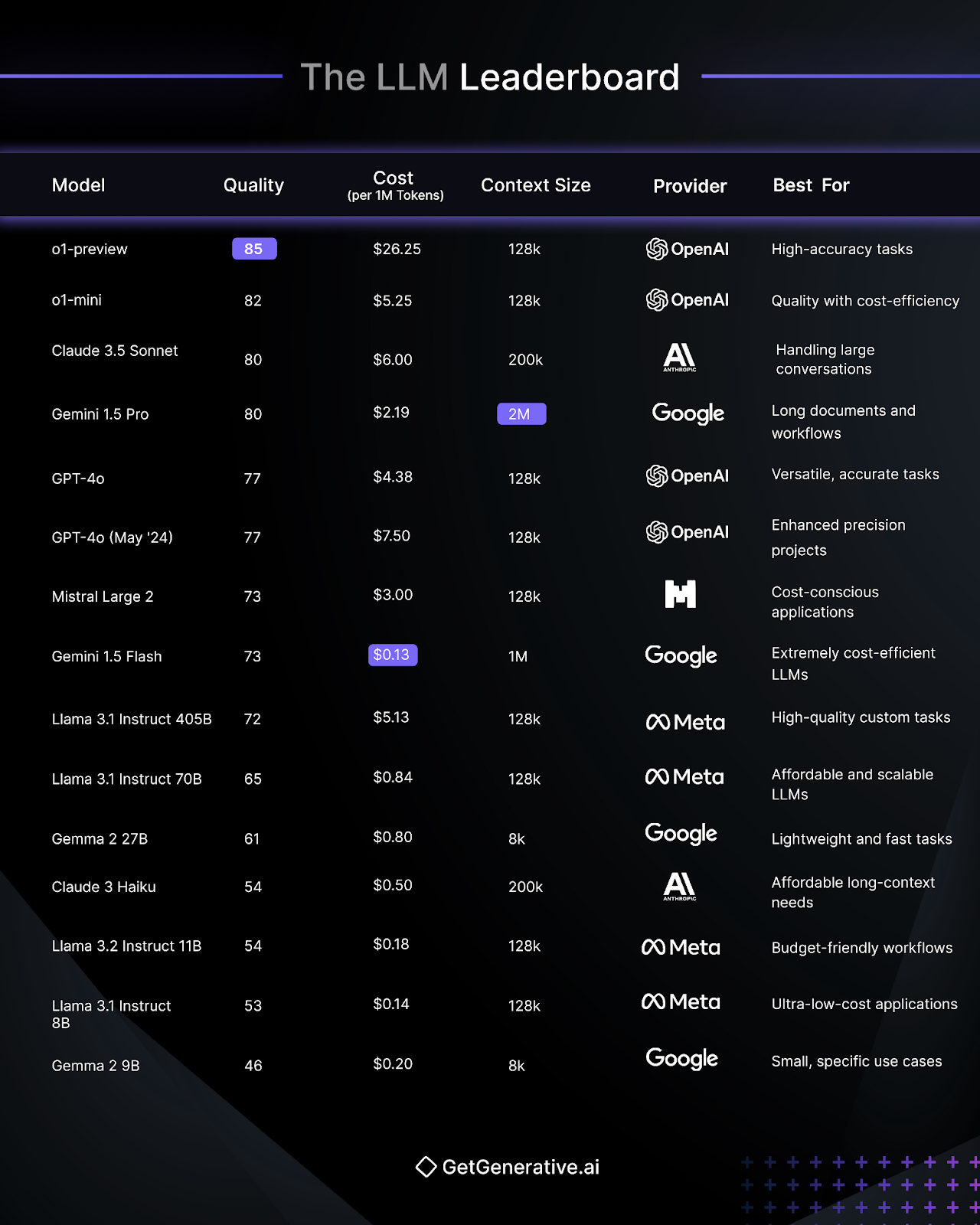
Artificial Intelligence (AI) has come a long way, and at the forefront of this technological evolution are Large Language Models (LLMs). Whether it’s powering conversational AI, automating workflows, or enhancing creative tasks, these LLMs are shaping the future of AI-driven solutions. But with so many LLMs available, how do you know which one suits your needs? Enter the LLM Leaderboard, a comprehensive guide that compares the top language models of 2025.
In this blog, we’ll break down the best LLMs based on quality, cost, context size, and use cases. Let’s dive in and explore the leaders in this exciting space!
What is the LLM Leaderboard?
The LLM Leaderboard is a curated list that ranks Large Language Models based on their performance, efficiency, and relevance. It provides insights into how these models stack up against each other, highlighting their unique strengths and ideal use cases. From budget-friendly models to high-accuracy options, the leaderboard is an invaluable resource for businesses and developers alike.
Key Metrics for Ranking LLMs
When evaluating language models, several factors come into play. Here are the key metrics considered in the LLM Leaderboard:
1. Quality
Quality is the backbone of any LLM. It reflects the model’s ability to generate accurate, coherent, and contextually relevant outputs. Models like o1-preview and GPT-4o stand out for their high accuracy.
2. Cost (per 1M Tokens)
Affordability is crucial, especially for startups and businesses managing tight budgets. Models like Gemini 1.5 Flash and Llama 3.1 Instruct 8B are known for their cost-efficiency, offering excellent performance at minimal expense.
3. Context Size
Context size determines how much information the model can process at once. For example, Gemini 1.5 Pro leads the pack with a massive 2M token context size, making it perfect for long-form documents.
4. Best Use Cases
Each LLM has its niche. While some excel at creative writing, others are ideal for technical applications or handling large-scale conversations.
Let’s explore some of the top-ranking models from the LLM Leaderboard and their standout features.
1. o1-preview (OpenAI)
Quality: 85
Cost: $26.25 per 1M tokens
Context Size: 128k
Best For: High-accuracy tasks. This model is ideal for precision-driven use cases like advanced research, legal analysis, or data-intensive projects.
2. o1-mini (OpenAI)
Quality: 82
Cost: $5.25 per 1M tokens
Context Size: 128k
Best For: Balancing quality and cost-efficiency. It’s a versatile model suited for businesses looking to maximize value without compromising too much on performance.
3. Claude 3.5 Sonnet (Anthropic)
Quality: 80
Cost: $6.00 per 1M tokens
Context Size: 200k
Best For: Handling large conversations. Its extended context size makes it perfect for use cases like customer support chatbots or long-format discussions.
4. Gemini 1.5 Pro (Google)
Quality: 80
Cost: $2.19 per 1M tokens
Context Size: 2M
Best For: Long documents and workflows. With an industry-leading context size of 2M tokens, this model excels in processing complex workflows and extensive documentation.
5. GPT-4o (OpenAI)
Quality: 77
Cost: $4.38 per 1M tokens
Context Size: 128k
Best For: Versatile, accurate tasks. GPT-4o is a go-to option for industries that need reliable, high-performing AI for various applications, from content generation to data analysis.
6. GPT-4o (May ’24 Edition)
Quality: 77
Cost: $7.50 per 1M tokens
Context Size: 128k
Best For: Enhanced precision projects. This version of GPT-4o offers refined capabilities for applications requiring even greater detail and contextual accuracy.
7. Mistral Large 2
Quality: 73
Cost: $3.00 per 1M tokens
Context Size: 128k
Best For: Cost-conscious applications. Mistral Large 2 delivers good quality without breaking the bank, making it a solid choice for startups and small businesses.
8. Gemini 1.5 Flash (Google)
Quality: 73
Cost: $0.13 per 1M tokens
Context Size: 1M
Best For: Extreme cost-efficiency. Gemini 1.5 Flash delivers outstanding performance for a fraction of the cost, making it ideal for businesses with high-volume but budget-conscious AI requirements.
9. Llama 3.1 Instruct 405B (Meta)
Quality: 72
Cost: $5.13 per 1M tokens
Context Size: 128k
Best For: High-quality custom tasks. This model is particularly effective for tailored applications, where precision and adaptability are critical.
10. Llama 3.1 Instruct 70B (Meta)
Quality: 65
Cost: $0.84 per 1M tokens
Context Size: 128k
Best For: Affordable and scalable LLMs. It’s a great choice for businesses scaling their AI operations without overspending on costs.
11. Gemma 2 27B (Google)
Quality: 61
Cost: $0.80 per 1M tokens
Context Size: 8k
Best For: Lightweight and fast tasks. This model is a perfect fit for small-scale applications requiring quick responses and minimal overhead.
12. Claude 3 Haiku (Anthropic)
Quality: 54
Cost: $0.50 per 1M tokens
Context Size: 200k
Best For: Affordable long-context needs. It’s an excellent choice for applications like writing long-form content or analyzing lengthy documents without straining your budget.
13. Llama 3.2 Instruct 11B (Meta)
Quality: 54
Cost: $0.18 per 1M tokens
Context Size: 128k
Best For: Budget-friendly workflows. For businesses focusing on efficiency and affordability, this model strikes the perfect balance.
14. Llama 3.1 Instruct 8B (Meta)
Quality: 53
Cost: $0.14 per 1M tokens
Context Size: 128k
Best For: Ultra-low-cost applications. With one of the lowest costs on the leaderboard, this model is perfect for startups or developers experimenting with AI projects.
15. Gemma 2 9B (Google)
Quality: 46
Cost: $0.20 per 1M tokens
Context Size: 8k
Best For: Small, specific use cases. If your needs are narrow and budget-restricted, Gemma 2 9B provides a straightforward solution.
Selecting the right LLM can feel overwhelming, but it all comes down to understanding your priorities. Here’s a quick checklist:
1. Define Your Use Case
Are you creating a chatbot, automating workflows, or analyzing large datasets? Models like Claude 3.5 Sonnet excel in conversational AI, while Gemini 1.5 Pro is great for document-heavy workflows.
2. Balance Cost and Quality
If you’re on a tight budget, consider Llama 3.1 Instruct 8B or Gemini 1.5 Flash. For high-quality outputs, o1-preview and GPT-4o are excellent options.
3. Consider Context Size
For long-form tasks, prioritize models with larger context sizes like Gemini 1.5 Pro or Claude 3.5 Sonnet.
4. Evaluate Scalability
If your business is growing, you’ll need a model like Llama 3.1 Instruct 70B, which offers affordable scalability.
Future of Large Language Models
The competition among LLMs is fierce, and the future holds exciting possibilities. Here are two trends to watch out for:
1. Multimodal Capabilities
The next generation of LLMs will integrate text, images, and even videos, enabling more immersive AI experiences. Think AI tools that can analyze documents and generate infographics in seconds!
2. Ethical AI Development
As AI becomes more prevalent, addressing biases and ensuring fair usage will be top priorities. Leaders like Anthropic’s Claude are already taking steps to create ethical, inclusive LLMs.
Conclusion
The LLM Leaderboard showcases the incredible diversity and innovation in the world of language models. From high-accuracy giants like o1-preview to ultra-efficient options like Gemini 1.5 Flash, there’s an LLM for every need and budget. By understanding your specific requirements and matching them to the right model, you can unlock the true potential of AI for your projects.
Streamline your Salesforce implementation with GetGenerative.ai – AI-powered Workspace + Agents to manage everything from Pre-Sales to Go-Live. Try it now!
FAQs
1. What is the most cost-effective LLM?
Gemini 1.5 Flash stands out as the most cost-efficient model, with a price of just $0.13 per 1M tokens.
2. Which LLM is best for long-form tasks?
Gemini 1.5 Pro and Claude 3.5 Sonnet excel in handling long-form content, thanks to their large context sizes.
3. What makes OpenAI’s o1-preview unique?
With a quality score of 85, it’s one of the most accurate models, making it ideal for tasks requiring high precision.
4. Are there budget-friendly LLMs for startups?
Yes, models like Llama 3.1 Instruct 8B and Gemma 2 9B are perfect for startups, offering excellent performance at minimal cost.
5. What are the future trends in LLMs?
Expect advancements in multimodal AI and a stronger focus on ethical, bias-free models.
Your Go-To Guide: The Ultimate AI LangChain Cheatsheet
Your Go-To Guide: The Ultimate AI LangChain Cheatsheet
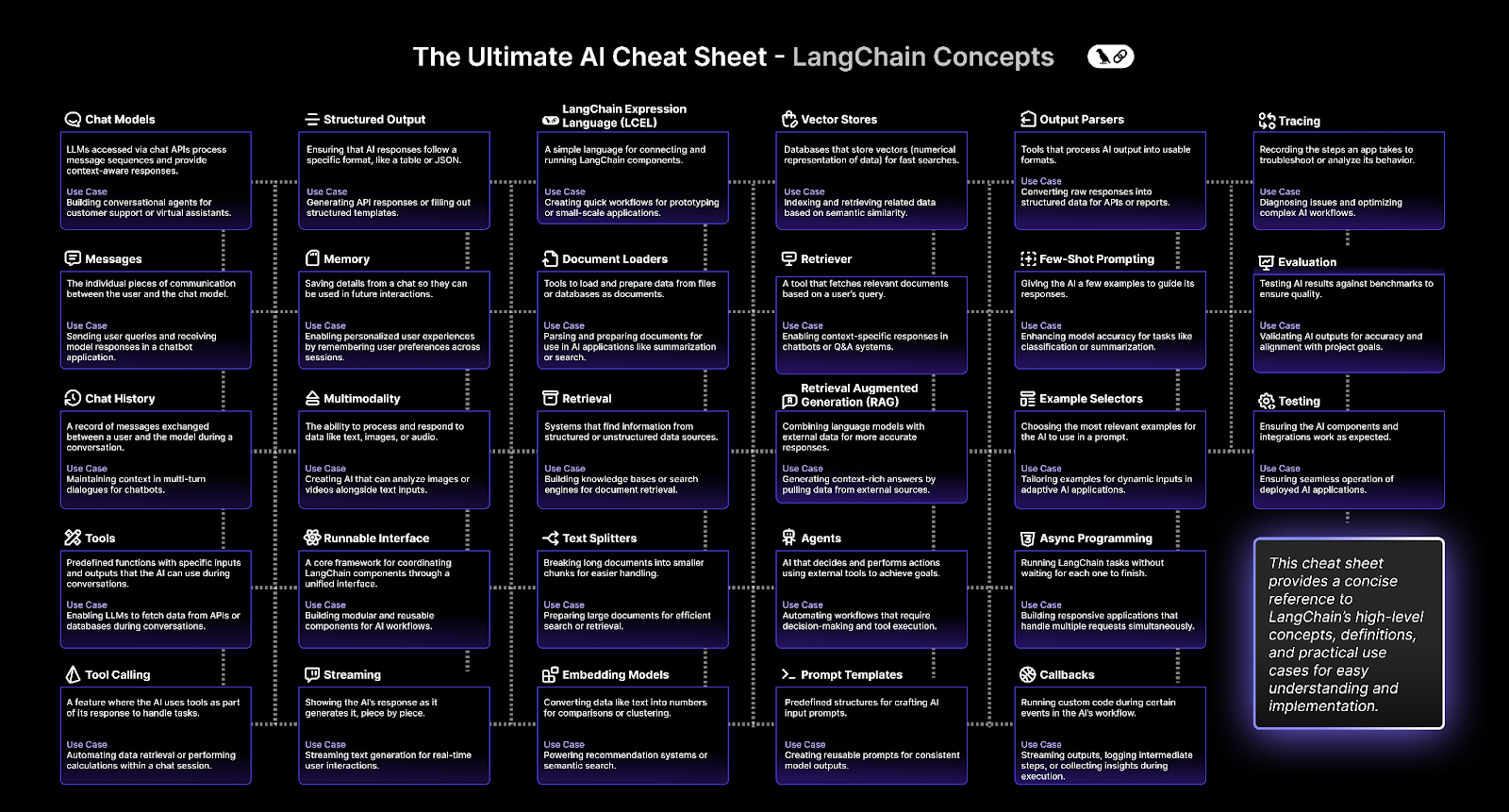
If you’re new to LangChain or looking for a consolidated reference, this ultimate cheatsheet will guide you through everything you need to know about its concepts, features, and applications. So, buckle up—this is your one-stop guide to mastering LangChain!
LangChain stands out because of its modularity, flexibility, and compatibility with other tools. It empowers developers to focus on creativity rather than worrying about the complexities of integrating AI components.
Core Concepts in LangChain
LangChain comprises several core concepts that make it incredibly versatile. Here’s a breakdown of the key components and their real-world applications:
1. Chat Models
Chat models are the backbone of LangChain. They process user inputs and provide intelligent, context-aware responses.
Use Case: Perfect for building customer service bots or virtual assistants.
2. Messages
Messages represent the smallest unit of interaction in a LangChain-powered conversation.
Use Case: Handling individual queries in chat-based applications.
3. Chat History
Think of chat history as the memory of your chatbot—it records previous interactions to ensure coherent and context-aware conversations.
Use Case: Maintaining context in multi-turn dialogues for chatbots.
4. Tools
LangChain can integrate with external tools to fetch data or execute specific tasks during conversations.
Use Case: Connecting chatbots with APIs or databases to retrieve real-time information.
5. Tool Calling
Tool calling allows LangChain to automate complex workflows, like performing calculations or retrieving specific datasets, without user intervention.
Use Case: Automating repetitive or computationally intensive tasks in workflows.
LangChain excels at generating structured outputs, such as JSON or tabular data. This capability is especially useful when you need AI to work with APIs or fill out predefined templates.
Use Case: Imagine automating a report generation process where the AI fills in data points into a JSON file, ensuring consistency and accuracy across formats.
Memory and Multimodality
1. Memory
LangChain’s memory functionality enables the system to remember user preferences and past interactions, creating personalized experiences.
Use Case: Think of a shopping assistant that recalls your favorite brands and makes tailored recommendations.
2. Multimodality
LangChain goes beyond text, supporting images, audio, and other data formats. This capability makes it ideal for creating applications like image-based search engines or audio transcription tools.
Use Case: Analyzing video content alongside text to generate rich insights.
Getting Started with LangChain
Step 1: Install LangChain
Before you dive in, make sure you have Python installed on your system. Then, install LangChain using pip:
pip install langchain
Step 2: Build Your First Application
LangChain allows you to create custom workflows by combining its core components. Start by defining your goal and selecting the appropriate tools, models, and memory modules.
Document Loaders and Retrieval
1. Document Loaders
These tools help you load and prepare data from files or databases for processing.
Use Case: Parsing large documents for AI summarization or search.
2. Retrieval Systems
Retrieval systems locate specific information from structured or unstructured data sources.
Use Case: Building knowledge bases or search engines for quick access to relevant information.
Vector Stores and Retrievers
1. Vector Stores
Vector stores organize data in numerical formats (vectors), enabling fast and efficient searches based on semantic similarity.
Use Case: Recommending products based on user preferences or historical data.
2. Retrievers
Retrievers fetch relevant data points in response to a user’s query.
Use Case: Powering Q&A systems that provide precise answers based on context.
Retrieval Augmented Generation (RAG) and Text Splitters
1. Retrieval Augmented Generation (RAG)
RAG combines the power of language models with external data to produce more accurate and context-rich responses.
Use Case: Generating detailed answers by pulling data from external knowledge bases or documents.
2. Text Splitters
Text splitters break long documents into smaller chunks, making it easier for LangChain to process large amounts of information efficiently.
Use Case: Preparing lengthy legal contracts for summarization or keyword-based search.
Embedding Models and Agents
1. Embedding Models
Embedding models convert textual data into numerical representations, enabling tasks like clustering or comparison.
Use Case: Powering recommendation systems or facilitating semantic search.
2. Agents
Agents take automation to the next level by performing actions, making decisions, and using external tools to achieve specific goals.
Use Case: Automating workflows like data analysis or customer support ticket resolution.
Prompt Templates and Output Parsers
1. Prompt Templates
Prompt templates are predefined structures that guide the AI on how to respond. This ensures consistency and improves the quality of outputs.
Use Case: Crafting reusable prompts for generating blog outlines, summaries, or code snippets.
2. Output Parsers
Output parsers process AI-generated content into structured formats like JSON, tables, or cleanly formatted reports.
Use Case: Converting raw chatbot responses into structured data for CRM systems or reports.
Few-Shot Prompting and Example Selectors
1. Few-Shot Prompting
Few-shot prompting provides the AI with a handful of examples to improve its accuracy for specific tasks like summarization or classification.
Use Case: Enhancing AI performance in custom classification systems.
2. Example Selectors
Example selectors pick the most relevant examples to use in a prompt, ensuring dynamic and adaptive responses.
Use Case: Tailoring chatbot conversations based on user inputs or context.
Async Programming and Callbacks
1. Async Programming
LangChain supports asynchronous programming, allowing tasks to run simultaneously without waiting for each one to finish.
Use Case: Building responsive apps that handle multiple user requests efficiently.
2. Callbacks
Callbacks let you execute custom code during specific events in an AI workflow, such as logging intermediate steps or streaming outputs.
Use Case: Tracking the execution flow in real-time for debugging or performance monitoring.
Tracing and Evaluation
1. Tracing
Tracing records each step in the workflow, helping developers troubleshoot issues and optimize AI applications.
Use Case: Identifying bottlenecks in complex AI workflows to enhance performance.
2. Evaluation
Evaluation benchmarks AI outputs against quality metrics to ensure alignment with project goals.
Use Case: Validating chatbot responses for consistency, accuracy, and user satisfaction.
Testing and Best Practices
Testing
Testing ensures that AI components and integrations function as expected, enabling seamless deployment.
Use Case: Verifying chatbot performance under different scenarios before launching it live.
Best Practices for LangChain Development
Start Small: Begin with manageable workflows and scale up as needed.
Leverage Documentation: LangChain’s official resources are a goldmine for learning.
Stay Updated: Regularly check for updates and community contributions to improve your projects.
Focus on Optimization: Debug chains frequently to maintain efficiency and accuracy.
Conclusion
LangChain is more than just a tool; it’s a framework that opens the doors to endless possibilities in the world of AI. Whether you’re building chatbots, automating workflows, or developing advanced AI applications, LangChain provides the flexibility, scalability, and power to achieve your goals.
At GetGenerative.ai, we’ve reimagined Salesforce implementation—built from the ground up with AI at the core. This isn’t legacy delivery with AI added on. It’s a faster, smarter, AI-native approach powered by our proprietary platform.
1. Can LangChain integrate with other tools and APIs?
Yes, LangChain supports seamless integration with external APIs, databases, and tools, making it highly versatile.
2. Is LangChain suitable for beginners?
Absolutely! LangChain’s modular design and extensive documentation make it beginner-friendly.
3. How do I optimize LangChain workflows?
Optimize workflows by testing frequently, using asynchronous programming, and leveraging tracing and callbacks for debugging.
The Ultimate Salesforce Model Builder Cheat Sheet
The Ultimate Salesforce Model Builder Cheat Sheet
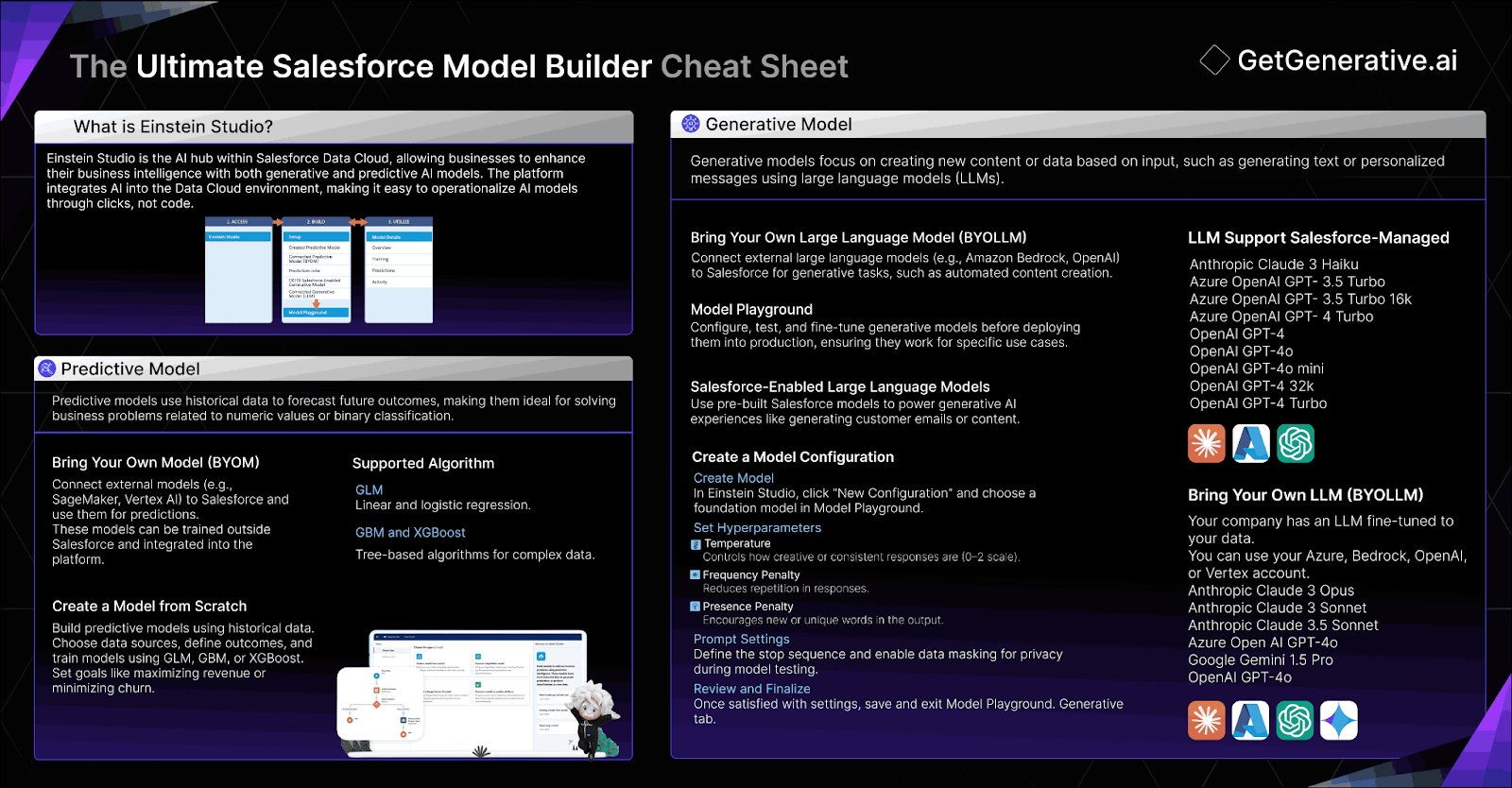
Salesforce’s Einstein Studio offers a comprehensive, no-code solution for building and integrating AI models directly within Salesforce. This cheat sheet is designed to provide a quick guide to mastering Salesforce Model Builder, from creating models to integrating external AI platforms, and optimizing model performance for your business needs.
What You Will Learn:
How to create and customize AI models using Salesforce’s Model Builder.
Best practices for integrating external AI models from platforms like AWS and Google Vertex AI.
Key settings to optimize model accuracy and performance.
Steps for testing, monitoring, and refining your AI models.
Let’s get started!
What is Einstein Studio?
Einstein Studio is a powerful tool within Salesforce’s Data Cloud for creating, managing, and integrating AI models. It allows users to build AI models with no-code interfaces, connect to external platforms like AWS SageMaker and Google Vertex AI, or use existing large language models (LLMs) from providers like OpenAI. This flexibility empowers businesses to incorporate AI-driven insights and predictions directly into their Salesforce environment.
Key Considerations:
Integration Options: You can either build AI models from scratch or connect to external AI models hosted on platforms like AWS, Google, or Azure.
No-Code Setup: Einstein Studio’s user-friendly interface allows users without technical expertise to create and manage models.
Model Types: Supports regression, binary classification, and more for various business needs like predicting opportunity amounts or customer churn.
External Model Dependency: Connected models remain hosted externally, and Salesforce accesses them via APIs, which may affect latency or reliability.
Create Model from Scratch
Building a model from scratch using Einstein Studio allows you to create AI-powered predictions based on historical data. The process involves selecting and structuring data, defining the outcome, training the model, and refining variables for optimal predictive accuracy. This task enables businesses to leverage AI to forecast future outcomes, such as customer behavior, sales trends, or operational efficiencies.
Key Considerations:
Selecting Data Source: Ensure your data source has at least 400 rows and 3 relevant columns. Avoid overly complex datasets with more than 50 columns. Accuracy and completeness are crucial.
Outcome Variable Selection: Choose a measurable KPI or outcome variable that aligns with business goals, such as revenue or customer churn.
Training Data Subset: If needed, filter the training data to focus on the most relevant records, ensuring a balanced sample for better predictions.
Setting Goals: Clearly define whether to maximize or minimize the outcome variable based on your business objective, like maximizing revenue or minimizing churn.
Data Preparation: Include only relevant variables and use Autopilot if unsure which ones are most impactful. Exclude irrelevant or sensitive fields.
Algorithm Selection: Choose GLM for simple relationships, GBM for complex patterns, or XGBoost for large datasets and optimized performance.
Review and Edit: Double-check all setup steps before training, focusing on data source and outcome variables, as these can’t be changed later.
Data Privacy: Exclude personally identifiable information (PII) and ensure data governance and privacy standards are followed.
Insight:
Using the Autopilot feature within Einstein Studio can help in automatically selecting the most impactful variables for prediction. This ensures higher model performance, especially if you’re unfamiliar with which variables are most relevant.
The Bring Your Own Large Language Model (BYOLLM) feature allows users to integrate external AI models with Salesforce via Einstein Studio. This capability enables organizations to connect their own foundation models, such as those hosted on Azure, OpenAI, or Google Vertex AI, to create custom generative AI configurations. Users can evaluate the model’s responses in the Model Playground before deploying it in production.
Key Considerations:
Model Integration: Ensure that your foundation model is hosted on a compatible external platform like Azure OpenAI or Google Vertex AI for seamless integration.
Endpoint Setup: When adding a foundation model, establish a secure endpoint connection between the external model provider and Salesforce for optimal performance.
Prompt Configuration: Utilize Prompt Builder to customize prompt templates and test various prompts with your integrated model before deploying it.
Monitoring: Use the monitoring dashboard to track model inference use and errors. Adjustments to prompts and configurations can improve overall model performance.
Editing Restrictions: Once a foundation model is linked to other model configurations, editing becomes limited. To modify the foundation model, you must first remove any associated configurations.
Model Usage Impact: Changing the foundation model may affect usage limits and costs, depending on the complexity and settings of the new model.
Insight:
The BYOLLM feature empowers businesses to integrate AI models tailored to their specific needs, offering flexibility in managing and testing models in a secure and scalable way. Before deploying a model, use the Model Playground to fine-tune responses, ensuring accuracy and relevance to your business requirements.
Salesforce Supported Models
Salesforce provides a wide range of Salesforce-managed Large Language Models (LLMs) that are pre-integrated into Einstein Studio for fast and efficient prompt creation. These models allow businesses to utilize AI-driven functionality across different applications, including Sales Emails and customer interactions. For more advanced needs, companies can leverage Bring Your Own Large Language Model (BYOLLM) to integrate custom models hosted on platforms like Azure and OpenAI.
The following Salesforce-managed models are available for quick integration via Prompt Builder:
Anthropic Claude 3 Haiku
Azure OpenAI GPT-3.5 Turbo
Azure OpenAI GPT-3.5 Turbo 16k
Azure OpenAI GPT-4 Turbo
OpenAI GPT-4
OpenAI GPT-4o
OpenAI GPT-4o mini
OpenAI GPT-4 32k
OpenAI GPT-4 Turbo
For businesses with custom AI needs, BYOLLM supports the following additional models:
Anthropic Claude 3 Opus
Anthropic Claude 3 Sonnet
Anthropic Claude 3.5 Sonnet
Azure Open AI GPT-4o
Google Gemini 1.5 Pro
OpenAI GPT-4o
Create and Edit Model Configuration
In Einstein Studio, you can create a model configuration to customize how your foundation model operates for specific use cases. By adjusting hyperparameters like temperature, frequency, and presence penalties, you can influence how the model generates responses to prompts.
Data masking ensures sensitive information is protected during testing, aligning with org-level privacy settings.
Key Considerations:
Temperature Setting: Adjust the temperature based on how creative or consistent you want the model’s responses to be.
Frequency Penalty: Use this setting to reduce repetitive phrases in responses.
Presence Penalty: Encourage diversity in token usage by increasing this value.
Data Masking: Always enable data masking to protect sensitive information, especially when testing with third-party models.
Hyperparameter Testing: Test various settings in the Model Playground to evaluate the model’s response quality.
Model Update: Editing model settings affects any associated prompts, so it’s best to create a new model if you need to change its configuration.
Limited Control for Some Models: Some settings, like temperature control, are not available for all foundation models.
Insight:
The temperature setting is a key hyperparameter that controls the creativity of the model’s responses. Lower values (closer to 0) will result in more predictable, consistent answers, making it ideal for tasks that require precision or factual accuracy. Higher values (closer to 2) introduce more randomness, which can foster creativity but may lead to less coherent responses.
Testing a model ensures that it performs as expected before being deployed. Using Model Playground, you can input prompts, adjust settings like data masking and response generation, and evaluate the outputs to refine the model’s responses. This phase helps to identify any necessary adjustments before moving into production.
Key Considerations:
Evaluate Hyperparameters: Adjust hyperparameters such as temperature, frequency, and presence penalties to refine responses.
Data Masking: Ensure sensitive information is properly masked during testing for better data security.
Debugging: Use the debug option to analyze how the model processes and generates responses.
Model Activity Monitoring: Keep track of model performance and inferences over time to catch any anomalies early.
Temporary Settings: Any adjustments to prompt settings during testing won’t be saved for future model configurations.
Error Management: Latency or biased responses may occur, affecting model reliability during testing.
Things to Take Care of:
Refine Hyperparameters: Adjust temperature to control response creativity, and use frequency/presence penalties to manage token usage.
Monitor Inferences: Keep an eye on inference usage to understand model efficiency and ensure it meets the performance requirements for the task.
Handle Errors: Be prepared to debug any model output issues like biased or inaccurate responses, adjusting hyperparameters as necessary.
Iterate Prompt Templates: After successful testing, use the generated outputs to create prompt templates that can be reused efficiently in production.
Monitor Model Activity
View Model Inferences and Errors Monitoring model activity helps ensure that your AI models perform as expected and are fine-tuned over time to align with your business needs. By tracking model inferences and identifying potential errors, you can adjust and improve model accuracy and reliability.
Key Metrics to Track
Inferences: A foundation model, while pre-trained on large datasets, continues to learn and adapt based on prompts during inference. This ongoing interaction enhances its ability to perform specific language-related tasks. Monitoring inferences helps you assess how many predictions or responses the model has generated over a specific time period. This metric provides a snapshot of overall model activity, helping you measure usage and responsiveness.
Errors: Errors occur when a model generates incorrect or biased responses, faces latency issues, or encounters problems in scaling. Monitoring error rates enables you to identify where the model may need adjustment. Potential error types could include:
Inaccurate Responses: Misunderstanding or misinterpreting a prompt.
Biased Outputs: When the model generates responses with unwanted biases, potentially based on flawed training data.
Latency Issues: Slow response times or delays in generating outputs.
Scalability Concerns: The model may struggle to maintain performance as the number of inferences increases.
Tips to Maximize the Value of Salesforce Model Builder
Salesforce Model Builder offers extensive capabilities, but leveraging it effectively requires strategic planning and a focus on best practices. Here are some tips to ensure you get the most out of this powerful tool:
1. Start Small, Then Scale
When building your first model, focus on a simple, impactful use case like lead scoring or churn prediction. Once you understand the process and results, scale to more complex models or multiple use cases.
2. Ensure High-Quality Data
AI models are only as good as the data they’re trained on. Invest time in cleaning and preparing your data to ensure it is accurate, complete, and representative of real-world scenarios.
3. Utilize Autopilot for Efficiency
If you’re new to AI modeling, leverage Einstein Studio’s Autopilot feature. It helps identify the most relevant variables for your model, ensuring accuracy while saving time.
4. Monitor and Refine Models Regularly
Model performance can degrade over time as business dynamics and data patterns change. Establish a routine for monitoring key metrics like accuracy, inference time, and error rates, and retrain your models as necessary.
5. Collaborate Across Teams
Involve stakeholders from different departments, such as marketing, sales, and operations, to ensure your models address real business challenges and deliver actionable insights.
6. Experiment with Hyperparameters
Don’t hesitate to tweak hyperparameters like temperature, frequency, and presence penalties. Experimenting in the Model Playground can help you find the optimal balance between creativity and precision in model responses.
7. Integrate with Salesforce Flows
Enhance automation by linking your models with Salesforce Flows. For instance, use a predictive model to trigger alerts or tasks when specific thresholds are met, streamlining operations.
8. Use BYOLLM for Specialized Needs
If your business has unique AI requirements, leverage the Bring Your Own Large Language Model (BYOLLM) feature to integrate external models tailored to your specific use case.
9. Educate Your Team
Provide training to your team on using Einstein Studio, understanding model insights, and applying predictions effectively in their workflows. This ensures buy-in and maximizes the ROI of your AI initiatives.
10. Document and Share Learnings
Maintain clear documentation of your models, configurations, and performance metrics. Share these insights across your organization to foster collaboration and continuous improvement.
Conclusion
Mastering Salesforce’s Model Builder empowers your business to harness the full potential of AI, making data-driven decisions more efficient and impactful. Whether you’re building models from scratch or integrating external AI platforms, the key is optimizing performance through careful testing and monitoring.
At GetGenerative.ai, we’ve reimagined Salesforce implementation—built from the ground up with AI at the core. This isn’t legacy delivery with AI added on. It’s a faster, smarter, AI-native approach powered by our proprietary platform.
The Ultimate Salesforce Einstein Copliot Cheat Sheet
The Ultimate Salesforce Einstein Copliot Cheat Sheet
Learn the essentials of Salesforce Einstein Copilot with our ultimate cheat sheet. This cheat sheet blog offers clear and practical insights to help you use Salesforce’s AI assistant effectively in your daily work.
What You’ll Learn:
Key Features and Components: Understand the core elements of Einstein Copilot, including actions, topics, the reasoning engine, and how it leverages large language models (LLMs).
Setup and Customization: Learn how to enable Einstein Copilot, configure its settings, and create custom actions and topics tailored to your business needs.
Security and Compliance: Gain insights into the Salesforce Trust Layer to ensure secure, compliant, and ethical AI interactions within your organization.
Best Practices and Troubleshooting: Discover strategies for optimizing Copilot’s performance, managing data usage, and resolving common issues effectively.
Let’s get started!
Agents and Copilot Overview
Agents and Copilot are AI-powered assistants in Salesforce that handle user queries in natural language, helping users with tasks and workflows by pulling secure, proprietary data. Einstein Copilot provides secure, trusted assistance to users, offering conversational and natural language interactions without needing any technical expertise for setup. This copilot can take action within the Salesforce org and responds contextually to follow-up questions or commands.
Copilot respects Salesforce access controls, permissions, and ethical AI standards, ensuring secure interactions.
It uses natural language processing to interpret and respond to user queries, enhancing productivity.
The copilot works in an ongoing conversational context, allowing users to ask follow-up questions naturally.
Extending the copilot’s capabilities is simple, leveraging Salesforce functionalities like flows.
While more flexible than Einstein Bots, it may not offer the same structured conversational flow required for specific use cases.
Use Case
A customer support team needs help summarizing case details and drafting follow-up emails for customer interactions.
Solution: Einstein Copilot summarizes case records and generates email drafts.
Reason: By leveraging Einstein Copilot, the team saves time by receiving AI-generated summaries and emails, improving response times, and allowing agents to focus on higher-level tasks. The copilot’s conversational interaction makes it easy for agents to ask follow-up questions about case history or next steps, all within the Salesforce environment.
The Building Blocks of Agents and Copilot
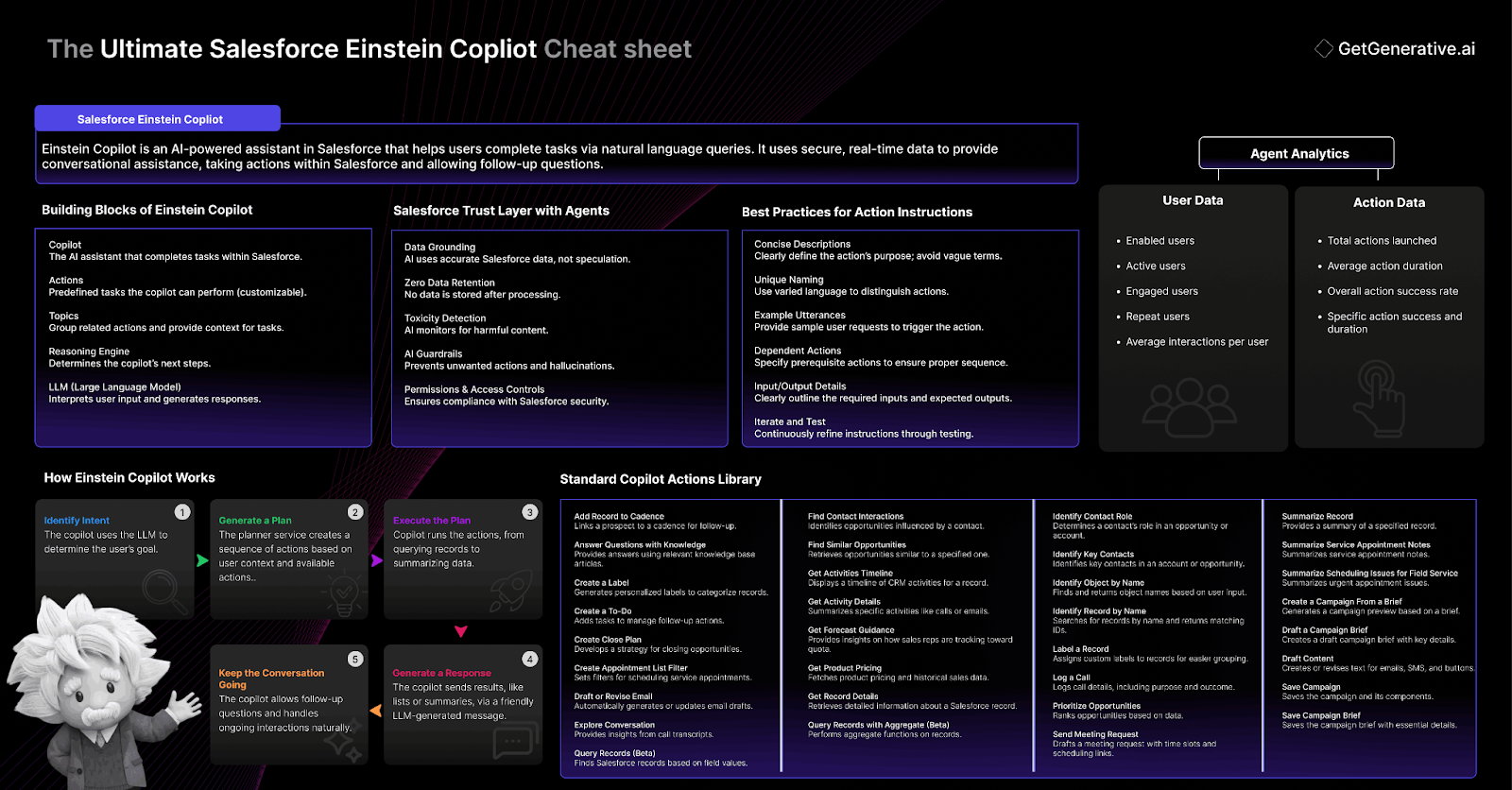
Einstein Copilot and Agents consist of five essential components: the copilot itself, actions, topics, the reasoning engine, and the large language model (LLM). Together, these elements enable the AI assistant to understand user queries, initiate relevant tasks, and deliver results based on secure Salesforce data.
Copilot: Acts as the trusted AI assistant, capable of completing tasks within Salesforce based on user requests.
Actions: Define the specific tasks that the copilot can perform, grounded in Salesforce data. Salesforce provides default actions, but custom actions can be created for specific business needs.
Topics: Organize related actions and provide context for the copilot to decide how to handle user requests. Topics include instructions for managing various tasks.
Reasoning Engine: Orchestrates how the copilot interacts with the user, using the LLM to determine the best course of action.
LLM: Enables the natural language understanding and action execution for the copilot, interpreting user input and generating appropriate responses.
Salesforce Trust Layer with Agents
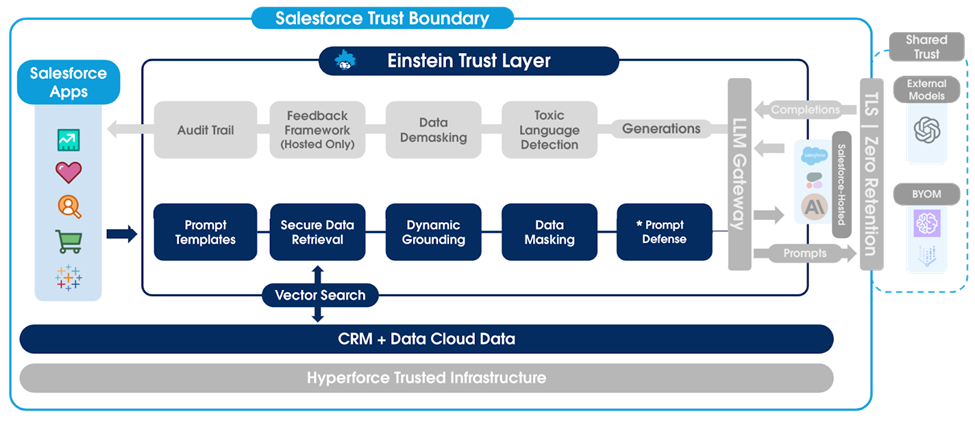
The Salesforce Trust Layer is a secure AI framework integrated into Einstein Copilot and agents, ensuring safe and reliable use of generative AI. It maintains strict data protection measures such as zero-data retention, data masking, and access controls. By integrating AI guardrails and toxicity detection, it mitigates risks such as AI hallucinations and data breaches, allowing enterprises to leverage AI responsibly while ensuring data security.
Data Grounding: AI-generated responses are based on trusted and accurate Salesforce data, rather than purely speculative AI outputs. This ensures that every piece of information used in generating responses is up-to-date, relevant, and specific to the organization’s proprietary data.
Zero Data Retention: No data shared with the large language model (LLM) is stored or reused. Once the request is processed, the data is forgotten by the LLM provider, ensuring that sensitive business or personal information is not retained or used for further AI training.
Toxicity Detection and Mitigation: The Trust Layer actively monitors and flags responses that may include harmful or inappropriate content, such as language that could be violent, abusive, or discriminatory. This protects the integrity of conversations and ensures that AI interactions align with ethical standards.
AI Guardrails: To prevent unintended actions or security breaches, Einstein Copilot includes built-in security measures to prevent malicious attacks like prompt injections. The AI guardrails ensure the AI behaves as intended, reducing risks of hallucinations or inaccurate responses.
Permissions and Access Controls: The Trust Layer adheres to Salesforce’s established security protocols, such as field-level security, sharing settings, and permission sets. This ensures that Copilot only has access to data and functionalities within the boundaries of the user’s permissions, respecting the organization’s existing security configurations.
Salesforce provides multiple conversational AI tools—Agents, Einstein Copilot, and Einstein Bots—each designed to assist users with business interactions. Choosing the right tool depends on your goals, the complexity of tasks, and how much control you need over conversations.
Agents autonomously handle tasks, Einstein Copilot collaborates with users for everyday business processes, and Einstein Bots follow predefined rules for more structured interactions.
Key Considerations:
Goal Alignment: Choose Einstein Copilot for tasks requiring human interaction, while Agents are best for autonomous actions. Use Einstein Bots for rule-based, transparent conversations.
Control and Complexity: Bots excel in scenarios with strict processes, while Copilot and Agents provide more fluid, context-driven conversations using AI and large language models (LLMs).
Security and Compliance: Both Agents and Einstein Copilot integrate with the Einstein Trust Layer for secure, compliant AI interactions, including HIPAA compliance for Copilot. Bots follow strict scripted responses, making them well-suited for regulated industries.
Use Case
A sales team needs real-time assistance with managing leads and drafting personalized follow-up emails during customer interactions.
Solution: Einstein Copilot
Reason: The sales team uses Einstein Copilot to quickly summarize lead details, suggest relevant next steps, and draft follow-up emails grounded in real-time Salesforce data. Copilot’s conversational AI allows team members to interact naturally, providing dynamic support during sales interactions without leaving the Salesforce interface. This improves efficiency, reduces manual work, and enhances the quality of customer engagement.
Gauge Einstein Copilot Adoption
Einstein Copilot Analytics enables you to track the adoption and usability of your copilot by providing comprehensive data insights through easy-to-read dashboards. By monitoring metrics such as user engagement and the success rate of copilot actions, you can assess how well your Copilot is performing and make necessary adjustments to drive adoption and optimize actions.
User Engagement: Focus on analyzing the number of active, engaged, and repeat users to understand how well your copilot is being adopted across the organization. If user engagement is low, consider improving training or refining copilot actions to better suit user needs.
Action Performance: Review the success rates of both standard and custom actions. Actions with low success rates might need to be re-evaluated or enhanced for better performance.
Interaction Metrics: Track metrics such as average interactions per user and average action duration to determine the usability and efficiency of Copilot actions. Actions that take too long to execute or require multiple interactions may indicate a need for simplification.
Custom vs. Standard Actions: Compare the performance of custom actions to standard actions to identify if customizations are enhancing or hindering user experience.
Use Case
A company wants to track the efficiency of its sales reps’ interactions with Einstein Copilot by monitoring Average Interactions Per User and Action Success Rate.
Solution: The company uses the Copilot Analytics dashboard to identify a low Average Interactions Per User metric, which indicates that some sales reps are not utilizing the Copilot effectively. Additionally, the Action Success Rate for a custom action designed to generate sales reports is lower than expected.
Reason: By addressing these insights, the company initiates focused training on Copilot usage and improves the input flow for the custom sales report action. This results in higher engagement and action success rates, leading to more efficient sales processes and better overall performance from the sales team.
What Are Copilot Actions?
Copilot Actions are the core functions that drive the productivity of agents and Einstein Copilot in Salesforce. Each action is a task that the copilot can perform based on user input, such as summarizing a record, drafting an email, or querying Salesforce data. Actions are organized under Topics, which group related tasks for specific use cases.
Copilot Actions can be categorized into two main types: Standard Actions and Custom Actions. These actions enable your copilot to perform a wide range of tasks, from simple data retrieval to complex business workflows.
Standard Actions
These are pre-built actions provided by Salesforce that allow your copilot to execute common Salesforce tasks right out of the box. Standard actions are designed to get your copilot up and running quickly without the need for additional configuration.
Many of these actions are system actions, meaning they are critical for the functionality of the copilot and cannot be removed. For example, a system action might retrieve record IDs or identify objects within Salesforce.
Advantages:
Quick Setup: No customization needed, works as soon as Einstein Copilot is enabled.
Core Functionality: Provides essential actions for querying, summarizing, and interacting with records.
Security Compliance: All standard actions respect Salesforce’s security and access controls.
Custom Actions
Custom Actions are where your copilot can truly be tailored to meet your organization’s specific needs. These actions allow you to extend the capabilities of your copilot by connecting it to custom business processes, third-party applications, or unique Salesforce setups. You can create Custom Actions using invocable Apex classes, autolaunched Flows, or Prompt Templates to incorporate dynamic processes and automation that are specific to your business.
Advantages:
Flexibility: Custom Actions give you the ability to automate complex tasks that are unique to your business.
Integration: Leverages existing Salesforce capabilities like Flows, Apex, and external APIs (via MuleSoft or custom API integrations).
Scalability: Custom actions can be tailored for different departments or workflows, expanding the copilot’s usefulness across the entire organization.
Agent topics in Salesforce Einstein Copilot act as a categorization system for managing different tasks that agents and Copilot can handle. A topic groups together related actions and provides instructions on how the Copilot should execute them. This allows your Copilot to understand the context of a conversation and respond appropriately based on the user’s requests and input.
Key Components of a Topic:
Actions: The tasks a Copilot can perform within the context of a specific topic.
Instructions: Guidelines for how the Copilot should behave when executing actions under a specific topic. These are non-deterministic and give the Copilot a sense of direction.
Classification: Describes the topic’s function in 1–3 sentences, guiding the Copilot on when to use this topic based on user input.
Scope: Defines the specific job the Copilot should perform under a given topic. This could limit the Copilot to certain functions or expand its capabilities based on the conversation’s flow.
Types of Topics:
Standard Topics: Predefined topics that handle common business use cases, available out of the box.
Custom Topics: Tailor-made topics created to address specific business needs by linking custom actions and instructions.
Parts of a Topic:
Classification Description: A brief overview of the topic’s function and the types of user requests it handles.
Scope: A clear definition of what tasks the topic should manage.
Instructions: Specific guidelines to direct the Copilot’s decision-making process within a topic.
Best Practices for Writing Topic Instructions:
Avoid sensitive rules: For deterministic business rules, ensure these are built into the action, not as instructions.
Provide context: Make sure instructions specify the scope of the task.
Clear language: Use precise terms like “Always” or “Never” to ensure consistent interpretation by the Copilot.
Review existing instructions: Avoid contradictions between instructions across topics to maintain accuracy.
LLM usage with Copilot Actions
Copilot actions within Salesforce rely on Large Language Model (LLM) calls to process user inputs, generate dynamic action plans, and create outputs. The cost of these actions depends on the number of LLM calls, which can vary based on the complexity of the user’s request, the conversation context, and the specific actions involved. Efficient use of copilot actions can help minimize LLM usage and ensure smooth, accurate responses.
Key Considerations:
LLM Call Frequency: Each stage of the copilot process (intent identification, dynamic plan generation, action execution, message generation) requires one or more LLM calls.
Complexity of Requests: More complex actions that require multiple steps, such as identifying a record by name before summarizing it, will increase LLM usage.
Action and Prompt Templates: Actions like Apex classes and flows don’t require LLM calls, while actions referencing prompt templates do.
User Input Influence: User interactions such as revisions or confirmations can drive additional LLM calls, especially when actions like drafting emails or revising summaries are involved.
LLM Costs: Higher usage of LLM calls in complex workflows can result in increased costs, especially when multiple actions are linked.
Error Handling: LLM-generated messages are required to manage errors and incomplete inputs, potentially increasing the number of LLM calls.
System Messages: System messages are not LLM-generated, limiting their flexibility compared to action-related messages.
How Einstein Copilot Works
Einstein Copilot is a conversational AI assistant within Salesforce that allows users to complete tasks with natural language inputs. It identifies user intent and generates an action plan using its reasoning engine and large language model (LLM). The copilot can handle both simple and complex workflows, utilizing Salesforce records and custom processes to deliver accurate responses and complete tasks efficiently.
User Initiates a Conversation: The user starts by typing a question or request into the Einstein Copilot panel. The Copilot interprets the request based on context and available actions.
Identifying User Intent: Copilot sends the request to the LLM, which identifies the user’s intent and decides which actions or topics are needed to fulfill the request.
Generating a Plan: The reasoning engine formulates a plan, identifying the steps and actions necessary to achieve the user’s goal. For example, if a user requests a record summary, the copilot first retrieves the record and then generates a summary.
Executing Actions: Copilot executes the relevant actions, whether it’s retrieving data, generating a report, or sending an email. Standard or custom actions may be executed depending on the request.
Generating a Response: After executing the plan, Copilot provides a natural language response, summarizing the results or giving follow-up instructions.
Maintaining Conversational Flow: The conversation continues with additional user inputs or follow-up questions, and Copilot dynamically adjusts its responses to accommodate these new inputs, ensuring a seamless experience.
Set Up Einstein Copilot
To set it up Einstein Copilot, you’ll need to enable the feature, manage user access, and configure its settings. Activation makes the copilot available to users, while deactivation allows changes to its setup.
Ensure Einstein Generative AI is turned on in your org. If not visible, confirm the appropriate licenses and user permissions are in place.
Enable Copilot: Turn on Einstein Copilot in Setup and ensuring Einstein Generative AI is enabled.
Assign Permissions: Grant access to users by assigning the appropriate permission set group(Einstein Copilot for Salesforce User) or Permission Sets (Einstein Salesforce for Copilot User and Prompt Template User)
Activate/Deactivate: Use the Builder to activate or deactivate your copilot. When deactivated, user conversations are interrupted and the copilot becomes unavailable until reactivated.
Copilot Settings
Einstein Copilot settings help customize the interaction experience, allowing admins to define system behavior, messaging style, and conversation logs. These settings ensure that the copilot is aligned with your organization’s brand tone and operates smoothly by managing conversations and handling errors effectively.
Enhanced Event Logs: Enable enhanced event logs to capture detailed conversation data, which helps in testing and troubleshooting. Event logs are stored for 7 days, providing visibility into every interaction and making it easier to identify errors and improve the copilot’s performance.
System Messages: Create and customize welcome and error messages that users encounter when interacting with Einstein Copilot. These messages clarify that users are communicating with an AI, not a human, and can be tailored to reflect your company’s tone.
Language Settings: Adjust the conversational tone of your copilot to match your brand’s communication style. Options include formal, neutral, and casual tones. This setting only affects the LLM-generated conversational messages, not the output of specific actions.
Key Considerations
Data Visibility: Enhanced event logs allow access to sensitive conversation data for troubleshooting, but when disabled, these logs will mask sensitive information.
Tone Consistency: Select the copilot tone that aligns with your company’s overall style to ensure a consistent user experience across all interactions.
Error Handling: System messages, especially for errors, should be clear and professional, preventing confusion and improving user satisfaction.
Data Usage with Einstein Copilot
Data usage in Einstein Copilot involves processing customer data through standard or custom actions using Salesforce objects. Usage is measured through Einstein Requests, calculated based on API calls to the Large Language Model (LLM). Proper request management helps ensure efficient resource consumption while providing accurate and relevant responses to user queries.
Requests are consumed on each API call to the LLM. The calculation is based on:
Usage Type Multiplier: Each LLM has a specific multiplier, representing how resource-intensive it is.
API Call Size Factor: The combined size of the input prompt and the LLM-generated response is divided by 1,500 words. This number is rounded up to the nearest integer to calculate the API call size.
Final Calculation: Request consumption = (API Call Size Factor) x (Usage Type Multiplier).
Example Calculation:
API call of 4,500 words.
Usage multiplier of 8 (for a more basic LLM).
Call size factor: 4,500 ÷ 1,500 = 3.
Final request consumption: 3 (Call Size) x 8 (Multiplier) = 24 Einstein Requests.
In this example, because the API call is 4,500 words, it’s divided by 1,500 to get a call size factor of 3. The usage multiplier of 8 reflects the LLM being used, which is less resource-intensive than the first example. This results in a total of 24 Einstein Requests for that API call.
Considerations for Efficient Data Use
Optimize Request Structure: Efficiently structured requests reduce the number of calls needed, lowering the total request consumption.
Monitor Data Quality: Keeping your CRM data accurate and up-to-date ensures that responses generated by the LLM are relevant and reliable, reducing the need for multiple requests.
Request Expiry: Einstein Requests have an expiration date tied to the contract, so it’s essential to track usage and ensure all requests are utilized before they expire.
Troubleshooting Agents and Copilot
Solve common agent and copilot issues by addressing misclassification, incorrect actions, inconsistent rule-following, and input-related errors. Below are strategies to resolve these issues efficiently.
My Agent or Copilot is Choosing the Wrong Topic To identify the correct topic, an agent or copilot compares user inputs with topic descriptions. If a topic is misclassified, review the topic’s classification description. Ensure that the description clearly defines the topic’s scope and includes specific examples of user requests.
My Agent or Copilot is Using the Wrong Action Agents and copilots rely on topic and action instructions to select an action. If the wrong action is selected within the right topic, ensure the action instructions are clear and accurate. You can modify the action’s name or adjust instructions for better clarity. Also, check for any conflicts between topic and action instructions that may degrade performance.
My Agent or Copilot Isn’t Selecting the Right Inputs Action input instructions guide agents and copilots in understanding the data needed for actions. Improve input accuracy by adding detailed instructions about data types, specific fields, and retrieval methods. More clarity in these instructions reduces errors.
My Agent or Copilot Isn’t Consistently Following Rules Large language models (LLMs) are nondeterministic, meaning responses can vary. Ensure that your instructions are as specific as possible, provide detailed examples, and avoid including rigid business rules in the instructions. For business-critical rules, it’s better to implement them in flows or Apex classes for more consistent results.
My Agent or Copilot Has Difficulty Understanding User Messages Free-text input from users can be ambiguous. If the agent or copilot struggles with classification, add clarifying instructions in your topics to prompt the copilot to ask follow-up questions when user messages are unclear.
The Standard Copilot Actions Library in Salesforce provides pre-built actions that copilot agents can execute to automate tasks across various use cases. These actions are designed to support common business processes, such as creating tasks, drafting emails, summarizing records, and querying data. Standard actions are available by default, while some require additional licenses depending on their functionality. Copilots can be quickly set up to handle day-to-day business interactions using these pre-built actions.
Add Record to Cadence: Links a prospect to a cadence within Einstein Copilot for follow-up.
Answer Questions with Knowledge: Provides responses to user inquiries using relevant articles from the knowledge base.
Create a Label: Generates personalized labels to help categorize and organize records.
Create a To-Do: Adds tasks for users to manage follow-up actions and assignments.
Create Close Plan: Develops a strategy for closing opportunities by a specified target date.
Create Appointment List Filter: Sets filters for service appointments in the dispatcher console to streamline scheduling.
Draft or Revise Email: Creates or updates email drafts based on user requests, including recipient, subject, and body content.
Explore Conversation: Delivers insights from call transcripts, such as customer sentiment or key points.
Find Contact Interactions: Identifies opportunities or accounts influenced by a specific contact.
Find Similar Opportunities: Retrieves a list of opportunities related to a specified one, along with explanations of similarities.
Get Activities Timeline: Displays a timeline of all CRM activities linked to a particular record.
Get Activity Details: Summarizes specific activity types like calls, emails, or tasks, providing relevant details.
Get Forecast Guidance: Gathers insights on how a sales rep is tracking toward quota, including deals at risk.
Get Product Pricing: Fetches pricing details for products, including historical sales data.
Get Record Details: Retrieves key details of a record, including fields, related lists, and associated tasks.
Identify Contact Role: Determines a contact’s role and influence on an opportunity or account.
Identify Key Contacts: Identifies significant contacts involved in an account or opportunity.
Identify Object by Name: Interprets user input to determine the relevant object and returns matching object names.
Identify Record by Name: Searches Salesforce for records by name and returns matching record IDs.
Label a Record: Assigns custom labels to records for easier grouping and retrieval.
Log a Call: Logs details of a customer call as a task, including the purpose and outcome.
Prioritize Opportunities: Ranks opportunities based on data or user instructions, providing reasoning for prioritization.
Query Records (Beta): Finds and retrieves Salesforce records based on specific field values and user requests.
Query Records with Aggregate (Beta): Performs aggregate functions like count, sum, or average on Salesforce records.
Send Meeting Request: Drafts a meeting request email with suggested time slots and scheduling links.
Summarize Record: Provides a concise summary of a specified record based on available data.
Summarize Service Appointment Notes: Creates summaries of service appointment notes for quick reference.
Summarize Scheduling Issues for Field Service: Summarizes urgent appointment issues, categorized by exceptions for easy management.
Marketing Cloud Copilot Actions
Create a Campaign From a Brief: Generates a campaign preview using the brief’s components such as subject line, preheader, and body copy. Use alongside the Save Campaign Copilot action.
Draft a Campaign Brief: Creates a draft campaign brief based on details provided by the user in the Einstein panel. Use in conjunction with the Save Campaign Brief Copilot action.
Draft Content: Creates or revises text for various campaign elements such as email subject lines, SMS messages, and buttons. Users can modify content by adjusting the key message, target audience, or tone.
Save Campaign: Saves the campaign and its components, working alongside the Create a Campaign from a Brief Copilot action.
Save Campaign Brief: Saves the campaign brief, including name, description, key message, and target audience, to be used with the Draft a Campaign Brief Copilot action.
Standard Topic Reference
Standard topics are available out of the box in the asset library. Many standard topics are accessible to all users who have permission to use Einstein Copilot, while some require additional licenses or permissions based on the specific cloud or product they support.
Close Deals: Leverages AI-powered insights to enhance sales success. Provides recommendations on closing deals based on past wins, conversation signals, and customer sentiment. Users also receive product pricing information and suggestions for effective close plans.
Communicate with Customers: Helps sellers generate personalized, clear communications for engaging with prospects, contacts, and leads through emails, follow-ups, and meeting requests.
Conversation Explorer: Answers user queries related to a voice or video call by analyzing the call transcript to provide relevant insights.
Field Service Dispatcher Actions: Enables users to find and prioritize appointments requiring immediate attention, displaying them in the appointment list for follow-up actions.
Forecast Sales Revenue: Offers deep insights for predicting sales revenue. Helps teams understand forecasts, predict future sales using market signals or predictive analysis, and answers questions regarding deal alerts, risky opportunities, or estimated deal values.
General CRM: Handles requests related to Salesforce CRM, such as identifying, summarizing, or updating records, drafting or refining emails, aggregating data, and querying Salesforce objects.
Manage Deals: Provides sellers with the tools to effectively manage deals by identifying key contacts and relationships, tracking similar opportunities, and prioritizing tasks. This topic ensures CRM records are kept up to date with the latest calls, tasks, and interactions, enabling more efficient deal and pipeline management.
Single Record Summary: Generates a concise summary of a single Salesforce record, offering a quick overview based on the available data.
Create New Custom Copilot Action
Custom actions enable your copilot to execute tasks beyond the standard functionalities by incorporating Salesforce features like Apex, flows, and prompt templates. These actions help automate and streamline processes unique to your business.
Key Considerations:
Reference Action Types: Custom actions are built using invocable Apex, flows, or prompt templates. Make sure your reference action is correctly set up before proceeding.
Action Instructions: Customize action instructions to guide the copilot on how and when to execute the task. Action instructions should be clear and tailored to specific use cases.
Input and Output Handling: Define input and output parameters and decide if the action requires user confirmation or collects data from the user. Effective input instructions are key to ensuring the copilot behaves as expected.
Testing and Iteration: Always test your copilot actions in the Agent Builder and iterate based on the results for optimal performance.
Permissions Required: To create or modify actions, users must have specific permissions such as “Manage Einstein Copilot for Salesforce” or “Prompt Template Manager.”
Customization: The complexity of the custom actions is limited by your Salesforce org’s capabilities and available actions.
Use Case
A business wants to automate scheduling customer follow-up tasks based on recent interactions.
Solution: Create a custom copilot action using an autolaunched flow that checks the interaction history and generates follow-up tasks.
Reason: Automating task generation saves time and ensures timely customer engagement, boosting efficiency and improving the user experience. The copilot can trigger this custom action when prompted by the user, ensuring seamless integration into existing workflows.
Create a Custom Topic
Creating a custom topic in Einstein Copilot allows you to define specific actions and instructions to tailor your copilot’s responses to meet your organization’s business needs. Topics are essential for organizing how a copilot behaves and which actions it can take in different scenarios. By carefully configuring a custom topic, you ensure your copilot operates effectively within your business context.
Key Considerations:
Topic Structure: Ensure that the topic’s classification description and scope are clear and aligned with the expected user requests and actions.
Action Selection: Only assign actions that are directly relevant to the topic’s purpose. This ensures that your copilot remains focused and efficient during interactions.
Iterative Testing: After creating the topic, thoroughly test it using real-world scenarios to ensure accuracy and refine instructions as needed.
Deactivation Requirement: The copilot must be deactivated to create or modify topics. This can interrupt user interactions, so plan changes accordingly.
Non-Deterministic Instructions: Copilot instructions are not deterministic, meaning that sometimes instructions may not be followed precisely as written. Always test and refine instructions to mitigate this.
Add Action to a Topic
Adding actions to a copilot topic allows Einstein Copilot to handle various tasks and workflows effectively. Actions are tasks that the copilot can perform, and by assigning them to specific topics, you ensure that the copilot responds appropriately to user inquiries within the context of that topic. Each topic can have multiple actions, and actions can be reused across different topics for flexibility.
Key Considerations:
Reusability of Actions: Actions can be added to multiple topics, making it easier to use the same functionality in different contexts.
Action Limit: For optimal performance, it’s best to limit the number of actions assigned to a single topic to 15.
Topic Relevance: Ensure that each action assigned to a topic is relevant to the user’s expectations and aligned with the topic’s purpose.
Deactivation Required: You must deactivate the copilot before adding or modifying actions in a topic, which can temporarily interrupt user interactions.
Action-Topic Fit: Adding too many actions or unrelated actions to a single topic may reduce the copilot’s efficiency in providing focused responses.
Enable Einstein Copilot with Flows
Connecting Salesforce flows with Einstein Copilot allows users to initiate and automate complex workflows, such as order returns or task assignments, using natural language. By creating custom Copilot actions linked to flows, business processes can be handled more efficiently and conversationally. This section outlines how to integrate flows with Copilot and the best practices to follow.
Key Considerations:
Action Parameters: Clearly define the input and output parameters for flows. Ensure that Copilot instructions specify which Salesforce records and fields the flow will interact with. Misconfigured parameters may result in incomplete or incorrect flow execution.
Confirmation Steps: For actions that modify records, it’s crucial to enable user confirmation steps. This ensures that users are aware of changes before they happen and can approve or cancel the action.
Data Collection: If the flow requires input from users (such as a record ID), make sure to use the Collect Data from User setting for smooth interaction. Poorly configured input fields may cause Copilot to return errors or ask unnecessary clarifying questions.
Error Handling: Include clear error-handling steps in the flow to manage unexpected scenarios, like missing data or incorrect input. Error messages should be intuitive and guide the user on how to fix the issue.
Testing: Test the entire flow extensively in the Agent Builder to identify any issues with how Copilot triggers the flow and whether it retrieves and displays the right data.
Flow Complexity: Be mindful of flow complexity, as some actions may require multiple steps or records. Ensure the Copilot instructions clearly define the flow’s purpose and when it should be triggered to avoid confusion.
Best Practices for Action Instructions
Action instructions for Einstein Copilot guide how the AI interacts with users, determining which actions are used and how. Writing clear, concise, and well-defined instructions is key to ensuring the copilot performs tasks effectively within a conversation. Instructions should cover what the action does, when it should be executed, and how it handles inputs and outputs.
Concise Descriptions: Write clear, natural language descriptions of what the action does, focusing on key details. Avoid vague or overly broad instructions.
Unique Naming: Use varied language when naming actions to differentiate between similar actions and avoid confusion.
Include Example Utterances: Provide sample user requests that would trigger the action, helping the large language model (LLM) match the input to the action.
Dependent Actions: Specify any prerequisite actions that must be executed before the current action, ensuring the correct sequence.
Detailed Input/Output Instructions: Clearly describe the format and type of information required for inputs and expected for outputs, helping the copilot execute the action accurately.
Iterate and Test: Continuously test and adjust your instructions in the Agent Builder to refine the action’s behavior and ensure it performs as expected.
Advanced Tips for Einstein Copilot Optimization
To ensure you’re leveraging Einstein Copilot to its fullest potential, consider the following advanced tips and strategies:
Personalization at Scale
Einstein Copilot can be customized to align with your organization’s specific needs. Beyond creating custom actions and topics, consider these personalization strategies:
Custom Prompts for Unique Workflows: Leverage Prompt Templates to guide Copilot on handling unique workflows or niche processes in your organization.
Department-Specific Topics: Create tailored topics for different teams, such as sales, support, or marketing, ensuring Copilot responds appropriately to varied requirements.
Integration with External Tools
Enhance Copilot’s efficiency by integrating it with external tools through Salesforce APIs:
Third-Party App Integrations: Use tools like MuleSoft to connect Copilot with third-party systems such as CRMs, marketing platforms, or project management tools.
Real-Time Data Synchronization: Ensure that Copilot pulls the latest data from external sources, keeping responses accurate and up-to-date.
AI-Driven Decision Support
Take advantage of Einstein Copilot’s reasoning capabilities to provide decision support for key business activities:
Predictive Insights: Enable predictive analytics within Copilot to offer suggestions based on historical trends, such as recommending high-priority leads for follow-up.
Scenario Planning: Use Copilot to simulate different scenarios for sales or marketing campaigns, helping teams make informed decisions.
Summing Up
Salesforce Einstein Copilot enables your organization to streamline workflows, enhance productivity, and deliver superior customer experiences. By applying the insights and best practices from this cheat sheet, you’re well-equipped to unlock the full potential of AI within your Salesforce environment.
At GetGenerative.ai, we’ve reimagined Salesforce implementation—built from the ground up with AI at the core. This isn’t legacy delivery with AI added on. It’s a faster, smarter, AI-native approach powered by our proprietary platform.
The Ultimate Salesforce Prompt Builder Cheat Sheet
The Ultimate Salesforce Prompt Builder Cheat Sheet
In a world increasingly driven by artificial intelligence, the ability to craft precise prompts isn’t just a nice-to-have—it’s essential. This cheat sheet will empower you to harness the full potential of Salesforce Prompt Builder, transforming the way you work.
What you’ll gain from this cheat sheet:
Essential Prompting Skills: Learn how to create prompts that guide AI to deliver the results you need.
Master Salesforce Prompt Builder: Understand its key features and how to integrate it seamlessly into your workflows.
Design Effective Prompt Templates: Discover how to build and customize templates for various business scenarios.
Best Practices: Get actionable tips to maximize the accuracy and relevance of your AI-generated content.
Let’s get started!
What is a Prompt?
A prompt is essentially a set of instructions provided to a large language model (LLM) to generate desired content. Whether it’s drafting an email, summarizing a meeting, or brainstorming ideas, prompts act as guides to shape the output produced by the AI. The quality of the LLM’s output depends heavily on how well the prompt is constructed.
Key Considerations:
Participants: Define who is involved, both as the creator and the recipient of the output. This adds clarity and ensures the generated content speaks directly to the intended audience.
Context: Providing the AI with specific context or background information makes the output more personalized and accurate.
Objective: Be clear about what you want to achieve. For example, are you trying to inform, persuade, or entertain? The clearer the goal, the more tailored the output will be.
Limitations: Constraints such as word count, style, tone, or even specific topics to avoid, help keep the content focused and within defined boundaries.
Key Limitations:
Vague Instructions: A poorly structured or unclear prompt will often result in irrelevant or generic responses.
Inconsistent Output: LLMs can sometimes produce different results even with the same prompt due to their non-deterministic nature. Adjusting certain settings like temperature can help control this variability.
Lack of Grounding: Without grounding in real, relevant data (such as customer or product details), the AI’s output may contain generic or incorrect information.
Use Case:
A real estate firm needs to automate the process of sending personalized follow-up emails to clients after property viewings.
Solution: Email Summary Prompt
Reason for the Solution: The real estate firm created a detailed prompt template that draws on CRM data, such as the client’s name, property details, and viewing feedback. By grounding the prompt with this data, the LLM generates personalized follow-up emails summarizing the viewing experience and outlining the next steps.
This saves time for agents and ensures timely, professional communication with clients.
Prompt Builder is a versatile tool within Salesforce that allows you to integrate generative AI into user workflows by creating, testing, and managing prompt templates.
These templates use CRM data, merge fields, flows, and Apex to generate AI-driven outputs that help automate tasks like drafting emails, summarizing conversations, and updating fields. By embedding generative AI into daily workflows, Prompt Builder enhances productivity and personalizes customer interactions.
Key Features:
Prompt Templates: Create and manage reusable templates for automating AI-driven responses based on Salesforce data. Templates can be customized for use cases such as drafting emails, generating summaries, and more.
Grounding with CRM Data: Incorporate Salesforce data into prompts to ensure personalized and context-relevant responses, leveraging data from record fields, flows, related lists, and Apex.
Prompt Design and Testing: Use a dedicated workspace to design, test, and refine prompts to ensure high-quality AI outputs tailored to your use case.
Dynamic Flow Integration: Use Flow Builder to add conditional logic, making prompts adaptable to different scenarios and ensuring responses are more accurate and relevant.
Data Masking and Security: The Einstein Trust Layer ensures that sensitive data is masked and securely handled, replacing it with placeholder text in the prompts sent to the LLM (large language model).
Multiple Prompt Template Types: Tailor templates to specific needs, like Sales Emails or Field Generation, ensuring efficient use of generative AI across workflows.
Key Considerations:
Prompt Design: The quality of AI responses depends on how well prompts are designed. Iterating and testing prompt templates is key to ensuring they produce relevant, accurate results.
Grounding: Always ground prompts with CRM data to provide context, reducing the likelihood of generating irrelevant or inaccurate responses.
Security and Data Masking: Ensure sensitive data is properly masked using the Einstein Trust Layer to protect customer information while interacting with the LLM.
Email Generation
Prompt Builder supports the creation of templates that automatically generate personalized emails, streamlining tasks such as lead outreach or event invitations. By integrating CRM data, businesses can ensure emails are targeted and relevant, saving time while maintaining a high degree of customization.
Field Generation
Field generation brings AI-driven content directly into Salesforce fields on desktop or mobile, allowing for real-time updates like generating summaries or product descriptions. This feature can streamline workflows, improve productivity, and empower teams to access up-to-date information instantly.
With Prompt Builder, your business can scale the creation of intelligent, data-driven prompts that simplify tasks, enhance productivity, and ensure more meaningful customer engagements.
Designing Effective Prompts
Creating an effective prompt involves combining key ingredients with clear, detailed instructions to guide the LLM (Large Language Model) in generating relevant and high-quality content. Just like a recipe, prompts need specific components to ensure the output aligns with your goals.
Key Ingredients for Prompts:
Participants: Identify who is involved in the task or communication.
Setting: Provide context to help the model understand the background of the request.
Goal: Clearly outline what outcome you want the model to achieve.
Relationships: Define how the participants interact and how the content connects with them.
Data: Supply any relevant information or details the model will need to include.
After gathering these components, you should provide specific instructions to the LLM on what kind of content to generate and the constraints it must follow.
Adding Constraints:
Limits: Set boundaries to avoid irrelevant or incorrect information.
Language: Specify the language or style the content should follow.
Style & Tone: Define how the content should be written, including tone, reading level, or word count limits.
By carefully designing your prompts with these ingredients and constraints, you can ensure more accurate and personalized output that aligns with your specific business or project needs.
Example Scenario:
You want to draft a promotional email for a new product launch targeting potential customers in the technology sector.
Prompt: “You are a marketing professional at a tech company. You are writing an email to promote our new software product aimed at improving productivity for technology companies. Your audience includes CTOs, IT managers, and tech consultants who are looking for solutions to streamline their operations.
Provide an informative email introducing the product, outlining its key features, and highlighting how it can reduce operational costs by 20%. Make sure to include a call to action that invites the recipient to schedule a demo.
The email should be written in English, at a professional level, and should not exceed 300 words. Avoid technical jargon, but maintain a formal tone. The call to action should be clear and motivating, encouraging recipients to take the next step.”
By including participants, the setting, a clear goal, and specific constraints, this prompt provides the LLM with the necessary information to generate a relevant and effective email.
A prompt template is a reusable framework for generating prompts that can be personalized with specific data, such as customer details or product information.
Think of it as a basic recipe that can be adapted for different needs. Just like a chef modifies a standard recipe to meet unique preferences or dietary requirements, prompt templates allow you to adjust a single prompt to fit the needs of various customers and use cases.
Scaling with Salesforce Data
The real power of prompt templates in Salesforce comes when you connect them with your CRM data. By using tools like merge fields and Flow Builder, you can ensure the templates pull live, relevant data from your Salesforce records. This allows the LLM to generate responses grounded in actual customer data, making the output even more personalized and accurate.
Through this integration, your teams can quickly generate consistent, high-quality prompts that meet both the needs of your business and the preferences of your customers, all without having to build individual prompts from scratch each time.
Key Benefits:
Scalability: Create once, use repeatedly with personalized data for various customers or products.
Efficiency: Saves time by eliminating the need to create new prompts for every task.
Consistency: Ensures a unified voice while maintaining personalization.
Data-Driven: Leverages Salesforce data to create relevant and accurate content.
Key Considerations:
Understand Your Audience: Define who is involved and their relationship to the content.
Set Clear Goals: Ensure the LLM knows the specific objective of the prompt.
Provide Context: Specify the setting, tone, and style for the generated output.
Establish Limits: Set constraints like word limits and avoid content outside the scope.
Test and Refine: Continuously test and adjust your prompt templates for accurate, consistent results.
Types of Prompt Templates
Pilot Templates: Available only to users who participated in the Prompt Builder pilot program. These templates cannot be used directly but can serve as reference material.
Custom Templates: Created from scratch by users using the New Prompt Template button. These templates offer full flexibility to meet specific business needs.
Standard Templates: Pre-made templates accessible to all users. They are pre-configured for common use cases across different prompt types, such as sales emails and record summaries.
Prompt Template Types
In Prompt Builder, various prompt template types are designed to help streamline and automate specific tasks by leveraging Salesforce data. These templates allow users to generate personalized content, summaries, and prioritizations, making workflows more efficient. Here’s a breakdown of the types:
Field Generation: Generates AI-created content to populate record fields in Lightning Experience. Users trigger this prompt by clicking a button within Salesforce, and it automatically fills in the required data.
Flex: A versatile template designed for business use cases that are not covered by other types. Flex templates allow customization based on unique business needs.
Sales Emails: Creates personalized customer emails based on data from Salesforce records, helping sales teams save time while maintaining personalization.
Record Prioritization: Helps prioritize records based on user inputs or data. Commonly used for prioritizing sales opportunities within Einstein Copilot.
Record Summary: Summarizes record data, providing a comprehensive overview. It’s used within the Summarize Record action to give users a quick snapshot of essential details.
These templates empower teams to create tailored content and workflows that increase productivity and accuracy.
Prompt Review Lifecycle
The prompt review lifecycle ensures that your generative AI templates deliver effective and relevant outputs. With the iterative process, prompt templates can be tested, revised, and improved to meet specific business needs.
This process involves reviewing the generated responses, evaluating their quality, resolving the prompts with real CRM data, and making necessary adjustments until the outputs align with desired expectations. The lifecycle promotes continual improvement of prompt templates for accuracy and relevance in output generation.
Preview a Generated Response: In the Prompt Preview section of the workspace, users can review a response grounded with real Salesforce data.
Evaluate Response Quality: Assess if the generated response meets the intended goals, is factually accurate, and doesn’t include harmful or biased content.
Enable Resolution for Review: Through prompt resolution, each merge field in the prompt template is replaced with real CRM data. This resolved prompt helps review and revise the prompt.
Revise the Prompt Template: Refining the prompt template is an iterative process. Users regenerate resolved prompts and responses, then make further updates based on new outputs. It’s vital to review all outputs, as the same prompt may generate different responses each time.
View Harmful Content Notifications: If a response contains harmful content (such as abusive, hateful, or toxic language), the Prompt Builder will notify the user with a “Harmful Content” badge, requiring prompt revision to eliminate any inappropriate content.
Key Considerations:
Prompt responses can vary even with the same prompt due to LLM nuances.
Regularly evaluate prompts for accuracy and adjust for consistent results.
Merge fields should accurately reflect real data for personalized responses.
Previous outputs are not saved when the prompt is regenerated.
Prompt templates require multiple revisions to consistently produce optimal results.
Responses may contain harmful content, which should be addressed by revising the prompt.
Create and Manage Prompt Template
Creating a prompt template in Salesforce enables you to automate and streamline workflows involving large language models (LLMs). By defining prompt templates, you provide detailed instructions to the model, guiding it to generate relevant and personalized responses based on Salesforce CRM data.
This process includes selecting a template type, defining the resources, and crafting the necessary instructions.
Key Considerations:
Template Type Selection: Choose the correct prompt template type (e.g., Sales Emails, Field Generation) based on your specific business use case.
Resource Definition: Ensure that the relevant CRM data fields, flows, and custom resources are properly included for accurate LLM responses.
Reusability: Build the template with scalability in mind, allowing it to be used across multiple workflows while still being adaptable for unique cases.
User Permissions: Only users with the Prompt Template Manager permission set can create and manage prompt templates.
Template Dependencies: The effectiveness of the template depends on the availability of relevant CRM data, which must be accurate and up to date.
Activate and Deactivate Prompt Templates
Activating and deactivating prompt templates allows you to control which version of a template is available to users. This process ensures that only finalized and tested versions are accessible. When a prompt template is activated, it becomes available for use, but only one version can be active at a time. If no versions are active, the template is unavailable to users.
To modify an activated version, you must save it as a new version. You can deactivate any active template at any time to restrict access to that version.
Prompt Builder allows you to create and compare multiple versions of a prompt template to refine its structure and improve responses. Each version can be saved and tested individually, enabling you to tweak grounding data, LLM settings, or template wording to achieve the desired output. Once a version is saved, it is assigned a version number, which is reflected in the Prompt Template Workspace.
When multiple versions exist, you can use a dropdown menu to select and compare them. Each version remains immutable once activated, meaning it cannot be changed, but you can save it as a new version or a completely new template.
Changing LLM Configurations
In Prompt Builder, you can easily modify or select a new LLM configuration to customize how outputs are generated. By default, Prompt Builder includes several pre-configured standard LLM configurations, but users also have the option to bring their own LLM (BYO-LLM) for specific use cases. Modifications to standard configurations are saved as custom versions.
Each version of a prompt template can have a unique LLM configuration. However, only the configuration in the currently active template version will be applied. If changes are needed after activation, the version must be saved as a new version to remain editable.
Sales Email Prompt Template
A Sales Email Prompt Template is a customizable framework designed to generate personalized, data-driven email content at scale using Salesforce CRM data. By leveraging Salesforce’s records and merge fields, these templates automatically create tailored emails for contacts or leads, streamlining communication and saving time.
Dynamic Content for Sales Email Templates Options
Record Merge Fields : Record merge fields pull specific data from Salesforce records directly into your email template. This allows for easy personalization by using fields such as recipient name, title, or company. The placeholders are replaced with actual record data when the email is generated.
Flow Merge Fields Without Data Cloud Objects: Flow merge fields allow you to use Salesforce Flow to dynamically retrieve and insert data into your email template. These fields are ideal for automating emails based on real-time data, such as upcoming events or special promotions relevant to the recipient’s location.
Flow Merge Fields with Data Cloud Objects Flow merge fields with Data Cloud objects go a step further by using data consolidated from multiple sources in Data Cloud. This enables you to access unified customer profiles, offering a more up-to-date and complete view of each contact’s details.
Apex Merge Fields Apex merge fields allow you to run custom Apex code within your email template. This provides the flexibility to pull highly specific data from complex queries or external systems, making your email content even more personalized and dynamic.
By using these dynamic content options, Sales Email Prompt Templates can generate more effective and personalized communication at scale, ensuring that your team stays connected with customers while saving valuable time and effort.
Field Generation Prompt Template
A Field Generation Prompt Template integrates generative AI workflows directly into Salesforce record pages, allowing users to auto-populate specific fields, such as summaries or descriptions, with AI-generated content. This can help streamline interactions and ensure that users have the most relevant, up-to-date data for efficient customer interactions.
Dynamic Content for Field Generation Templates Options
Record Merge Fields: Record merge fields pull specific data from Salesforce objects, allowing the template to create AI-generated content based on up-to-the-minute information stored in your Salesforce records. These fields make your templates dynamic and personalized.
Flow Merge Fields Without Data Cloud Objects: These merge fields allow you to integrate Salesforce Flows into your field generation templates without needing Data Cloud objects. This is ideal for summarizing data, such as open cases for an account, and displaying them in relevant fields automatically.
Flow Merge Fields with Data Cloud Objects: Flow merge fields with Data Cloud objects provide a 360-degree view by leveraging unified customer data consolidated across multiple sources. This allows AI-generated fields to be populated with more comprehensive and real-time insights from Data Cloud.
Apex Merge Fields: Apex merge fields allow you to run custom Apex code for complex queries or data extraction, enabling dynamic field content generation based on unique business logic. This provides advanced flexibility for data retrieval and display in Salesforce fields.
Retriever (Einstein Search) Merge FieldsSummary: Retrievers utilize Einstein Search to pull data from external sources or unstructured data, such as Wikipedia, to generate insights or summaries directly in Salesforce fields. This is useful for bringing in relevant external data into Salesforce workflows.
Flex Prompt Template
A Flex Prompt Template allows you to craft AI-generated content for any business use case not covered by other template types. These templates provide flexibility, allowing you to define resources, such as Salesforce records, flows, and custom inputs, to generate tailored content for various business cases, such as personalized emails, product descriptions, or custom text messages.
Dynamic Content for Flex Prompt Templates Options
Record Merge Fields: Record merge fields pull data directly from Salesforce objects, enabling AI-generated content to be dynamic and specific to each record. This allows for personalized content, such as custom text messages or detailed product descriptions, based on up-to-date data.
Flow Merge Fields Without Data Cloud Objects: These merge fields integrate Salesforce Flows into Flex templates, pulling together data from various Salesforce sources. This allows you to generate dynamic content based on data compiled from flows, such as product records or service campaigns.
Flow Merge Fields with Data Cloud Objects: Flow merge fields with Data Cloud objects provide a comprehensive view of your customers by using unified data from multiple sources. This allows for generating content based on more accurate, consolidated data from across systems.
Apex Merge Fields: Apex merge fields enable advanced customization by integrating custom Apex code into Flex templates. This allows the AI to generate content based on more complex or specific data queries that are processed through Apex logic.
Free Text Inputs: Free text inputs allow users to input arbitrary text that the AI can use when generating content. This flexibility is useful in scenarios where users might want to include additional data, such as customer queries or feedback, into the content generation process.
Best Practices for Building Prompt Templates
When creating prompt templates, there are several best practices to keep in mind to ensure clarity, consistency, and effectiveness.
Keep it concise: Use clear, natural language without industry jargon or overly technical terms.
Use role-play: Instruct the LLM to act as a specific character, like a sales or support representative, and define the character’s goal. Example: “You are a marketing executive inviting customers to a live event.”
Iterate on templates: Test different versions of prompt templates and gather end-user feedback to improve effectiveness.
Maintain a consistent style: Use the same writing style, word choices, and punctuation across templates to ensure consistent LLM responses.
Separate instructions clearly: Create an Instructions: section and enclose instructions in triple quotes (“””) to help the LLM differentiate between context and the task.
Provide direct instructions: Tell the LLM exactly what to generate. For example, “Follow these instructions strictly to generate only the email message.”
Leverage template libraries: Start with templates from an Example Prompt Template Library and customize them to fit your specific needs, studying the language used for writing style and tone.
Prompt Builder Limitations
Prompt Builder has several numerical and functional limitations that affect template size, merge fields, and specific functionalities within Salesforce. Understanding these limits ensures that templates remain efficient and manageable.
Functional Limitations
Audit Trail: Creating or updating prompt templates isn’t tracked in the Setup Audit Trail.
New Custom Objects/Fields: Newly created custom objects or fields aren’t immediately available in Prompt Builder. Log out and back in to use them.
Record Selection: Templates with encrypted or missing name fields cannot be previewed.
Supported Object Types: Supports standard objects, custom objects (__c), and related lists (__r). KnowledgeArticleVersion objects are only supported for Flex templates.
Template-Specific Limitations
Field Generation Templates: Cannot be used for rich text areas in knowledge entities (__kav). Use Flex templates, Flow, or Apex instead.
Flex Templates: Cannot import or export metadata, such as Apex classes or flows. Remove any flows or Apex resources before deleting the template.
Einstein Search: Change sets do not include Einstein Search retriever metadata. Retrievers must be manually created in the destination org before deployment.
Ground Prompt Templates with Salesforce Resources
Prompt Builder allows you to use CRM data dynamically within prompt templates through the use of merge fields. This technique, known as grounding, gives the LLM (Large Language Model) the necessary context to deliver tailored, accurate responses using the latest Salesforce information. With the Einstein Trust Layer, sensitive data, like personal information, remains secure within Salesforce and is not shared externally with the LLM.
How Grounding Works
When setting up a prompt template, you first select an object to associate with your template.
For field generation templates, you can choose a specific field for Einstein to help complete.
You can then add merge fields referencing record fields, flows, Apex classes, Data Cloud DMOs, or related lists.
Ground with Record Merge Fields
Record merge fields allow prompt templates to access Salesforce object fields, connecting your templates to real-time data for personalized output. These merge fields are determined by the prompt template type and the objects you associate with it, ensuring relevant and dynamic responses.
How Record Merge Fields Work
Sales Email Prompt Templates: Merge fields can pull data from the recipient (contact or lead), sender (user), and sender’s organization.
Field Generation Prompt Templates: These templates use merge fields related to the current user, their organization, and the object linked to the template.
Flex Prompt Templates: Flex templates can reference data from the current user, their organization, and the objects tied to the template.
Ground with Flow Merge Fields
Flow merge fields allow you to enhance your prompt templates by incorporating complex logic and real-time data through Salesforce Flow Builder. By integrating flows, you can create more dynamic templates that pull data from multiple sources, including unified Data Cloud objects, providing real-time insights to improve your AI-generated content.
How Flow Merge Fields Work
Flows in Prompt Templates: You can use flows to dynamically generate content in your prompt templates by launching a flow when the prompt template is triggered. The flow fetches data, processes it, and returns specific information as part of the template output.
Data Cloud Integration: Flows enable you to access unified Data Cloud objects, consolidating data from multiple sources. This makes it possible to use real-time, comprehensive data in your prompts, ensuring that the generated content is up-to-date and relevant.
Steps to Use Flow Merge Fields
Create a Flow: Use Template-Triggered Prompt Flow in Flow Builder to create flows specifically designed for prompt templates. This type of flow adds dynamic instructions to the associated template.
Use the Get Records Element: To pull Data Cloud information, use the “Get Records” element in the flow and select “Data Cloud Object” as the data source. Apply filters to retrieve the relevant data.
Add Prompt Instructions: Use Create Prompt Instructions elements to define what the flow should return to the prompt template. These instructions can include CRM and Data Cloud data through merge fields, such as Input.Contact.MailingCity, which could return values like “San Francisco.”
Link the Flow to the Template: Add the flow to your template by referencing it in the format Flow:FlowName. When the prompt template runs, the flow is executed, and the prompt instructions are added as dynamic content in the output.
Ground with Apex Merge Fields
Apex merge fields allow you to enhance your prompt templates by returning data from SOQL queries or external APIs, enabling dynamic, real-time data integration. You can also use Apex for tasks such as generating well-structured JSON or applying custom programmatic filtering.
Key Requirements for Using Apex in Prompt Templates
Apex Class with InvocableMethod: The class must contain a method annotated with @InvocableMethod. This annotation links the class to the specific prompt template type through the CapabilityType attribute.
CapabilityType Assignment: Each prompt template type has its own unique CapabilityType. For example:
Field Generation: PromptTemplateType://einstein_gpt__fieldCompletion
Flex: FlexTemplate://template_API_Name
Method Input: The input parameter must use a List<Request> type. This Request class defines InvocableVariable members, which correspond to the template’s inputs, such as an Account object. The CapabilityType acts as an interface for the Request class, ensuring the input fields match the object and variables defined in the prompt template.
Method Output: The output is a List<Response> type containing a single string variable named Prompt. This output is used to pass the result of the Apex logic back to the prompt template as a string.
By mastering the art of prompt engineering with Salesforce Prompt Builder, you’re equipping yourself with a skill that’s increasingly vital in today’s AI-driven landscape. This cheat sheet has provided you with the tools to enhance productivity and create more personalized customer interactions.
At GetGenerative.ai, we’ve reimagined Salesforce implementation—built from the ground up with AI at the core. This isn’t legacy delivery with AI added on. It’s a faster, smarter, AI-native approach powered by our proprietary platform.
The Ultimate Salesforce Sales and Service AI Cheat Sheet
The Ultimate Salesforce Sales and Service AI Cheat Sheet
In today’s increasingly fast-paced business environment, leveraging AI to streamline sales and service operations makes all the difference in maintaining competitive advantage. Salesforce Einstein is a blanket term for vast AI tools that simplify processes, enhance decision-making, and eradicate time-consuming tasks.
This blog will walk you through the most impactful Salesforce Sales and Service AI, features to help you better understand how these tools can change your business processes. Let’s get started!
Sales Einstein:
1. Einstein Lead Scoring: Focus on High-Conversion Leads
The sales representatives would never know which leads to follow up and waste time elsewhere by handling mediocre prospects. Einstein Lead Scoring eliminates guesswork as the AI system analyzes historical data assigned scores on the degree of conversion probability of each lead. Through Einstein Lead Scoring, your team would close deals much faster and in a smoother manner, thus ensuring that time and resources are utilized for the best opportunities.
2. Einstein Opportunity Scoring: Prioritize Deals That Really Matter.
In much the same way that lead scoring will help a sales team zero in on potential clients, Einstein Opportunity Scoring can do the same with deals. This makes sense in this regard because scores for each opportunity are provided by the tool based on factors such as deal size, customer engagement, and historical success factors. This way, a sales rep will spend more time and efforts on deals that have a high chance of occurring, leading to a much more strategic and efficient sales pipeline.
3. Einstein Activity Capture: Autologs Sales Activities for More Accuracy
Sales activity logging in the form of emails, meetings, or calls is a human and arduous labor-susceptible to errors and missed possibilities. Einstein Activity Capture changes the game entirely. It will now automatically log all these activities so that there are no misrecorded interactions on the part of Salesforce and sales representatives will have more time for what truly matters: closing deals.
4. Einstein Automated Contacts: Don’t Miss a Key Contact
Maintaining up-to-date contact information is crucial for effective sales management. Einstein Automated Contacts automatically creates and updates contact records directly from emails and calendar events, ensuring that your CRM always reflects the current information, which helps your sales teams maintain seamless contact with prospects and clients.
5. Einstein Forecasting: Make Data-Driven Sales Predictions
Future sales performance forecasting is necessary for a goal and strategic planning involving setting. Perhaps the most refreshing feature about Einstein Forecasting is how it uses AI to drive precise data-driven historical trends forecasts along with current data. With such a forecast, sales managers can make wise decisions, wisely allocate resources, and set achievable targets.
6. Einstein Conversion Insights: Refine Your Approach with Data-Driven Insights
The art of closing more deals lies in knowing what works in your sales conversations. Einstein Conversion Insights will take a close look at conversations and interactions, and it surfaces valuable insights to optimize the tactics of your sales reps. Patterns in successful sales tactics define continued improvement that will lead to greater conversion.
7. Einstein Activity Metrics: Monitor and measure performance
The tracking of sales activities is essential because it shall give you insight as to how the teams are doing and areas of improvements to focus on. The Einstein Activity Metrics allows one to see every activity that the sales representatives do in detail, such as the number of emails, calls, and meetings scheduled. It helps the managers measure productivity, stay informed about who their best performers are, and provide underperformers with focused coaching to bring them up to a level where they can be expected.
8. Email Insights by Einstein: Improve Your Communication Strategy
Without proper communication, sales are unlikely to succeed. Einstein Email Insights helps measure email interactions and provides recommendations on how to optimize communication strategies based on such interactions. Hence, the group of salespeople can learn the emails that bring engagement and those that need such engagement, and upgrade their outreach and keep in touch with potential leads.
9. Einstein Relationship Insights: Building Deeper Connections
In sales, “relationships are everything”. This is exactly what Einstein Relationship Insights does: helps sales teams to understand and manage their relationships with all key stakeholders. Based on the analysis of conversations and engagement levels, this tool provides a total view of the relationship health, enabling sales reps to proactively decide to strengthen connections and close deals faster.
10. Einstein’s Next Best Action: Take the Guesswork Out of Selling
Knowing the next step in a sales process is unpredictable, and with complicated deals, it is close to impossible. Einstein Next Best Action takes the guesswork out of selling by suggesting the next best steps that the sales rep should take, such as sending a follow-up email or scheduling a call. These suggestions will help ensure that your team stays on track to close deals effectively.
11. Buyer Assistant: Real-Time Assistance for Sales Reps
Salespeople who face prospects need quick access to information or even recommendations in the sales process. Buyer Assistant provides real-time support by giving recommendations and insights as reps interact with prospects. Sometimes, it could suggest the best next action or insights into the buyer’s preferences. Einstein Recommended Connections makes it easy for reps to go about their sales processes.
12. Einstein Recommended Connections
Sales will only be successful with networking. Einstein Recommended Connections helps you to grow more in networking as it picks new possible connection suggestions for the sales team with data insights behind AI-driven recommendations that help reps connect with the right people who can lead to new opportunities and sales.
Einstein Copilot Sales Actions
Find Similar Opportunities: Maximize Sales Success Einstein Copilot helps sales reps find opportunities similar to previously successful deals. Using these patterns and deal characteristics, this feature applies proven strategies to new prospects so that your team can close more deals.
Send Meeting Request: Automate Sales Meeting Scheduling Sales meetings can take much precious time from the representatives. Scheduling these meetings is hectic for sales reps with multiple clients. The Send Meeting Request feature allows automation of the scheduling process, making it easier for reps to schedule meetings with prospects without sending each other messages many times over.
Draft & Edit Sales Emails: Email Communication Composition and editing sales emails are really time-consuming. Einstein Copilot will let reps draft and edit emails using suggestions powered by AI to craft messages that are both engaging and personalized. This is an efficiency winner that cuts down on email communication errors.
Call Explorer: Analyze and Enhance Your Sales Call Talking sales call talking is one of the most important parts of a sales cycle; Call Explorer provides an insight into how calls are going. By going through data on a call, the tool identifies strengths and areas that need improvement, thus helping a sales representative perfect his approach to getting better and closer engagement from the prospects.
Sales Summaries: Stay in Organizational Mode with Sales Activity Recaps Here’s why keeping track of all the sales activities and interactions is important to stay in some kind of order- Sales Summaries will automatically generate recaps of sales activities so managers and reps can quickly review any key milestones and make informed decisions.
Forecast Guidance-Receiving: Data-Based Forecast Suggestions A reliable prediction allows scope for long-term planning. From the Forecast Guidance, the AI-driven suggestion of the sales force regards how to improve the accuracy of their sales forecast. The advice of this guidance tool is based on the history of data and market trends to set achievable targets.
Meeting Follow-up: Automating Action After Meetings It is vital to do follow-ups after meetings with nurse leads. Einstein Copilot offers to automate all those action follow-ups on the meeting. Whether it’s sending the “thanks so much” email or scheduling the next call. Thus, every opportunity is recovered due to timely follow-ups.
Close Plan: Develop a Pre-Close Strategy Every close needs strategic thinking. Using Close Plan, the sales rep can develop plans for all the opportunities they create and track activities to ensure they make all moves necessary to close deals as efficiently as possible.
Custom Actions: End customers engineer automated sales activities. Every sales process is unique, and with Einstein Copilot, teams can now create Custom Actions to fulfill their exact requirements. Whether it is automating a specific workflow or customizing follow-up sequences, this feature allows it to be tailored to your team’s exact sales strategy.
Generative AI
Automatic Contact Enrichments: Maintain Contact Data Current Keeping your contact data current is essential for successful sales outreach. Generative AI automatically enriches your contact information with relevant data, which expands the profiles in your CRM to full and maximum accuracy and depth.
Call Summaries: Drive Key Insights from Every Sales Call After every sales call, the Generative AI creates call summaries that pinpoint key points and insights discussed. These call summaries help organize sales reps and provide an easy reference for future conversations without taking out a notebook to write down everything.
Call Explorer: Analyze Sales Call Effectiveness Like Einstein Copilot, Generative AI’s Call Explorer gives you a deep analysis of the sales calls. With this, you get recommendations generated based on AI for optimizing call effectiveness, so your reps never go off track.
Sales Signals: Monitor Key Indicators Finding and acting on the right sales signals at the right time makes all the difference in between closing and missing a deal. Generative AI can pick up on key signals such as prospect engagement or readiness-to-buy, guiding the sales team to the appropriate next steps at the right time.
Insights into Conversations: Generating sales through generative conversations. Generative AI analyzes and generates insights from sales conversations to help refine sales teams’ communication strategy. Whether it is the identification of the key objections or understanding of customer preferences, it gives the sales team an upper hand in negotiations.
Einstein Sales Emails : Save the time spent in writing a compelling sales email, and allow the AI to draft professional, personalized, custom-fit email drafts for every prospect. This saves you a lot of time but also chances of getting that lead will be increased because it is done by AI.
Sales Summaries: Stay on Top of Your Sales Activities In addition to activity logging, Generative AI provides Sales Summaries which give a concise overview of all active sales communications. This keeps managers and reps aligned on the current steps taken and next actions that will improve smooth collaboration and communication.
Partner Sales Emails: Siding with Partner emails Lots of firms today need their sales team to collaborate with other parties to finalize deals. Generative AI lets you compose emails based on the type of partnership, so you can rest assured that the communication sent over is professional, clear, and targeted to generate mutual success.
Service Einstein:
1. Einstein Bots: Automate Customer Interactions for Faster Responses
Handling a large volume of customer inquiries can be overwhelming for support teams. Einstein Bots automate customer interactions by providing instant responses to common queries. These bots can handle routine requests like password resets or order status updates, freeing up agents to focus on more complex cases. With Einstein Bots, customers receive quick, accurate responses, improving their overall experience while reducing the workload on your service team.
2. Einstein Case Classification: Automatically Route Cases to the Right Agents
Not all customer inquiries are the same, and ensuring that cases are handled by the right agent is crucial for timely resolution. Einstein Case Classification uses AI to automatically categorize incoming cases based on the content and urgency, then routes them to the most appropriate agent. This ensures that cases are addressed by agents with the right expertise, leading to faster resolutions and higher customer satisfaction.
3. Einstein Case Routing: Intelligent Case Distribution
Einstein Case Routing further optimizes case distribution by considering each agent’s expertise and current workload. By assigning cases to the most suitable agent, based on real-time factors, this tool ensures that support teams are working efficiently without being overwhelmed. This leads to better resource management and quicker case resolutions.
4. Einstein Case Wrap-Up: Streamline the Case Closure Process
Closing cases efficiently is just as important as resolving them. Einstein Case Wrap-Up helps agents streamline the case closure process by automatically generating case summaries and next steps. This ensures that every case is wrapped up neatly, with all necessary follow-ups documented, saving agents time and effort.
5. Einstein Article Recommendations: Empower Agents with Relevant Information
When agents are handling customer issues, having the right information at their fingertips can make all the difference. Einstein Article Recommendations suggests relevant knowledge base articles to agents based on the context of the case. This feature helps agents resolve cases faster by providing them with the most relevant information without needing to search manually.
6. Einstein Reply Recommendations: Speed Up Response Times with Suggested Replies
Einstein Reply Recommendations analyzes previous responses and provides agents with suggested replies to common customer questions. By automating routine replies, this tool helps agents respond faster and more consistently, improving the overall efficiency of the support team.
7. Einstein Work Summaries: Improve Context and Follow-Up
Maintaining a complete view of customer interactions is key to providing excellent service. Einstein Work Summaries generate comprehensive summaries of customer interactions, helping agents stay up to date on case histories and follow-up actions. This feature ensures that no important details are missed, improving the quality of customer follow-ups.
8. Service AI Grounding: Ensure Relevant and Accurate Responses
One of the challenges of AI in customer service is ensuring that responses are accurate and contextually relevant. Service AI Grounding enhances the accuracy of AI-driven recommendations and responses by grounding them in real-time data and context. This ensures that the AI-powered responses align with the specific needs of each customer interaction, leading to more personalized and helpful service.
9. Einstein Service Replies: Automate Routine Customer Service Emails
Handling routine customer service emails can take up a significant portion of agents’ time. Einstein Service Replies automates these responses by generating accurate and helpful replies to common customer inquiries. This frees up agents to focus on more complex issues while still providing timely responses to routine questions.
10. Einstein Knowledge Creation: Build a Rich Knowledge Base Automatically
Maintaining an up-to-date knowledge base is crucial for efficient customer service. Einstein Knowledge Creation automates the creation and updating of knowledge base articles based on case resolutions. As agents resolve cases, the AI-driven tool extracts key information and generates articles, ensuring that your knowledge base evolves in real-time to reflect new solutions and insights.
11. Einstein Next Best Action: Guide Agents to Resolve Issues Faster
Knowing the next best step to take when resolving a customer issue can significantly improve resolution times. Einstein Next Best Action provides agents with real-time, AI-driven recommendations for resolving cases. Whether it’s suggesting follow-up actions or escalating a case, this tool helps agents make informed decisions quickly, ensuring that cases are resolved efficiently.
12. Einstein Recommendation Builder: Customize AI-Driven Recommendations
Every service process is unique, and Einstein Recommendation Builder allows companies to customize and build AI-driven recommendations that fit their specific workflows. This flexibility ensures that the AI tools are aligned with your organization’s service goals, leading to more personalized and effective support.
Einstein Copilot Service Actions: Streamlining Service Efficiency
Conversation Summaries: Get Quick Overviews of Customer Interactions Keeping track of ongoing customer conversations can be challenging, especially when handling multiple inquiries simultaneously.
Knowledge Answers: Deliver Accurate Responses from Your Knowledge Base The ability to provide instant, accurate answers to customer queries is crucial for maintaining high levels of customer satisfaction.
Custom Actions: Tailor Service Automation to Your Needs Every service department operates differently, and Custom Actions allows you to create personalized, automated workflows that match your specific processes.
Generative AI: Empowering Customer Service with Advanced AI Solutions
Service AI Grounding: Increase the Accuracy of AI-Driven Responses One of the main challenges in AI-driven customer service is ensuring the accuracy of automated responses. Service AI Grounding improves the contextual accuracy of AI-generated answers by grounding them in real-time customer data and the specific context of each interaction.
Search Answers for Agents and Customers: Quick Access to Information Providing quick and accurate answers is essential for both customers and agents. Search Answers for Agents and Customers leverages AI to help both parties find relevant information faster.
Knowledge Creation: Automate the Building of a Comprehensive Knowledge Base As customer issues are resolved, valuable information is gained. Knowledge Creation automates the process of capturing this knowledge by generating knowledge base articles from case resolutions.
Service Replies: Automate Responses to Routine Inquiries Handling routine customer inquiries can take up a significant amount of agents’ time. Service Replies automatically generates responses to common queries, such as order status updates or account information requests.
Work Summaries: Create Detailed Overviews of Service Activities Maintaining detailed records of customer interactions and service activities is essential for follow-up and long-term relationship building. Work Summaries automatically generate comprehensive summaries of all interactions and tasks associated with a case.
Generative AI Surveys: Design AI-Powered Surveys for Customer Feedback Gathering customer feedback is crucial for improving service delivery. Generative AI Surveys allows companies to quickly design and distribute AI-generated surveys that are tailored to specific customer interactions.
Conclusion
With Salesforce Einstein, automate tasks, enhance decision-making, and simplify processes for your sales and service teams. Integrate these features to improve overall efficiency and provide better customer experiences.
Elevate your Salesforce consulting with GetGenerative.ai. Seamlessly create top-notch proposals, allowing you to focus on delivering superior service to your clients.
Begin your journey now!
Salesforce Einstein Trust Layer Cheat Sheet
Salesforce Einstein Trust Layer Cheat Sheet
Salesforce’s Einstein Trust Layer plays a critical role in ensuring data privacy and security within generative AI processes. This blog will guide you through the key features, setup, and best practices for leveraging the Einstein Trust Layer to safeguard your organization’s AI interactions.
What You Will Learn:
Key features of the Einstein Trust Layer and how it ensures AI security
Step-by-step guide to setting up the Trust Layer and Einstein Generative AI
How to audit AI data and monitor user feedback effectively
Best practices for ensuring responsible AI usage in your Salesforce environment
What is the Einstein Trust Layer?
The Einstein Trust Layer is a critical security framework integrated within Salesforce’s generative AI solutions. It enhances data privacy, ensures secure AI interactions, and maintains trust throughout AI-driven processes. This layer enables organizations to harness the power of AI while upholding Salesforce’s core value of Trust by providing a safe and secure environment for AI usage.
Key features of the Einstein Trust Layer include:
Zero Data Retention: Ensures that sensitive information is not retained by third-party large language models (LLMs), preventing the use of your data for training or improvements.
Dynamic Grounding: Safeguards secure data retrieval, merging Salesforce data with prompts while adhering to user permissions and field-level security.
Prompt Defense: Implements system policies that limit AI hallucinations and prevent harmful or unintended outputs.
Audit and Accountability: Tracks prompts, responses, and toxicity scores to ensure transparency, with reporting tools available for analysis.
Source: Salesforce
Why the Einstein Trust Layer Matters
The Einstein Trust Layer goes beyond basic security measures by adapting to the specific needs of each organization. Through dynamic data retrieval, data masking, and real-time adaptability based on user permissions, organizations can safely scale their AI initiatives without compromising security. This enables the responsible use of AI while maximizing productivity and ensuring data privacy.
How the Einstein Trust Layer Works
The Einstein Trust Layer secures data as it moves through various stages of the generative AI process. The entire journey, from prompt creation to response delivery, is secured to protect sensitive information. Here’s how it works:
1. Prompt Journey
A prompt is generated from a Salesforce app, such as the Service Console, using a pre-built template.
The prompt is dynamically grounded using relevant CRM data (e.g., customer records, flows, knowledge articles), while secure data retrieval ensures that user permissions and access controls are respected.
Sensitive data is identified and masked before being sent to the LLM.
2. LLM Gateway
The masked prompt passes through the secure LLM Gateway, where it is encrypted before being sent to the connected LLM (e.g., OpenAI).
Salesforce enforces a zero-data retention policy with external LLM providers, ensuring that no data is stored or used for training.
3. Response Generation
The LLM generates a response based on the grounded prompt and sends it securely back through the same gateway.
Before reaching the user, the Einstein Trust Layer applies additional checks such as toxic language detection to ensure the content is safe.
4. Response Journey
The response is demasked, and placeholders are replaced with original data for personalization.
The response is delivered back to the Salesforce app for the end user to view and use.
An audit trail logs every interaction, including the original prompt, masked prompt, toxicity scores, and feedback data for accountability and analysis.
Source: Salesforce
Use Case Example: Enhancing Customer Support
A global e-commerce company aims to improve customer support by generating AI-driven responses that are personalized and contextually grounded in real-time customer data.
Solution: The company uses Dynamic Grounding through the Einstein Trust Layer. By dynamically retrieving relevant data such as order history and previous interactions from Salesforce, the Trust Layer integrates this data into prompts. This ensures that the AI-generated responses are accurate, personalized, and tailored to the customer’s specific inquiry.
Create Responsible Generative AI: Ensuring Trust, Safety, and Ethics
Generative AI offers transformative capabilities for creating content, driving customer engagement, and streamlining business processes. However, the powerful nature of this technology also introduces ethical and operational risks. Salesforce addresses these challenges by embedding responsible AI principles into its generative AI tools.
These principles ensure that trust, safety, and ethical standards are maintained throughout AI applications, helping to mitigate risks such as bias, accuracy issues, privacy breaches, and environmental impact.
Key Considerations for Responsible Generative AI
1. Accuracy
Generative AI relies on vast datasets for content generation, but this can sometimes result in outputs that are not factually accurate. To mitigate this risk:
Ensure clear guidelines are in place for citing sources.
Validate AI-generated responses through human review.
2. Safety and Bias
Preventing bias, toxicity, and privacy risks is crucial for maintaining the integrity of AI-driven content. To ensure safety:
Implement regular assessments and red teaming.
Establish robust guardrails to prevent harmful or biased outcomes.
3. Honesty and Transparency
To avoid confusion between AI-generated and human-generated content:
Clearly indicate AI-generated content with disclaimers or watermarks.
Ensure users are aware of the origin of the content.
4. Empowerment
Strive for a balance between AI automation and human judgment by:
Allowing users to enhance their work with AI while retaining control over key decisions.
Encouraging collaboration between AI and human expertise.
5. Sustainability
The environmental impact of AI models should not be overlooked. To maintain sustainability:
Prioritize building right-sized AI models that optimize performance while minimizing environmental impact.
Use computational resources efficiently to balance AI capabilities with sustainability goals.
Risks of Generative AI
While generative AI can greatly enhance productivity, it also presents risks that require careful oversight and safeguards.
Inaccurate Information: Generative AI may produce convincing yet factually incorrect content. Without proper validation, this can lead to the spread of misinformation.
Amplified Bias: AI models trained on biased data may unintentionally perpetuate or amplify societal biases, resulting in unfair outcomes. Continuous tuning and oversight are essential to prevent this.
Privacy Breaches: Without proper data management, generative AI models can leak sensitive information. Enforcing strict data masking and zero-data retention policies is crucial to safeguard privacy.
Ethical Dilemmas: Automating decisions in sensitive areas such as healthcare or finance can introduce ethical challenges. Human oversight is necessary to ensure that AI-generated decisions align with ethical standards.
Setting up the Einstein Trust Layer is crucial to ensuring security and privacy controls are aligned with your organization’s policies. The setup process involves configuring Einstein Generative AI, Data Cloud, and adjusting settings like data masking to protect sensitive information. While the Trust Layer supports sandbox environments for testing, it comes with certain limitations.
Key Considerations for Setting Up Einstein Trust Layer
1. Prerequisites: Before setting up the Trust Layer, ensure that both Einstein Generative AI and Data Cloud are configured. Data Cloud is essential for enabling features such as data masking and audit trails.
2. Sandbox Environment Limitations: While sandbox environments are supported, some key features are not available for testing, such as:
LLM Data Masking configuration within the Einstein Trust Layer setup.
Grounding on objects within Data Cloud.
Logging and reviewing audit and feedback data in Data Cloud.
3. Multi-Language and Region Support: The Trust Layer supports data masking and toxicity detection across multiple languages and regions. However, certain entries like US-specific IDs and ITINs are only supported in English.
Insight
While detection models within the Trust Layer have shown effectiveness based on internal testing, they are not foolproof. Cross-region and multi-country use cases may introduce challenges in accurately detecting specific data patterns. Continuous evaluation and refinement are essential to maintain trust and improve detection over time.
Setting Up Einstein Generative AI
Configuring Einstein Generative AI opens the door to AI-driven features across your Salesforce environment. Proper setup ensures the integration of generative AI capabilities while maintaining data privacy and compliance.
Key Steps for Setting Up Einstein Generative AI
Verify Data Cloud in Your Org: Ensure that Data Cloud is provisioned and enabled. This is a prerequisite for using Einstein Generative AI functionalities, including the Trust Layer.
Turn On Einstein Generative AI: Enable generative AI features across Salesforce by turning on Einstein. This step syncs Einstein with Data Cloud, unlocking its AI capabilities.
Set Up Einstein Trust Layer: Configure the Trust Layer to integrate data privacy controls, ensuring secure and compliant AI operations across the platform.
Turn On Einstein Data Collection and Storage: Enable the collection and storage of generative AI audit and feedback data in Data Cloud. This allows you to monitor AI performance, ensure compliance, and fine-tune AI responses for better outcomes.
Auditing Generative AI Data
Auditing Generative AI Data is a critical step in tracking and storing information related to the performance and safety of generative AI within your Salesforce org. It includes tracking prompt templates, response metadata, toxicity scores, and user interactions.
Key Considerations for Auditing Generative AI Data
Types of Data Collected
There are two main types of data collected:
Generative AI audit data: This includes prompt details, masked/unmasked responses, and toxicity scores.
Feedback data: Captures user interactions like thumbs up/down and response modifications.
Data Collection and Storage: All data is stored in Data Cloud, with streams refreshed hourly. Data can be accessed through Data Cloud reporting tools, and stored data can be deleted when necessary.
Billing Considerations: Storing and processing generative AI audit data consumes Data Cloudcredits, particularly during data ingestion, storage, and query operations.
Credit Usage: Monitoring credit usage is essential, as ingesting and processing generative AI audit data can lead to increased billing impacts. Regular reviews can help assess these impacts and manage costs.
Data Retention: Data stored in Data Cloud can be deleted, but careful management is necessary to avoid unintentionally removing critical audit information.
Insight
To enable Einstein Generative AI data collection, ensure that Data Cloud is provisioned and Einstein is activated in your org. From the Setup menu, navigate to Einstein Feedback, and on the setup page, turn on Collect and Store Einstein Generative AI Audit Data. Data will begin appearing in Data Cloud within 24 hours, providing the foundation for audit and feedback analysis.
Use Case Example: Monitoring AI Interactions
A retail company wants to monitor the safety and performance of AI-generated customer interactions to ensure compliance and optimize response quality.
Solution: The company uses Data Cloud to track audit data, such as prompt details, response scores, and feedback interactions. This enables them to generate reports, analyze AI behavior, and make data-driven adjustments to improve the customer experience while staying compliant with privacy regulations.
Reporting on AI audit and feedback data in Salesforce provides vital insights into the performance and safety of generative AI features. By leveraging pre-built dashboards and reports in Data Cloud, you can monitor key metrics such as data masking trends, toxicity detection, and user feedback. These tools allow for a comprehensive understanding of AI interactions and help ensure responsible AI usage across your organization.
Key Dashboards and Reports
1. Einstein Generative AI and Feedback Data Dashboard
This dashboard tracks weekly user engagement and request trends to the large language model (LLM). It includes:
Weekly count of users interacting with generative AI features.
Weekly count of requests made to the LLM.
Total user feedback collected by feature.
Weekly token usage to monitor AI consumption.
2. Einstein Trust Layer Dashboard
This dashboard highlights data masking trends, toxic response detection, and concerning patterns across various time frames.
Data masking trends over 7 days, 30 days, and all time.
Toxic response trends categorized over 7 days, 30 days, and all time.
Data masking and toxic response trends by feature, allowing you to see which areas may need additional oversight.
3. Toxicity Detection in Responses Report
This report provides detailed views of toxic responses detected by the AI. It includes:
The exact response text.
The number of toxic detections by feature for in-depth analysis.
4. Masked Prompt and Response Report
This report offers a comprehensive view of how prompts and responses are processed, including:
Masked and unmasked data to show what sensitive information was protected before sending to the LLM.
How responses were personalized for the end-user.
Insights for Reporting
To access Einstein Generative AI audit and feedback data, first ensure that data collection is enabled. Navigate to the App Launcher, search for “Data Cloud,” and explore the Dashboards or Reports tabs. Search for “Einstein Generative AI” within all folders to view detailed metrics on AI performance, user feedback, and audit data.
You can automate the monitoring of generative AI audit and feedback data by setting up flows in Data Cloud. For example, if toxicity scores for responses exceed a specific threshold for several consecutive days, you can trigger an alert for investigation. This proactive approach ensures that AI outputs remain aligned with your organization’s ethical and safety standards, maintaining trust and reliability.
Data Model for Generative AI Audit and Feedback
To fully analyze your Einstein Generative AI audit and feedback data, understanding the relevant Data Model Objects (DMOs) is crucial. These objects store audit and feedback data in Data Lake Objects (DLOs) and map them to DMOs for detailed analysis.
Key DMOs and Their Attributes
1. Einstein Generative AI App Generation DMO
Captures feature-specific changes made to the original generated text.
Key attributes: Generation type, text versions, and modification details.
2. Einstein Generative AI Content Category DMO
Stores safety and toxicity score data.
Key attributes: Detector type, sub-category, and scoring details.
3. Einstein Generative AI Content Quality DMO
Captures whether a request or response is marked as safe or unsafe.
Key attributes: Request safety indicators and content flags.
4. Einstein Generative AI Feedback DMO
Stores user feedback related to specific generated content.
Key attributes: Feedback type, response ID, and feedback timestamp.
5. Einstein Generative AI Feedback Detail DMO
Provides detailed user feedback, including sensitive information if applicable.
Key attributes: User input details, feedback reasons, and comment specifics.
6. Einstein Generative AI Gateway Request DMO
Captures prompt inputs, request parameters, and model details.
Key attributes: Prompt content, model settings, and request metadata.
7. Einstein Generative AI Gateway Request Tag DMO
Stores custom data points for more tailored analysis.
Key attributes: Tag names and associated values.
8. Einstein Generative AI Gateway Response DMO
Enables deeper analysis by joining request and generation data.
Key attributes: Response IDs, processing time, and response quality indicators.
9. Einstein Generative AI Generations DMO
Captures generated responses, including masked prompts if masking is enabled.
Key attributes: Generation output, masked data, and user interaction records.
Key Benefits of the Einstein Trust Layer for Organizations
Implementing the Einstein Trust Layer offers organizations significant advantages, ensuring a seamless and secure adoption of generative AI across Salesforce environments. Here’s a breakdown of the key benefits:
Enhanced Data Privacy The Einstein Trust Layer ensures that sensitive data is never retained by third-party LLMs, safeguarding confidential information from being reused or compromised. This robust privacy protection aligns with regulatory standards and fosters client trust.
Improved Compliance By adhering to strict policies on data masking and zero data retention, the Trust Layer simplifies compliance with global data protection laws like GDPR, CCPA, and HIPAA. Salesforce’s audit trail features also make it easier to document compliance efforts for external audits.
Dynamic Personalization at Scale Leveraging Dynamic Grounding, the Einstein Trust Layer combines secure Salesforce data with AI-generated prompts, enabling highly personalized, context-aware responses without breaching user permissions or exposing sensitive data.
Transparency Through Accountability The built-in auditing and reporting tools provide comprehensive insights into AI interactions, including prompt history, response quality, and toxicity scores. This fosters accountability and equips organizations with actionable data to optimize AI performance.
Mitigation of Ethical Risks The Trust Layer’s real-time toxicity detection and response validation features help prevent the dissemination of harmful or biased content. These safeguards ensure that generative AI outputs align with ethical standards and organizational values.
Scalable AI Adoption With region-specific support for multi-language environments and adaptability to organizational needs, the Einstein Trust Layer empowers businesses to scale their AI initiatives securely and effectively.
Conclusion
The Einstein Trust Layer is an essential component for ensuring secure, ethical, and efficient AI-driven processes in Salesforce. By implementing this framework, you can maintain data privacy, prevent AI biases, and foster trust within your organization.
Maximize your Salesforce AI implementation with GetGenerative.ai. Effortlessly craft outstanding proposals, enabling you to dedicate more time to providing exceptional client service.
Get started now!
The Ultimate AI-Driven Salesforce BA Cheat Sheet 2024
The Ultimate AI-Driven Salesforce BA Cheat Sheet 2024
A recent survey by Gartner revealed that 80% of organizations have already implemented AI in some capacity, with 63% of Business Analysts reporting significant improvements in their ability to analyze data and make informed decisions source.
AI-driven solutions have emerged as powerful enablers for Salesforce BAs, streamlining processes and enhancing decision-making.
This cheat sheet will walk you through the AI-driven Salesforce project lifecycle and the essential tools and concepts you need to adapt to excel in your role.
AI-Driven Salesforce Project Life-cycle for Business Analysts
1. Industry and Domain Research
The foundation of any successful Salesforce project lies in thorough industry and domain research. By leveraging AI tools like Perplexity.AI, BAs can conduct comprehensive research on industry trends and domain-specific insights. This AI-powered tool helps you stay informed about market dynamics, ensuring that your strategies and solutions are aligned with the latest developments.
Whether you’re working in finance, healthcare, or retail, AI can quickly analyze vast amounts of data, delivering actionable insights that can shape your project’s direction.
2. Discovery & Planning
Once the research is in place, the next step is discovery and planning. AI-driven analysis enables BAs to generate detailed requirements and define an optimal project scope with precision. Tools like GetGenerative.AI come into play here, assisting in the creation of accurate solutions, estimates, and proposals.
The use of AI ensures that no detail is overlooked, and every requirement is clearly defined, reducing the likelihood of scope creep and project delays.
3. Pre-Sales
Pre-sales activities often involve creating tailored proposals and engaging client demos. With AI, this process becomes more efficient and impactful. Utilizing tools like Docuopia for user stories and GPT for general prompting, BAs can craft compelling proposals and demo scripts that resonate with potential clients. AI enhances your ability to showcase the value of your solutions, ultimately leading to higher conversion rates.
4. Solution Design & Proposal
In the solution design phase, AI helps you move swiftly from concept to prototype. AI-driven tools like Lucid Charts and Whimsical assist in creating process flow diagrams and prototypes, ensuring that your designs are not only visually appealing but also technically sound. AI’s ability to generate precise technical documentation further accelerates the proposal stage, allowing you to present a well-rounded solution to stakeholders.
5. Project Planning
Effective project planning is crucial to the success of any Salesforce implementation. AI can optimize resource allocation and predict potential risks through advanced forecasting and simulations. Numerous.AI enhances your Excel capabilities, allowing you to manipulate data, analyze trends, and automate repetitive tasks. By incorporating AI into project planning, you can create more accurate timelines and resource plans, mitigating risks before they materialize.
6. Implementation & Development
The implementation and development phase is where AI truly shines. AI’s involvement in this stage leads to a more efficient development process, reducing the time and cost associated with manual coding.
7. Testing & Validation
Quality control is a critical aspect of any project, and AI-driven testing can significantly enhance this process. By automating test script creation and employing AI-driven testing tools, BAs can ensure that the final product meets all quality standards.
8. Deployment & Go-Live
Deployment can be a stressful time, but with AI, it doesn’t have to be. Auto-creating deployment checklists through AI ensures that all necessary steps are followed, leading to a smooth and comprehensive go-live process. This automation reduces the risk of human error and allows BAs to focus on post-deployment activities, ensuring that the transition from implementation to operation is seamless.
9. Post-Implementation Support
The project doesn’t end at deployment. Post-implementation support is crucial for user adoption and system optimization. AI can assist in this phase by providing automated responses to user queries and generating AI-driven training plans.
Essential AI Tools for Salesforce Business Analysts
In addition to understanding the AI-driven project lifecycle, having the right tools at your disposal is crucial for maximizing efficiency and effectiveness in your role as a Salesforce BA. Below are some of the essential AI tools that can significantly enhance your productivity:
1. Perplexity.AI
Industry Knowledge Research: Perplexity.AI is a powerful tool for conducting in-depth industry research. It enables BAs to gain insights into market trends and industry-specific data, helping you stay informed and make data-driven decisions. Whether you’re exploring new markets or deepening your knowledge in a specific domain, this tool provides the comprehensive research you need to succeed.
2. Whimsical
Process Flow Diagrams: Whimsical simplifies the creation of process flow diagrams, allowing you to visualize business processes with ease. Its intuitive interface and AI-powered features help you create clear and effective diagrams that communicate complex processes in a straightforward manner, making it easier to collaborate with stakeholders.
3. Humata.AI
Document Synthesis: When you need to quickly synthesize information from multiple documents, Humata.AI is your go-to tool. It extracts key insights and data from large volumes of text, saving you time and ensuring that you have all the critical information at your fingertips.
4. Numerous.AI
Excel AI Tool: Numerous.AI takes your Excel capabilities to the next level by automating data manipulation and analysis tasks. This tool is invaluable for BAs who regularly work with large datasets and need to perform complex calculations or generate reports efficiently.
5. Lucid Charts
Process Flow Diagrams: Lucid Charts is another excellent tool for creating detailed process flow diagrams. It’s ideal for mapping out complex business processes and ensuring that all team members have a clear understanding of how each component of the project fits together.
6. Docuopia
User Stories: Writing user stories is an essential part of requirements gathering, and Docuopia makes this process more efficient. This AI-driven tool helps you generate clear and concise user stories, ensuring that all requirements are well-documented and understood by the development team.
7. GetGenerative.AI
Solutions, Estimates, and Proposal: GetGenerative.AI is an indispensable tool for creating tailored solutions, accurate estimates, and compelling proposals. Its AI-driven features ensure that your outputs are precise and aligned with client needs, helping you close deals and deliver successful projects.
8. GPT
General Prompting: GPT is a versatile tool that can assist with a wide range of tasks, from generating content to solving complex problems. Its general prompting capabilities make it a valuable asset for BAs looking to automate repetitive tasks or explore creative solutions to challenges.
9. Otter.AI
AI Meeting Notes: Otter.AI captures and transcribes meeting notes in real-time, ensuring that you never miss a detail during discussions. This tool is particularly useful for post-implementation support, where tracking user feedback and issues is critical to the success of the project.
10. Uizard
Product Prototypes: Uizard allows you to design and create product prototypes quickly and efficiently. This tool is perfect for early-stage product development, helping you visualize ideas and present them to stakeholders for feedback and approval.
11. Gemini
For Video Analysis: Gemini specializes in video analysis, providing insights into visual media that can be used for training, marketing, or project validation. Whether you’re analyzing training videos or user interactions, Gemini’s AI-driven features ensure you get the most out of your video content.
12. Microsoft Copilot
AI Presentations: Microsoft Copilot enhances your presentation capabilities by using AI to generate professional and compelling slides. Whether you’re presenting to clients, stakeholders, or your team, this tool ensures that your presentations are engaging and visually appealing.
Key Considerations for AI Adoption
Adopting AI in your Salesforce projects is not just about selecting the right tools; it’s also about understanding the broader implications and ensuring that your implementation is successful. Here are some key considerations:
Bias and Fairness: Ensure that AI systems are designed and implemented to minimize bias and promote fairness. This includes being mindful of how AI models are trained and used, as biases in data can lead to biased outcomes.
Transparency: Maintain transparency in how AI models operate, including how decisions are made. This builds trust with users and stakeholders, ensuring that AI-driven decisions are understood and accepted.
Data Security: Protect the data used in AI processes, ensuring it is secure and compliant with regulations. This is particularly important in industries with strict data privacy laws, such as finance and healthcare.
User Adoption Training: Provide comprehensive training to users for effective AI adoption. This helps ensure that your team is equipped to use AI tools effectively, maximizing the benefits of your AI investment.
Ethical Considerations: Address ethical concerns related to AI, such as privacy and the impact on employment. This includes considering the long-term effects of AI on your workforce and ensuring that AI is used responsibly.
Cost Implications: Consider the financial impact of implementing AI, including both initial setup costs and ongoing expenses. It’s important to weigh these costs against the expected benefits to ensure that AI adoption is financially viable.
Data Quality: Ensure that high-quality data is used in AI models to improve accuracy and outcomes. Poor data quality can lead to inaccurate predictions and decisions, undermining the value of AI.
Ongoing Support and Maintenance: Plan for continuous support and maintenance to keep AI systems up to date. AI technologies evolve rapidly, and regular updates are necessary to maintain performance and security.
Vendor Reliability: Evaluate and select reliable vendors for AI solutions, ensuring long-term partnership success. A strong relationship with your AI vendor can provide ongoing support and innovation, helping you stay ahead of the curve.
Understanding the core concepts of Generative AI is crucial for effectively leveraging AI in your Salesforce projects. Here are some essential concepts to be familiar with:
Prompt Engineering: Designing effective prompts to direct AI models toward accurate outputs is a key skill for any BA. This involves crafting prompts that elicit the desired responses from AI models, ensuring that the generated content meets your needs.
Large Language Models (LLMs): LLMs are AI models that generate human-like text from vast datasets. These models are capable of understanding and producing text in a way that is often indistinguishable from human writing, making them invaluable for tasks such as content generation and customer communication.
Machine Learning (ML): ML is the AI technique where models learn from data to make predictions. In the context of Salesforce, ML can be used to predict customer behavior, optimize marketing strategies, and more.
Natural Language Processing (NLP): NLP enables AI to understand and generate human language. This is particularly useful in customer service and communication, where AI can be used to interact with customers in a natural and intuitive way.
Retrieval-Augmented Generation (RAG): RAG enhances AI-generated content with information retrieval techniques. This ensures that the generated content is not only accurate but also contextually relevant and up-to-date.
Vector Embeddings: Vector embeddings are numerical representations that help AI understand and generate contextually accurate text. This concept is fundamental to many AI applications, including search engines, recommendation systems, and more.
Conclusion
The integration of AI into the Salesforce ecosystem is transforming the role of Business Analysts. By leveraging AI tools and understanding key AI concepts, BAs can enhance their productivity, deliver more accurate and effective solutions, and drive greater value for their organizations. As you continue to navigate the ever-evolving landscape of Salesforce, keep this cheat sheet as a guide to help you stay ahead and maximize the potential of AI in your projects.
Enhance your Salesforce consulting with GetGenerative.ai. Effortlessly craft outstanding proposals, enabling you to dedicate more time to providing exceptional client service.
Start today!
Salesforce Business Analyst Skill Set Cheat Sheet
Salesforce Business Analyst Skill Set Cheat Sheet
A Salesforce Business Analyst plays a pivotal role in bridging the gap between business needs and technological solutions.
Here’s a comprehensive guide to the essential skills and processes that define a successful Salesforce Business Analyst.
Key Steps for Effective Salesforce Business Analysis
1. Understanding the Context
Initial Review: A Salesforce Business Analyst begins by reviewing all available information to understand the context and scope of the project. This step is crucial for gaining a comprehensive overview of the business environment and the project’s specific requirements.
Identify Key Objectives: Clarifying the business’s objectives ensures that the analysis aligns with strategic goals. By understanding what the business aims to achieve, the analyst can tailor their approach to meet these objectives effectively.
2. Critical Questioning
Formulate Key Questions: Developing a set of targeted questions helps probe for deeper insights and identify information gaps. This step ensures that the analysis covers all necessary aspects and uncovers critical data points.
Engage Stakeholders: Interacting with stakeholders to gather diverse perspectives is essential. By using prepared questions, the analyst ensures that all voices are heard and considered, fostering a comprehensive understanding of the project’s requirements.
3. Data Gathering
Comprehensive Collection: Data is gathered from various sources, including interviews, surveys, operational data, and existing documentation. This holistic approach ensures that the analysis is based on a broad spectrum of information.
Observational Techniques: Employing observational methods helps the analyst understand workflows and processes firsthand. This direct observation can reveal insights that might be missed through other data collection methods.
4. Note-Taking and Documentation
Systematic Recording: Carefully noting down all findings and observations in a structured manner ensures data integrity and traceability. This systematic approach is vital for maintaining accurate and reliable records.
Document Patterns and Anomalies: Keeping an eye out for recurring themes or discrepancies helps identify underlying issues or opportunities. Recognizing these patterns is crucial for developing effective solutions.
5. Analysis and Synthesis
Data Analysis: Using analytical tools and techniques, the analyst dissects the collected data to understand patterns, relationships, and root causes. This step is fundamental for transforming raw data into actionable insights.
Synthesize Information: Integrating findings into a coherent narrative focuses on how individual data points relate to broader business objectives. This synthesis is key to providing meaningful and relevant recommendations.
Validate Findings: Cross-verifying data and conclusions with stakeholders ensures accuracy and relevance. This validation step is essential for building trust and confidence in the analysis.
Iterative Refinement: Refining understanding and approaches based on feedback and additional data often involves returning to earlier steps. This iterative process ensures a thorough and comprehensive approach to problem-solving.
7. Strategic Insights and Recommendations
Develop Insights: Translating analyzed data into actionable business insights is the hallmark of a successful business analyst. These insights drive strategic decisions and business improvements.
Recommend Actions: Suggesting strategic actions based on insights aligns with business goals and stakeholder expectations. Effective recommendations are practical and actionable, guiding the business toward achieving its objectives.
8. Presentation and Implementation Support
Communicate Findings: Preparing clear and persuasive presentations conveys findings, insights, and recommendations to stakeholders. Effective communication is key to ensuring that stakeholders understand and support the proposed solutions.
Support Implementation: Providing ongoing support and guidance during the implementation of recommendations ensures adherence to the proposed solutions. This support is crucial for successful execution and achieving the desired outcomes.
This cognitive process reflects how a business analyst systematically tackles complex information, focusing on delivering meaningful insights that drive business improvement. Each step builds upon the previous one, ensuring a thorough and comprehensive approach to problem-solving.
Additional Key Skills for a Salesforce Business Analyst
Core Analytical Skills
Data Analysis & Interpretation: The ability to dissect large volumes of data, identify trends, and extract actionable insights is crucial for driving business decisions.
Problem-Solving: Utilizing logical reasoning to address complex business challenges helps provide clear and effective solutions.
Requirements Gathering: Expertise in eliciting needs from stakeholders through interviews, surveys, and observation ensures that all business requirements are thoroughly understood and documented.
Technical Proficiency
Salesforce Platform Knowledge: A deep understanding of Salesforce functionalities, customizations, and integrations is essential to optimize business processes.
Data Management Tools: Proficiency with tools like SQL for data manipulation and analysis, and familiarity with BI tools such as Tableau or PowerBI for data visualization, is vital.
System Configuration: Skills in configuring Salesforce to meet business needs, including the setup of custom fields, workflows, and user interfaces, are necessary for tailoring the platform to specific requirements.
Interpersonal and Communication Skills
Stakeholder Engagement: Effectively communicating with and managing the expectations of stakeholders at all levels of the organization ensures alignment with business objectives. This skill is crucial for maintaining strong relationships and facilitating successful project outcomes.
Presentation Skills: Being capable of synthesizing complex information into clear, persuasive presentations and reports is essential. This ability helps convey key insights and recommendations in an understandable and compelling manner.
Team Collaboration: Working seamlessly with cross-functional teams to facilitate project success demonstrates strong leadership and teamwork skills. Collaboration is vital for integrating diverse perspectives and achieving common goals.
Project Management Capabilities
Agile and Scrum Methodologies: Familiarity with agile project management frameworks allows a Salesforce Business Analyst to lead projects efficiently and adaptively. Understanding these methodologies helps in managing projects dynamically and responsively.
Timeline and Resource Management: Skills in managing project timelines, resources, and budget allocations are crucial for ensuring project deliverables are met on time and within scope. Effective resource management contributes to the overall success and sustainability of projects.
Change Management: The ability to lead and manage change is essential for ensuring the smooth transition and adoption of new processes and systems within the organization. This capability helps in minimizing resistance and maximizing acceptance of changes.
Strategic Business Understanding
Business Process Reengineering: Expertise in analyzing and redesigning business processes to enhance efficiency and productivity is key. This skill helps in optimizing workflows and improving overall business performance.
Market Analysis: Conducting market analysis to understand industry trends and align business strategies accordingly is crucial. This ability ensures that the business remains competitive and can capitalize on market opportunities.
Financial Acumen: Understanding financial metrics and their impact on business decisions enhances the ability to drive profitability through analytical insights. This knowledge is vital for making informed and strategic business decisions.
Professional Development: A commitment to ongoing learning and certification in areas like Salesforce updates, new tools, and business analysis techniques is important. Continuous professional development ensures that the analyst remains up-to-date with the latest industry trends and best practices.
Innovative Thinking: Encouraging innovative approaches to solve business problems promotes a culture of continuous improvement. This mindset helps in finding creative and effective solutions to complex challenges.
Adaptability: Flexibility to adapt to new challenges and changes in the business environment is crucial for maintaining effectiveness across varying situations. Adaptability ensures that the analyst can respond proactively to evolving business needs.
The Future of Salesforce Business Analysis: Emerging Trends to Watch
As the Salesforce ecosystem continues to evolve, the role of the Salesforce Business Analyst is expanding beyond traditional responsibilities. Here are some emerging trends that professionals in this field should watch and prepare for:
1. AI-Driven Insights
Artificial Intelligence (AI) is revolutionizing data analysis within the Salesforce platform. Tools like Einstein AI are enabling business analysts to uncover deeper insights, predict customer behaviors, and automate routine tasks. Developing expertise in AI-driven features can significantly enhance an analyst’s effectiveness.
2. Low-Code and No-Code Solutions
With the rise of low-code and no-code tools, Salesforce Business Analysts are becoming key enablers for rapid app development. Understanding how to leverage these tools for creating custom workflows, automations, and applications without heavy coding is an invaluable skill.
3. Focus on Customer Experience (CX)
Businesses are increasingly prioritizing customer experience, and Salesforce tools are at the forefront of this shift. Analysts who can align business processes with customer-centric strategies using Salesforce capabilities will drive competitive advantages for their organizations.
4. Integration of IoT with Salesforce
The integration of Internet of Things (IoT) devices with Salesforce is opening up new avenues for data collection and business insights. Analysts familiar with IoT-driven data and its applications in customer service, predictive maintenance, and operational efficiency will stand out.
5. Sustainability and Ethical Data Practices
With growing emphasis on sustainability and data privacy, analysts are expected to navigate ethical considerations in data collection and use. Understanding regulatory compliance and championing transparent data practices will become essential responsibilities.
6. Expanding Remote Work Environments
The shift to remote and hybrid work models has influenced how businesses operate. Analysts are now focusing on enabling seamless collaboration through Salesforce tools, ensuring teams stay connected and productive regardless of their physical location.
Conclusion
This comprehensive cheat sheet offers an in-depth look at the skills and processes essential for a Salesforce Business Analyst. By mastering these areas, professionals can effectively bridge the gap between business needs and technological solutions, driving meaningful improvements and achieving strategic goals. Whether it’s through critical questioning, data analysis, stakeholder engagement, or continuous learning, each aspect plays a crucial role in the success of a Salesforce Business Analyst.
Enhance your Salesforce consulting with GetGenerative.ai. Effortlessly craft outstanding proposals, enabling you to dedicate more time to providing exceptional client service.